A PC player always wants a faster graphics card, and that is a hard thing to put under a tree. The things they actually touch are easier. A mouse, a keyboard, a headset and the pad under the mouse shape how every session feels. A good gift in this category fits the hand, the desk and the computer of one particular person, so it pays to know those three things before you buy.
The ten picks below all have a review on this blog. The list starts with six mice, because the mouse is the most personal choice, then moves to the keyboard and the headset, and ends with the two surfaces that sit under everything. Every one of these reviews is a research-based assessment from specifications, published tests and owner reports. None is a personal test.
Disclosure: The Amazon links in this guide are affiliate links. As an Amazon Associate I earn from qualifying purchases. None of these products was supplied by its maker.
1. Logitech G502 HERO: many buttons, one hand
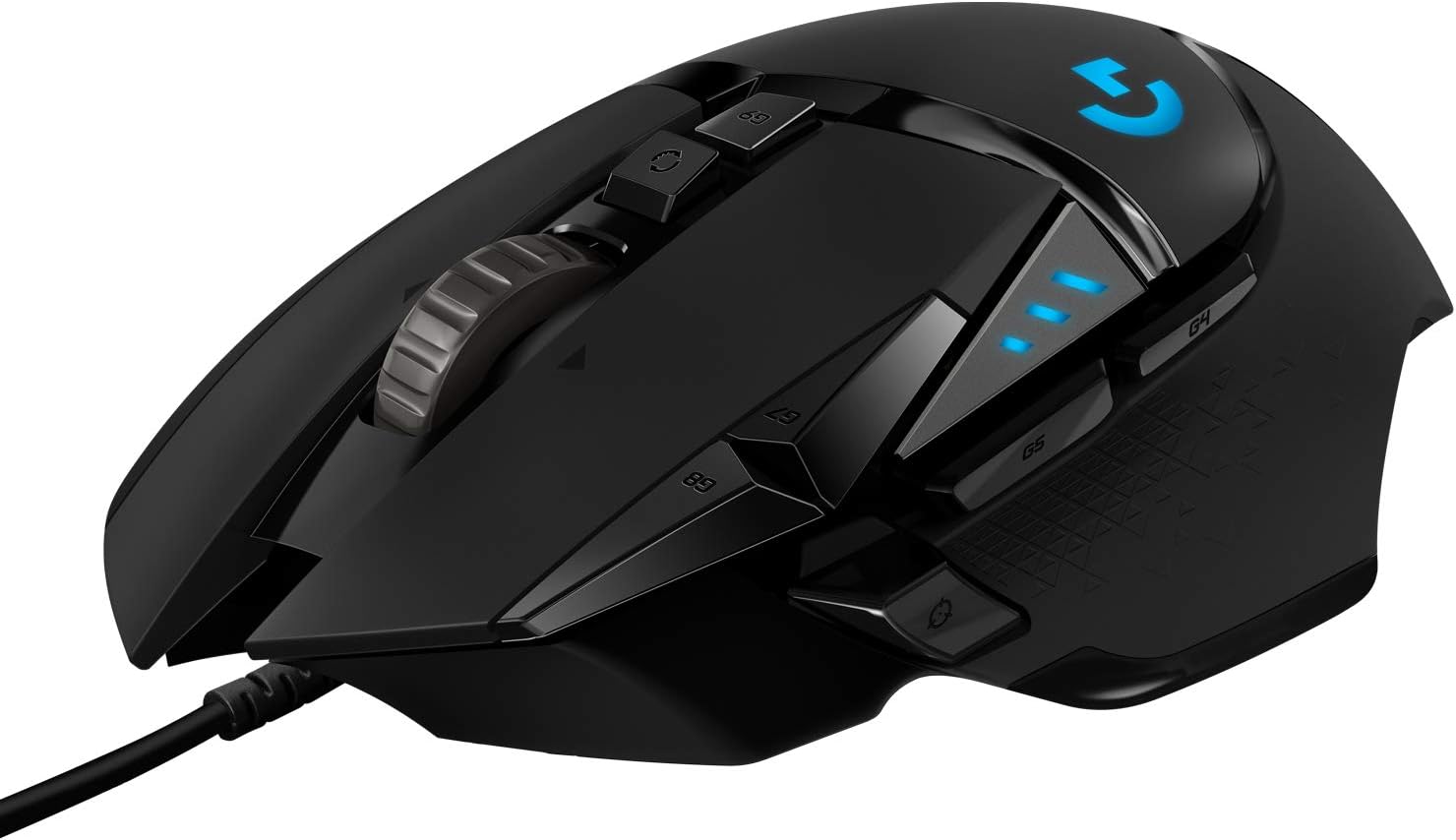
The list opens with the mouse for the player who likes to configure things. Logitech describes the wired G502 HERO with eleven programmable buttons, removable weights and onboard profiles, and its documented strength is putting repeated commands under one hand.
That same richness is the catch. The shape with its thumb rest does not suit every grip, it is not a light mouse, and the button setup runs through Logitech’s G HUB software, which may not be allowed on a work computer. Give it to someone who will enjoy an evening of setup, from a shop with practical return terms.
The longer version is in my G502 HERO review, and the wired model is on Amazon.
2. Logitech G305: no cable, no charging

Related reading
For a player who wants the opposite, fewer things on the desk, the G305 drops the cable. It connects through a USB receiver and runs on one replaceable AA battery, with six programmable buttons. On paper it suits someone who prefers swapping a cell to plugging in a charging lead.
Know two things first. It is not a Bluetooth mouse, so the computer needs a free USB port, and a laptop with only USB-C needs an adapter. The compact shape will also leave some hands tense, and no sensitivity setting fixes a wrong fit.
My G305 review covers the receiver and battery routine, and you can find the mouse on Amazon.
3. Logitech G203 Gaming Mouse: cheap and likeable

A step down in price brings the simplest mouse here. The G203 is a small wired six-button mouse with RGB lighting, and owners with small or medium hands keep praising it as good value. There is no battery and no pairing.
The honest catch is durability. The review found a consistent pattern of owner complaints about double-clicking main switches and failing scroll wheels within a year or two, and one programmer reported buying four of them in a row. Large hands will find it tight. It is a stocking filler, not an heirloom, so keep the receipt.
The owner reports are collected in the G203 review, and the mouse is sold on Amazon.
4. Razer DeathAdder Essential: a shape for big hands
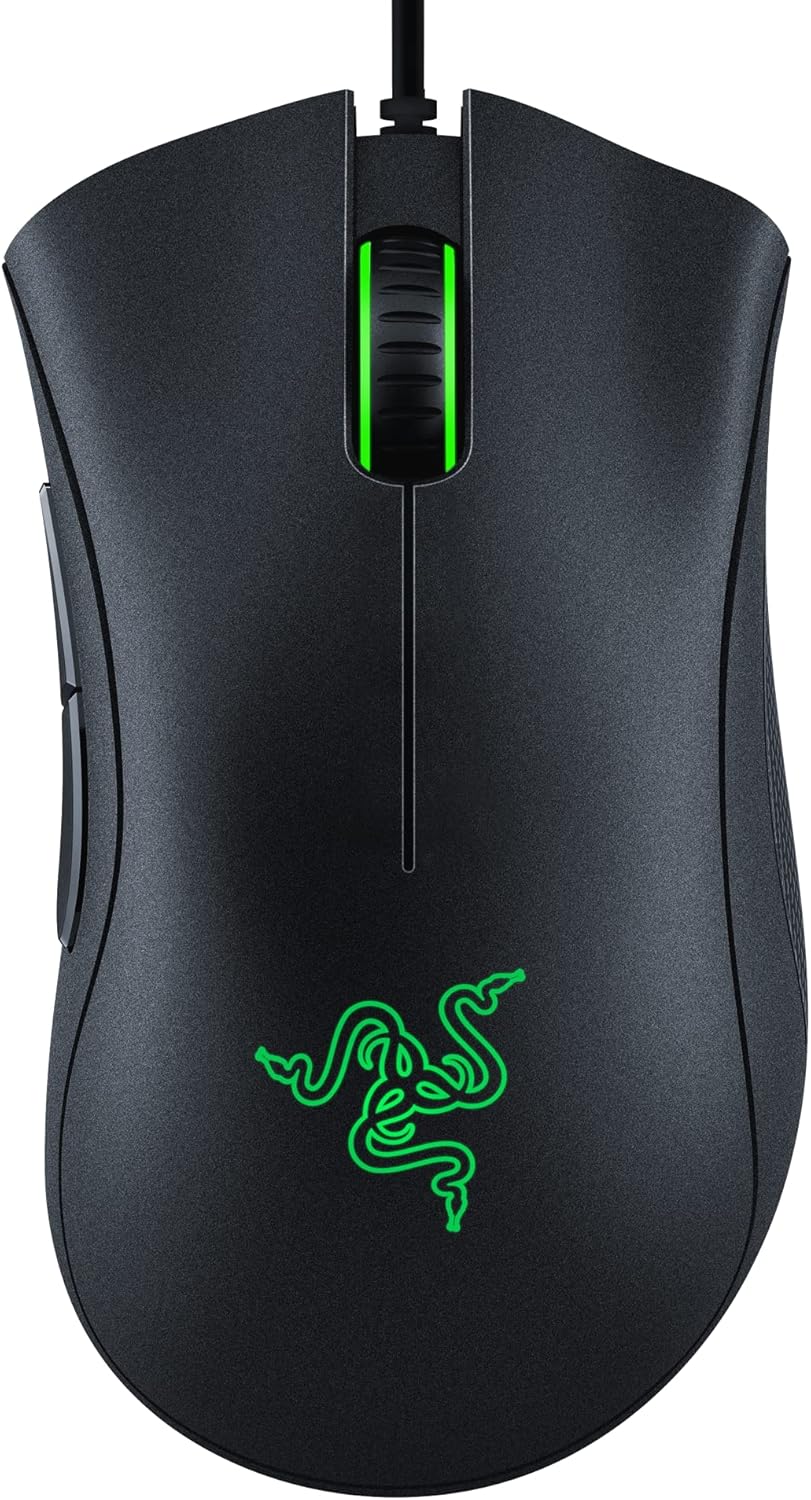
Where the G203 is built for smaller hands, this one is the answer for a large right hand. The DeathAdder Essential is a wired five-button mouse, and published reviews agree that its comfortable palm-grip shape is the reason to buy it. One of them called it capable and good value.
There are two documented problems. Owners on Razer’s forum describe a scroll wheel that starts to jump, and the cable is stiff. The bigger one is software: its settings need Razer Synapse 3, which has not been available for macOS. Give it to a Windows player only, and never to a left-hander.
See my DeathAdder Essential review for the wheel reports. The listing is on Amazon.
5. Razer Basilisk X HyperSpeed: wireless with a spare AA

Staying with Razer but cutting the cord, the Basilisk X HyperSpeed is the wireless pick for a Windows desk. Razer lists six programmable buttons, a USB dongle that stores under the top cover, Bluetooth as a second mode and one AA battery. A long-term owner quoted in the review got about two months per battery on the dongle and had no regrets.
That owner also explains the catch. Over Bluetooth the mouse fell asleep and took more than five seconds to wake, so treat the dongle as the real product. It has no lighting, and Mac support for remapping is unconfirmed. Check that the box says Basilisk X, not the later V3 X.
Both modes are compared in the Basilisk X HyperSpeed review, and the mouse is on Amazon.
Related reading
6. Logitech G600 MMO Mouse: twelve keys under the thumb

The last mouse is the most specialised thing on the whole list. The G600 has 20 buttons, twelve of them in a grid under the thumb, plus a G-Shift button under the ring finger that gives every button a second command. It was made for MMO players, and one published article makes a case for it as a Photoshop shortcut tool.
It demands commitment. Reviews weighed it at 133 g and none called it light, the thumb needs days of practice, and pressing G-Shift can interrupt a button you are already holding. It is right-handed only, and reports from current Macs are rare. Buy it for someone who already repeats the same shortcuts all day.
Read my G600 review for the G-Shift problem, and look at the mouse on Amazon.
7. Redragon K552 Mechanical Keyboard: a first mechanical board

From the right hand we move to the left. The Redragon K552 is an 87-key mechanical keyboard without a number pad, and reviewers were surprised by how solid it feels for the money. Its documented strength is being a low-risk way to find out whether someone likes mechanical switches at all.
Before ordering, find out which version is in the box, because the name covers several. The blue-switch version clicks loudly on every press, which makes it a poor gift for anyone who shares a room or sits on video calls. The keycaps are thin, the cable does not detach, and the software is Windows only.
The switch confusion is untangled in the Redragon K552 review, and the keyboard is on Amazon.
8. HyperX Cloud Alpha: one plain cable for long sessions

A loud keyboard is one more reason for a closed headset. The wired HyperX Cloud Alpha uses a 3.5mm plug, needs no software and no charging, and works with anything that has a headphone jack. The cable and the microphone both detach, so a worn cable is a cheap repair.
Comfort splits the reviewers. One wore it for hours and another had sore ears in under an hour, so it needs a return window. The microphone is fine for team chat and wrong for streaming or recording, and nothing on the headset shows when it is muted.
Details are in my Cloud Alpha review, and the wired version is available on Amazon.
9. SteelSeries QcK Medium Mousepad: the small safe gift

Every mouse above needs something to slide on, and this is the smallest present in the guide. The QcK Medium is a plain black cloth pad on a rubber base, 2 mm thick and about 32 by 27 cm. Its documented strength is longevity as a product: a review from 2007 describes the same basic pad, and owners report years of use for work and games.
Cloth gets dirty and loses glide, so it has to be washed by hand now and then. The edges are not stitched and can fray, and players who use low sensitivity with big arm movements find this size too small.
How to wash it is explained in the QcK Medium review, and the pad is on Amazon.
Related reading
10. Corsair MM300 Extended Mousepad: a mat for the whole desk

If the QcK is too small, the list ends with its opposite. The Corsair MM300 Extended is 930 mm long, 300 mm deep and 3 mm thick, so the keyboard and the mouse share one cloth surface. The edge is stitched against fraying, and that stitching is what owners keep praising.
Measure the desk before you order, because on a small one it will not fit. This plain version makes no spill-proof claim, cleaning a mat this size takes planning and a long drying time, and one owner in the review reported a strong smell that washing did not remove.
The measurements and owner comments are in my MM300 Extended review, and the mat is on Amazon.
How to choose
Start with the hand and the computer. For a teenager with small hands and a first gaming PC, the G203 with a QcK Medium is a cheap and complete present. For an adult with a large right hand on Windows, the DeathAdder Essential fits better. For someone who hates cables, choose between the G305 and the Basilisk X HyperSpeed. For the MMO player or the person who lives in one editing program, the G600 is the only pick that makes sense.
Then look at the room. For a player with their own space, the Redragon K552 is a fun first mechanical keyboard. For anyone who shares a wall, the HyperX Cloud Alpha is the kinder gift. For a long desk, the Corsair mat ties the setup together. One practical note for Christmas: check the delivery date and the return window before ordering, and check the exact model and variant on the listing, because several of these names cover more than one product.
More gift guides from this series: for the person with a Mac there is 10 Mac apps worth giving as a licence, for the frequent flyer 10 travel tech gifts for people who are always on the move, and for young families 10 gifts for babies, kids and new parents.
One email a week with practical Mac workflows, useful comparisons and honest tech recommendations.