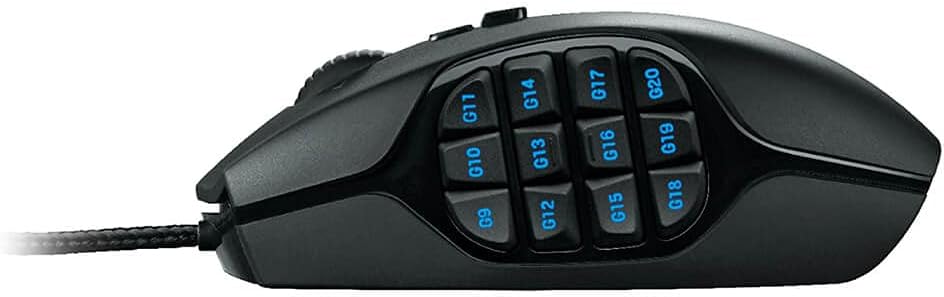
Twelve buttons sit under your thumb on the Logitech G600, laid out in a grid, and that grid decides everything. Your thumb either learns it in a few evenings, or the mouse goes back in the box. Logitech made it for MMO players who want a full hotbar under one hand. The more interesting case for it comes from people who use it at work, for shortcuts in programs like Photoshop.
Most detailed writing about the G600 dates from around 2012, and owner comments are short. For a mouse this old, I expected more long-term reports than I got.

Product image from the Amazon listing.
What You Are Actually Holding
The G600 is a wired mouse with 20 buttons in total. Techgage’s 2012 review lists a sensor that goes up to 8200 DPI, a braided cable that it calls “very smooth”, and a dedicated button that switches between profiles. LanOC weighed it at 133 grams without the cable, and the cord adds another 15 grams.
Those grams matter. Techgage says “the mouse is no lightweight”, and there are no weights to take out. Destructoid agrees: “It’s far from light.” If you like a small, quick mouse, this one will feel like a brick for a while, and it may stay that way.
Related reading

The strangest part is the third main button. Next to the usual left and right buttons sits an extra one, placed under your ring finger. This is the G-Shift button. Hold it down and the other buttons switch to a second set of commands, like the Shift key on a keyboard. That is how 20 buttons turn into about 40 commands.
The shape gets real praise. LanOC says “Logitech nailed the form of the G600; it feels great to hold.” Destructoid says the body is wide enough for the ring finger to rest properly, which it needs to be, since that finger has a job here. Left-handed readers can stop now, because LanOC also says plainly that “the G600 is not lefty-friendly.”
Teaching Your Thumb a New Trick
Twelve buttons look impossible at first. Destructoid’s reviewer needed a couple of hours to adjust. The shaped keys help you tell them apart by touch, though the back row asks for a small thumb shift that feels awkward early on. Over time that reviewer says they barely notice it.
There is one physical detail to watch. LanOC found that the thumb keys “do have a bit of resistance”, while the left and right buttons “actuate much easier than the thumb keys.” That is a sensible choice, but thumb pressure can still set off a key by accident, and it takes practice to grip the mouse without pressing anything. If you squeeze a mouse hard, expect some stray commands in your first week.
One note from Destructoid applies to long sessions at a desk: the plastic surface may not suit people with sweaty palms.

Product image from the Amazon listing.
The Photoshop Argument
The best case for the G600 outside games comes from a 2021 Fstoppers article, and it is my favorite thing written about this mouse. The author sets it up for photo editing. A side button holds Shift for zooming. Clicks on the scroll wheel handle panning and a jump to 100 percent view. Alt plus right-click resizes the brush. His claim is simple: “You can have virtually all of your favorite Photoshop commands and actions at your fingertips.”
He also says the 40 slots “fill up quickly”, which tells you how far he took it. His real point is about attention. If your hand stays on the mouse and your eyes stay on the image, you stop breaking your flow to hunt through menus.
Readers in the comments were less sure. Some said they could not remember what all the buttons did, and others pointed out that a drawing tablet is more precise. Both points are fair. A macro mouse pays you back only after you build the habit. If you use a program for an hour a week, you will spend more time setting up the buttons than you ever save.
Related reading

The same logic holds for video editing, 3D work or spreadsheets with many shortcuts. I found no detailed owner reports for those jobs, so I will only say the idea carries over. It does not prove the result does.
The G-Shift Catch
This is the flaw I would think about hardest before buying, because it touches games and work alike.
Holding G-Shift changes what the other buttons do, and it does so while you may already be holding one. Techgage says the button “interrupts all other mouse buttons”, which can cause accidental clicks, for example when you are holding the right button to turn the camera. LanOC describes the same thing from the software side: pressing it “will send an ‘up’ signal to any keys that are currently pressed.”
In plain words, a drag or a held key can stop the moment you touch G-Shift. In an MMO that may cost you a turn of the camera. In an editing program it could end a drag you were in the middle of. Techgage also saw some jitter in tracking while G-Shift was held, and it found fine movement harder because of the weight and the feet.
Opinion on the button itself is split. One owner on Best Buy calls it badly underrated. One early reviewer still preferred to rest that finger beside the mouse. A retailer review from another owner says the button simply would not work for them. My advice is to try it for a week and decide then. You can also give that button a normal job, or leave it alone.
Product image from the Amazon listing.
Mac and PC Are Different Stories
Most of the praise above comes from Windows and from Logitech’s older Gaming Software. The Fstoppers setup, with profiles that switch by themselves when you change programs, was built on that older software. Logitech’s current app is G HUB.
Logitech’s product text lists macOS 10.11 or later and says the advanced features need G HUB, and RTINGS also says G HUB is available on macOS. So a Mac is a supported home for this mouse on paper. Real Mac owner reports are rare. The one useful report I found came from a person with a G600 and a Logitech keyboard, who saw the keyboard as inactive and the mouse missing in G HUB until they gave G HUB Input Monitoring permission in macOS settings. Start there if your Mac does not see the mouse.
Profiles stored on the mouse would help if you move between computers, but sources disagree on the number. Logitech’s text mentions up to three, while its spec list shows one. Techgage describes three. LanOC describes six in the older software. Plan on a small number and test it yourself. I could not confirm how well profile switching per app works on a current Mac, so do not buy this mouse on that promise alone.
Wear After the First Year
Long-term reports are thin. They also point in both directions. One Best Buy owner says the mouse was still going strong after about two years. Another says the wheel began to squeak loudly a month after they bought it. A retailer review mentions a side button that got stuck. A Mac review site back in 2012 was not kind to the wheel either, saying it sounded cheap.
Related reading
Techgage liked the feet less on one kind of desk. It found glass surfaces “still a bit twitchy, so not recommended”. Use a mouse pad.
I cannot give you a failure rate from comments like these. I can only say that I found no pattern as strong as the G-Shift issue, which comes from the design itself and shows up in several reviews.
A Great Shortcut Tool With a Heavy Hand
I like the G600 most for someone who lives in one or two programs and already knows which commands they repeat all day. That also covers the MMO player it was built for. Destructoid’s verdict still reads well: it praised the buttons and the layout for MMOs, and called it good, not great, as an all-purpose mouse. It has no dedicated DPI button either, so shooter players should look elsewhere.
Skip it if you want a light mouse, if you are left-handed, or if you rely on holding one button while you press another. Mac owners should expect more setup work and fewer people to ask for help.
If you are ready to spend a week retraining your thumb, the Logitech G600 MMO Mouse can take a lot of work off your keyboard. This is an affiliate link. As an Amazon Associate I earn from qualifying purchases.
One email a month: new articles, reviews and the upcoming live webinar + free recording. No spam, unsubscribe anytime.