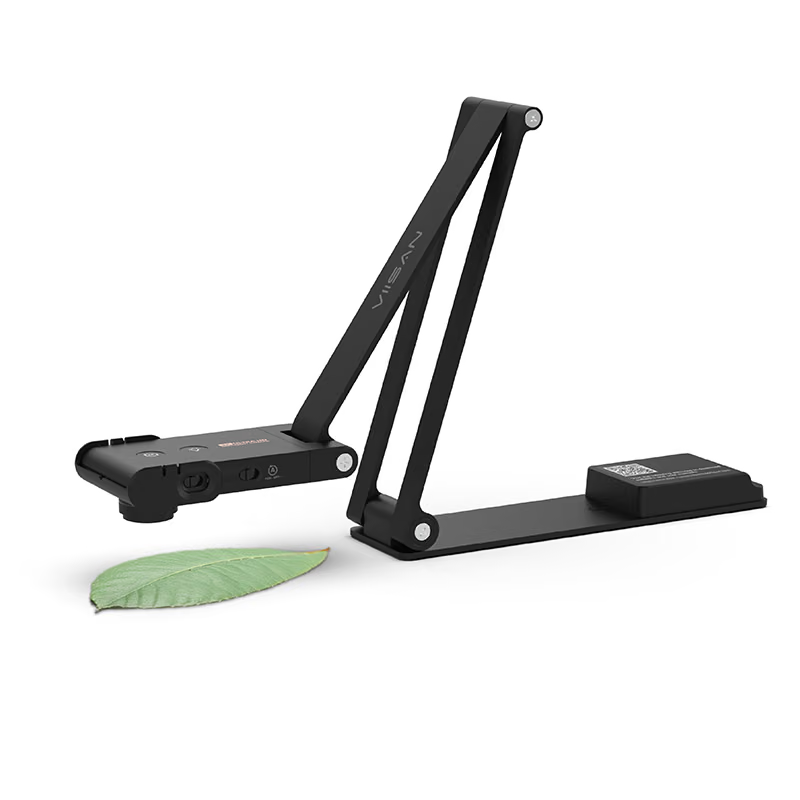
Most people only meet a document camera in a classroom. The VIISAN VS13AM wants to be useful at home. It is a folding arm with a 13 MP camera head that looks down at your desk like a visualizer, flips up to face you like a webcam, and takes a clip-on 20x macro lens for very close work. It weighs 409 g, folds flat to about 20 mm, and connects to a computer over a single USB-C cable.
Quick verdict
A well-designed all-in-one desk camera on paper, worth buying if you want one device for calls, desk demos and close-ups.
- Best for
- Mac users who want a single camera for video calls, showing papers or boards on the desk and close-up electronics work.
- Main benefit
- A G-sensor rotates the image automatically when you flip between webcam and document mode, so it works in any app.
- Biggest drawback
- VIISAN does not say whether VisualCam for Mac runs natively on Apple Silicon, and the microphone and autofocus are still untested.
VS13AM
amazon.com · United States, also sold via Amazon UK and other retailers
Check price and availability: VS13AM at amazon.comAffiliate link. As an Amazon Associate I earn from qualifying purchases.
Time with the product: A first look after the unit arrived on 12 November 2026.
Reviewed version: 13 MP document camera and 4K webcam with 20x macro lens
Compatibility: VIISAN lists macOS 10.15 or later and Windows 7 to 11 as a UVC/UAC USB-C camera, plus VisualCam for Mac and Windows and ViiShow for Linux.
Review context: The review focuses on everyday use on a Mac as a webcam, a downward-facing document camera and a macro camera for electronics.
My interest is practical, not educational. I want one camera on the desk next to my 14-inch MacBook Pro M4 Max that handles daily calls and can also point down at a Raspberry Pi 5 board, a row of solder joints or a sketch on paper when I need to show it to someone. I like tools that replace several gadgets without a complicated setup, and I distrust tools that only work inside their own app. The VS13AM claims to do both jobs as a standard USB camera.
Disclosure: VIISAN sent this VS13AM free of charge for review, via its European distributor, and I keep it. No money changed hands, and VIISAN had no approval over the text.
What the VS13AM is
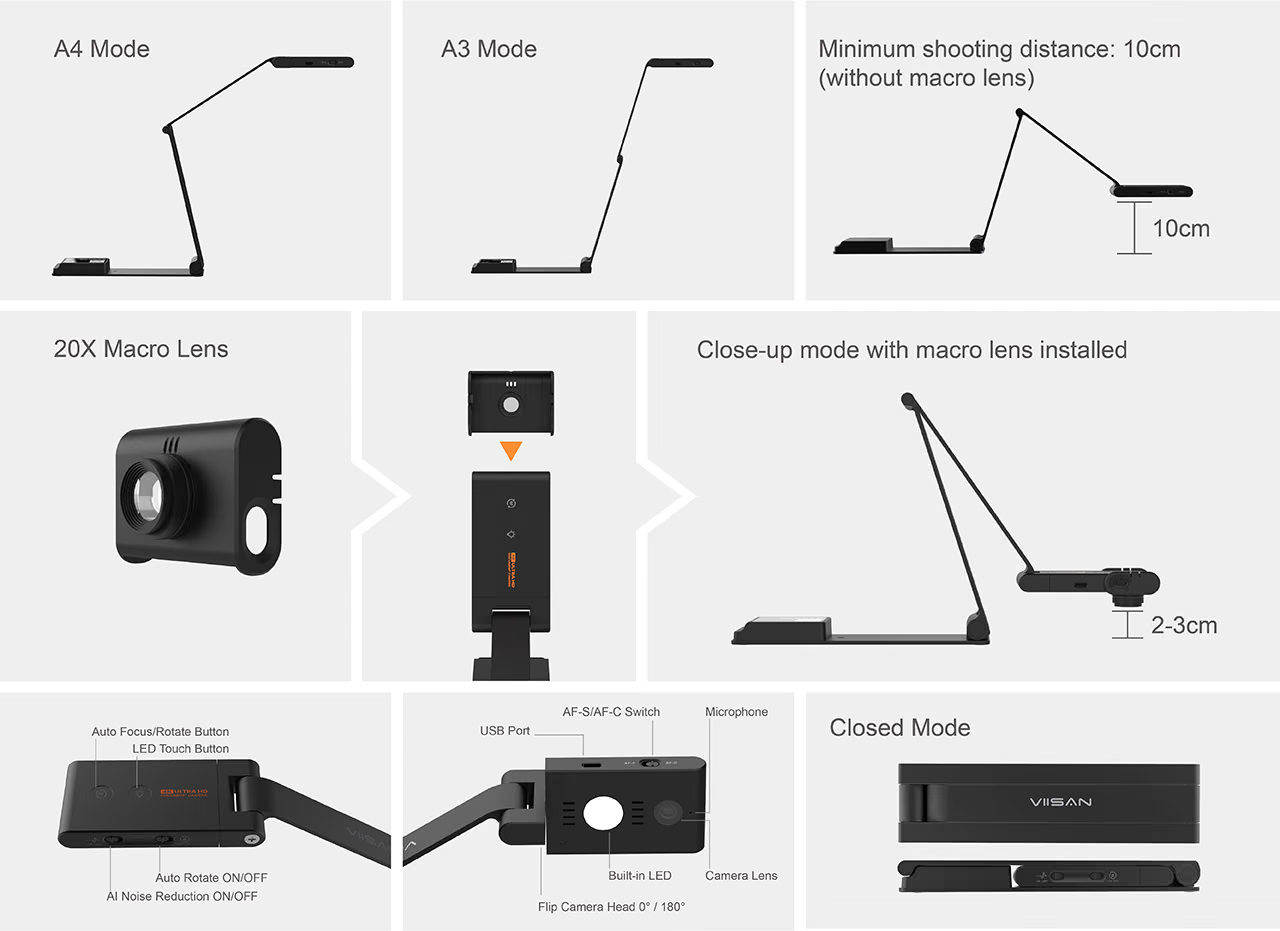
VIISAN lists a 1/2.55-inch CMOS sensor behind an f/1.8 lens, stills up to 4160 by 3120 pixels, and 4K video at 30 frames per second. The arm covers a sheet of A3, with a maximum capture area of 440 by 330 mm. An LED on the camera head lights dark desks, and the camera runs from USB power alone. Minimum focus distance is 10 cm, or 2 to 3 cm with the macro lens.
Related reading
macOS: a standard camera first, an app second
The question I care about most is whether a Mac needs anything installed. VIISAN describes the VS13AM as UVC and UAC compliant, the standard USB classes for cameras and audio, so macOS should see it as an ordinary webcam and microphone without a driver. VIISAN says it works with Zoom, Microsoft Teams and Google Meet, and the spec sheet lists macOS 10.15 or later alongside Windows 7 to 11.
For scanning and annotation, VIISAN offers its own software. The product page lists VisualCam for Mac, version 1.8.7, a 209 MB download for macOS 10.11 or later, next to Windows and Linux versions. VIISAN does not say whether the Mac build is native on Apple Silicon, and I could not find that answered elsewhere. That is the first thing I will check on the M4 Max. My plan is to use the camera mostly in FaceTime, Zoom and Teams, with the app as an optional extra.
Two modes and a G-sensor that does the rotating
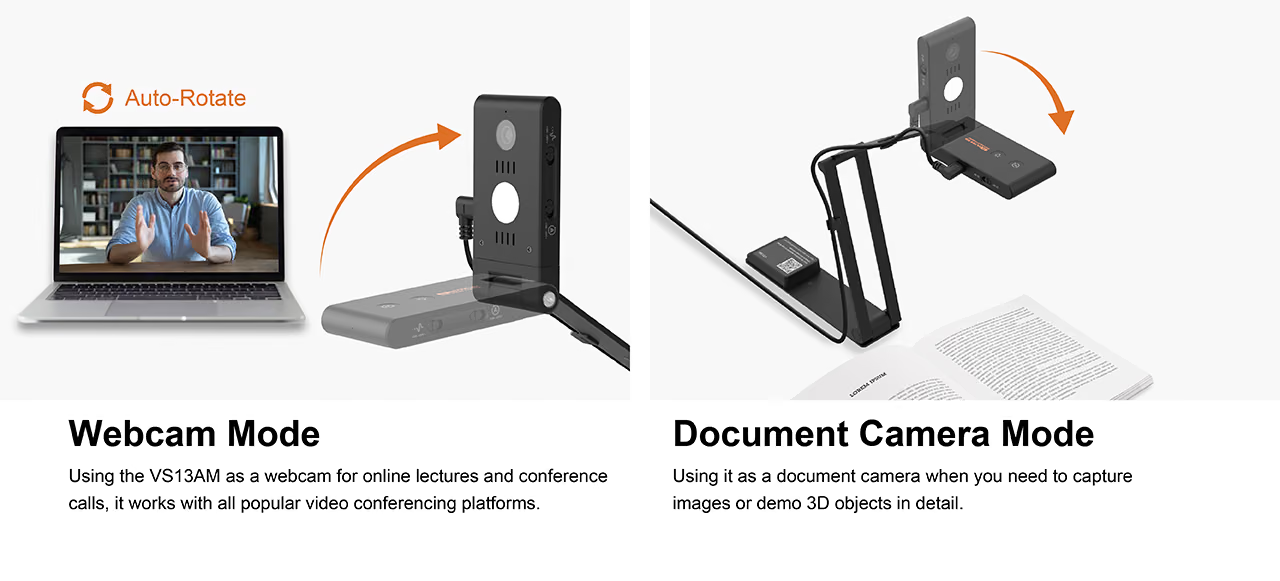
The clever part is the hinge. In document camera mode the head points down at the desk; for webcam mode you lift it to face you. VIISAN says a built-in G-sensor detects this and rotates the picture automatically, so it stays the right way up in both positions. There is a physical switch to turn auto-rotation off, and the spec sheet lists fixed 0 and 180 degree options as well.
This matters more than it sounds. Point an ordinary webcam at a desk and the picture ends up upside down, with the fix buried in some app’s menu. Rotation handled in the camera itself should carry into any app on the Mac. That is what VIISAN describes, and it is what I want to confirm in a normal Zoom call, flipping between my face and a circuit board mid-sentence.
Product images: VIISAN.
The controls are physical too: buttons for focus and the LED, and switches for auto-rotation, noise reduction and focus mode.
Related reading
Autofocus for papers and for faces
VIISAN describes the autofocus as dual-mode. AF-S focuses once and holds, for a document or board that sits still. AF-C refocuses continuously, for a person moving in front of the camera. VIISAN’s team describes the VS13AM’s autofocus as phase detection, although the public spec sheet only says “Auto, supports dual modes (AF-C / AF-S)”. How quickly it settles on a small component is something I want to see in practice.
A hardware switch is a good decision. The classic document camera failure is hunting focus onto your finger when you point at something, and locking AF-S for desk work should avoid it.
The 20x macro lens and the electronics bench
The macro lens is a small clip-on module that slides over the camera head. VIISAN rates it at 20x and says it brings the focus distance down to 2 to 3 cm, with the arm folded low over the subject.
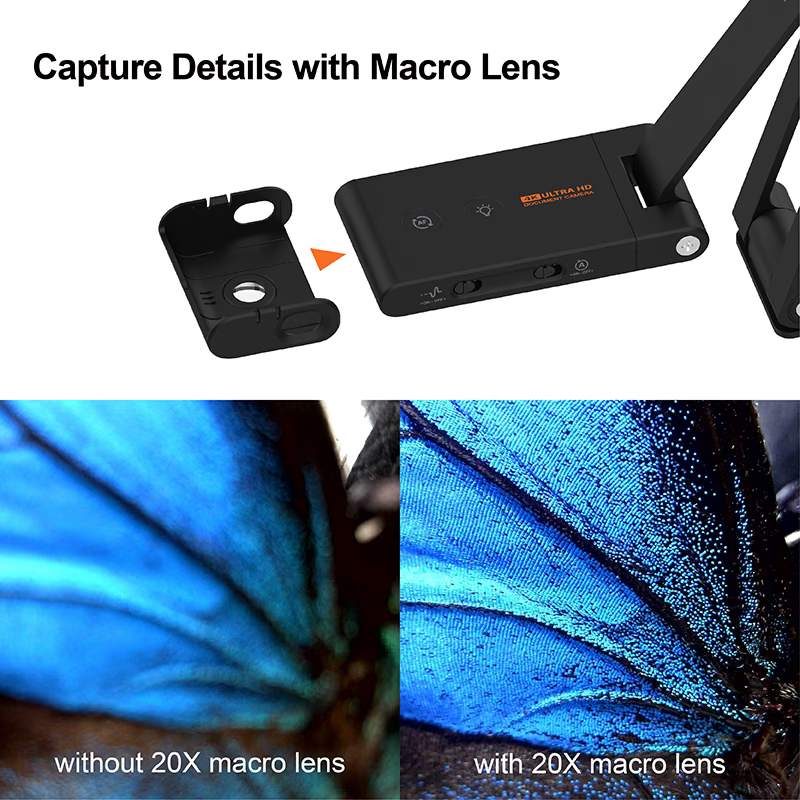
This is the feature that made me want the camera. With a Raspberry Pi 5, an Orange Pi and a pile of small boards, checking a solder joint or reading a tiny chip marking usually means a phone camera and patience. A fixed arm holding a lit macro lens just above a board could be much better, and easy to share during a call. Whether 2 to 3 cm leaves enough room to work with a soldering iron underneath it is a separate question, and one I will only answer at the bench.
The microphone and a home with a baby
The VS13AM has a built-in microphone with what VIISAN calls AI noise reduction, switched on and off with a slider on the head. VIISAN lists a sensitivity of minus 26 dBFS typical and a signal-to-noise ratio of 64 dB, and says the processing is meant to cut background noise while keeping the speaker’s voice.
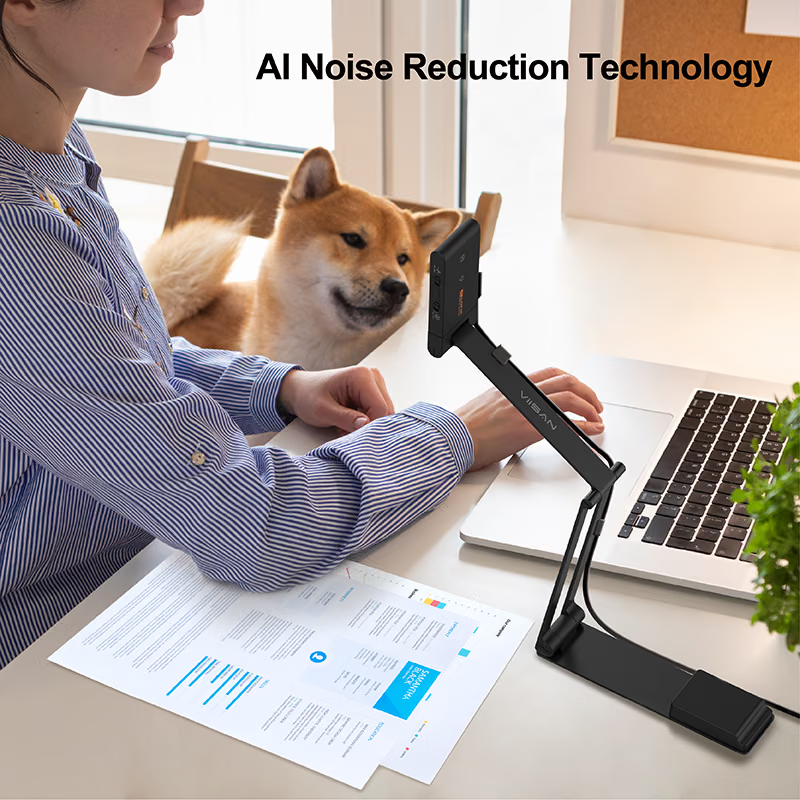
I work from home with a baby in the house, so this is a real test for me. I have not used the microphone on a call yet, and I will not guess how it handles crying in the next room. My plan is to record the same sentences with noise reduction on and off, with household noise in the background, and compare them with the MacBook Pro’s own microphones, which are already good. If the VS13AM cannot beat those, I will keep it for video and leave the audio to the laptop.
Related reading
Price and where to buy
VIISAN does not publish a price on its product page and sells the VS13AM through retailers, including Amazon. When I checked, the US reseller Spedal listed it at $119.95, and the UK Amazon listing was around £99. You can find it on Amazon.com through my Amazon link. As an Amazon Associate I earn from qualifying purchases. Check the model number on the listing, because VIISAN also sells a similar VS13AI.
What this review is based on
The VS13AM arrived on 12 November 2026, and this is a first look based on the hardware in front of me and VIISAN’s documentation. Specifications, software versions, operating-system support and the description of auto-rotation and noise reduction come from VIISAN’s product page. I did not find an in-depth independent review of this model to compare against. I have not yet tested how macOS handles the camera, whether VisualCam runs natively on Apple Silicon, auto-rotation in third-party apps, the autofocus, the macro lens at the bench or the microphone in a noisy home. Those are for a follow-up.
Verdict
On paper the VS13AM is a well-thought-out desk camera. It works as a standard UVC camera instead of hiding features in an app, fixes the upside-down picture in hardware, offers a physical focus switch, and adds a macro lens that makes it useful for electronics. The price is reasonable for that.
The open questions decide daily use: the Mac app, the autofocus and the microphone in a real home. I like the design a lot, and if it does what VIISAN documents, I would recommend it to anyone who wants one device for calls, desk demos and close-ups.
What worked
- Standard UVC and UAC support means it should work in FaceTime, Zoom, Teams and Meet without a driver.
- Physical switches for auto-rotation, AI noise reduction and AF-S/AF-C focus modes.
What bothered me
- The autofocus method is not named in VIISAN's spec sheet.
- No price on VIISAN's own site, so buyers depend on retailer listings.
Who should not buy it
- People who only need a webcam and will never point a camera at the desk.
Alternatives I would consider
- MacBook Pro built-in camera with Desk View. Shows the desk for free in FaceTime, though without a macro lens or A3 coverage.
Evidence and sources
The article separates my judgement from specifications and claims credited to their sources. All images are VIISAN's own product images from its product page.
- VIISAN VS13AM product page
- Spedal VS13AM listing
- Amazon.com VS13AM listing Affiliate link. As an Amazon Associate I earn from qualifying purchases.
Features, compatibility and rated figures from the maker are manufacturer information. My opinions are identified in the review.
Conclusion
Reasonably priced for a 4K webcam, A3 document camera and 20x macro lens in one folding unit.
VS13AM
amazon.com · United States, also sold via Amazon UK and other retailers
Check price and availability: VS13AM at amazon.comAffiliate link. As an Amazon Associate I earn from qualifying purchases.
One email a week with practical Mac workflows, useful comparisons and honest tech recommendations.