Until September, the continuous integration for this blog ran on a Raspberry Pi in my home lab. It was slow, it was occasionally flaky, and it was still useful, because a small arm64 machine that runs your tests every time you push teaches you things a cloud runner never will. When the repository grew past what the Pi could handle in a reasonable time, the pull requests moved to hosted runners. The Pi went back into a drawer, and the question of what a better small CI box would look like stayed open.
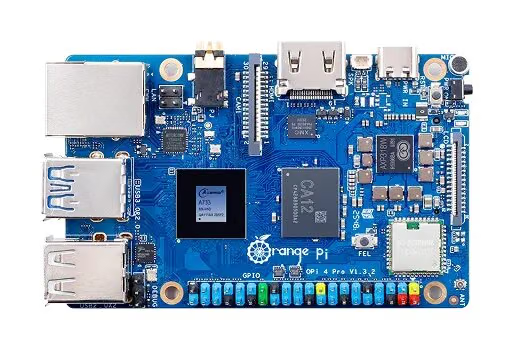
The Orange Pi 4 Pro with 12 GB of memory is a good candidate for an answer. It is a Raspberry Pi sized board, 89 by 56 mm and 58 g by Orange Pi’s figures, built around the Allwinner A733 with two Cortex-A76 and six Cortex-A55 cores, LPDDR5 memory, an M.2 slot for an NVMe SSD and Gigabit Ethernet with optional PoE. That combination of memory, fast storage and one network cable for power and data is exactly what a small test farm needs. This review looks at the board through that lens, and at what it takes to build your own system image for it.
Disclosure: Orange Pi sent this Orange Pi 4 Pro free of charge for review and I keep it. No money changed hands, and Orange Pi had no approval over the text.
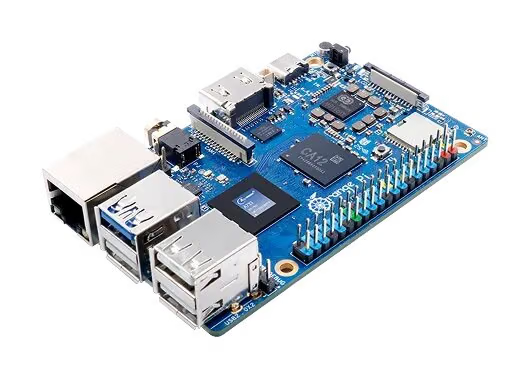
The board in one paragraph
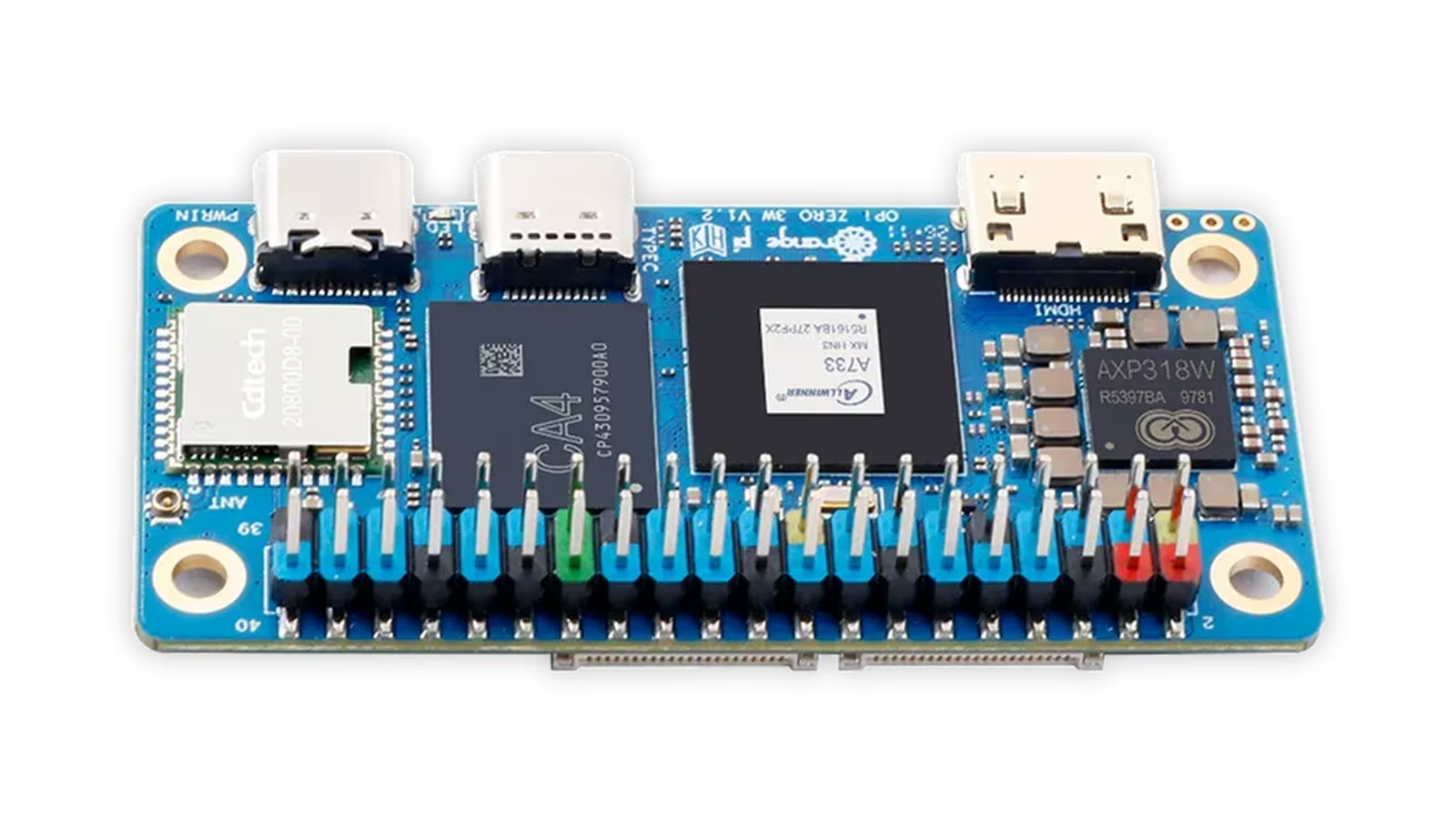
The A733 is the same processor that powers the Orange Pi Zero 3W, which I reviewed in September. Here it gets a full-size board around it. Orange Pi lists the two A76 cores at up to 2.0 GHz, an Imagination BXM-4-64 GPU, an NPU rated at 3 TOPS at INT8 and a RISC-V E902 coprocessor at 200 MHz. Memory goes up to 16 GB of LPDDR5. Storage options are an M.2 M-key slot for NVMe, a microSD slot, an optional eMMC or UFS module and optional SPI flash of 128 or 256 Mbit. The rest is a normal single-board computer: HDMI 2.0 at up to 4K60, MIPI DSI, one 2-lane and one 4-lane MIPI CSI camera interface, one USB 3.0 and three USB 2.0 Type-A ports, a USB-C port for 5 V and 3 A power, Wi-Fi 6 and Bluetooth 5.4, a 40-pin header, a fan header and a 3.5 mm audio jack.
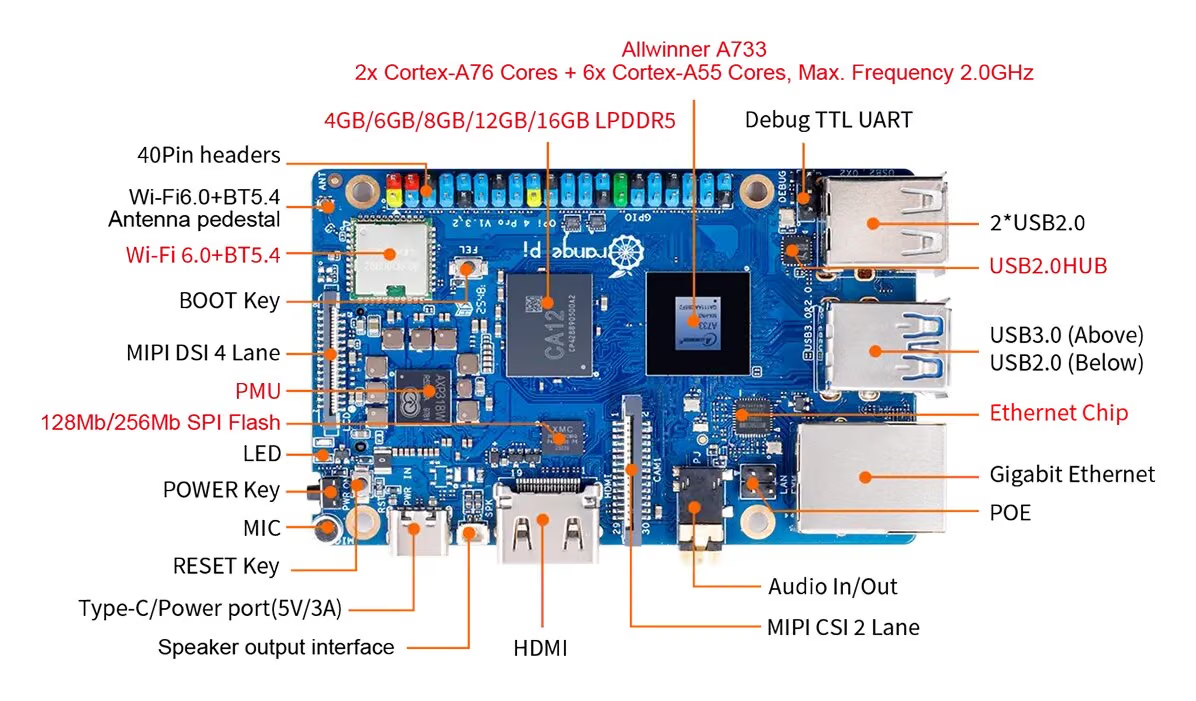
For a server, three of those lines matter far more than the rest: the memory, the NVMe slot and the Ethernet port with PoE. Everything else is a pleasant bonus.
Related reading
Why a test farm wants arm64 and 12 GB
Apple Silicon Macs are arm64, a growing share of cloud instances are arm64, and so is every Raspberry Pi class device. Building and testing on the architecture you deploy to removes a whole category of surprises, from native dependencies that do not compile to Docker images that were only ever built for amd64 and quietly run under emulation.
Memory is the constraint that decides how useful such a box is. A CI job that installs dependencies, builds an app and starts a database for integration tests can easily use two gigabytes. A preview environment for a branch, an app container plus a small database, is often half to one gigabyte. My budget for the farm described below is roughly one gigabyte for the operating system and Docker, under a gigabyte for monitoring, a few hundred megabytes for the reverse proxy and the registry cache, two concurrent CI jobs at about two gigabytes each, and four preview stacks at around 750 MB each. That adds up to about nine gigabytes and leaves the rest for the page cache, which on a build machine is not wasted memory at all. On a 4 GB or 8 GB board the same plan means fewer stacks and constant swapping. Twelve gigabytes is where it stops being a compromise.
The farm: what runs where
The idea is simple. Every push to a repository triggers a job on the Orange Pi. The job builds an arm64 image, runs the tests and, if they pass, starts a preview copy of the app for that branch with its own address on the home network. A reverse proxy routes each address to the right stack, a local registry caches every image pulled from the internet, and a small monitoring stack keeps an eye on memory, temperature and disk.

The runner can be a Forgejo Actions runner for a self-hosted forge or a GitHub Actions self-hosted runner for repositories that live on GitHub. Either way it runs jobs in throwaway containers, so a broken build cannot leave rubbish on the host. Preview stacks are ordinary Docker Compose projects started with the branch name as the project name, which keeps their containers, networks and volumes separate and makes cleanup a single docker compose -p <branch> down -v when the branch is merged or deleted. A nightly job removes any stack older than a week, because preview environments that nobody remembers are how small servers run out of memory.
The labels that tie a stack to its address are short:
services:
  app:
    image: registry.farm.lan:5000/myapp:${GIT_SHA}
    cpuset: "0-5"
    mem_limit: 768m
    labels:
      - traefik.enable=true
      - traefik.http.routers.${STACK}.rule=Host(`${STACK}.farm.lan`)
The mem_limit is the most important line in that file. On a shared box, every preview stack gets a hard ceiling, so one leaking branch is killed by the kernel instead of taking the CI runner down with it. The cpuset line is the second most important, and it deserves a section of its own.
Two fast cores and six slow ones
The A733 is a heterogeneous processor. Its two Cortex-A76 cores are much faster than its six Cortex-A55 cores, and Linux will happily schedule a compiler on a slow core while a sleepy preview container occupies a fast one. For a test farm that is the wrong way round.
The fix is to tell Docker where things should run. On the board, cat /sys/devices/system/cpu/cpu*/cpu_capacity shows which CPU numbers are the big cores, since the kernel gives them a higher capacity value. CI jobs then get the A76 cores plus a couple of A55 cores through the runner’s container options, and preview stacks and monitoring are confined to the remaining A55 cores with cpuset. Builds stay fast, and a dozen idle containers do not steal time from them.
Boiling Steam’s review of the 4 Pro is a useful reality check on what that hardware can do. In Geekbench 6 they found single-core performance within range of a Raspberry Pi 5, and multi-core performance clearly behind it and almost half that of the Orange Pi 5 Ultra. That matches the core layout: a test that runs on one or two threads will feel quick, while a heavily parallel build will be bound by the little cores. They also ran Nextcloud, MariaDB, Prometheus, Grafana, Home Assistant, Jellyfin, Immich with its machine learning module, Redis and Postgres at the same time and reported that they ran fairly quickly, which is a reassuring data point for a box that will host many small services.
Storage: NVMe for Docker, microSD only to boot
The M.2 slot on the underside takes a 2280 NVMe SSD over a single PCIe 3.0 lane, which caps throughput at a little under 1 GB/s. That is far above what a microSD card will manage, but for a CI box the more important difference is endurance and random I/O. Docker layer extraction, package caches and database tests are a constant stream of small writes, which is exactly the workload that wears out memory cards.
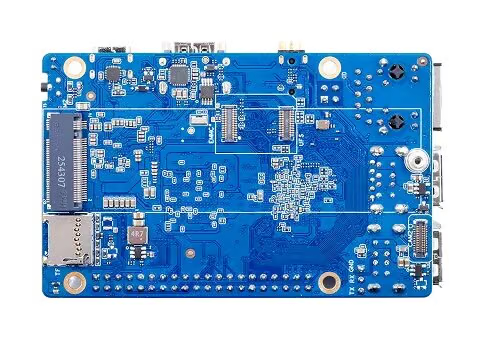
My layout puts the Docker data directory, the registry cache and the runner’s work directory on the SSD, mounted at /srv, and keeps only the operating system on the boot medium. Whether the board can boot from NVMe directly depends on the bootloader. Orange Pi’s build system ships a boot0 image for SPI NOR flash on the A733, so a board with the optional SPI flash populated can keep its bootloader there and hand off to the SSD. On a board without SPI flash, a small microSD card that holds the bootloader and a read-mostly root file system is the pragmatic answer, and the next section shows how to make that root file system almost write-free.
Building your own image
The fastest way to get started is Orange Pi’s official Debian or Ubuntu image. For a machine that is supposed to be rebuilt from scratch whenever something goes wrong, I prefer to build the image myself, with Docker, the runner and my SSH keys already inside. Orange Pi’s orangepi-build repository makes that possible. It is a fork of the Armbian build framework, its README lists the Orange Pi 4 Pro under the A733, and it officially supports Ubuntu 22.04 as the build host.
Related reading

The board’s configuration file in the repository, orangepi4pro.conf, shows the options. There are two kernel branches: legacy, based on Linux 5.15, and current, based on Orange Pi’s 6.6 tree. For the current branch the file lists Debian bookworm and trixie and Ubuntu jammy and resolute as targets. The A733 family configuration enables overlayroot, which can mount the root file system read-only with a RAM overlay on top. That is a very good fit for a farm node: the SD card is barely written to, and a reboot always returns the system to a known state.
A headless build without the interactive menus looks like this:
git clone https://github.com/orangepi-xunlong/orangepi-build.git
cd orangepi-build
sudo ./build.sh BOARD=orangepi4pro BRANCH=current RELEASE=bookworm \
  BUILD_OPT=image BUILD_MINIMAL=yes BUILD_DESKTOP=no KERNEL_CONFIGURE=no
Setting KERNEL_CONFIGURE=yes opens the kernel’s menuconfig before the build, which is where you would enable an extra file system, a USB network adapter’s driver or zram options. The customisation that matters most for a farm lives in userpatches/customize-image.sh, a script the framework copies into the image and runs inside it before packing. Mine installs Docker, prepares the SSD mount and points Docker at the local registry cache:
#!/bin/bash
# userpatches/customize-image.sh, runs inside the image chroot
apt-get update
apt-get install -y docker.io git curl jq
mkdir -p /srv /etc/docker
echo 'LABEL=farm-nvme /srv ext4 defaults,noatime,nofail 0 2' >> /etc/fstab
cat > /etc/docker/daemon.json <<'EOF'
{
  "data-root": "/srv/docker",
  "registry-mirrors": ["http://registry.farm.lan:5000"],
  "insecure-registries": ["registry.farm.lan:5000"],
  "log-driver": "local"
}
EOF
The nofail flag means the board still boots if the SSD is missing, and the file system label means the same image works on any board, whichever SSD is inside. The runner registration and SSH keys come from a small first-boot script rather than the image itself, so the image contains no secrets and can be shared.
Reading the configuration files also tells you something about the project’s polish. The comment at the top of orangepi4pro.conf describes the A733 as quad-core with 2 to 16 GB of memory, which is a leftover from another board. It changes nothing in the build, but it is a reminder that with Orange Pi you read the source rather than trust the comments.
There is a community alternative. A GitHub project, orangepi-4pro-armbian, builds Armbian images for the board with a mainline 7.1 kernel. That is exciting for the long term, because mainline support is what keeps a board useful for years, but its hardware table lists LPDDR4X memory and a Realtek Ethernet PHY where Orange Pi specifies LPDDR5 and a Motorcomm YT8531CA. I would treat it as a project to watch rather than the base of a farm today.
Thermals, power and the fan you should buy
A CI box spends its life at full load in short bursts, and that is where a small board’s cooling decides everything. Boiling Steam measured the A733 reaching 90°C quickly without a heatsink, after which it throttles. A generic aluminium heatsink allowed longer bursts, but sustained parallel workloads still reached 90°C, and they recommended active cooling. The board has a 2-pin 5 V fan header, and Boiling Steam noted that no official fan was available at the time of their review.
For the farm, that means a heatsink with a small fan from day one and a runner limited to two concurrent jobs. A build that alternates between full and throttled speed makes test timings noisy, and noisy timings are the enemy of a test farm.
Power is the board’s best argument. Boiling Steam measured about 4 W at idle on the desktop, perhaps a watt less headless, just above 8 W while playing 1080p video, and rarely more than 5 to 6 W for ordinary web applications. Even with an SSD and a fan, a node that idles around 5 W costs very little to run all year, and with Orange Pi’s optional PoE module it needs nothing more than a single cable to a PoE switch. Rebooting a stuck node then becomes a port toggle on the switch instead of a walk to the shelf.
The software caveats
Two warnings belong in any honest review of an Allwinner board. The first is the kernel. Orange Pi’s images use vendor kernels, 5.15 on the legacy branch and 6.6 on the current one, rather than mainline Linux. Boiling Steam’s Debian image was on 5.15, which reaches end of life in December 2026, and it found the distribution’s packages generally outdated. For a Docker host that matters less than for a desktop, because almost everything the farm runs comes from container images rather than the system’s package manager, but it does mean security updates for the kernel depend on Orange Pi.
The second is acceleration. Boiling Steam found no GPU acceleration on the desktop, which is irrelevant for a headless farm, and large language models through Ollama took several seconds per token even at very small sizes. The NPU’s toolchain is Allwinner’s own and I have not yet seen it work from inside a container. This is a build and test machine, not an AI box.
Price and alternatives
At launch CNX Software reported prices of $35 for 4 GB, $40 for 6 GB, $45 for 8 GB and $55 for 12 GB, with the 16 GB version unpriced. Street prices have moved a lot since, and Boiling Steam saw the 12 GB board at $125, so it is worth checking current listings carefully. An NVMe SSD, a heatsink with a fan, a good 5 V 3 A supply or the PoE module, and a microSD card should be counted as part of the purchase.
Related reading
The obvious alternative is a Raspberry Pi 5 with an NVMe HAT, with a far larger community and better multi-core performance at a higher price for the same memory. An RK3588 board such as the Orange Pi 5 Ultra is the step up when parallel build speed matters more than power and price, and a used x86 mini PC is the answer if you do not need arm64 at all.
What this review is based on
The Orange Pi 4 Pro with 12 GB arrived on 21 October 2026. This review is built on Orange Pi’s product page, the board and family configuration files in the orangepi-build repository, CNX Software’s launch report and Boiling Steam’s long-term review. Every specification, price, benchmark and power figure above belongs to those sources, and the farm described here is the setup I am building on the board, not a measured result.
I do not publish my own benchmarks for the board. Where performance, temperature or power matters, the figures come from the sources named above, and the verdict below is mine.
Verdict
On paper the Orange Pi 4 Pro with 12 GB is one of the most sensible small boards for a home lab test farm. It has the three things such a box needs, plenty of memory, real NVMe storage and wired networking with PoE, at a power draw that makes leaving it on all year a non-issue. The orangepi-build framework, for all its rough edges, makes it possible to treat the board as cattle rather than a pet: build an image, flash it, let it join the farm, and rebuild it from scratch when it misbehaves.
It suits developers who want native arm64 builds and tests at home, people who run a self-hosted forge and want a quiet runner and preview host next to it, and tinkerers who are comfortable reading build scripts and kernel configuration. It does not suit anyone who wants a polished desktop, a long-term mainline kernel today, fast heavily parallel builds, or local AI inference. Those buyers should look at a Raspberry Pi 5, an RK3588 board or a mini PC.
For my own lab, it is the board most likely to take over the job the old Raspberry Pi gave up in September, with a fan, an SSD and a PoE cable as the non-negotiable extras.
Product images: Orange Pi.
One email a month: new articles, reviews and the upcoming live webinar + free recording. No spam, unsubscribe anytime.