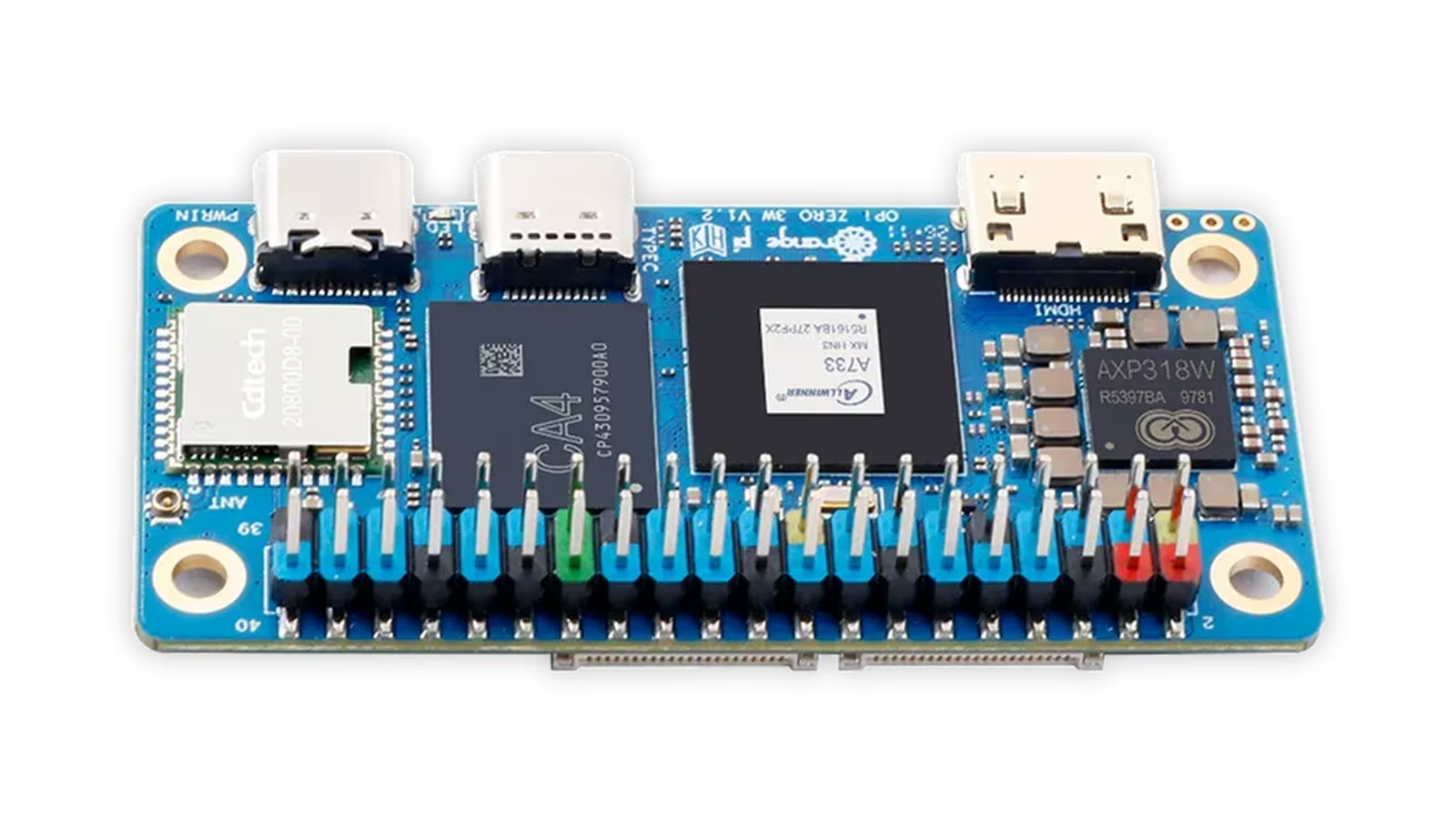
Small Linux boards have usually forced a choice between size and speed. The Zero-format boards were cheap and light but modest in performance, and anything fast needed a larger PCB, a proper heatsink and a desk to sit on. The Orange Pi Zero 3W narrows that gap considerably, and it is an excellent piece of hardware.
Orange Pi’s product page builds it around Allwinner’s A733, with two Cortex-A76 cores and six Cortex-A55 cores, LPDDR5 memory up to 16 GB, Wi-Fi 6 and Bluetooth 5.4. The specification table gives the PCB as 65 by 32 by 1.2 mm and the weight as 14 g. That is Zero-class size with the processor of a much larger board.
Liliputing described the board as closely resembling a Raspberry Pi Zero 2 W while offering far more memory, faster Wi-Fi and a PCIe interface. That comparison sets the expectations well. The Zero 3W is for people who like the Zero format and have run out of performance inside it.
Which board this is
The naming is dense enough that it is worth being precise. The manufacturer’s own site calls this board the OrangePi Zero 3W, sometimes shortened to OPi Zero 3W. It is not the older Orange Pi Zero 2W, which shares the Zero shape and almost nothing else.
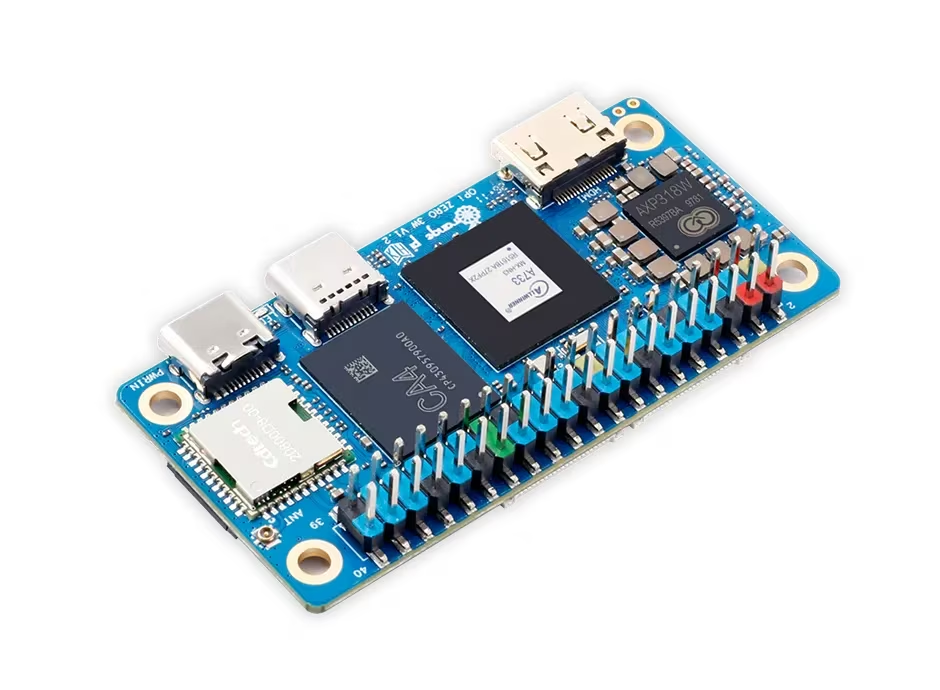
The Zero 2W, according to Orange Pi, uses an Allwinner H618 with four Cortex-A53 cores at up to 1.5 GHz, LPDDR4 up to 4 GB, Wi-Fi 5 and Bluetooth 5.0 on a 30 by 65 mm board. The Zero 3W moves to a newer eight-core processor, a newer memory generation, a newer wireless standard, a second display path and a PCIe connector. Anyone searching a marketplace should check the chip name in the listing, because the names differ by one digit and the boards are very different computers.
Related reading
The A733: two fast cores, six efficient ones and three helpers
Orange Pi lists two Arm Cortex-A76 cores at up to 2.0 GHz and six Cortex-A55 cores. CNX Software’s launch coverage gives the A55 cluster a clock of up to 1.79 GHz. The split is the interesting part. Two large cores can take the threads that decide how responsive the system feels, while six smaller ones absorb background services, network traffic and container housekeeping. For a board that will often run one main application plus a handful of daemons, that is a sensible balance.
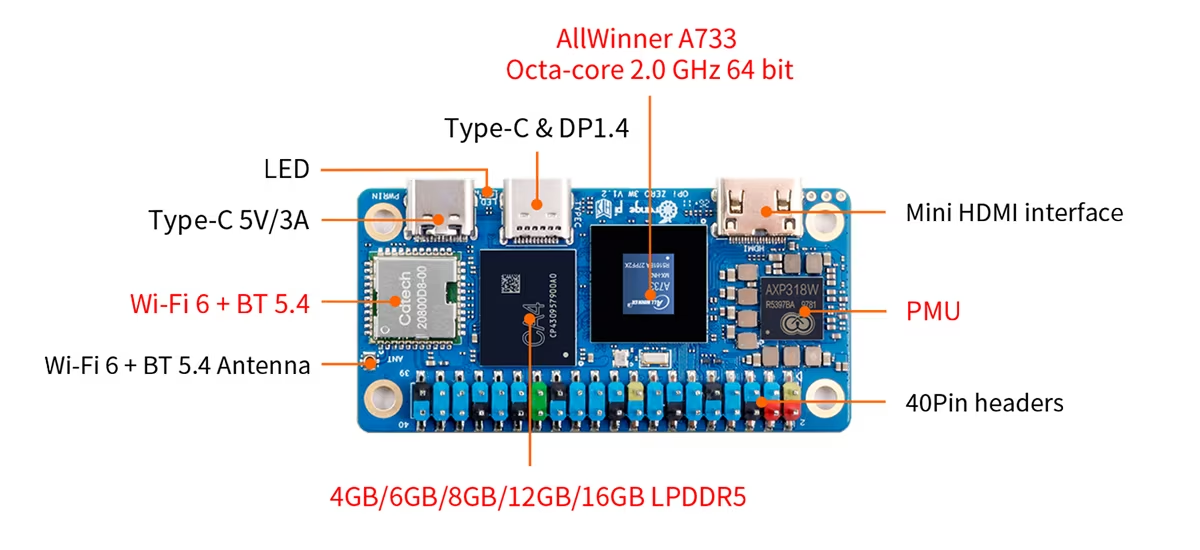
The GPU is an Imagination PowerVR BXM-4-64 MC1, which Orange Pi lists with OpenGL ES 3.2, Vulkan 1.3 and OpenCL 3.0 support. OpenCL and Vulkan on a board this small mean the GPU is exposed for compute work as well as for drawing the screen. How much of that capability a given workload can use will depend on driver maturity for the chosen image, so treat it as potential rather than a guarantee.
The neural processing unit is rated at up to 3 TOPS at INT8, with mixed-precision support for INT8, INT16, FP16 and BF16. Orange Pi names ONNX, TensorFlow, PyTorch and Caffe as supported frameworks and promises a toolchain from model import to deployment. TOPS figures are peak numbers at a given precision, and real throughput depends on how well a model maps to the accelerator, so the headline is best read as the class of work the board can attempt: small vision and audio models at the edge.
The third helper is less visible and quite useful. The A733 includes a Xuantie E902 RISC-V real-time coprocessor at up to 200 MHz. For projects that mix Linux with timing-sensitive control, a dedicated low-power core on the same chip is the right architectural answer, even if most buyers will never program it.
Memory and storage are options, so choose them deliberately
Orange Pi specifies onboard LPDDR5 at 4800 MT/s, up to 16 GB. CNX Software reported configurations from 1 GB to 12 GB at launch, with the 16 GB version not yet available at the time. That is a wide range for one board, and it changes what the Zero 3W can be. A 1 GB or 2 GB board is a headless sensor gateway or a single-purpose appliance. A 4 GB or 8 GB board has room for a desktop, several containers or a small model. The 12 GB and 16 GB versions exist for people who know why they need them.
Storage follows the same logic. The specification table lists optional onboard eMMC in several capacities and optional onboard UFS at 32, 64 or 128 GB, both unpopulated by default, plus a microSD slot that supports cards up to 128 GB. A base board therefore boots from microSD. For anything that writes constantly, such as a database, a log collector or a build cache, a version with onboard eMMC or UFS is the better purchase, because a memory card is often the weakest part of a small Linux system.
The decision has to be made at purchase. Memory and onboard storage are soldered, so a buyer who underestimates the workload has no upgrade path apart from a new board.
Two displays and two cameras from a very small board
The display options are generous for the size. Orange Pi lists a mini HDMI 2.0 output at up to 4K and 60 frames per second, a 4-lane MIPI DSI interface, and a USB-C port with DisplayPort Alt Mode, also at up to 4K and 60 frames per second. The board supports two independent displays, which makes it a real candidate for signage, dashboards and small control panels that pair a local panel with a second monitor.
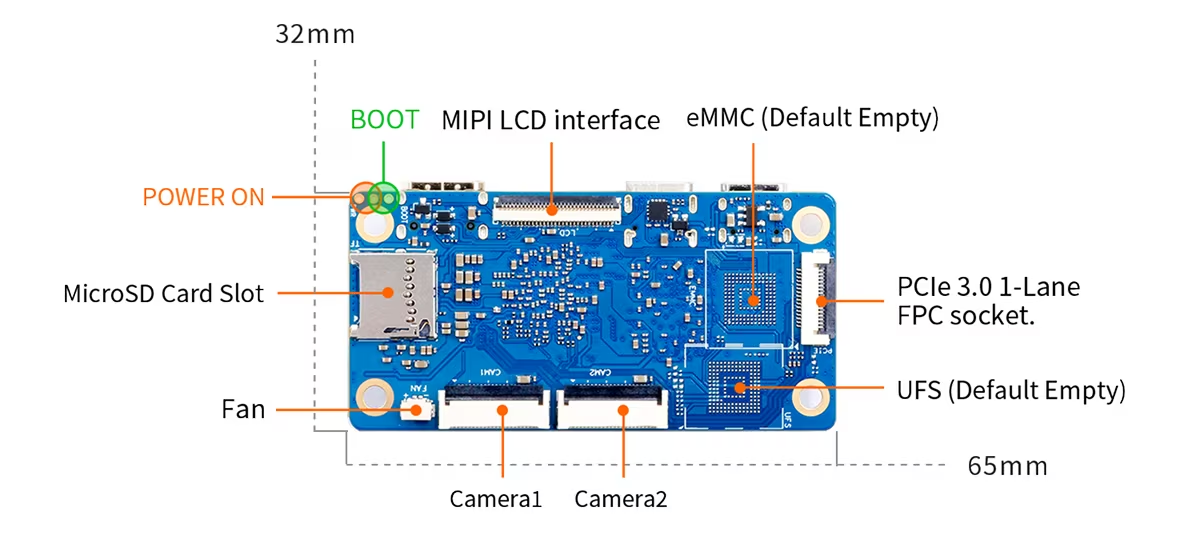
Cameras connect through two 4-lane MIPI CSI interfaces. Paired with the NPU, that makes the Zero 3W a plausible base for a compact vision device: two sensors, a model and a network connection on one small board.
The practical cost is adapters. Mini HDMI needs a cable or adapter, the MIPI interfaces need FPC cables and compatible modules, and DisplayPort over USB-C needs a monitor or dock that accepts it. None of this is unusual for a Zero-format board, but a buyer should budget for it.
Related reading
Wireless, USB and the PCIe connector
Wireless is Wi-Fi 6 with Bluetooth 5.4 including BLE, and Orange Pi notes support for external antennas. That last point matters for a board that will often end up inside an enclosure, where an antenna mounted outside the case is the better option.
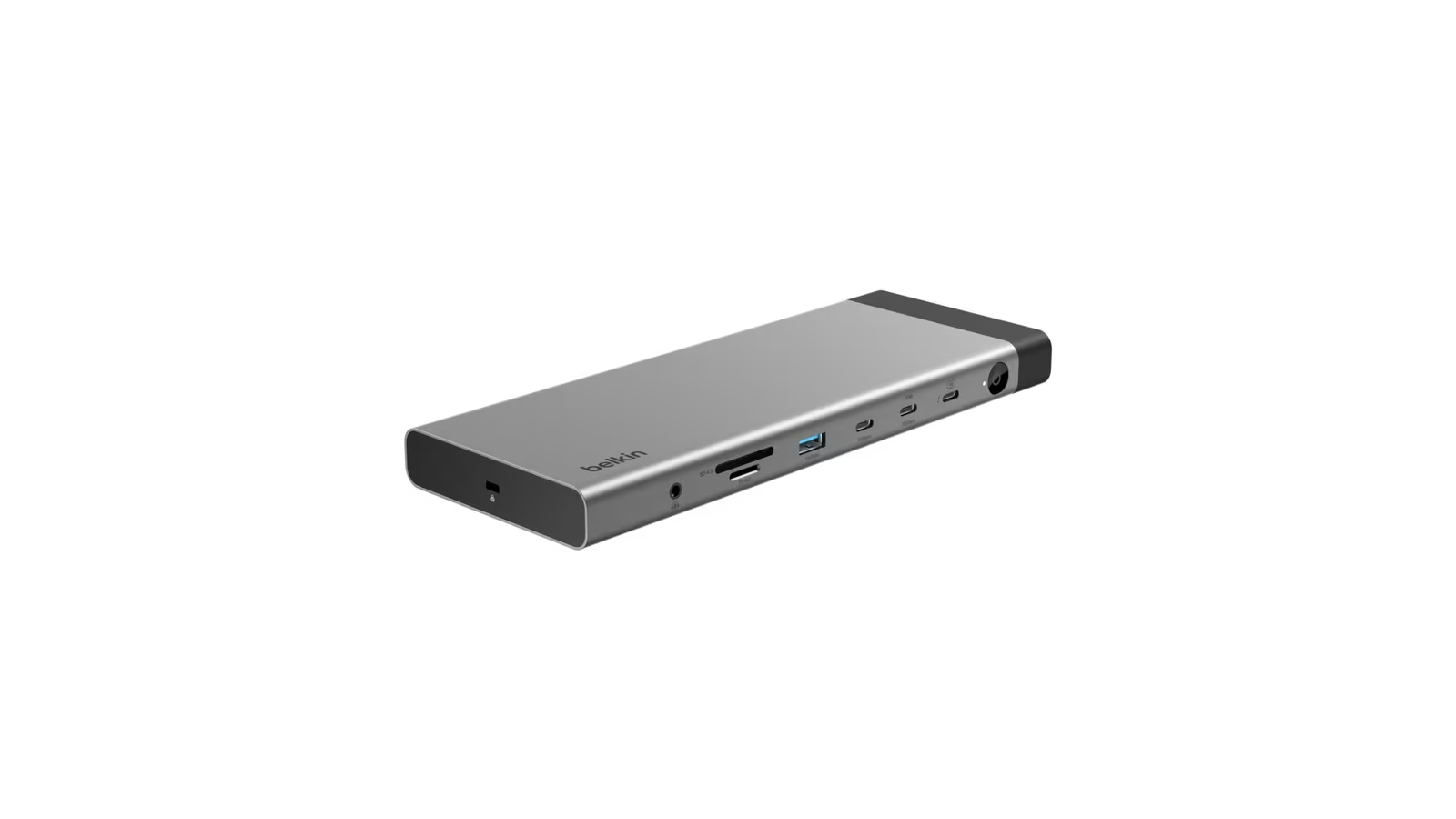
The USB arrangement is minimal. CNX Software describes one USB 3.1 OTG Type-C port with DisplayPort Alt Mode and a separate USB 2.0 Type-C port for power, and Orange Pi specifies the supply as 5 V at 3 A over Type-C. The specification table lists no Ethernet port and no full-size USB-A socket. Wired networking, a keyboard and a mouse at the same time will therefore mean a USB-C hub.
The most unusual feature on a board this size is a PCIe 3.0 x1 connection on an FPC socket. It needs an adapter board to become useful, and it is the reason the Zero 3W can reach beyond its footprint. Fast storage or a wired network controller on a small daughterboard would be a far cleaner answer than a chain of USB adapters.
The 40-pin header, cooling and the physical board
Orange Pi provides a 40-pin expansion header with GPIO, UART, I2C, SPI and PWM, and publishes a pin definition on the product page. For anyone moving a project from another Zero-format board, the header is the familiar part, although pin functions should be checked against Orange Pi’s own definition rather than assumed.
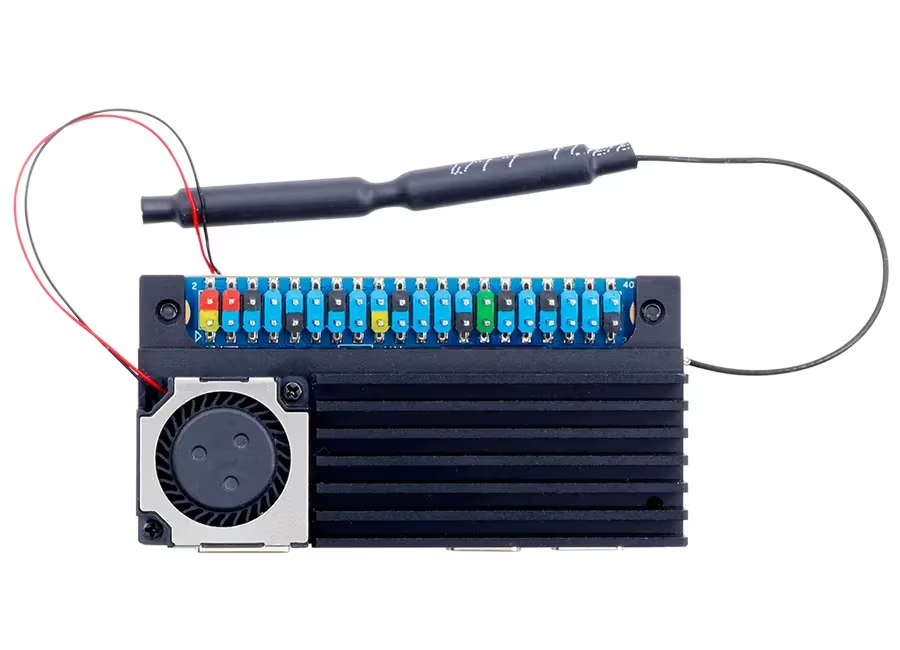
There is also a 2-pin fan connector, and Orange Pi sells a dedicated heat dissipation assembly for this board. Orange Pi describes it as an anodised aluminium heatsink with a 20 by 20 by 6 mm fan rated at 10,000 RPM and 5 V, and gives the assembled height as 11.8 mm over the 65 by 32 mm footprint. An eight-core processor with Cortex-A76 cores in a board this small is exactly the case where a manufacturer-designed cooler makes sense, and I would treat it as part of the purchase for any sustained workload.
The board’s size is its main virtue and its main constraint. At 14 g, it disappears inside a project enclosure. It also leaves no room for full-size ports, so the Zero 3W rewards people who plan the finished device rather than those who want a desk computer.
Software, images and documentation
Orange Pi’s download page lists official images for Orange Pi OS (Arch), Ubuntu, Debian and Android, alongside Linux and Android source code, a user manual, the schematic, mechanical drawings and official tools. The product overview also names OpenHarmony among the supported operating systems.
A published schematic and mechanical drawing matter more than they seem. They make it possible to design a carrier board or an enclosure without guessing, which is what turns a development board into the heart of a product.
The honest trade-off is ecosystem size. Software for the Zero 3W comes from Orange Pi’s own images and toolchain, and the volume of third-party tutorials, add-on boards and forum answers will not match the most popular single-board platforms. For a developer comfortable with Linux, that is a reasonable price for this much hardware. For a beginner who needs every step documented by someone else, a more mainstream board is the safer start.
Price and who it is for
The Orange Pi product page does not print a price and links to Orange Pi’s AliExpress and Amazon stores. At launch, CNX Software reported pricing of $25 for 1 GB, $35 for 2 GB, $50 for 4 GB, $80 for 8 GB and $99.90 for 12 GB, with the cooling assembly at $5.99, and noted that the Amazon listings carry a small markup.
At those prices, the Zero 3W is aimed squarely at developers and builders. It suits a compact edge gateway, a camera device with local inference, a signage player driving two screens, a small always-on server for a home lab, or the prototype of a product that will later get its own carrier board. The 4 GB version is the sensible default for most of those jobs, and the 8 GB version is the one for containers or a desktop.
Related reading
It is the wrong board for someone who wants Ethernet and USB-A ports without adapters, or for a first Linux project where community tutorials carry more weight than hardware capability. Those buyers should look at a larger board with full-size ports.
Verdict
The Orange Pi Zero 3W is excellent. It puts the processor of a much larger board on a 65 by 32 mm PCB weighing 14 g, at a launch price CNX Software reported as starting at $25. It is a pleasure to work with, and it has earned its place on my desk.
Its limits come from the format and the ecosystem, not the silicon. It rewards people who plan the finished device rather than those who want a desk computer.
Why I recommend it
- Eight cores in Zero size. Two Cortex-A76 cores at up to 2.0 GHz take the threads that decide responsiveness, while six Cortex-A55 cores absorb background services.
- Memory sized to the job. LPDDR5 goes up to 16 GB, so the same board can be a 1 GB headless gateway or an 8 GB machine for containers or a desktop.
- Two displays and two cameras. Mini HDMI and USB-C DisplayPort both reach 4K at 60 frames per second, and two MIPI CSI interfaces pair with the 3 TOPS NPU for a compact vision device.
- PCIe on a tiny board. A PCIe 3.0 x1 link on an FPC socket lets fast storage or a network controller sit on a daughterboard instead of a chain of USB adapters.
- Documentation for product work. A published schematic and mechanical drawings make a carrier board or enclosure possible without guessing.
Why it may not be for you
- Adapters for almost everything. With no Ethernet and no full-size USB-A, a keyboard, mouse and wired network mean a USB-C hub, and mini HDMI, MIPI and PCIe need adapters too.
- Decisions you cannot undo. Memory and onboard storage are soldered, and eMMC and UFS are unpopulated by default, so a base board boots from microSD.
- The cooler belongs in the basket. For sustained workloads I would treat the $5.99 heatsink and fan assembly as part of the purchase.
- A smaller ecosystem. Software comes from Orange Pi’s own images, and third-party tutorials and forum answers will not match the most popular platforms.
- Headline figures are potential. The 3 TOPS rating is a peak INT8 number, and GPU compute depends on driver maturity in the chosen image.
For a developer who has outgrown a Zero-format board and does not want to give up the format, the Zero 3W is the board to buy, with 4 GB as the sensible default. Anyone who wants Ethernet and USB-A without adapters, or a first Linux project backed by plenty of community tutorials, should look at a larger board with full-size ports.
Product images: Orange Pi.
One email a month: new articles, reviews and the upcoming live webinar + free recording. No spam, unsubscribe anytime.