The Echo Show 8 (2nd Gen) has an awkward place in Amazon’s line. It arrived in 2021 with one big change over the first model, a much better camera. Two years later the 3rd Gen arrived with most of the other changes. So the buying question is narrow. Do you need what the middle model added, and can you live without what came after?
Owner feedback on this exact generation is less detailed than I would like, because many comments do not say which Echo Show the writer owns. Where a report could apply to another model, I say so.

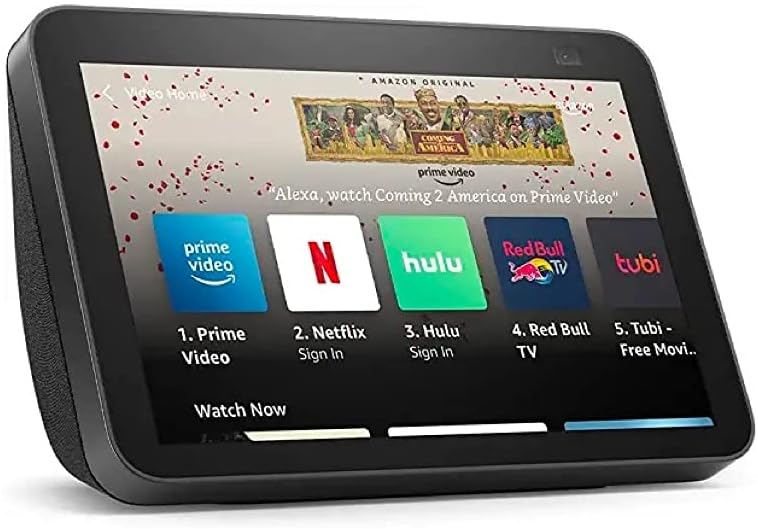
Product image from the Amazon listing.
What Changed From the First Model
The honest answer is one thing that matters. Tech Advisor’s June 2021 review lists “few updates” as a drawback, and it is right. The 8-inch screen keeps the same 1280 by 800 resolution. The two 2-inch speakers and bass radiator are praised for their volume, but the review says the sound is “not much different” from before. The chip moved from a MediaTek MT 8163 to an MT 8183, which the reviewer calls “a minor bump.”
Related reading

The camera is the real change. The old 1-megapixel unit gave way to 13 megapixels, and Tech Advisor says “camera quality itself is excellent.” Software follows you around the frame on a call, so you can walk a little without leaving the picture. The body does not turn, since this is cropping and zooming in software. The review’s conclusion is that this makes the new model “a far, far better option” for video calling than the one before.
So if you call family on video every week, this upgrade is real. If your Echo Show is a kitchen clock and timer, you can keep your first-generation model.
There is one oddity to plan for. Tech Advisor notes that “the camera is pointing towards the ceiling,” and that you need an optional stand to watch a pet or the floor. Anyone hoping to use it as a room camera should allow for that.
Daily Life: Routines, Recipes and Calls
As a kitchen or bedside screen, the appeal is easy to understand. Tech Advisor calls the display “clear and bright,” with text large enough to read recipes and appointments easily. It works as a control screen for compatible smart home devices and supports routines, so a single phrase can run a few actions.
The weak part is speed. The same review says responses are sometimes slow, though acceptable, and that your internet connection plays a part. Owner comments follow that line. In Best Buy reviews, one owner of a Show 8 says video calls and Drop In to a bedroom unit have a noticeable delay at the start. Another gave it full marks but said the system sometimes freezes and lags. The fair summary is that this is a device with modest hardware, and some owners feel it. If you ask it for one thing at a time, a pause of a moment is easy to forgive. If you expect it to feel like a recent phone or tablet, it will let you down.
Since the 3rd Gen review at Reviewed still noted occasional freezes on the faster model, I would not treat slowness as a defect of this generation alone.
Product image from the Amazon listing.
Privacy Controls Are a Real Plus
Anyone putting a 13-megapixel camera in a home should ask about this. Tech Advisor describes a physical slider that covers the lens, plus an on-screen message when the camera or microphones are active. Drop In calls need permission from both users. A physical cover is the kind of protection I trust most, because no software setting can undo it. If the device goes in a bedroom, get into the habit of closing it.
Remote viewing of the camera is one of the features the review liked. That is handy for checking on a room, and it also means you should think about who has access to your Amazon account. A shared household account gives shared access.
Related reading
The Screen Is Also an Advertising Space
Reviews from 2021 say little about ads, and this is where owners and reviewers part ways. Owners notice them. In the comments on an older TechJunkie guide, one owner disputed the article’s claim that the Echo Show has no ads, reporting in October 2021 that coffee ads were appearing with no way to turn them off.
You can reduce the clutter. A reader in that same thread gave the path: swipe down, open Settings, then Home & Clock, then Home Content, and switch off the items you do not want. Turning them all off leaves just the time, date and temperature. Guiding Tech gives the same path and adds that you should turn off the Rotate Continuously option at the bottom. A Reddit poster in 2023 said this cut ads to a minimum, apart from suggestions to try Alexa features.
I would treat that as reduced, rather than gone. Some sponsored and suggested items may remain, and Amazon can change what appears on the screen through software at any time. If a screen that sometimes sells you things would annoy you in your kitchen, take that seriously, because no setting I read about promises a clean device forever.

Product image from the Amazon listing.
Against the 3rd Gen
This is the comparison that decides most purchases now. The Reviewed report on the 3rd Gen, from November 2023, lists a faster processor, Spatial Audio with better bass and clarity, and a smart home hub with Zigbee, Matter and Thread support. Tech Advisor confirms that the 2nd Gen has no built-in Zigbee hub. It works with devices that connect over Wi-Fi or through another hub, but it cannot talk to Zigbee sensors and bulbs on its own.
The camera, however, did not move forward. Reviewed says the 13-megapixel camera “remains unchanged compared to the last-generation model.” For a family that mainly wants video calls, the two models are close, and that helps the older one a lot.
Here is how I would decide. If you are building a smart home around Zigbee or Matter devices, buy the 3rd Gen and do not think twice, because those radios cannot be added later. If you want a video-calling screen, a photo frame and a recipe display, and you find the 2nd Gen at a clear discount, it does those jobs nearly as well. If the price gap is small, take the newer one, since it has a faster chip and should get software support for longer. That last point is my own expectation, as I found no published support dates for either model.
The 2nd Gen also has no 3.5mm audio jack, which Tech Advisor counts as a drawback. If you hoped to wire it to a hi-fi, plan on Bluetooth.
What Happens When the Internet Drops
This is a cloud product. Tech Advisor already links response speed to your connection, and most of what makes the display useful depends on Amazon’s servers: voice answers, video calls, recipes and streaming. I found no owner report that sets out what still works in an outage, so I would not plan on anything beyond the basics.
Related reading

Reliability notes are thin as well. An iFixit troubleshooting page made by students lists common issues such as a screen that will not respond, Wi-Fi that will not connect and Bluetooth that will not pair. It points first to power cycling and to moving closer to the router. Nothing there suggests a pattern of failures for this model. The device needs its own power adapter and has no battery, so it stays where the socket is.
A Fine Video-Calling Screen at the Right Price
I think of this as a very good middle child. It fixed the first model’s weak camera, and the next model kept that same camera. For calls with grandparents or a recipe screen on the counter, that is most of what you need.
Skip it if you want a Zigbee or Matter hub, if ads on a home device make you angry, or if slow responses would drive you mad. Skip it too if you already own a first-generation Show 8 and never make video calls, since little else changed.
If video calls matter to you and the price is clearly below the newer model, the Echo Show 8 (2nd Gen) is still a sensible buy. This is an affiliate link. As an Amazon Associate I earn from qualifying purchases.
One email a month: new articles, reviews and the upcoming live webinar + free recording. No spam, unsubscribe anytime.