A small Ethernet switch solves a very ordinary problem: the router is across the room, one cable reaches the desk, and three devices need a reliable connection. The TP-Link TL-SG105 is built for that job. It adds wired connections without another wireless network, an account, or a settings page. Its appeal is easy to understand when a Mac, a NAS, and a small server all share the same corner of a home office.
This is a research-based review of the five-port TL-SG105. I have not measured throughput, heat, or reliability on a physical unit. The product details come from TP-Link’s documentation; the setup advice and buying judgment are my assessment of those details. The Amazon link identifies this model, rather than a PoE switch or the larger SG108.
Count the connections before buying
The easiest mistake is to count five ports as five new devices. One port normally connects the switch to the router or another switch, leaving four for equipment. A computer, NAS, printer, and game console fill it. Add an access point or another test machine and the small box has already run out of room. Draw the desk on paper first, including anything you expect to add during the next year.
Related reading

That little exercise makes the choice between five and eight ports much clearer. A five-port model makes sense when the setup really is small, or when it serves one room with a fixed collection of equipment. If you already have four local devices, I would usually buy more ports now. The extra space can save another power adapter, another uplink cable, and the awkward arrangement of two small switches sitting beside each other.
What the hardware actually offers
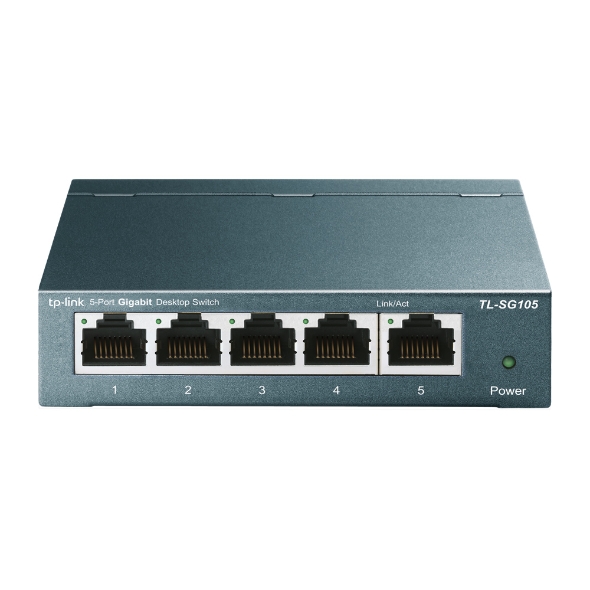
TP-Link specifies five automatically negotiated 10/100/1000 Mbps Ethernet ports, a metal enclosure, desktop or wall mounting, and a fanless design. The switch is unmanaged: it works without a configuration step. The current product page also lists traffic-priority features and IGMP snooping. Those details describe a simple gigabit switch; they do not make it a managed network appliance. Hardware revisions can differ, so match the label on the unit to the documentation. TP-Link’s product information is the reference for those claims.
The fanless design is especially relevant beside a microphone or a quiet desktop computer. There is no cooling fan to become another moving part. That does not establish that a particular power adapter is silent, or that the box stays cool in a closed cabinet. Give it air and keep the adapter accessible. A compact device still needs a sensible position, especially when several warm adapters share the same cable tray.
Gigabit has a clear ceiling
A gigabit port is a useful match for many printers, TVs, and older computers. It also supports ordinary work such as downloading documents and accessing a home server. It becomes a limit when you expect very fast transfers from a modern NAS. A Mac with a faster Ethernet adapter cannot create a faster link through this switch. The connection negotiates at the speed supported by both ends, which here is no more than one gigabit per second per port.
For file transfers, remember that network speeds use bits and file sizes normally use bytes. Dividing the headline rate by eight gives a theoretical ceiling before protocol overhead. The result is not a promised copy speed. Storage speed, small files, encryption, the NAS processor, and other traffic all affect what you see. If a large video project already makes you impatient over gigabit, buying another gigabit switch does not address that particular problem.
Keep local traffic local
Putting the computer and NAS on the same desk switch is a useful arrangement. Their Ethernet traffic can travel through the switch directly rather than taking an unnecessary route through another room’s equipment. The router still provides the normal services that the network needs, such as internet access and usually IP address assignment. The TL-SG105 does not replace that router, and it does not create Wi-Fi.
A practical installation starts with a known working cable from the router to the switch. Connect one computer and check that it receives a normal network connection before adding everything else. Then connect the NAS and try opening a shared folder. Add the remaining devices one at a time. This takes slightly longer than plugging in every cable at once, but it leaves a clear point to investigate if a connection fails.
Avoid the loop that breaks an afternoon
A small unmanaged switch looks harmless enough to invite experimentation. Resist connecting two cables between the same pair of switches just because spare sockets are available. Without a deliberately designed arrangement that supports it, redundant links can create a network loop and cause serious disruption. TP-Link itself calls attention to loop-related problems on the product page. One straightforward uplink is the right starting point for a simple home installation.
Related reading

Label that uplink cable at both ends. If the box is mounted under a desk, mark which connection goes to the router and which goes to the NAS. A few small labels are more useful during a fault than a photograph of an attractive cable tray. When troubleshooting, remove any recent addition first and return to the last known working layout. An unmanaged switch offers few diagnostic controls, so physical clarity matters.
Understand what unmanaged leaves out
For a basic shared home network, the lack of settings can be a benefit. There is no management password to remember and no cloud account to maintain. For a homelab, the same simplicity becomes a boundary. You should not buy this model expecting a web interface for creating VLANs, viewing detailed port statistics, capturing traffic through a mirror port, or setting a custom policy for every socket.
If the plan includes separating experiments from personal devices, select equipment that explicitly supports the required network design. A router may still create separate networks, but this switch is not a substitute for the managed switch needed to control them at the ports. Likewise, a device that needs power over Ethernet needs an appropriate power source. The plain TL-SG105 is not the PoE variant. Similar product names are a good reason to read the model label twice.
Diagnose the cable before blaming the switch
A link that unexpectedly runs at a lower speed often starts a search for new hardware. Begin with the simpler possibilities. Check the speed reported by the computer, inspect the cable, and try another known good cable and port. Look at both ends, including a wall socket or USB Ethernet adapter. A cable can make a connection while still preventing the expected link speed. A basic internet speed test alone does not identify which component is responsible.
For a more useful check, copy a large file between two capable local machines while noting their negotiated link speeds. Keep the same file and endpoints when changing one cable or port. This is a way to investigate your setup, not a benchmark result for this review. If local transfers work normally but internet access is slow, the problem may sit beyond the desk switch. Separating local and internet tests keeps the diagnosis focused.
A small box needs a long-term place
The wall-mounting option is useful when the desk surface is already crowded, but placement should still allow access to connectors. Leave enough slack to replace a cable without pulling the whole installation apart. Avoid letting a bundle of heavy cables hang from the sockets. If you use adhesive cable clips, give the cables support before they reach the switch rather than asking the Ethernet plugs to carry their weight.
Keep a note of the power adapter that belongs to it. Small office devices often collect similar-looking adapters with different outputs. Moving the switch during cleaning is much less frustrating when its adapter is labelled. If the router and NAS use a backup power supply, think about the switch as part of the same path. A running NAS is not very useful to a computer if the little switch between them has lost power.
Before mounting it permanently, photograph the model label and keep that image with your network notes. It gives you the hardware version and power details without having to dismantle the desk later. For a shared home office, also leave enough information for someone else to reconnect the uplink after moving furniture. This switch is simple to use, but a clear physical installation is what makes that simplicity last after the person who installed it has forgotten the cable order.
Related reading

Who should buy it
I would consider the TL-SG105 for a small fixed setup where gigabit is sufficient and simple wiring is the main need. It has a sensible role behind a TV, beside a modest desktop, or at a workbench with a few devices. I would look elsewhere for faster NAS access, several growing projects, PoE equipment, or network experiments that need management features. Those are different requirements, even when the boxes look similar in an online catalogue.
The strongest reason to buy this switch is that you can describe its entire job in one sentence: connect these few Ethernet devices to that existing network. If the sentence grows into a list of speed upgrades, security boundaries, and remote management needs, choose equipment designed for those jobs. A basic switch is valuable when it removes a small practical obstacle and then stays out of the way.
You can check the exact TP-Link TL-SG105 five-port listing on Amazon. This is an affiliate link. As an Amazon Associate I earn from qualifying purchases. Check the hardware revision, included power supply, seller, and current return terms before ordering.
One email a month: new articles, reviews and the upcoming live webinar + free recording. No spam, unsubscribe anytime.