The Netgear GS305 is useful when a room has one working Ethernet cable and several devices that would benefit from it. It is a small unmanaged gigabit switch, so its role is expansion rather than network management. The practical decision is whether five ports are enough and whether gigabit is the speed your devices actually need. Those questions are more useful than treating a metal box as a general upgrade to the internet.
This is a research-based review of the plain five-port GS305 linked by Amazon ASIN B07S98YLHM. I have not measured throughput, latency, power consumption, temperature, or reliability. Netgear’s specifications support the hardware description. The setup advice explains the design’s useful role without claiming that a test lab or a long-running home installation has verified this particular unit.

Five ports usually means four local devices
One port normally connects to the existing network, leaving four for local equipment. A computer, printer, TV, and NAS can fill those immediately. If the plan also includes an access point or another workstation, compare an eight-port model before buying. A little spare capacity can avoid another small box, power adapter, and connection later.
Count cables in the actual room rather than devices in the whole home. The GS305 is a useful room-level accessory when one cable reaches a group of equipment. It is less compelling if the installation is already growing into a central network cabinet. Choose enough ports for the known job and reasonable near-term additions, while remembering that a larger switch may have different power, noise, and mounting characteristics to check.
Related reading
The plain model has a plain purpose
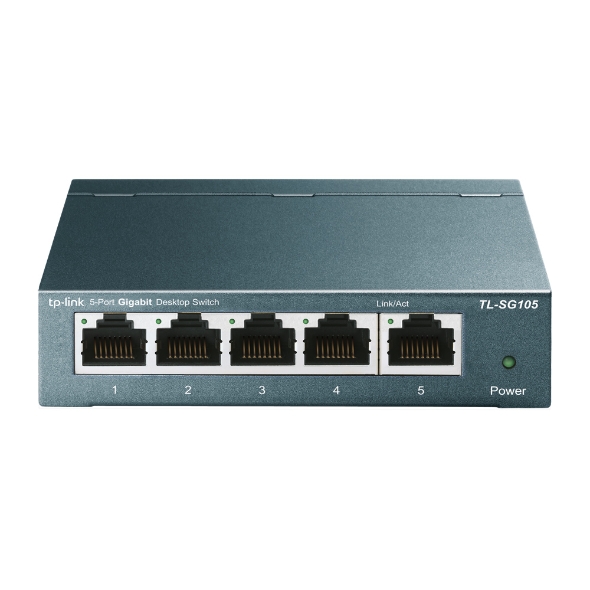
Netgear describes the GS305 with five 10/100/1000 Mbps ports, plug-and-play operation, a metal enclosure, desktop or wall mounting, and a fanless design. The plain GS305 does not provide a PoE power budget. Netgear’s current product specifications describe GS305v3, so compare the supplied revision rather than applying every detailed figure to every historical unit.
The unmanaged design means there is no normal configuration task before a simple installation. It also means the product should not be bought expecting the controls of a managed switch. Similar names with extra letters can describe different models, including PoE variants. Check the exact label and included power supply. A product family photograph is not enough to establish that the box will power an access point or support a particular management feature.
It extends the network you already have
A switch connects Ethernet devices within an existing network. The router normally continues to provide internet routing and services such as address assignment. The GS305 does not create a new Wi-Fi network or replace a modem. This distinction matters when the problem is actually poor wireless coverage or a slow internet plan rather than a shortage of Ethernet sockets.
Start installation with the existing working cable from the router and one computer. Confirm that the computer connects normally before adding the rest. Then add a second local device and check the task you need, such as opening a NAS share or reaching a printer. This creates a known working base. Connecting every cable at once can make a simple fault harder to isolate if an existing device or cable is already problematic.
Gigabit is a per-port limit
The fastest normal link on this switch is one gigabit per second per port. A faster computer adapter or NAS does not raise that port’s capability. If your main goal is moving large video projects to fast network storage, compare the complete path against a faster switch before assuming this one is an upgrade. It may add sockets while leaving the transfer limit unchanged.
Keep bits and bytes distinct when reading transfer figures. Network link rates are expressed in bits, while files are normally described in bytes, and useful transfer speed also includes overhead and endpoint limitations. A progress bar is influenced by source storage, destination storage, software, and file size. I have not measured copies through the GS305, so there is no promised file-transfer result in this review.
Put related equipment together thoughtfully
Connecting the computer and NAS to the same local switch can give their traffic a direct local path. That is a sensible desk arrangement when both use ordinary gigabit Ethernet. The uplink still carries traffic to other parts of the network, so several devices using remote resources can share that path. Think about where the actual data travels rather than counting sockets alone.
For a TV corner, a wired connection may simplify a console, television, and media player setup. It does not guarantee a better service if the original fault lies in the internet connection or application. Test the intended task after installation and compare with the previous arrangement. The value of wiring is a known and manageable path, not an automatic cure for every type of slow playback.
Related reading

Diagnose lower link speeds systematically
If a computer reports a link below the expected rate, first check both endpoints and the cable. Try a known good cable and another port while keeping the rest of the setup unchanged. Include any wall socket, coupler, dock, or USB Ethernet adapter in the investigation. A cable can establish a connection without supporting the rate you expected.
Separate local tests from internet tests. Copying a file between suitable local machines checks a different path from downloading from an online service. If local networking works normally but internet access is slow everywhere, investigate the router and internet connection. If one device alone struggles, focus on that endpoint and its physical path. A basic switch offers limited diagnostic information, so controlled comparisons are more useful than changing several pieces at once.
Keep the cabling unambiguous
Label the uplink and important device cables at both ends. Leave enough slack to reach the connectors without pulling the switch out from a shelf. Support heavy cable bundles so the sockets do not carry their weight. A small installation is easier to maintain when the person cleaning or moving the desk can tell what belongs where.
Avoid connecting redundant cables between switches without a deliberately supported network design. An accidental loop can disrupt the network rather than make it faster. One clear uplink is the appropriate starting point for a simple room expansion. If you need redundant paths, link aggregation, or loop-management controls, choose equipment and a design that explicitly support the requirement instead of improvising with spare sockets on an unmanaged box.
Fanless does not mean placement is irrelevant
The fanless design avoids a cooling fan beside a quiet desk or microphone. That is a documented hardware property, but it is not a measurement of every possible noise from a particular adapter or installation. Keep the box and power supply ventilated and within the manufacturer’s environmental guidance. Do not bury them under papers or place them against a heat source merely because the switch has no fan.
For mounting, leave access to the activity lights and cable latches. A neat installation that requires dismantling furniture to change a lead can be inconvenient during a fault. Check the supplied mounting instructions and use an appropriate arrangement for the surface. The power adapter also needs a secure socket and a cable route that will not be accidentally disconnected whenever someone moves a chair.
The power path belongs in the plan
A small switch is easy to forget when thinking about backup power. If a NAS and computer remain running during a short outage but the switch between them loses power, their connection disappears. Where continuity matters, include the network path in the same practical planning as the endpoints. That does not mean every home needs a backup supply; it means understanding which part would stop working first.
Label the correct adapter because similar-looking plugs can belong to very different devices. Follow the model’s voltage and polarity requirements, and replace a damaged supply through a suitable supported route. I have not measured the GS305’s consumption, so I would not calculate a running-cost claim from an unverified assumption. If power use is central to your choice, measure the exact unit under a stated load.
Management and separation need other equipment
If the job includes creating port-based network separation, detailed monitoring, or capturing traffic from another port, an unmanaged GS305 is the wrong category. A router may provide some network features elsewhere, but the switch does not become managed because it connects to an advanced router. Write down the required controls and choose a model that explicitly supports them.
Related reading
For a small homelab, this can be the dividing line between a useful simple accessory and a purchase that must soon be replaced. Learning a managed switch may be worthwhile when the experiments require it. Conversely, adding management complexity to a plain TV or printer corner may provide little value. The best choice is the least complicated equipment that actually meets the known requirement, with enough room for realistic growth.
My verdict
I would consider the GS305 for a small fixed group of gigabit devices that needs more sockets without a management project. I would compare an eight-port model when four local devices already fill the plan, and a faster or managed switch when the workload calls for it. The plain GS305 should be bought for its clear limited role, with PoE and other variants kept separate.
Its usefulness comes from a simple installation that stays understandable: one uplink, labelled device cables, sufficient ventilation, and known endpoint speeds. If that describes the job, a small unmanaged switch can remove a daily obstacle. If the requirement is more complicated, the extra letters and specifications on another model may represent necessary capabilities rather than optional decoration.
Check the exact Netgear GS305 five-port Amazon listing. This is an affiliate link. As an Amazon Associate I earn from qualifying purchases. Confirm revision, plain non-PoE model, power supply, seller, and return terms before ordering.
One email a month: new articles, reviews and the upcoming live webinar + free recording. No spam, unsubscribe anytime.