A Wi-Fi extender is tempting when one room works badly and the rest of the home is fine. The TP-Link RE315 belongs in that conversation. I would consider it as a targeted repair, with a clear test for the room it must serve. I would not choose it from a coverage number alone or expect it to rescue a weak internet connection coming into the house.
This is a research-based review of the AC1200 RE315, ASIN B08RHD97QY. I have not measured its throughput, latency or roaming in a home. The practical suggestions below describe how I would evaluate the documented design. They are not results from a review sample. Hardware version, firmware and regional plug type must be checked for the exact unit being purchased.

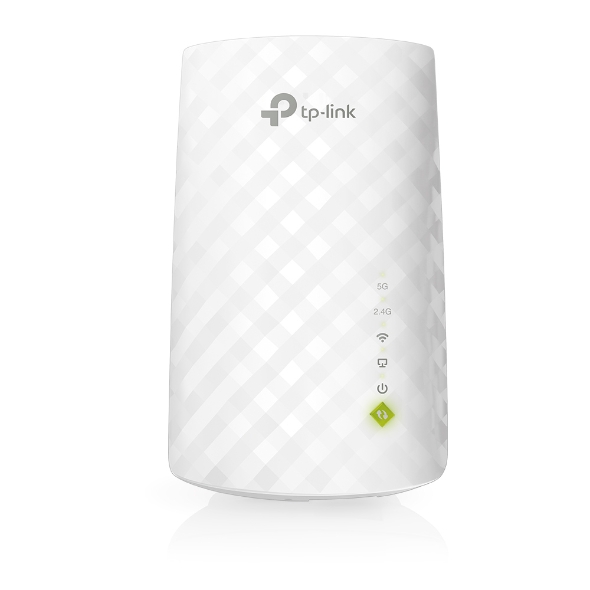
Product image: TP-Link product photography for the AC1200 variant from the Amazon listing.
What AC1200 does and does not tell you
The listing describes dual-band Wi-Fi with nominal rates of 867 Mb/s on 5 GHz and 300 Mb/s on 2.4 GHz. It identifies a Fast Ethernet port and an access-point mode. Its mesh wording refers to EasyMesh compatibility and explicitly says it is not compatible with Deco mesh systems. These are supplier descriptions, and mesh support must be verified for your exact hardware and firmware. They are not a promise of a 1,200 Mb/s download. Source: TP-Link RE315 listing.
Related reading
Those distinctions shape the purchase. A combined wireless class is a label for the radio configuration, not a measurement at your desk. The extender’s connection back to the router matters as much as the signal shown on the laptop. Giving the laptop a nearby access point does not help enough if that access point itself struggles to hear the main router.
The Ethernet description deserves attention too. If you want a fast wired path for large local transfers, check the actual port specification rather than assuming every network socket is gigabit. Buy for the connection you will use. A port can be convenient for a particular device without making the whole extender a substitute for a wired network designed around much higher speeds.
Diagnose the weak room before buying
First compare the problem room with a position near the router using the same device and task. If both locations perform poorly, the extender may be aimed at the wrong problem. Check whether other people are using the connection heavily and whether the issue affects all services or one application. A video-call problem can have several causes, and a purchase should follow the cause you can identify.
Try moving the existing router to a more open position if its installation allows it. A router hidden inside furniture or placed low behind a television may have an avoidable disadvantage. Follow its placement guidance and keep its connections safe. This simple rearrangement can be worth testing before adding another powered network device. You may find that the weak room needs less help than you first thought.
Write down what success means. For a home office, it might be a normal meeting without repeated audio dropouts, plus reliable document transfers. For a guest room, ordinary browsing may be enough. If you do not define the task, it is easy to keep running speed tests while remaining unsure whether the purchase helped. The best acceptance check resembles the reason you wanted better Wi-Fi.
The extender belongs between good and bad coverage
Do not start by putting the RE315 in the place where the signal has already disappeared. It still needs a usable connection to the router. Try an outlet partway along the route, then use the product’s documented placement guidance and indicators. The exact best position depends on your home. I have no floor-plan measurements that would justify promising a particular distance or number of walls.
Check several available outlets while keeping the laptop in the problem room. Record the position and a short description of the result. A hallway outlet may be more useful than the one hidden behind the office desk, even though it is farther from the laptop. You are choosing a position for two links: router to extender and extender to the working device. Both need to make sense.
Think about everyday use of the outlet. A useful network position should not block access to something essential or put the device where it is routinely knocked. Check the regional plug format and electrical label as well. The workbook uses an Amazon.com listing; a US plug configuration should not be treated as automatically suitable for a Czech installation. Buy the regional version intended for your home.
Related reading

Give the first setup a clear baseline
Follow the current instructions for the exact hardware version and use official setup tools. Keep a record of the model and version from the label. If the application offers an update, read the relevant notes and complete it under stable power. Avoid copying a random firmware file because a forum post mentions the same family name. Version details exist for a reason.
Use a network name you understand during evaluation. If the setup uses separate names, they can make it easier to confirm which connection you are testing. If a supported mesh configuration uses one name, check how to identify the actual access point through the available tools. A phone showing strong Wi-Fi bars is not enough to prove it has moved to the connection you intended.
Keep your router’s working configuration noted before making changes. You should be able to return to the previous arrangement if the extender does not help. A targeted repair should not turn into an uncontrolled redesign of every network setting. Change one thing, test it, then move to the next. That makes problems easier to understand and prevents an ordinary setup task from consuming a whole weekend.
Test work, not just the download number
For video calls, use the room and device that matter. Try an ordinary meeting or a test call while moving as little as you normally would. Listen for interruptions and check whether the picture remains usable. Then repeat when other people are using the network. A quiet late-night test can establish a baseline, but it does not describe a busy household during the working day.
If your work involves a NAS or another local computer, include a representative local transfer. An internet speed test cannot tell you everything about traffic inside the house. Use expendable copies of files, verify the destination and record the path the devices use. This is especially useful when one device is wired to the router and the other reaches it through the extender.
Keep the comparison fair. Use the same device, location and task before and after the change, and note unusual activity on the network. You do not need laboratory equipment to recognize a useful improvement, but a comparison becomes much less helpful when every condition changes. I would value a stable call and predictable file access above a single impressive result that cannot be repeated.
Mesh compatibility needs exact names
TP-Link’s product families should not be treated as interchangeable. The listing’s EasyMesh statement and its Deco exclusion are particularly relevant if you already own a mesh system. Check the router’s support page and the extender’s regional hardware-version page together. Do not assume that buying two products with the same brand guarantees the mesh behavior you want.
If you need smooth movement between rooms during calls, test that exact behavior. Walk the normal route while a noncritical call is active and observe what happens. A device remaining connected is different from a seamless handover. I have not tested the RE315’s roaming, so I would not promise it based on the word mesh. Your router, client and settings all belong in the final assessment.
For someone who works in one fixed room, roaming may matter less than a stable connection at the desk. That is a good reason to avoid paying for a feature you do not need. Conversely, a large house with several weak areas may deserve a broader network plan. A small extender is more coherent as a focused solution than as the first of several unplanned fixes.
Related reading

When a cable is the better answer
If a suitable Ethernet route already exists, consider whether an access point or another wired arrangement better serves the room. Confirm the RE315’s access-point-mode limitations before assuming it fits that role. The appeal of wireless extension is avoiding a new cable, but avoiding a cable is not always the highest priority. Predictable work can justify a more deliberate installation.
If you are buying several devices to cover a large home, compare the total cost and management effort with a suitable mesh system. Include the time spent moving extenders, naming networks and troubleshooting. The cheapest first purchase can become an expensive collection of partial fixes. A clear layout with one identified weak room is the situation in which I would be most interested in the RE315.
My assessment
I would shortlist this AC1200 extender for a modest, clearly defined coverage problem, provided its regional version and router compatibility are confirmed. Placement and real work tests should decide whether it stays. I would pass when the requirement is multi-gigabit local networking, unverified mesh integration or coverage across several difficult areas. Those jobs deserve equipment chosen specifically for them.
Check the exact AC1200 option through my TP-Link RE315 Amazon link. This is an affiliate link. As an Amazon Associate I earn from qualifying purchases. This review does not claim measured speed, latency or coverage in a test home.
One email a month: new articles, reviews and the upcoming live webinar + free recording. No spam, unsubscribe anytime.