Scrivener 3 is the writing app from Literature & Latte, a small British company that has made it since 2007. It is known as the novelist’s tool. Instead of one long document, you write a book as many small sections in a project, keep your research next to it, and at the end Scrivener stitches everything into a manuscript, an ebook or a PDF.
Quick verdict
Scrivener 3 is a strong choice for technical authors who want structure, research and compile output in one project.
- Best for
- Self-publishing technical authors who plan a book in sections and compile it to ePub, PDF and DOCX.
- Main benefit
- The binder, snapshots and Compile turn one project into an ebook, a print PDF and an editor's DOCX.
- Biggest drawback
- The rich-text editor has no syntax highlighting, so code listings rely on the Code Block style and Pandoc.
Scrivener 3 Standard Licence for macOS
literatureandlatte.com · Worldwide
Check price and availability: Scrivener 3 Standard Licence for macOS at literatureandlatte.comProduct link.
Time with the product: A first look after the licence arrived on 11 November 2026.
Reviewed version: Standard licence for macOS, version 3.5.2
Compatibility: Requires macOS 11 or later; Windows and iOS versions are sold separately.
Review context: The review focuses on writing and self-publishing a technical programming book in Scrivener.
I have self-published technical books before, and the next one is about software. So I am asking a narrower question than most Scrivener reviews: does a tool built around novelists suit someone whose chapters are full of code samples, screenshots and terminal output? My general stance is that the structure of a long book matters more than the editor you type in, and that is exactly where Scrivener puts its weight.
Disclosure: Literature & Latte sent this Scrivener 3 for macOS licence free of charge for review and I keep it. No money changed hands, and Literature & Latte had no approval over the text.
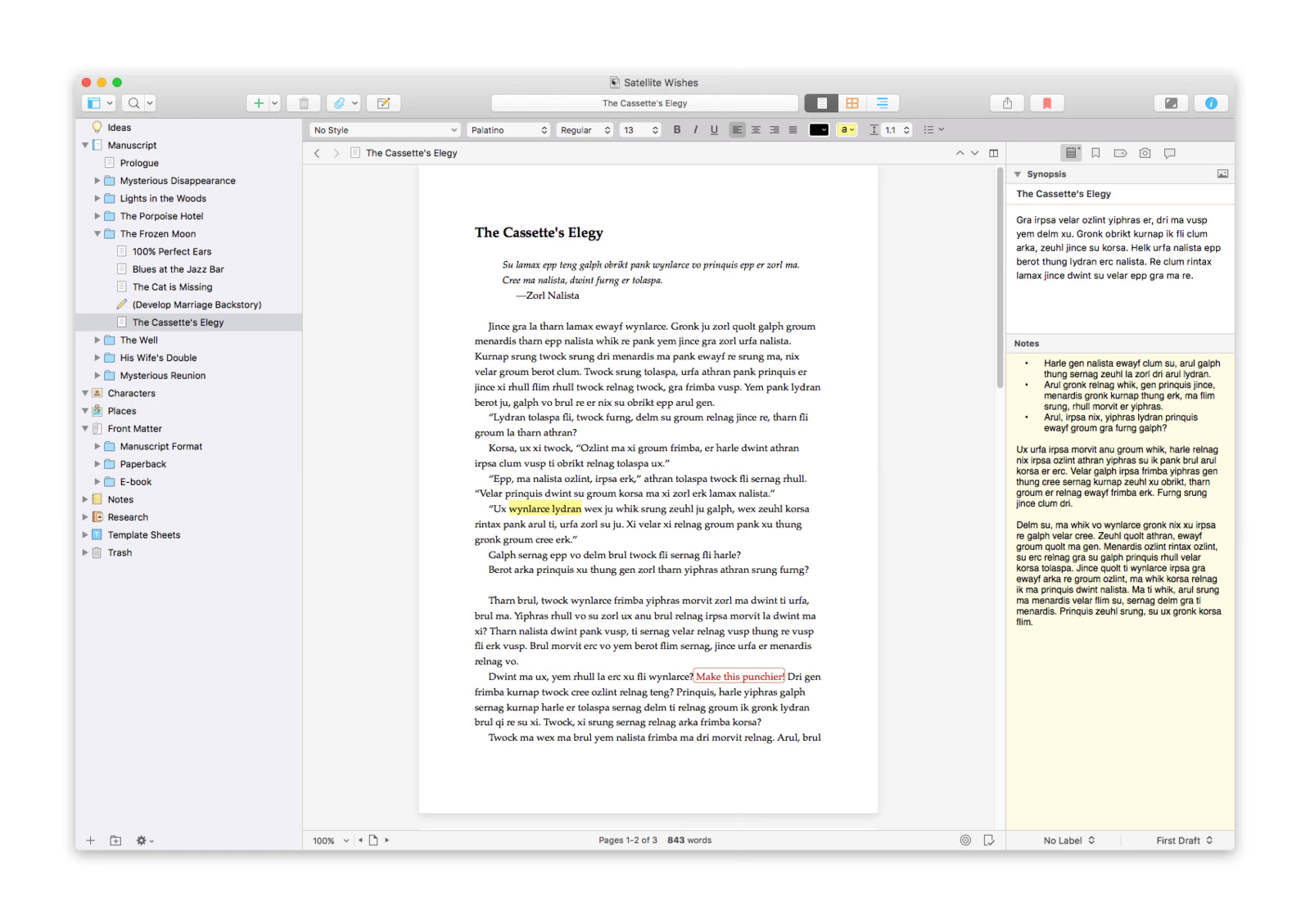 Screenshots: Literature & Latte press kit.
Related reading
One project for chapters, notes and research
The heart of Scrivener is the binder, the sidebar on the left. Literature & Latte describes it as a ring-binder metaphor: the manuscript is a tree of folders and documents of any size, and next to it sit folders for notes, research, front matter and trash. A chapter can be one document or twenty, and Scrivener joins them when you view a folder or compile the book.
For a technical book this is the right model. A programming chapter breaks into a concept, a worked example, a listing and a pitfall, and each piece as its own document can move to another chapter without scrolling through forty pages. The research folder accepts PDF, images, web pages, audio, video and Word files, according to the product page. That is where I would put API documentation, RFCs and my architecture diagrams, next to the text that cites them.
Corkboard and outliner: planning before writing
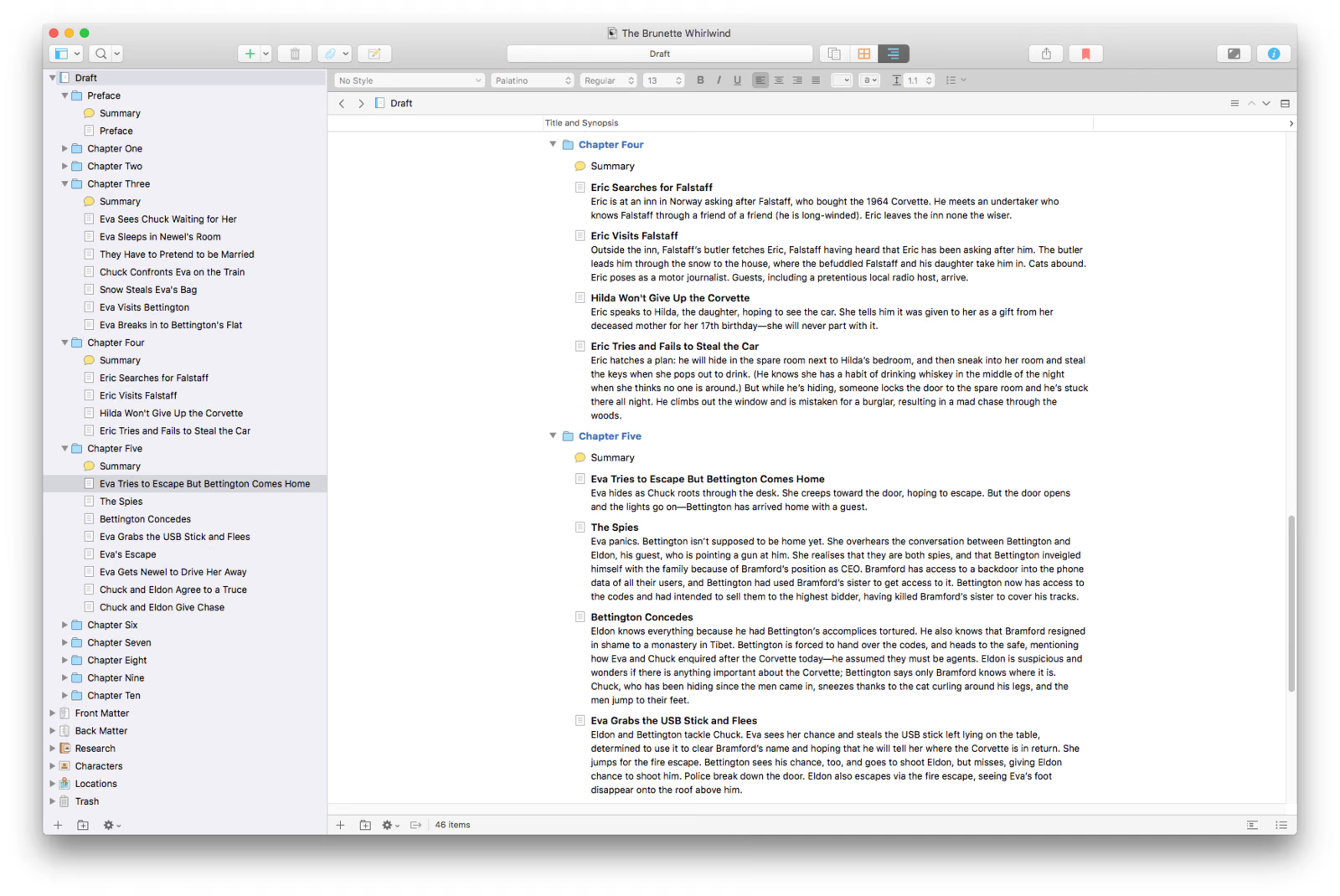
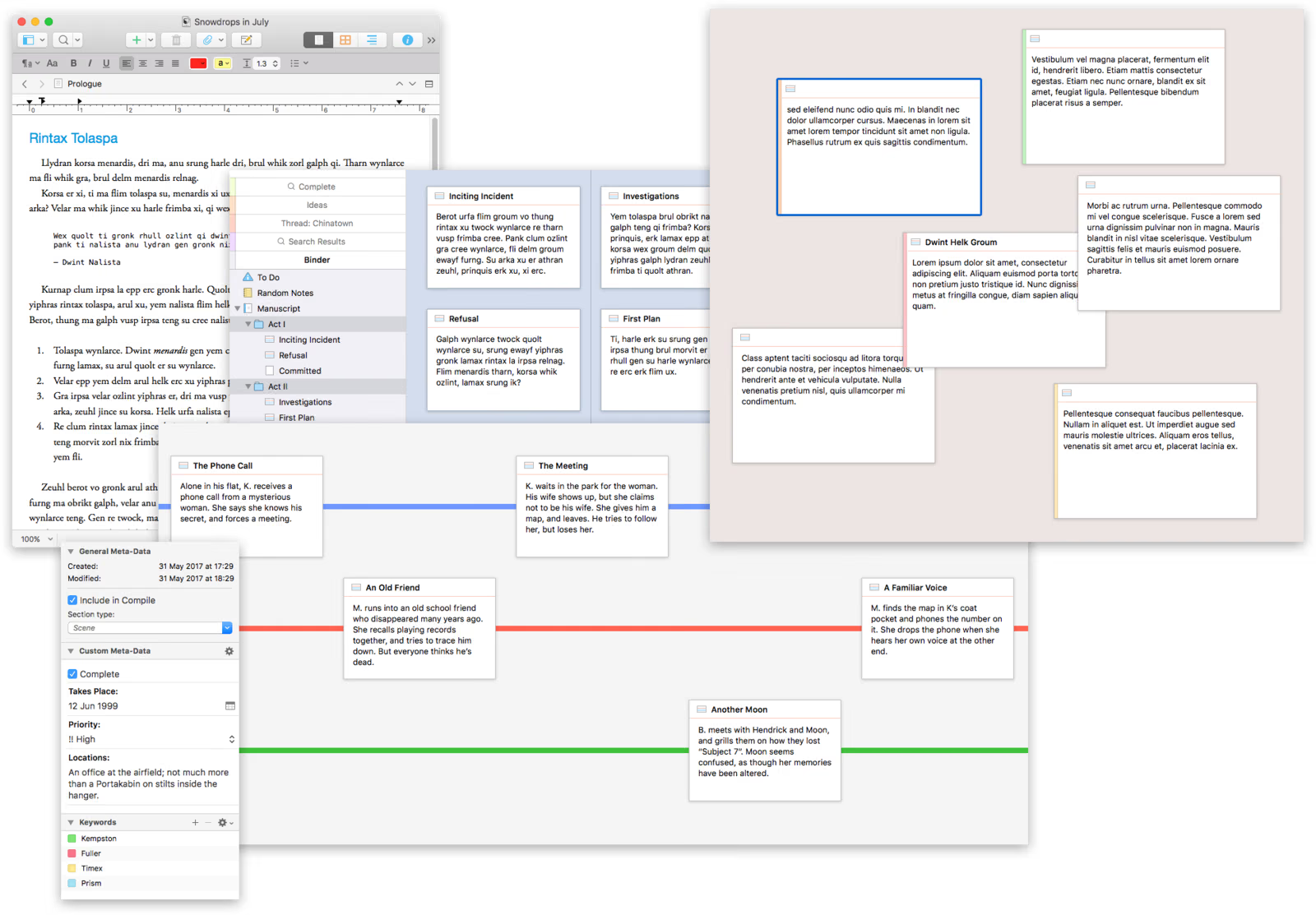
Every document has a synopsis, which appears as an index card on the corkboard. Moving the cards reorders the manuscript. The outliner shows the same structure as rows with synopses, word counts, labels and status, and you can drag rows to restructure the book.
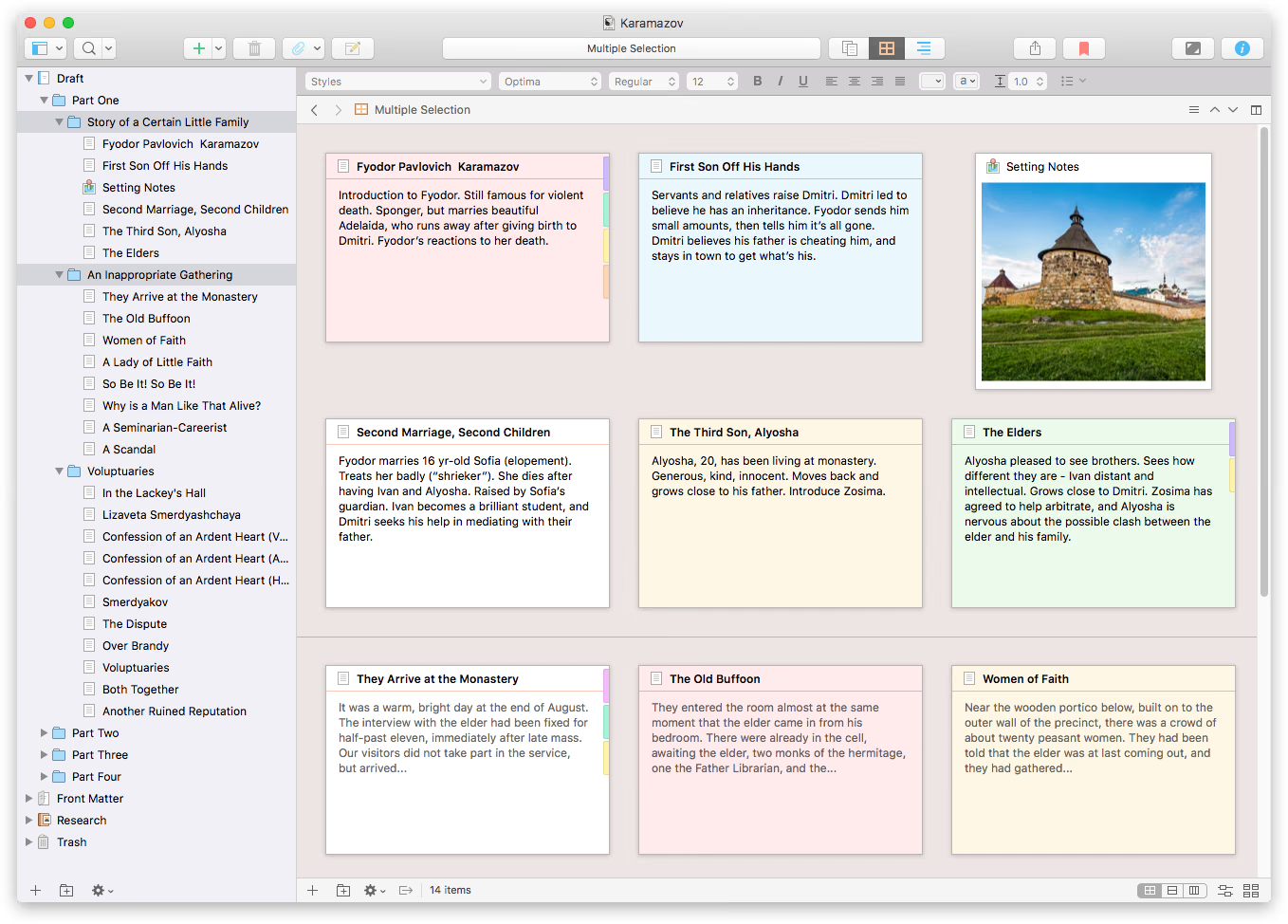
This is where the novelist heritage shows most. The colourful cards and the “Characters” and “Places” folders in the templates are built for plotting a story, but a technical author can give them a different meaning. A card becomes “Section 4.3: retries with exponential backoff, needs listing 4-7”, a label becomes “needs tech review” and the status becomes “code tested”. I like that the outliner shows word counts per section, because a technical book drifts out of balance easily when one chapter turns into a reference manual.
Split editor and snapshots for revisions
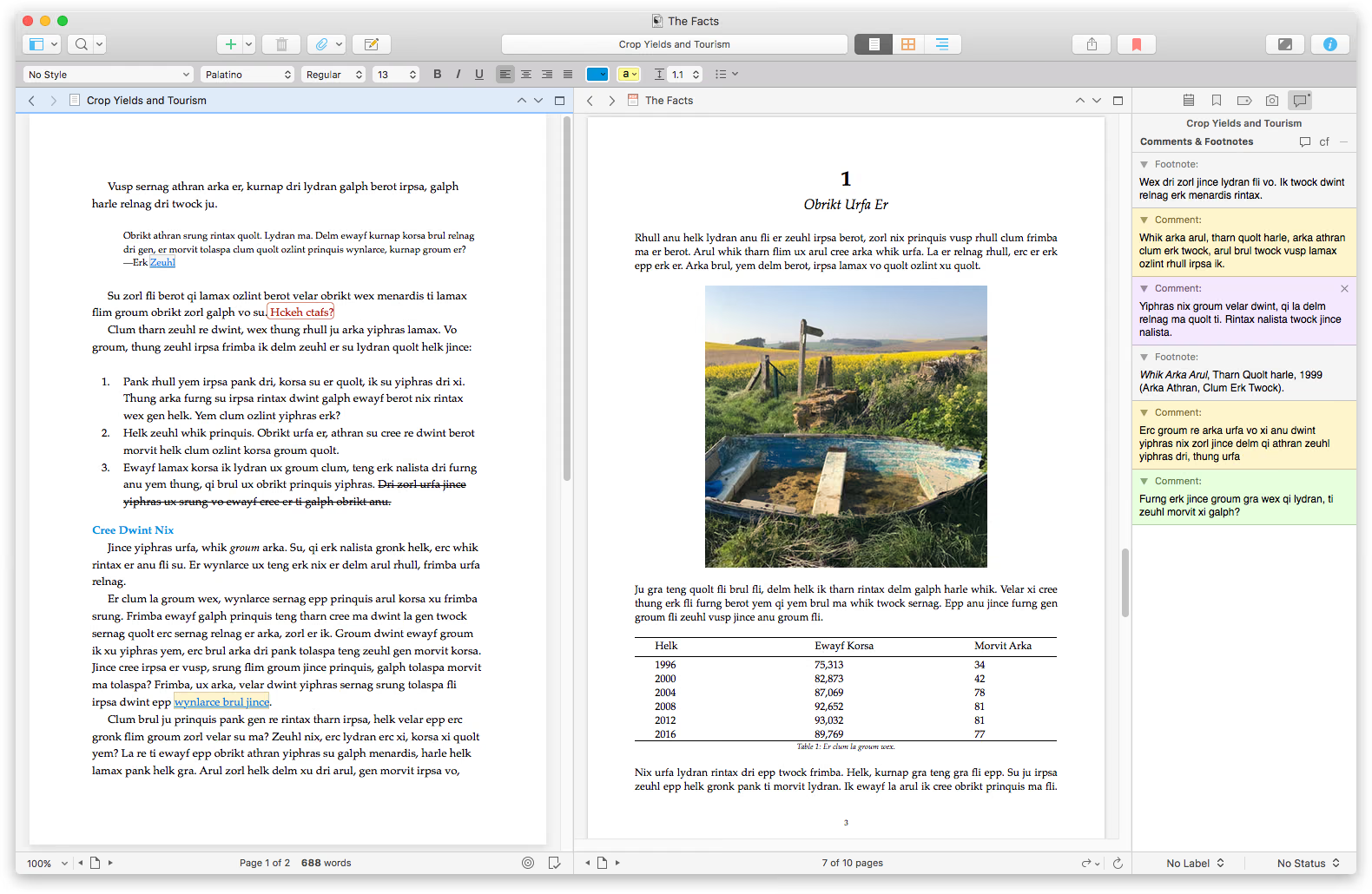
Scrivener can split the editor and, with what Literature & Latte calls Copyholders, show up to four documents side by side in one window. That means the chapter you are writing in one pane and an earlier chapter or the PDF of a spec in another. On a 14-inch MacBook Pro two panes are realistic, and on my external monitor all four should fit.
Related reading

Snapshots are the other feature a technical author will appreciate. Before a big rewrite you take a snapshot of a section, and the product page says you can later compare it with the current text to see what changed. It is not Git, but per-section snapshots are a quick safety net while you rewrite a chapter after a library ships a breaking change.
Code samples and images
This is the weak spot for programming books, and it is better to know it in advance. Scrivener is a rich-text editor, not a code editor. Literature & Latte’s own staff explain on the forum that text marked with the built-in “Code Block” style is exported as code in the default Markdown-based formats, but that you get no syntax highlighting out of the box. Highlighting has to come later from Pandoc or MultiMarkdown.
So you paste code from your editor, apply the Code Block style, and let the compile step handle the rest. Images work more naturally: you drop them into the text, keep originals in the research folder, and captions are recognised by the MultiMarkdown export, which version 3.5.0 fixed for captions with footnotes according to the release notes.
Compiling a self-published book
Compile is where Scrivener earns its price for self-publishers. One project can produce Word, RTF, PDF, plain text and ePub 3 output, each with its own format settings, so the same manuscript can become an ebook, a print PDF and a DOCX for a copy editor. John Voorhees wrote in his MacStories review that the redesigned Compile window, with formats, a preview and project settings in one place, made the options easier to follow, and that the styles system carries through to Word and ePub.
One change matters for Kindle authors. Scrivener 3.5.0, released in October 2025, removed Kindle .mobi as a Compile option because Amazon no longer supports it, according to the release notes. You compile to ePub, check it in Kindle Previewer and upload the ePub to Kindle Direct Publishing.
Markdown, MultiMarkdown and Pandoc
For a technical author, the most interesting part is that Scrivener can compile to MultiMarkdown and hand the result to Pandoc. Literature & Latte’s Scrivener 3 announcement lists Markdown output and custom post-processing as the route to technical formats, and the 3.4.0 release notes mention Pandoc 3’s split-level option for ePub.
The best example is Scrivomatic, an open-source workflow that maps Scrivener styles to Markdown on compile and passes the file to Pandoc through a post-processing script. It produces DOCX, HTML, and PDF via LaTeX, Typst or PrinceXML, keeps code blocks semantic with syntax highlighting, and handles cross-references and citations through Pandoc filters. If you already keep a Pandoc toolchain, this is the bridge: Scrivener for structure, Pandoc for typesetting. If you write plain Markdown files in a Git repository, Scrivener asks you to give that up, because its editor is rich text, a point MacStories also made.
Related reading
Price and where to buy
Scrivener 3 for macOS costs $59.99 on Literature & Latte’s store, checked on 13 November 2026. The Windows licence is a separate $59.99, and a bundle with both costs $95.98. The company’s press notes give students and academics a 15 percent educational discount, and Scrivener for iOS and iPadOS is sold separately on the App Store for $23.99. The macOS version is also on the Mac App Store at $59.99. It is a one-time purchase, not a subscription, and there is a 30-day free trial. I did not find Scrivener sold on Amazon.com, so there is no Amazon link here.
What this review is based on
The licence arrived on 11 November 2026, and this is a first look based on Literature & Latte’s documentation, not on months of writing. Features, versions and prices come from the product page, store, press notes and macOS release notes. The code block behaviour comes from Literature & Latte staff on the forum, the Compile and styles assessment from MacStories, and the Pandoc workflow from the Scrivomatic project. I have not yet built a chapter with real code listings, compiled an ePub for KDP or tested the Pandoc route, and that is what the coming weeks are for.
Verdict
Scrivener 3 is not a technical writing tool by birth. But the hard part of a technical book is structure, research and the final compile, and those are exactly Scrivener’s strengths. The binder, snapshots and Compile to ePub and PDF fit a self-published programming book well, and Pandoc covers what the rich-text editor cannot do with code.
I would recommend it to technical authors who think in sections and want everything in one project, especially at a one-time $59.99. If your book lives as Markdown in Git and you want syntax highlighting while you type, stay with your editor and your Pandoc pipeline.
What worked
- The binder and research folder keep chapters, sections, PDFs, images and web pages in one project.
- Compile to ePub 3, PDF and DOCX, plus MultiMarkdown output that can be handed to Pandoc.
What bothered me
- No syntax highlighting for code samples in the editor or in the default compile.
- Kindle .mobi export was removed in version 3.5.0, so Kindle books go through ePub.
Who should not buy it
- Authors who keep their book as plain Markdown files in Git and want a code editor experience.
Alternatives I would consider
- Plain Markdown in a code editor with Pandoc. Keeps the book in Git with syntax highlighting while you type, at the cost of Scrivener's binder and corkboard.
Evidence and sources
The article separates my judgement from specifications and claims credited to their sources. All screenshots come from the Literature & Latte press kit for reviewers.
- Literature & Latte Scrivener overview
- Literature & Latte press kit
- Literature & Latte forum on code blocks
- Scrivener macOS release notes
- MacStories review by John Voorhees
- Introducing Scrivener 3
- Scrivomatic on GitHub
- Literature & Latte store
Features, compatibility and rated figures from the maker are manufacturer information. My opinions are identified in the review.
Conclusion
A one-time licence with a 30-day trial is good value next to subscription writing tools.
Scrivener 3 Standard Licence for macOS
literatureandlatte.com · Worldwide
Check price and availability: Scrivener 3 Standard Licence for macOS at literatureandlatte.comProduct link.
One email a week with practical Mac workflows, useful comparisons and honest tech recommendations.