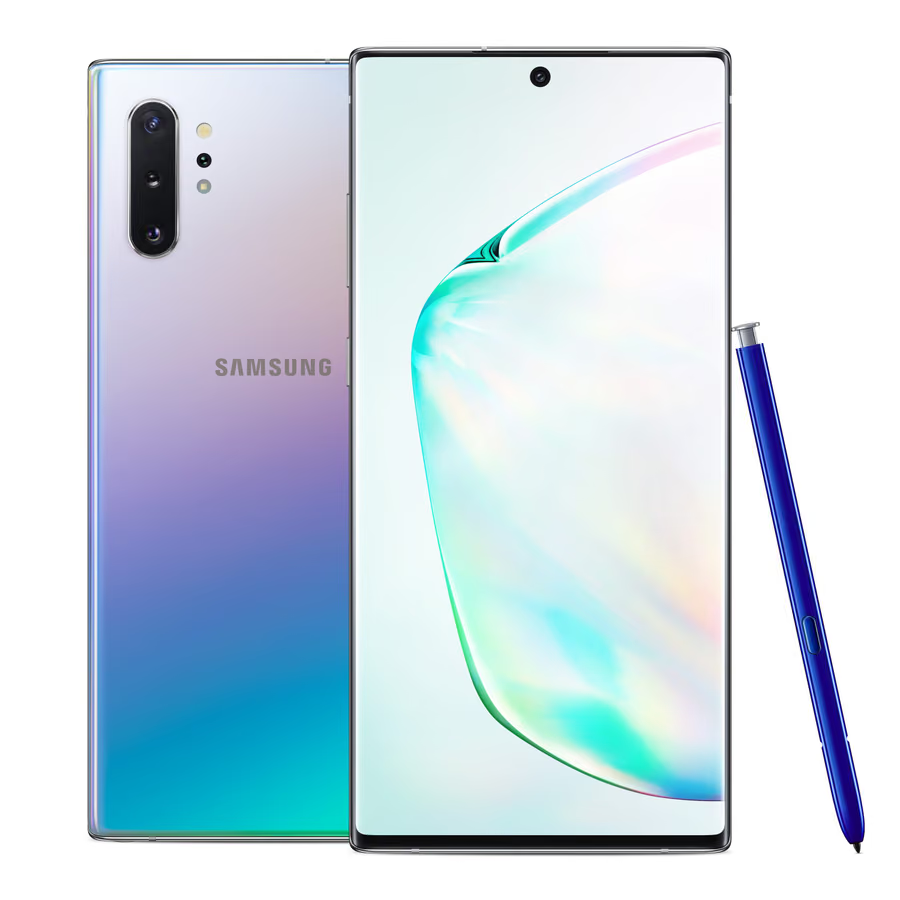
The Galaxy Note10 brought the stowed pen into a smaller format
The regular Galaxy Note10 went on sale in the US on August 23, 2019. Its 6.3-inch screen was designed to go with a smaller body than the Note10+. It still had a stowed Bluetooth S Pen and three rear views. The usual storage and headphones decisions needed more thought: 256 GB was the built-in capacity, with no microSD slot and no 3.5 mm jack. This was a useful Note for somebody who already wanted to mark things with a pen and had found the bigger previous phones more than they wanted to grip or carry. Samsung’s US Note10 launch and retail date
Quick verdict
Retail release in the United States · Archive date
I would have bought the standard Note10 if writing short notes and marking an image still worked better in an easier shape to hold.
Best for: Someone who uses the pen frequently for small and precise work but rarely needs the room for long reading that the Plus offers.
Main benefit: It kept a stowed pen and versatile rear cameras in a more compact body than the Note10+.
Biggest drawback: It lacked a microSD slot, a conventional headphone jack and the larger battery of the Plus. Those matter if they already belong in the user's routine.
Reviewed version: The regular US Galaxy Note10 on sale August 23, 2019, with a 6.3-inch display, 256 GB and integrated S Pen.
Compatibility: The standard model uses fixed storage and USB-C or compatible wireless audio. Its Bluetooth pen supports selected Air Actions.
Review context: I evaluate the documented retail hardware and the software available in its release window. Regional variants and software changes are identified where they affect the verdict.
The US retail price began at $949.99. In the same release the Note10+ gave someone a bigger display and additional storage options. The 5G rollout had its own models and availability. For this review I am considering the regular US Note10 sold at launch. Give the smaller body an actual job before assuming it loses all the advantages you might buy a Note for.
Check the important part of what you need to mark
A short note alongside an image can make a useful test. Load a picture from your normal application, use the S Pen to mark a small detail people have to find, and see how much of the rest stays visible. A shorter body can be easier to keep in hand as you make a small choice. There may also be less room to keep a long set of text visible next to it. The note’s location in the phone means you can use it with very little preparation. Looking at the result afterward is the next test of whether it adds to how you work.
Related reading
The display has a 2280 by 1080 class resolution and a camera opening near the top. Try reading and entering a short piece of information at the text size you normally prefer. A person who uses the larger display to see two files at once should consider the Note10+ more seriously. Someone typing or marking mostly one thing might like the smaller body’s ability to be held comfortably. The diagonal does not tell you where your fingers will be while you do either task.
The camera and remote can make a specific combination
Samsung offered three rear lenses. The Main camera can keep an ordinary person’s distance in view, the Ultra Wide includes more of the room and the separate Telephoto gives a tighter composition. Try two shots from the same position so you can see which part of the image needs to tell the story. A Note buyer who takes an image to add a mark later gets direct value out of combining a useful frame with the pen. It is much more straightforward than choosing the phone for every setting advertised at once.
The pen supported Bluetooth remote input and new Air Actions. A person using the camera from a supported position or switching something in another compatible app could find some of those inputs helpful. I would have checked the specific availability and compared it with tapping the real screen. A successful gesture for a job you repeat can be worthwhile. A handful of capabilities that require you to hold the pen in a particular way can give a different result depending on how a person usually works. That does not change the direct use of a small controlled tip against the device.
Consider the existing way you move data and listen
The storage was fixed at 256 GB on the reviewed standard launch model. This might leave enough room that a person no longer needed the removable card they used on previous Notes. Somebody keeping a large local library or long videos should compare the cost and location of that data. The Note10+ had a microSD option. I would have made a list of what goes to the phone and what regularly comes away from it. That helps identify the benefit of having enough usable internal space and whether the loss of a different path to store data matters.
The regular headphone jack was absent. Owners could use a compatible USB-C or Bluetooth setup. Check where your ordinary charger goes, which headphones you already have and how often you use both at the same time. A phone that gives you another useful way to hold a large display can still change a smaller audio habit. That kind of question is best settled while it’s easy to compare with what you already use.
Related reading

The smaller Note carried some power compromises
Samsung listed a typical 3,500 mAh battery and support for the available fast charge setup. A person interested in the smaller body should still check what the longest part of their usual workday looks like away from a charger. The penalty for a larger phone may be too high even if it offers more rated power. On a day when most work happens near supported charging, the smaller shape can make more sense. I would also have checked if a simple two-app layout was enough for the normal time I spend away from another display. A long job can be easier on a Note10+ even when both carry the main pen and cameras.
Pick the smaller size for use when the larger one is already available
The best direct comparison is an ordinary brief mark and the document to which it points. Use the same picture in both formats. There may be plenty of room to make the mark on the compact Note10 at the scale at which somebody else will see it. A longer conversation or reading material beside a note can have a different outcome. I would have started with something that needs only a small movement, then tried an entire longer task. A person taking notes while standing might find the shorter area easier to support. Somebody already sitting down with two applications has more room to benefit from the Plus.
The smaller Note also offered a fair way to assess the S Pen over a complete day. Carry only the things you really need for that ordinary work, including the case and compatible headphones or charger. The choice of the fixed storage and the smaller screen makes more sense if the remaining pen, camera and ordinary touch tasks regularly work at the smaller size. I would have considered how often to reach for that just a little earlier in the sequence, rather than simply ranking which of the two Notes had the longest feature list.
My verdict on the Note10
I would have bought it for a genuinely more manageable pen phone that could do most of the common work of a larger Note. A Galaxy Note9 already gave you storage expansion and a built-in pen that works in several remote situations. The Galaxy Note10+ review shows what you could buy in the broader body on the same day. The Galaxy review timeline keeps both sizes in that launch context.
What worked
It kept a stowed pen and versatile rear cameras in a more compact body than the Note10+.
Its 256 GB entry capacity and three useful ways to frame something supported a buyer without the need to carry the biggest Note.
What bothered me
It lacked a microSD slot, a conventional headphone jack and the larger battery of the Plus. Those matter if they already belong in the user's routine.
Remote commands depended on supported apps and gestures. The value of the writing function is easier to establish than most extra control situations.
Who should not buy it
Someone who needs removable local media, a larger document view or extra power between charges.
Alternatives I would consider
Galaxy Note10+. The Plus has a larger and higher-resolution display, larger battery and microSD expansion, with a bigger body and higher opening price. Read my Galaxy Note10+ review.
Evidence and sources
The release date refers to general availability in the named market. The archive filing is ten days later. Feature assessments are editorial judgments based on the documented retail model.
Features, compatibility and rated figures from the maker are manufacturer information. My opinions are identified in the review.
Conclusion
Compare the price and comfortable grip at the fixed capacity. Give the smaller panel a short and a longer real task before making the choice.
One email a week with practical Mac workflows, useful comparisons and honest tech recommendations.