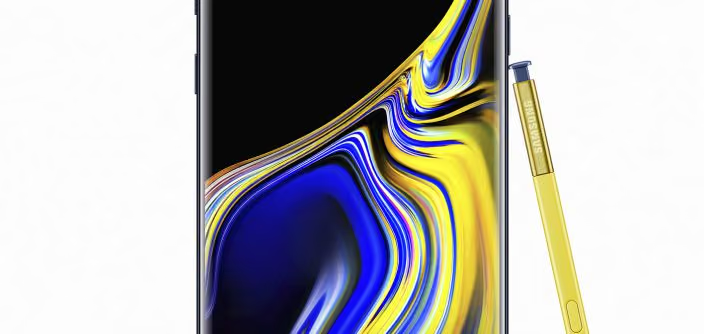
The Galaxy Note9 made the pen useful away from the screen
Samsung released the Galaxy Note9 in the US on August 24, 2018. The 6.4-inch display, optical wide and telephoto pair and embedded pen made it recognisably a Note. Samsung gave the pen Bluetooth Low Energy to control certain things from a distance. The device also carried a typical 4,000 mAh battery and started with 128 GB. Those changes gave two fairly separate reasons to buy it. The remote mattered if it helped a task you do with the phone in a different place. Extra storage and battery capacity mattered when the whole device was already doing enough useful work. Samsung’s August US retail announcement
Quick verdict
Retail release in the United States · Archive date
I would have bought it if the remote pen or increased power and storage gave an already useful Note a longer or easier working day.
Best for: Someone who often makes a quick mark, gives a supported presentation or sets a phone in a different place for a photograph.
Main benefit: The new pen button could do useful work at a distance while keeping the regular pen functions that make sense on the screen.
Biggest drawback: It was a big body to carry. Less frequent remote work made it harder to justify replacing a Note8 where the camera and the pen already worked well.
Reviewed version: The US Galaxy Note9 first sold August 24, 2018, with a 6.4-inch display and 128 GB or 512 GB before microSD expansion.
Compatibility: Its supplied BLE S Pen supported remote actions in compatible apps. DeX needed suitable display and input equipment for the intended job.
Review context: I evaluate the documented retail hardware and the software available in its release window. Regional variants and software changes are identified where they affect the verdict.
The 128 GB US model cost $999.99 at release, with a larger 512 GB version on sale in selected channels. This review uses Samsung’s documented launch features. A person who spent a lot of time with the Note8 could compare the new pen and storage directly. That makes a better starting point than assuming more parts of an already large phone necessarily put it to better use. Samsung’s record of the initial Note9 markets and specification
The new button needed to do its job at the right distance
A group photograph gives the remote S Pen a straightforward job. Put the phone in a stable position, make sure the group fits the useful view and start the picture from a place where it doesn’t make sense to keep touching the screen. A timer could solve some of the same situations. The button gives people one more decision about when it happens, which can be useful after everyone is in position. I would have tried this with the actual case and stand I would take out for a photo. Stable framing is important regardless of how easy the trigger is to reach.
Related reading
The same kind of input could help a supported presentation. If a device is already attached to a display, a button for stepping through slides may let you stand somewhere more comfortable. It depends on which app accepts the input and the exact display arrangement. Try changing a slide and returning to a helpful portion of it before deciding whether it saves bringing something else. The new S Pen had practical value when those actions could be repeated without bringing a separate clicker. It still served as an ordinary precise tool on the display for a mark or note.
Knowing when you really need a remote can save treating every contact with the pen as a demonstration of it. I would have tried an ordinary handwritten name and one remote command in the same setup. If you frequently get useful work from both and can get enough reliability from the second, you get more from putting the pen into the device. People who mainly write directly on the screen have a more modest reason to replace an established Note8 for this one feature.
Battery and storage helped if enough of your day already went through the Note
The 4,000 mAh battery was a material capacity change. Figures are best read as a comparison of devices rather than a predicted day. A Note may be used for quick messages, long periods of screen use, camera work and some video, all with a different effect on the battery. I would have accounted for the part of the day that regularly happened without dependable power and whether it required the most expensive configuration or simply a fresher battery. Extra headroom makes a stronger difference when the phone could take one more useful job before reaching a charger.
The Note9 started with 128 GB while a 512 GB model and compatible microSD offered more room. Decide what needs to stay available locally and what can live on a computer or card. A person who recorded a lot or brought a useful library to work could value the expanded space. For ordinary app and camera use, a smaller storage setup could provide all the material someone needs. Moving through a folder of useful items and getting it to the next device is a more relevant comparison than putting the combined capacity limit next to your purchase price.
The two camera fields still worked for separate pictures
The optical rear cameras gave a familiar wide field and a narrower one. I would have tested a picture in changeable light with the phone held where I would hold it normally. Compare a shot giving useful space to the surroundings and one that needed a specific detail to stand out. Samsung added software to suggest scene settings and warn about possible flaws. Those functions could be helpful in particular cases, and I would have compared what’s actually in the saved image before accepting the suggestion. They were additions to how you capture, rather than substitutes for timing and the position of the camera.
Related reading

The panel also earns some credit as the place to check photos and edit a short note. It made sense to test a longer text at a comfortable distance, then try the top controls when only one hand was free. The Note title tells you the screen is an important part of the phone. The real decision is getting enough from its area to justify carrying the whole body through the less involved parts of the day.
A desk mode needed more than an interface
Samsung included DeX support to extend the phone to a compatible display. A buyer can try one task a regular monitor improves, with the particular cable, screen and input method they intend to use. The Note could store material and process it in one place while showing rather more to the viewer than its own screen could. Check whether the task can really stay in the apps and file formats you normally bring. An ordinary note and a short presentation have different needs. The greater internal capacity could make it easier to carry material to the place where the main display was already available.
I would have tried stepping through or sharing the result before committing to a remote-pen routine. Good wireless control and storage support both have a clearer value if the usual room, application and screen arrangement is ready for them. People who already use a free hand or an available computer have another way to finish the task. The Note9 makes sense when being able to bring the relevant files and pen together is itself part of what lets you do the work.
My verdict on the Note9
I would have bought it if the Bluetooth S Pen or extra power and storage solved a recurring device problem. The Galaxy Note8 already had a useful pen and two stabilised camera fields. The Galaxy review timeline follows what the Note series did with the pen and how the later models changed their display and controls.
What worked
The new pen button could do useful work at a distance while keeping the regular pen functions that make sense on the screen.
The bigger battery and expandable storage gave more room to keep a recording, document or suitable presentation on the same phone.
What bothered me
It was a big body to carry. Less frequent remote work made it harder to justify replacing a Note8 where the camera and the pen already worked well.
A distant shutter still needed a stable camera position and an app that could use it. Added storage did not by itself make the file workflow easier.
Who should not buy it
Someone who never works away from the screen or rarely needs the increased capacity and prefers a smaller body.
Alternatives I would consider
Galaxy Note8. The earlier Note shares the large pen approach and two optically stabilised cameras without the new Bluetooth remote actions. Read my Galaxy Note8 review.
Evidence and sources
The release date refers to general availability in the named market. The archive filing is ten days later. Feature assessments are editorial judgments based on the documented retail model.
Features, compatibility and rated figures from the maker are manufacturer information. My opinions are identified in the review.
Conclusion
Try the remote controls in your real apps and set the storage tiers by what needs to stay local. Those are distinct parts of the purchase.
One email a week with practical Mac workflows, useful comparisons and honest tech recommendations.