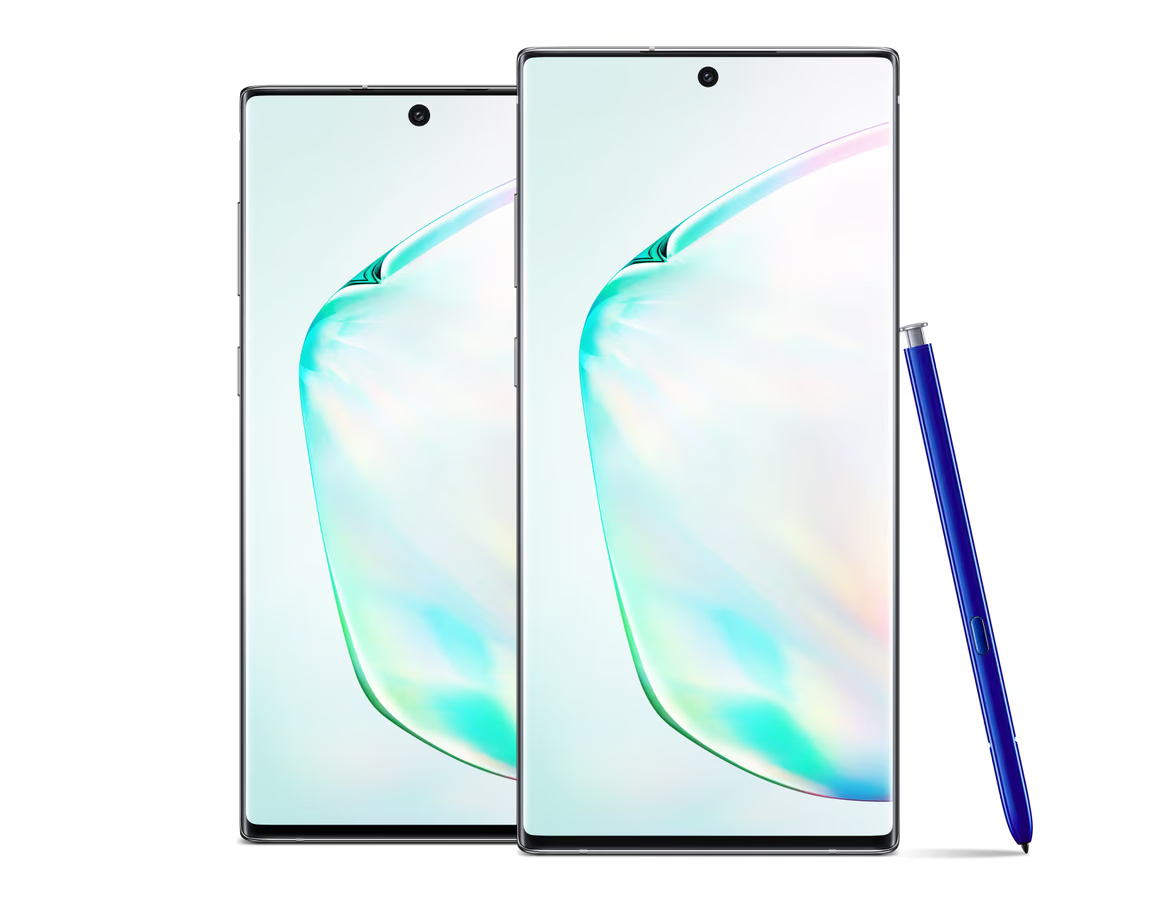
The Galaxy Note10+ gave the stowed pen a bigger working surface
Samsung’s Galaxy Note10+ reached US stores on August 23, 2019. The Plus gave the same main S Pen idea a 6.8-inch screen, more battery capacity and an expandable storage option the regular Note10 did not have. It also added a depth-sensing camera component alongside the three main photographic fields. The decision at launch was what the broader screen could do for the kind of work that makes you want to open a note, inspect a photo or compare details in two different places. Samsung’s Note10+ US launch information
Quick verdict
Retail release in the United States · Archive date
I would have chosen the Plus if the larger display and storage made a meaningful difference to the work I expected to continue on it.
Best for: Someone who writes or checks images and documents regularly on the display and wants a way to keep more files locally.
Main benefit: The wider display and a microSD option gave the familiar Note pen workflow a larger place to work and store some of its material.
Biggest drawback: It required more carrying room and thumb reach. The smaller Note10 had the ordinary pen, main and wider or tighter camera fields already.
Reviewed version: The US Galaxy Note10+ sold August 23, 2019, with a 6.8-inch display and 256 GB at entry. The Note10+ 5G was sold as a separate configuration.
Compatibility: It supported compatible microSD and appropriate newer wired charging equipment. The DepthVision component adds depth capabilities in supported applications.
Review context: I evaluate the documented retail hardware and the software available in its release window. Regional variants and software changes are identified where they affect the verdict.
This retrospective looks at the US Note10+ starting at $1,099.99 with 256 GB. The separate Note10+ 5G was offered through Verizon at launch. A buyer primarily interested in a new network needed to check the plan and model separately. The standard Plus’s bigger display and storage had jobs even in places where the additional connectivity had no immediate use.
A large screen works well when the information is already yours
Put a document in the intended app and look at the information before or after opening the keyboard. The 6.8-inch display may leave enough visual area to type while looking at part of the source material. A person using the S Pen can sometimes put a much more precise mark into a page without first scrolling away from what explains it. If you mostly use the phone for one short entry, the smaller Note10 may be more comfortable through the same task. I would have tried a short and long piece of work with the same application and relevant file before deciding where size matters.
Related reading
The Plus used a higher-resolution panel than the Note10. The more useful question is what you can read from where you hold it. A wide photo with a small detail and a regular document are good comparisons. The bigger body was useful for checking the result on the phone. It also asked for more reach in a normal bag, case and grip. Try putting it away and opening it again in the position where you normally read. Holding a broad model upright in one hand and taking it to a desk for a note are separate tests.
The rear cameras and depth sensor should be compared by the use they add
The Note10+ had Wide, Ultra Wide and Telephoto fields to choose among. Optical position and movement matter before you get to processing. A wider shot can give the recipient more of the space around what you want to show. A 2x optical field can make it easier to identify a detail that would otherwise occupy little of the image. I would have kept two example views, read both from an ordinary distance and made sure the right information stayed visible after sharing.
The Plus also made use of a DepthVision rear camera for supported features. This had a reason to be considered in jobs related to depth rather than as a separate ordinary framing distance. If one’s main purpose was taking typical photographs and marking them, a useful lens or clearer large preview could make a bigger difference. Check the mode you intend to use and what can be kept or passed on. The larger screen has a useful role where the result is clearly visible before you leave the place.
A bigger device gave one more route to storage and longer use
The Plus had configurable capacities and microSD expansion in supported arrangements. A buyer who used an earlier Note for a large library could choose whether the card still makes sense for some files. Larger storage on the phone helps when a useful piece of work ought to stay available before it is moved. I would have compared which applications and data needed internal space, and which material I could sensibly keep elsewhere. That can make the price difference clearer than a simple comparison of advertised totals.
Samsung rated the Plus battery at a typical 4,300 mAh and specified supported charging up to 45W with appropriate separately sold equipment. A person can benefit from a bigger battery even when the needed charger is not available. Faster supported charging work is useful when a short stop is part of the day. I would have priced them as two different reasons to buy. The extra screen provides its own demands and the active app, signal, age and brightness can change the real result. Check the type of daily work you actually want to keep longer.
Try the entire short work session before buying for the wide display
If the phone needs to record a brief video, inspect it while you are away from the computer and mark it for somebody else, use precisely that sequence. A bigger screen may reveal useful detail before going on to the next piece of work. It is not enough on its own to guarantee that the local file will be easy to move or that compatible software can show the desired result. I would have looked at the working size and storage while you can still see how the transfer goes. An app may make it possible to do an adjustment directly on the phone. A more elaborate edit might deserve to wait for another screen regardless of the size chosen.
Related reading

Samsung gave Galaxy Note10 buyers a DeX setup that could work with a supported PC or Mac using USB. At launch this could help a person who had an appropriate computer nearby. Try the specific destination and check the normal app and file paths. The phone’s broader screen helps in the places where you don’t have that setup. These are two separate ways to use the same device. The Plus is easier to choose when those shorter places of use already take advantage of its greater area or the added internal and expandable capacity. A smaller Note remains a useful choice if most of the material is immediately taken to another screen to be used.
My verdict on the Note10+
I would have chosen the Note10+ for an appreciably broader work area and the ability to keep more local material. The regular Galaxy Note10 used much of the same camera and pen idea with a smaller display and fixed storage. The Galaxy review timeline gives both devices their August US availability and shows where Samsung offered two ways to carry a Note.
What worked
The wider display and a microSD option gave the familiar Note pen workflow a larger place to work and store some of its material.
The extra capacity and screen made it a more plausible device to record, review and give some information to another person before a transfer.
What bothered me
It required more carrying room and thumb reach. The smaller Note10 had the ordinary pen, main and wider or tighter camera fields already.
Some camera depth modes and DeX workflows had their own compatibility requirements. The bigger phone is only useful if the complete job fits.
Who should not buy it
A buyer chiefly using the S Pen to jot brief notes who benefits more from fitting the standard Note10 in one hand.
Alternatives I would consider
Galaxy Note10. The smaller Note has much of the same pen and camera workflow, while losing the larger panel, different depth feature and expandable storage. Read my Galaxy Note10 review.
Evidence and sources
The release date refers to general availability in the named market. The archive filing is ten days later. Feature assessments are editorial judgments based on the documented retail model.
Features, compatibility and rated figures from the maker are manufacturer information. My opinions are identified in the review.
Conclusion
Pay for the larger surface when it saves a step or offers an actual reading benefit. Compare storage and charging equipment at their real cost.
One email a week with practical Mac workflows, useful comparisons and honest tech recommendations.