Creator promotion. I created this app. This is an introduction to my own work, not an independent product review.
View Pregnancy Calculator on the App Store Hero image: Jakub Jirák · App Store.
A pregnancy date is often written in weeks and days, while everyday plans live in a calendar. Moving between those two views can become a repeated small task. Pregnancy Calculator brings the dates into a clearer layout so that the information is easier to read and discuss.
This is my app, and this article is a promotional introduction to it. It is an information and planning tool. An estimated due date is an estimate, and the app does not replace pregnancy care or a clinician’s assessment. That boundary is part of explaining the product honestly.
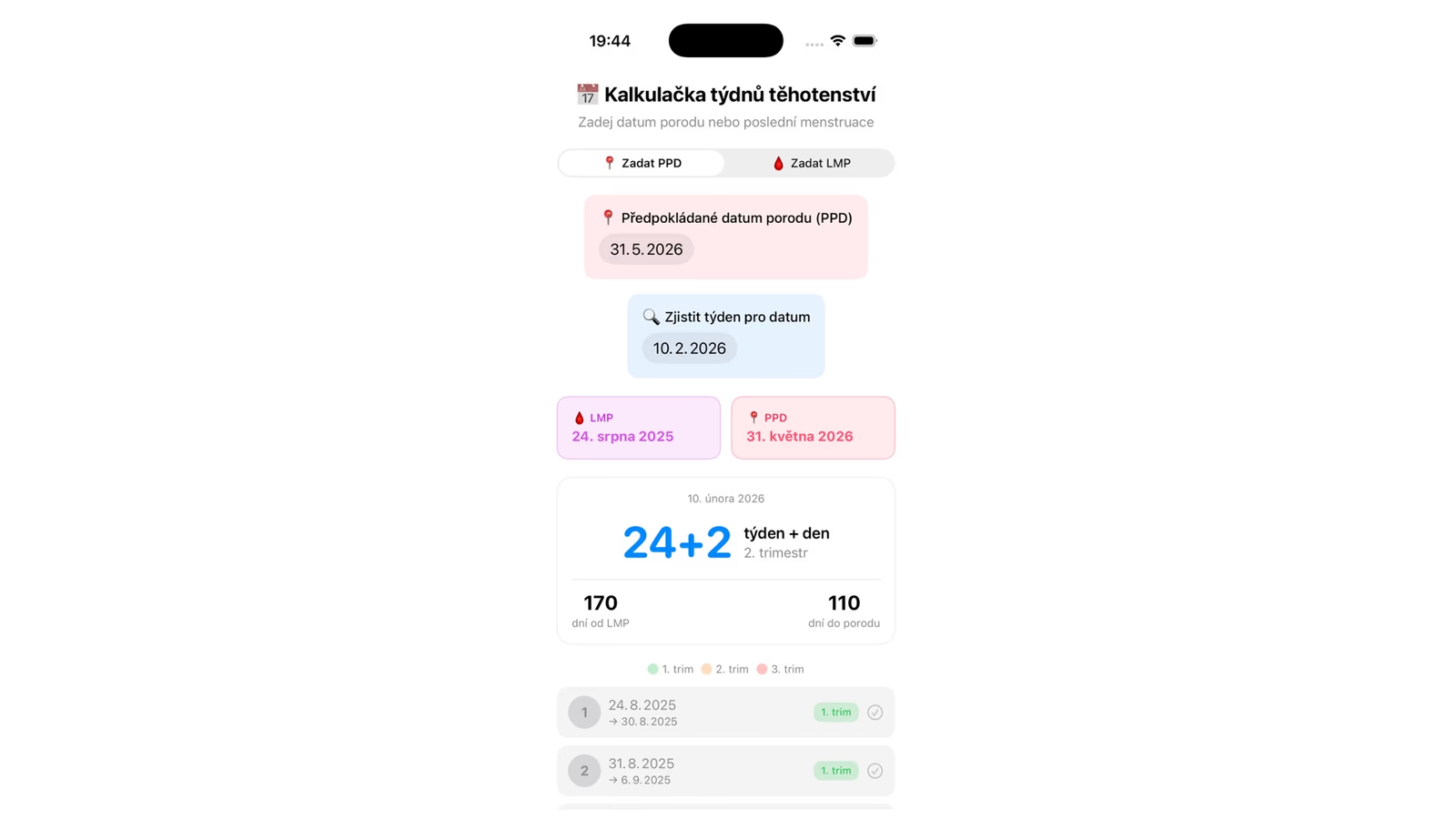
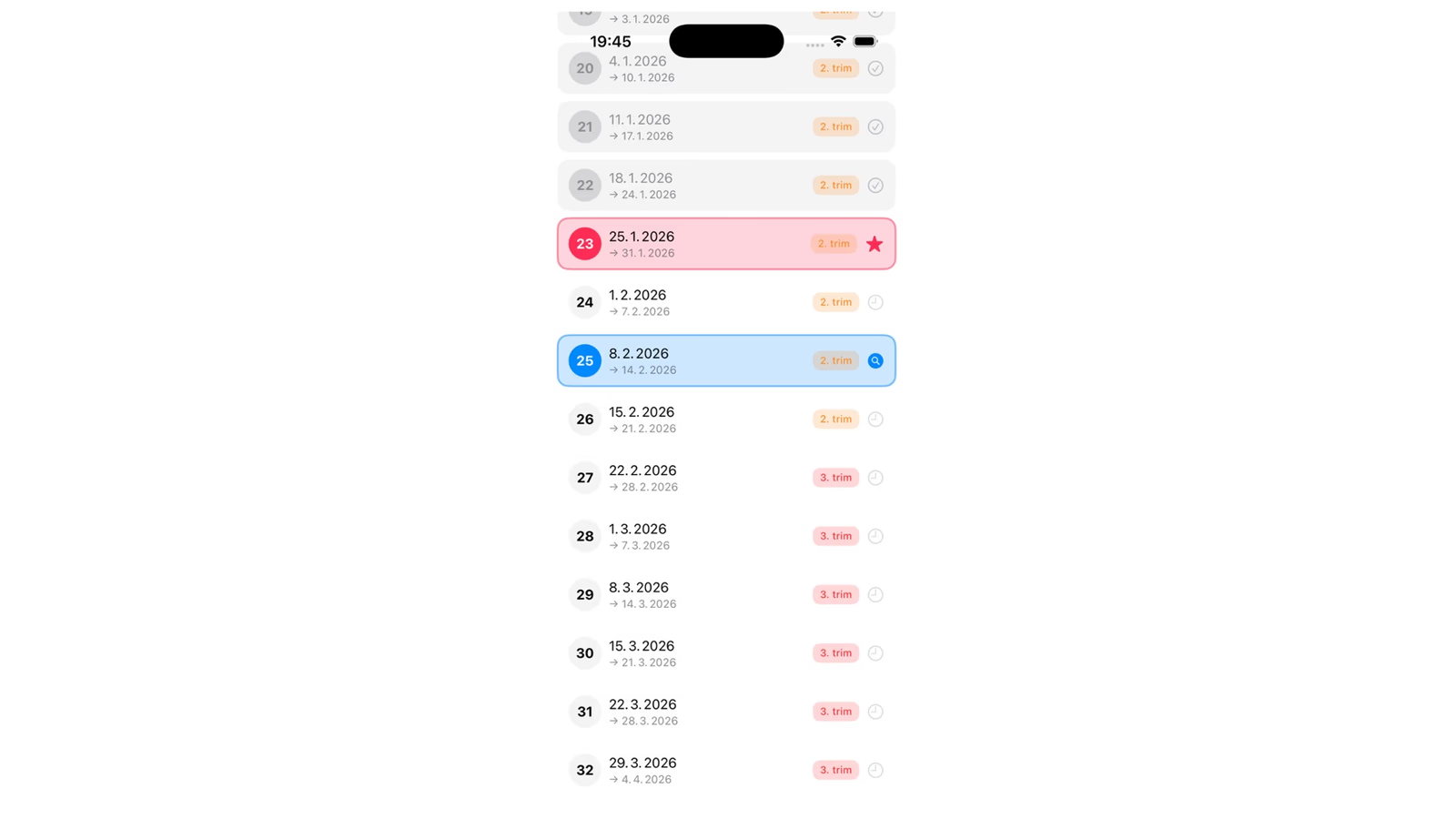
The screenshots here come from the actual App Store listing and retain the interface text shown there. They display date entry, a weeks-and-days result and a timeline of weeks. The current store page provides the release details and supported devices.
Two ways of reading the same calendar
A date such as the middle of a month is easy to place beside an appointment. A result such as 24 weeks and two days describes a different view of the timeline. Both can be useful, but repeatedly translating between them can make an ordinary planning conversation harder than it needs to be.
Related reading

The app’s main purpose is to make the relationship visible. A date reference leads to a readable result, and the timeline gives the surrounding weeks a place. You can look at the chosen day instead of doing the arithmetic again during every conversation.
That is a modest role, and a useful one. The product does not need to promise certainty about a future event to help organise information about it. Clear presentation can support a better question at an appointment or a simpler discussion about a calendar.
Begin with a date you can identify
The published screenshots show entry options around an estimated due date and the last menstrual period. Before entering a value, identify what the date represents. A remembered reference and a date provided during care may come from different information, even when both are written in the same calendar format.
The NHS explains that a due-date calculator gives an estimated date, and that a scan can estimate gestational age more accurately. That is why an app result should not be used to overrule clinical dating. Keep the source of the reference clear when using a planning tool.
If a date is uncertain, preserve that uncertainty in the conversation rather than treating a precise-looking result as new evidence. The software can calculate from an input. It cannot independently establish that the input is the correct reference for the pregnancy.
Actual App Store screenshot by Jakub Jirák. Image source.
Weeks and days deserve a plain explanation
A display such as 24+2 means 24 completed weeks and two additional days. It is not 24.2 weeks written as a decimal. The distinction is simple once stated, but it matters when information moves between a conversation, a note and a calendar.
For an arithmetic illustration, one week contains seven days. A weeks-and-days display separates the completed weeks from the remaining days instead of hiding the result inside a fractional number. The example explains notation; it is not an assessment of any reader’s pregnancy.
When sharing a result, keep the reference date beside it. A weeks-and-days value describes a point on a timeline. Without the date used for the calculation, someone looking at the note later may not know which day the number describes.
Use the timeline to see the surrounding weeks
An isolated result answers one question. A timeline helps show the relationship between that result and the weeks around it. This can make it easier to discuss when a future calendar event falls in relation to the chosen reference.
The actual screenshots show a list of weeks and dates. That layout is useful for looking ahead without repeatedly starting a new calculation. It keeps the current point and nearby dates in one readable place.
Related reading

Treat the timeline as an organiser of dates, not a schedule that every pregnancy must follow in the same way. Appointments and care decisions belong to the relevant care plan. The display can help prepare a calendar question without deciding the medical answer.
A small planning example
Imagine arranging a trip or a family visit. The calendar contains the proposed date, while the conversation may use pregnancy weeks. The useful app task is to see where that date sits on the chosen timeline and keep the result with the plan.
That does not establish whether the trip is medically suitable. It simply makes one piece of information easier to express. Questions about the activity itself can then be discussed with the appropriate professional using a clear date reference.
The same approach can help when preparing for an appointment. Write down the date, what you want to ask and the reference being used. A calculator is most useful when it supports an understandable conversation rather than becoming a separate source of certainty.
Keep a changed reference understandable
Sometimes the date being used in a timeline changes after a conversation with the care team. A planning tool should then be read with the updated reference in mind. Do not compare two results without checking whether they began from the same information.
For your own notes, record when the reference changed and where it came from. That makes an older calculation easier to interpret later. Otherwise a difference in the displayed week can look like a software disagreement when the input simply changed.
This is ordinary information organisation, not a method for choosing between medical assessments. The app’s role is to keep dates readable. The clinical interpretation remains outside what a date calculator can establish on its own.
Precision on screen is not certainty about the future
Software is good at returning an exact-looking result from a defined input. A clean date and a clear number can make information feel settled. The important distinction is between precise arithmetic and certainty about the event being estimated.
An estimated due date remains an estimate even when the calculation is displayed to the day. The app should be understood within that limit. It can help answer where a selected date falls on the timeline; it cannot promise the day a baby will arrive or assess wellbeing from the calendar.
Keeping that distinction visible makes the tool more useful. You can use the number for the question it answers, while leaving other questions to the people and evidence that can answer them. A clear boundary supports trust rather than reducing the practical value of the app.
Share only the part of the plan that is needed
Pregnancy information can be personal even when it appears to be only a date. Before copying a result or sharing a screenshot, decide who needs it and for what purpose. A private planning note and a public announcement have different audiences.
Include enough context to make the shared information understandable. A date reference and the day of the calculation can prevent confusion. There is usually no reason to include unrelated personal details merely because they happen to be visible nearby.
Related reading
For the app’s current data practices, read its live App Privacy section and linked policy. This article does not turn a store label into an independent technical audit. The current listing is the place to review the developer’s disclosure before deciding how the app fits your own preferences.
A useful first few minutes
Open the app with a clear reference date in mind. Choose the appropriate input view and check the entered calendar value. Then read the weeks-and-days result and find the corresponding area of the weekly timeline. Those steps establish the relationship the tool is intended to make clearer.
Try a second selected date to understand how the timeline moves. Keep the reference unchanged while learning the interface, so that the difference is easy to interpret. This is a suggested introduction to the layout, not a medical test or validation procedure.
Before relying on a saved note later, include when it was made and which reference it used. A small amount of context can make a simple calculation useful for much longer than an unexplained number copied into a message.
Who the app is for
Pregnancy Calculator is for people who want a clearer way to organise an estimated timeline and discuss dates. Its usefulness is in the ordinary interaction between a calendar, a weeks-and-days view and a planning question. It does not need to become a full medical record to serve that role.
The live App Store page has the current screenshots, compatibility and purchase information. If a clear date view would help your own planning, that is the place to take a closer look. Use the estimate for what it can explain, and keep your care team’s guidance at the centre of medical decisions. View Pregnancy Calculator on the App Store
More from this collection
One email a week with practical Mac workflows, useful comparisons and honest tech recommendations.