The G604 interests me as a mouse that can carry a few useful commands as well as move the pointer. For a development desk, I would start with repeated actions such as navigation and switching tools, rather than try to use every available control immediately. I like the possibility of giving familiar work a consistent physical location.
Quick verdict
I would choose it when several frequent commands genuinely belong under the thumb.
Best for: I would choose it when several frequent commands genuinely belong under the thumb.
Main benefit: Extra controls and the wheel modes can give common desktop actions a consistent physical place.
Biggest drawback: The larger control layout needs a suitable hand fit, and profiles add software maintenance.
Logitech G604 Mouse
Amazon US · US
Check price and availability: Logitech G604 Mouse at Amazon USAffiliate link. As an Amazon Associate I earn from qualifying purchases.
Reviewed version: Logitech G604 Lightspeed Wireless Gaming Mouse with 15 programmable Controls, up to 240 Hour Battery Life, Dual Wireless connectivity Modes, Hyper-Fast Scroll Wheel - Black
Compatibility: G604 910-005622, right-handed wireless mouse. LIGHTSPEED uses its compatible receiver; Bluetooth is a separate mode. Check current G HUB support for custom profiles.
Review context: I assess IDE shortcuts, six thumb controls, scroll modes, hand fit and a clear mapping/recovery routine.
I would choose the Logitech G604 only if the shape and thumb area suit the hand using it. Extra controls are valuable when they are easy to identify and press deliberately. My assessment is based on the documented design and a proposed mapping approach, not a claimed personal trial. A large feature count cannot settle fit or prove a faster working day.
Begin with a few commands worth remembering
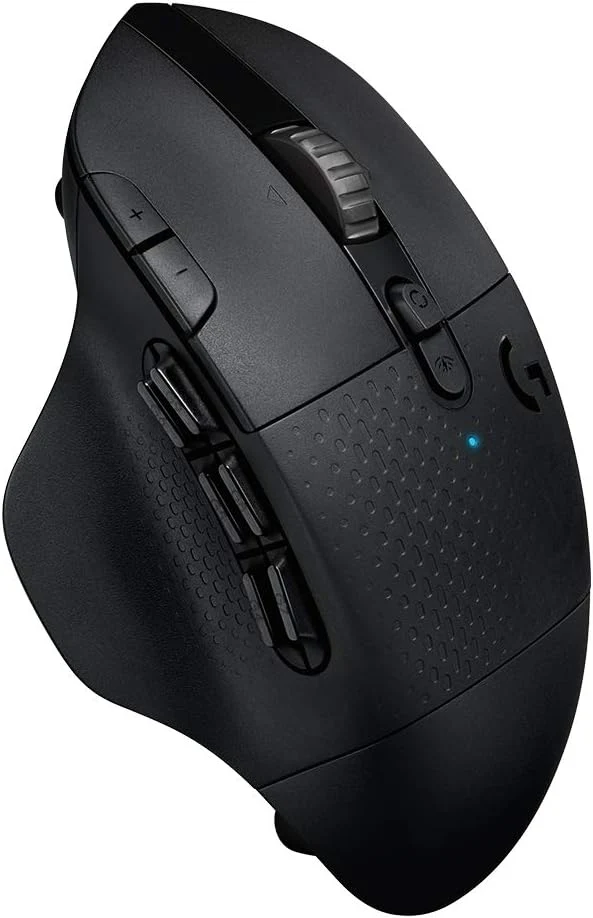
Logitech’s quick-start guide documents the G604’s controls and G HUB configuration. The six thumb buttons are the part I would investigate first for desktop work. I would assign a small group of related actions, then leave enough time to learn their positions before adding more.
Related reading

Navigation makes a clearer starting point than an elaborate sequence. Going back, moving forward or opening a frequent view can provide an immediate physical meaning for a button. I would choose actions that remain understandable when the application changes. A shortcut map should reduce memory work rather than create another private language to maintain.
I would also keep the original keyboard route available. If a profile is missing on another computer, ordinary work should continue. The mouse is most useful as a convenient layer over familiar commands, not as the only place a process exists. That makes the setup easier to explain and recover after changing machines.
Application context still matters
A programmed button can send a shortcut, but the active application determines what that shortcut means. I would check the intended action in the real work sequence, including what happens after switching windows. A mapping that works in an isolated demonstration can behave differently when another application has focus.
I would keep profile changes visible and easy to understand. If a button performs one action in the IDE and another in a browser, that difference should be deliberate. I would avoid building many nearly identical profiles whose state is difficult to identify. The useful result is a predictable set of controls rather than maximum customisation for its own sake.
For longer sequences, I would prefer a clear completion signal and an ordinary way to recover. Timing alone does not establish that each application step succeeded. A mouse macro should not be treated as a full workflow engine just because several keystrokes can be sent in order. The mapping needs to match the task’s real behaviour.
The wheel has a separate role
The documented scroll modes are appealing for a desk that moves between long documents and more deliberate navigation. I would choose the mode according to the application rather than assume one setting is best for everything. Scrolling a large reference page and making a precise small movement are different actions.
Related reading

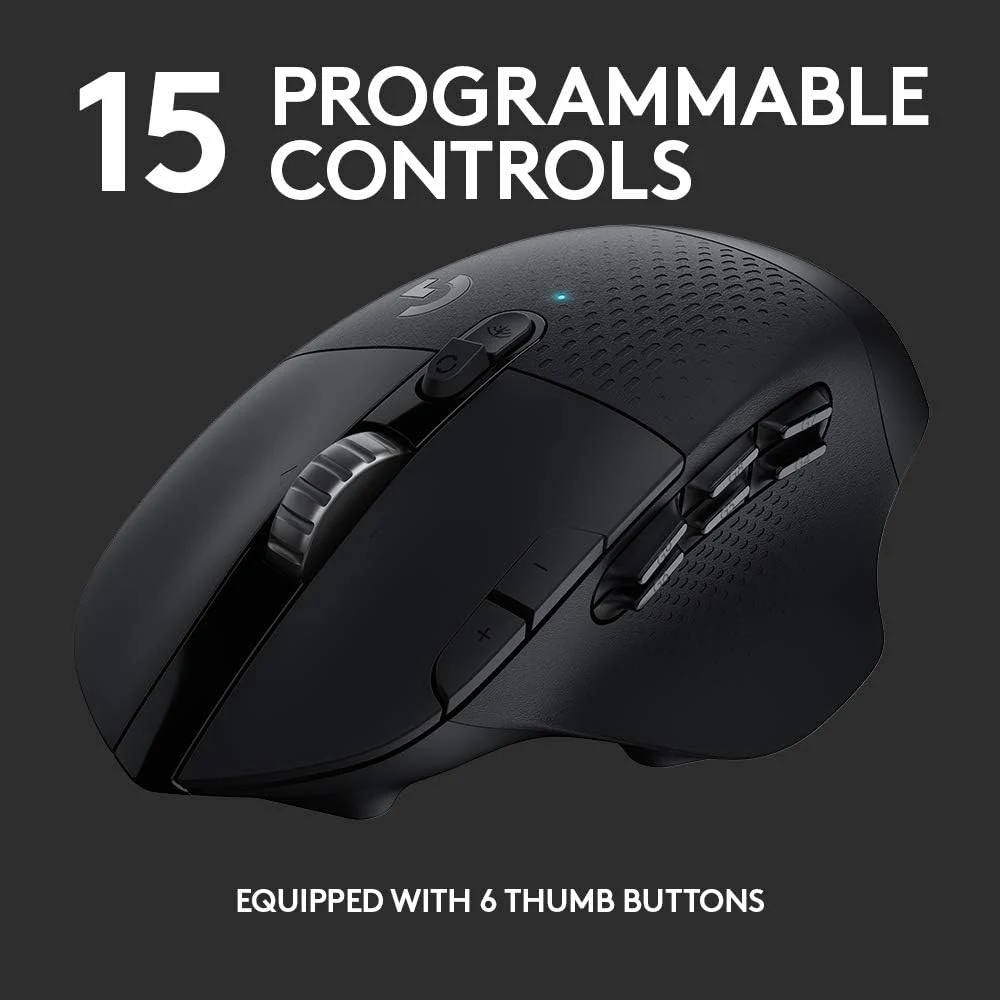
I would also assess how easy the mode control is to reach without changing grip awkwardly. A feature is useful only if the physical action feels natural. Product photographs can show the controls, but they cannot establish how the combination will suit a particular hand during an ordinary work session.
The mouse’s overall size belongs in that same decision. A comfortable reach to the main buttons does not automatically mean the whole thumb cluster fits. I would use a return or trial opportunity where possible. A smaller number of easily reached controls can be more valuable than a larger collection that requires constant adjustment.
Wireless modes are different connection choices
G604 offers LIGHTSPEED through its compatible receiver and a separate Bluetooth mode. I would choose the route according to the host and task. The modes have different documented characteristics, so I would not transfer every performance claim from one to the other or assume switching also moves files and application state.

I would keep the correct receiver identified with the mouse. A generic-looking wireless receiver is not automatically compatible with every Logitech generation. If the host needs an adapter, that connection belongs in the desk plan. The convenience of wireless input should not depend on a receiver that is difficult to find or an unsupported pairing assumption.
Battery life is another manufacturer estimate to keep in context. The connection mode and use pattern can affect the routine. I would plan a straightforward replacement habit rather than treat a maximum figure as a measured result from this review. The useful feature is a maintainable wireless setup, not an exact promised replacement date.
Related reading

When fewer controls are better
I would choose the Rival 3 for a simpler wired role when extra mappings do not solve a clear problem. I would compare a Stream Deck Mini when labelled shortcuts are better placed on the desk than under the pointing hand. Those alternatives make the decision about the workflow rather than the largest button count.
My assessment of the G604 is positive for a suitable right-handed setup with a few well-chosen commands. I would check the exact model, current G HUB support and fit before the offer price. Its value is a predictable control arrangement that makes repeated actions easier to reach, rather than a claim that more programmable inputs automatically improve every development task.
The product images come from the selected listing and identified manufacturer materials. My assessment uses the linked product information and the buying decisions explained here. Specifications are manufacturer or retailer claims; the conclusions are my own editorial judgement.
What worked
Extra controls and the wheel modes can give common desktop actions a consistent physical place.
What bothered me
The larger control layout needs a suitable hand fit, and profiles add software maintenance.
Who should not buy it
Someone wanting a very small simple mouse, left-handed thumb controls or advanced profiles without supported software.
Alternatives I would consider
SteelSeries Rival 3. I would choose it for a simpler wired pointing role with fewer mapping decisions. Read my SteelSeries Rival 3 review.
Elgato Stream Deck Mini. I would choose labelled desk keys when shortcuts are better kept away from the pointing hand. Read my Elgato Stream Deck Mini review.
Evidence and sources
The linked product documentation and exact retailer listing support the product details. Images: Amazon product gallery. These are not personal test photographs or measurements.
Features, compatibility and rated figures from the maker are manufacturer information. My opinions are identified in the review.
Conclusion
Worth considering for a small set of high-use mappings; unnecessary complexity if ordinary mouse buttons already suffice.
Logitech G604 Mouse
Amazon US · US
Check price and availability: Logitech G604 Mouse at Amazon USAffiliate link. As an Amazon Associate I earn from qualifying purchases.
One email a week with practical Mac workflows, useful comparisons and honest tech recommendations.