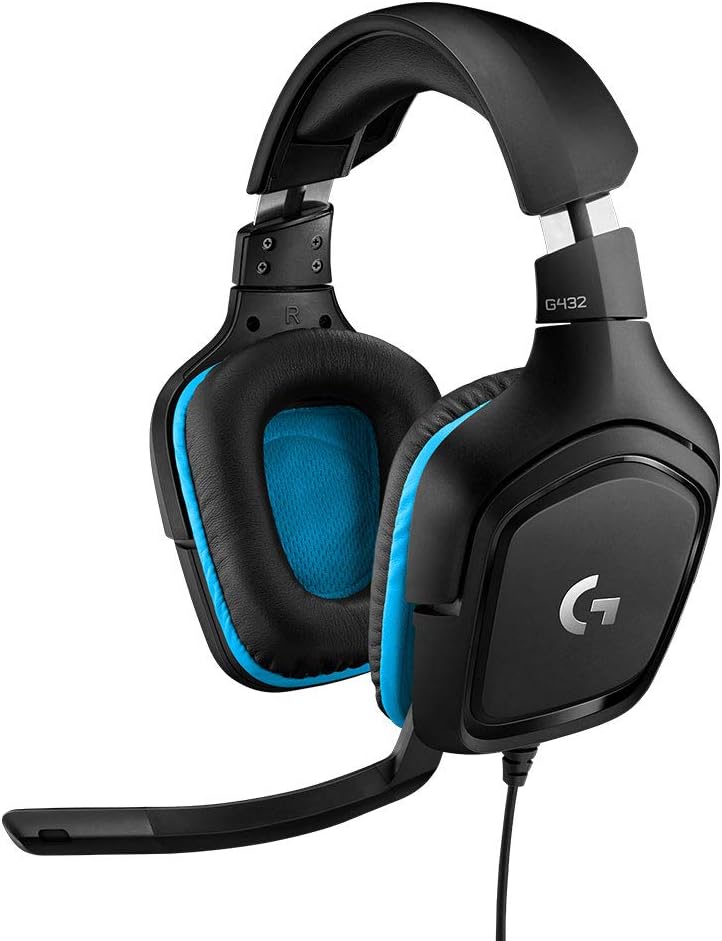
Logitech sells this headset on 7.1 surround, but that feature has conditions. You get it on a Windows PC, through the included USB adapter, with Logitech’s software running. Take away any one of those three and the G432 becomes a plain wired stereo headset, which changes who should buy it.
I want to be upfront that the evidence is thin. The two full reviews here were written by people who used the headset for a while, but they are only two voices.
Product image from the Amazon listing.
The USB Adapter Is the Product
The G432 ends in a 3.5mm plug, and the box adds a USB adapter and a splitter for PCs. Treat that adapter as a required part, at least on a Windows machine. TheSixthAxis review from April 2019 says the USB connection noticeably improves the audio, while a plain connection to a console or controller gives you only the microphone and the volume wheel, with no EQ and weak bass.
That is the first real split between platforms. On a PS4 or Xbox One in that review, the headset is a basic set. On Windows, it can be more, if the software behaves.
Related reading

Software is where TheSixthAxis had its worst time. The reviewer called Logitech’s G HUB unreliable at that point: the updater had to be run by hand, or it hung on the loading screen, and the reviewer could not reach the surround option at all. That was early in G HUB’s life, and it may well have improved since. Still, it is a warning about a feature that sits on a chain of parts. The reviewer’s USB connector also needed repositioning before it worked, and one faulty sample proves nothing about the rest, though I would test that connection on the first day.
Nook Gaming’s review was kinder about the sound. It says Logitech advertises DTS Headphone 2.0 as a key feature and describes the drivers as “actually really good.”
Mac Owners Get Less Than the Box Says
This matters for many readers of this blog, so I will be direct. On a Mac, do not buy the G432 for surround.
An Apple community thread tells the story well. In early 2021 a German Mac owner bought the G432 for its 7.1 sound and installed G HUB for macOS. The surround switch never appeared, and updating macOS did not help. Three years later, another owner hit the same wall and said Logitech support had not helped in two days of trying. The reply marked as the best answer quotes Logitech’s own product text: DTS Headphone:X 2.0 surround and EQ presets are available only on Windows-based systems.
So the limit appears to be by design, and I see no reason to expect a fix. The owner who opened the thread had bought it for that feature, and the limit only came up when another reader checked the product description.
How much of G HUB still works with this headset on a Mac beyond that missing switch is unclear. The thread suggests the app installs and sees the headset. Assume stereo sound and a working microphone, and treat anything else as a bonus. If you want to change EQ on a Mac, you may need to do it in the app you use for listening or in a separate tool.

Product image from the Amazon listing.
Comfort Is Fine for an Evening, Less So for a Workday
TheSixthAxis found it light and “satisfying solid” once it is on, while saying that Razer’s Kraken Tournament Edition felt more comfortable.
Long sessions are a different matter. Nook Gaming says it becomes “uncomfortable,” above all along the band across the top of the head. One other reviewer described comfort as acceptable but said the headband was a bit stiff and that it could bother the ears after a while. Nook Gaming’s trouble arrived after a couple of hours.
Here is why that detail matters for this particular review. The idea of one wired headset for both games and work calls sounds neat. But a workday is longer than a gaming session. A stiff headband that starts to bite at the two-hour mark is a poor partner for a day of meetings. If your head is sensitive to pressure on top, I would plan for breaks or look elsewhere.
Related reading
Build quality draws mild criticism. RTINGS lists a plasticky build among the drawbacks. At this price, that is no great surprise.
The Microphone Splits Opinion
This is the part where a clear answer would help most, and there isn’t one. Reviewers disagree.
TheSixthAxis says the arm is stiff with little fine adjustment and that your voice comes across thin and distant, though it works for chat in a game. Nook Gaming calls the mic “just okay” and says it picks up sound well but leans toward treble, so recordings for YouTube needed editing software. RTINGS is more generous and says voices come through clearly on phone calls, even in moderately noisy places.
Owners seem just as divided. One Best Buy owner calls it the best mic they have used for online gaming, while another says it is clearly worse than the headset it replaced. I can’t tell you how common each view is.
My reading of all this is modest. The mic should be fine for game chat and for internal team calls where nobody is judging your tone. I would not choose it for client calls, podcasts or recorded video. A thin and distant voice does you no favors in a meeting where you are trying to sound confident, and I suspect a cheap USB microphone on the desk would do that job better.
The good news for office use is the wired connection. No battery can die in the middle of a call, and no Bluetooth pairing can go wrong on Monday morning. That simple reliability has real value, and it is the best argument for this headset in a work setting.

Product image from the Amazon listing.
What to Expect on Each Machine
Putting the reports together, here is how I would plan.
On a Windows PC, use the USB adapter and install G HUB. This is the only setup where you get what the box describes. Check that the surround option really appears, and if it does not, run the updater by hand, as TheSixthAxis had to do.
On a Mac, expect a stereo headset. Skip G HUB unless you have a reason to install it. Test the microphone in your calling app in the first week.
Related reading

On a PS4 or Xbox One, the review I read found a basic setup with a mic and a volume wheel and with little bass. I found no useful owner reports on newer consoles or on the Switch, so I can’t speak to those.
One more gap: no source I found measured latency or checked for sync problems. With a wired connection, I would not expect a problem, but that is my assumption.
For Windows Gamers Who Want One Cable
I think the G432 makes sense for one buyer: a Windows PC gamer on a budget, playing in sessions of a couple of hours, who wants surround effects and does not want to charge anything. For that person, the USB adapter, G HUB and those drivers line up.
Skip it if you use a Mac and hoped for surround, because that feature is off the table. Skip it if you plan to wear it through full workdays, or if your voice on calls matters to your income. Console-only players should also look at something else, because the features that make this set interesting stay behind on the PC.
For that Windows gamer, the Logitech G432 Wired Headset is a reasonable choice, as long as you test the USB adapter and the microphone while you can still return it. This is an affiliate link. As an Amazon Associate I earn from qualifying purchases.
One email a month: new articles, reviews and the upcoming live webinar + free recording. No spam, unsubscribe anytime.