A smart home hub has an awkward job. It has to justify adding another box to a home that already contains connected things. Another device to set up, another application to learn, another product making promises about convenience.
After two weeks with Homey Pro 2026, I have a fairly simple answer: this is a box I’m happy to have around.
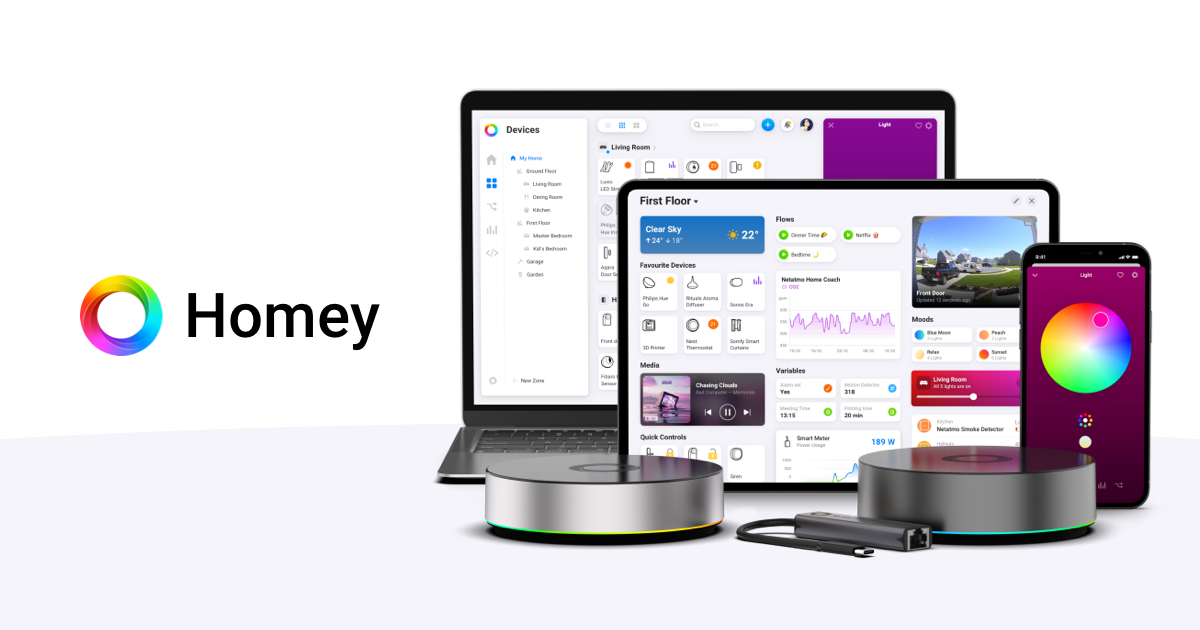
Everything I tried worked well from the start. The setup was straightforward, the controls made sense, and Philips Hue fitted into the experience without spoiling that encouraging first impression. I enjoyed using it. I also enjoyed looking at it, which is a slightly unexpected thing to say about the equipment responsible for coordinating smart home accessories.
That combination is what stayed with me. Homey has plenty of technology to talk about, and the enthusiast in me is interested in all of it. But my strongest impression after these two weeks concerns something much more immediate: the experience feels properly thought through.
You can be excited about what a product might eventually do and still dislike the process of getting there. With Homey Pro, getting started was part of the pleasure. It gave me a working, understandable system early enough that I could enjoy the possibilities ahead of it.
For a product whose entire purpose is to make other products work together, that feels like a very good place to begin.
The good part starts early
My experience straight out of the box was refreshingly uneventful. The steps were clear, the setup felt logical, and I could follow what was happening without feeling that I needed to understand the whole platform first.
That last point matters to me. I’m a technical enthusiast; I enjoy understanding what is happening underneath an interface. Even so, I want that curiosity to be optional during the first encounter with a product. Let me get it working. Give me something useful. There will be plenty of time to investigate the clever bits afterwards.
Homey got that order right for me.
There is a certain pleasure in an interface that answers your next question before you have to stop and formulate it. Where do I go next? What am I adding? How do I control it once it is there? The overall process felt direct, and that made the system approachable from the beginning.
Related reading
What I remember most clearly is understanding where I was in the process. Each step led somewhere useful, and the result matched what I was trying to do. Setup has a very practical job: get the equipment into a state where you can use it with confidence. Mine did exactly that.
It also establishes a tone for everything that follows. When the first steps make sense, a new option feels inviting. You are more willing to explore because the product has already shown that it can explain itself.
Across these two weeks, that straightforward character was one of Homey’s strongest qualities. The enjoyment started with getting it running and carried through into using it. I never felt that being accessible made it less interesting as a piece of technology.
Yes, I like the way it looks
Before getting further into the software, I want to give the hardware some credit. Homey Pro looks good in a room. Having it around for two weeks has made me appreciate the appearance as part of the everyday experience, well beyond that first look when opening the box.
The rounded shape and illuminated ring give it a recognisable identity. There is enough character for it to register as an object in its own right, while the overall appearance remains simple. To my eye, it adds something to the space where it sits.
That makes me happier than it probably should. We spend time choosing furniture, lights and all the other things we see every day. Technology deserves the same consideration, especially when it is intended to become a permanent part of a home.
With Homey, I like that the visual design appears to belong to the same product as the software. Both feel approachable. The enclosure gives you very little sense of the different systems being coordinated inside it, and the interface takes a similarly calm approach to presenting the controls.
Of course, taste is personal. An illuminated ring will appeal to some people more than others. For me, it contributes to the pleasure of owning the thing. I would happily have Homey visible in a room.
Appearance alone wouldn’t earn a recommendation from me. Combined with the easy setup and enjoyable controls, though, it makes the whole package feel more complete. This is home equipment, and someone has clearly considered the home part.
The controls keep things understandable
Once Homey was running, the everyday controls continued the good first impression. I found them easy to understand and straightforward to use. There was a comfortable consistency to the experience, which is exactly what I want from a central place for controlling accessories.
Homey’s device interface organises supported products into Zones, so rooms and areas of the house can provide the structure. It also offers access through mobile and web applications. That is a sensible arrangement: organise things around where they are and what they do. Homey’s device controls explain the available options.
The appeal of that approach becomes clear when you think about an ordinary intention such as changing the lighting in a room. You know the room. You know what you want to change. Those should be enough to get started.
Philips Hue was part of my own setup, and it gave me a concrete way to judge that experience. Connecting it fitted with the straightforward start, and controlling it through Homey felt easy. There was no need for a dramatic demonstration to make the benefit apparent. Having familiar equipment available through clear controls was already satisfying.
I care about this because basic interaction is where an ambitious product has to earn its place. A platform can support elaborate routines and still be irritating when you simply want to operate one device. Homey left me with a very positive impression at that basic level.
The controls felt like something I could settle into. After two weeks, simplicity remains one of the first things I would mention to someone asking what it is like to use.
Hue today, plenty of room for more
Accessory support is a major part of Homey’s appeal. The system gives you a broad selection of brands and technologies to work with, which makes it easier to imagine expanding a setup around particular needs.
The hardware supports Zigbee, Z-Wave, Bluetooth LE, Wi-Fi, 433 MHz and infrared, alongside Matter and a Thread border router. That is a substantial collection of connectivity options in one device. The Homey Pro specifications list the current capabilities and regional details.
For me, the useful part of that list is choice. A light, a sensor and a smart plug are different purchases with different requirements. I like being able to consider each on its own merits, then look at how it can participate in the same system.
My own experience here includes Philips Hue. One practical detail for anyone following that route: Homey’s official Hue app requires a Hue Bridge. There is also a community app for connecting supported Hue devices directly to Homey Pro. Those are different integration choices, so check which one suits your existing setup. Homey’s Hue connection guide sets out the distinction.
Beyond Hue, Aqara and Shelly are two brands I would investigate for expanding the system. Aqara’s supported motion and contact sensors are appealing candidates for giving automations useful information about a room. Shelly’s supported plugs and modules offer another direction, bringing switching and, on suitable models, power measurements into the picture. The Aqara app listing and Shelly integration overview are useful starting points for that research.
Related reading

Those are possibilities for expansion, rather than part of my two-week hands-on verdict. For any particular purchase, I would check the exact model and its current Homey app support. A familiar logo is the beginning of the compatibility check, and the functions available through an integration are what make it useful.
Even with that sensible qualification, the breadth is exciting. It gives Homey somewhere to grow. I can see the appeal of starting with something familiar, as I did with Hue, and adding other pieces when there is a good reason for them.
Flow makes the possibilities easier to picture
Easy controls explain why Homey is pleasant to operate. Automation explains why bringing those controls together can become particularly interesting.
Homey’s regular Flow system expresses a rule through three parts: When, And and Then. Something happens, any conditions are checked, and an action follows. The cards available depend on the devices, apps and system functions involved. Homey’s Flow overview shows how the pieces fit together.
That structure appeals to the way I think about useful home automation. Start with a situation you recognise. Decide when a response would help. Define that response. It gives the idea a shape before the technical details have a chance to dominate it.
Imagine a supported contact sensor triggering a light after sunset. That is an example of what you could build, and its usefulness is easy to understand without having to care which company made each component. A hub starts earning its place when those separate purchases can contribute to the same small convenience.
Advanced Flow gives more complicated ideas a visual canvas, with connected cards, delays, branches and ways to coordinate different paths. It is included with Homey Pro. The Advanced Flow documentation shows the additional controls.
I find that visual approach compelling because an automation has to remain understandable after its first exciting moment. At some point, you will want to change it. Perhaps the timing needs adjusting, or a second condition would make it more useful. Being able to follow the logic matters then.
This is also where restraint becomes part of the fun. The most appealing automation ideas to me have an obvious reason to exist. A helpful response to a real situation can be more satisfying than an elaborate sequence designed mainly to demonstrate how much the system can do.
Homey’s approach leaves room for both curiosity and practical judgement. The straightforward experience I had with setup and controls makes the deeper possibilities feel worth exploring. There is a clear next step when you want one.
Enough underneath to keep me interested
Naturally, I also want to know what is inside the enclosure. In the 2026 model, the headline change is 4 GB of RAM, double the 2023 model’s allocation. Homey says the two versions share the underlying platform and will receive support until at least June 2031. The 2026 announcement explains the relationship between them.
Extra memory makes sense for a hub that can run multiple integrations. I see it as useful room for a growing setup. My two weeks of use are a judgement of the experience I had, though; they don’t establish a performance comparison with the older model or prove how a very large installation will behave.
The other architectural choice I like is local processing. Homey Pro runs its automation logic on the hub, and automations using local devices can continue when the internet connection is unavailable. Cloud-dependent integrations and services still need their respective connections. Homey’s explanation of offline operation describes that boundary.
That is a sensible foundation for equipment operating inside a home. I want local actions to have as few unnecessary dependencies as possible. It also gives me a useful question to ask when choosing future accessories: how does this particular integration communicate?
There is further depth for people who want it through HomeyScript and the Homey Web API. Custom logic and integrations are part of the platform’s possibilities. I like knowing that an approachable interface can coexist with those tools.
None of this changes what made the strongest impression on me. The experience was easy. The technical foundation makes that ease more interesting because there is something substantial underneath it.
What I would consider before buying
At the time of writing, on 10 September 2026, Homey’s Czech storefront lists Homey Pro at €449. Wi-Fi is built in; the optional Ethernet adapter costs €29. Advanced Flow and remote access are included with the hub. Those are the current figures on the official product page.
That is a meaningful purchase, and I would think about what I want the hub to coordinate before ordering. If your ambitions begin and end with a small lighting setup that already does everything you need, there may be little urgency to add another layer.
The case becomes more persuasive when you want accessories from different brands to share controls and participate in automations. That is where Homey’s broad support, interface and connectivity start to form a useful whole.
Coming at it through Hue, I find that distinction helpful. Easy lighting control is a good first impression, but the more interesting reason to buy Homey is what can join those lights later. A compatible sensor could supply a trigger; a plug could participate in the same routine. You can give the system a modest first job and expand from there. I would much rather have a few useful ideas for that expansion than buy a hub simply because its specifications look impressive. Homey’s specifications are appealing, but the approachable experience is what makes me want to do something with them.
Related reading

I would also make backups part of a growing setup. Homey offers local USB backups and optional automatic cloud backups, with a prepaid year currently priced at €10. The backup guide explains the choices. Once you have spent time arranging devices and routines, keeping a copy seems a reasonable habit.
My enthusiasm comes from two very enjoyable weeks, with everything I tried working well. That gives me confidence in recommending the experience while leaving the usual purchasing questions intact: are your exact accessories supported, are the functions you need available, and does the price make sense for the setup you want?
Those questions are easy to reconcile with liking the product. In fact, answering them first is how I would give someone else the best chance of having the same positive start I had.
An easy recommendation after two weeks
What I like most about Homey Pro is how well its different qualities sit together. Setup was straightforward. Operating it was simple. Philips Hue fitted comfortably into the experience. There is a broad range of accessory support to explore, and the hardware looks good enough to contribute to the room around it.
Each of those things matters on its own. Together, they made Homey a product I enjoyed spending time with.
As a technical enthusiast, I find that particularly satisfying. There is plenty here to investigate, from the different connection technologies to the automation tools. At the same time, the ordinary experience remains approachable. I can admire the engineering and enjoy the result without making every interaction an engineering exercise.
Two weeks has been enough for a strong personal impression: Homey Pro 2026 gets the basics right in a way that makes the rest of the product inviting. I came away pleased with the setup, happy with the controls and interested in what else the platform could bring together.
If you want a central place for compatible smart home equipment, with an accessible interface and room to build more ambitious automations, I can comfortably recommend it. Check your accessories, give it a sensible place in the room, and enjoy getting started.
I certainly did.
One email a month: new articles, reviews and the upcoming live webinar + free recording. No spam, unsubscribe anytime.