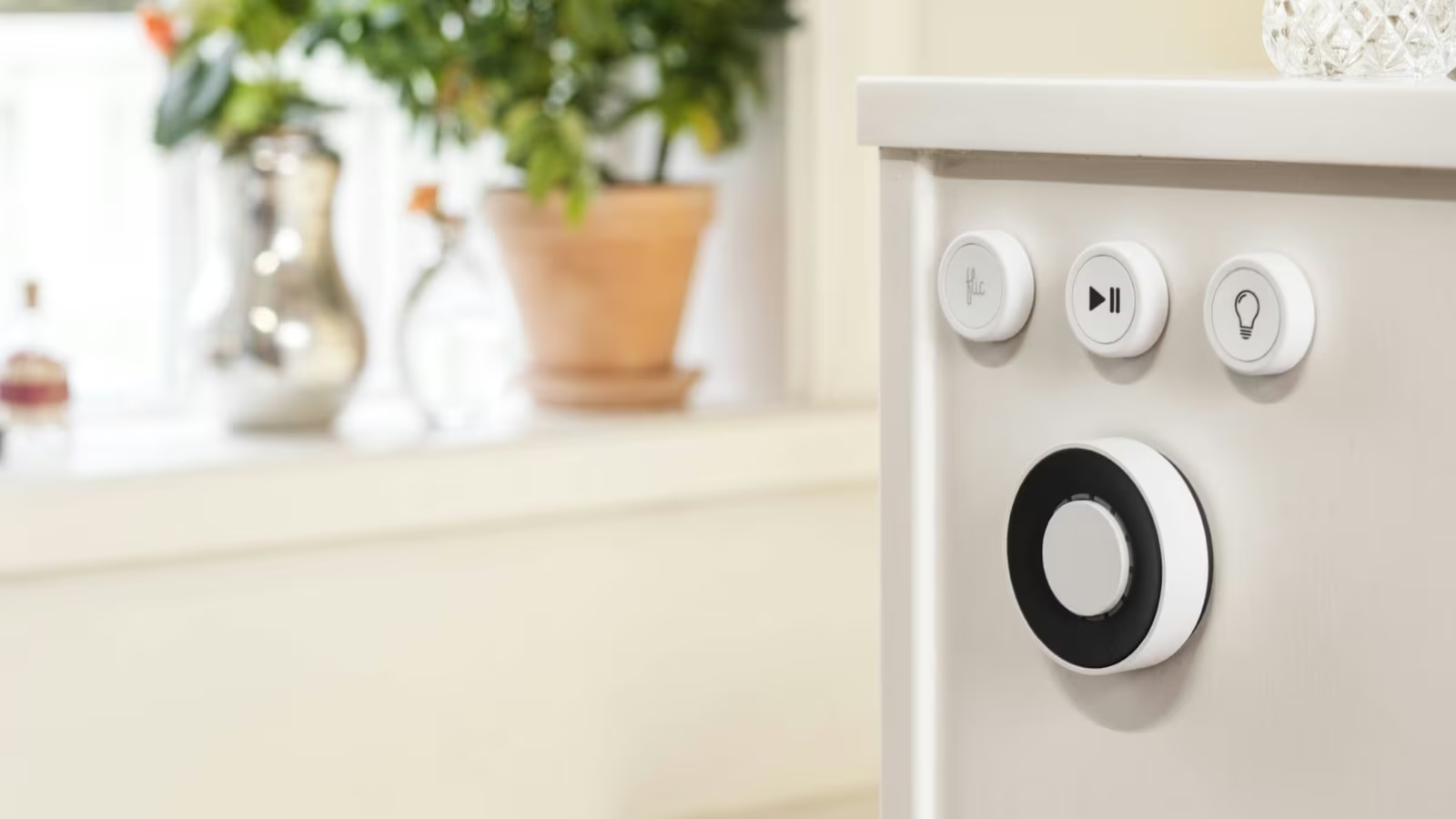
A smart home becomes less intelligent when switching on a light requires finding a phone. Voice control is faster until someone is asleep, music is playing or the room name is misunderstood. Automation is elegant until the exception occurs. A physical button remains the interface everybody already knows.
Flic builds that interface around small Bluetooth buttons and a dedicated hub. One press, a double press and a hold can each trigger an action. The Hub LR keeps the buttons independent from a nearby phone, connects them to local devices and internet services, and opens a programmable path through FlicScript.
The hardware is easy to explain. Trust is harder. A button has to respond quickly, respond consistently and keep enough functionality when the internet is unavailable. One slow press teaches people to press twice. One missed action sends them back to the wall switch.
The button is deliberately simple
Flic Button exposes three gestures: push, double push and hold. That is enough for several actions without turning the surface into a keypad. The tactile click provides confirmation before any light or speaker responds.
The simplicity is useful only when the mapping can be remembered. A single press for the main light and a hold for everything off is natural. A double press that starts one of five scenes may be forgotten by anyone who did not configure it.
Labels help, and Flic sells icon stickers, but the best mapping is implied by location. A button beside the bed should control the bedroom. One by the door should handle leaving. The hardware becomes a physical part of the room rather than a generic remote.
I would limit each button to two actions at first. Add the third only after the first mappings have become automatic. Smart-home interfaces fail when the person has to remember the system instead of the desired outcome.
The hub removes the phone from the path
A Flic button can connect to a phone or computer, but that receiver must be nearby, powered and allowed to run the required background service. The Hub LR provides a fixed receiver designed to stay available.
This matters more than the feature list. A household control cannot depend on one person’s phone being at home. The hub receives Bluetooth Low Energy presses and then executes local network, cloud, infrared or scripted actions according to configuration.
Flic’s setup documentation says initial button pairing requires an internet connection so the backend can verify the button identity. Account creation is also part of the normal hub flow. That means installation is not completely local even when the eventual action can be.
Related reading
The distinction should be tested rather than assumed. Pair and configure while online, then block the hub’s internet access at the router. Press every important button. Record which actions still work, which become slower and which stop. A local HTTP request may survive while a cloud integration cannot.
Latency is a distribution, not one number
A physical switch feels immediate because the delay is small and predictable. A smart button can travel through Bluetooth, the hub, the LAN, an integration service and the target device. Each layer adds delay and a chance of retry.
Average latency hides the problem people feel. A button that usually responds in 120 milliseconds but occasionally takes a second is less trustworthy than one that consistently responds in 250 milliseconds. The long tail causes the second press and the accidental double action.
I do not have a controlled data set that supports publishing universal Flic latency figures. The path depends on the chosen integration and network. The useful test is still straightforward: record the button and target in the same high-frame-rate video, perform at least one hundred presses and calculate median, 95th percentile and worst case.
Run separate tests for a local action and a cloud action, then repeat with the internet blocked. Do not compare two different lights or scenes and attribute the difference to Flic. Keep the target and room constant.
The result should include missed actions and double activations. A fast response rate measured only on successful presses is incomplete.
Range depends on the house, not the brochure
Flic states long Bluetooth range for current buttons and the Hub LR, with typical indoor performance affected by walls and interference. Radio range in an open area says little about a button behind concrete, metal appliances or a utility cabinet.
Place the hub centrally and away from dense electronics. Test every intended button location before using adhesive. Press repeatedly with doors open and closed, from the normal hand position. A marginal link may work during installation and fail when people or furniture change the path.
The failure mode matters. A dropped press is obvious. A delayed retry can be more confusing because the action happens after the user has already tried something else. Include both in the log.
Hub LR supports Ethernet as well as 2.4 and 5 GHz Wi-Fi according to Flic Hub Studio documentation. Wiring the hub can remove one variable from the network side, but it does not extend the Bluetooth path to the button. Additional hubs may be a cleaner solution for a large or radio-hostile home.
Adhesive makes placement part of the product
The back of a Flic button can attach to a wall or surface, which turns a portable object into an interface. The right location should be reachable without looking and clear enough that guests understand its purpose.
Do not attach it immediately to wallpaper, delicate finishes or a place that receives steam and direct sun. The official setup guide explicitly warns against fragile surfaces. Use the button loose for several days, then clean the chosen surface and mount it.
A metal clip and other holders can support portable use. A button carried on keys has a different range and accidental-press profile from one fixed to a wall. Test it while sitting, walking and inside the pocket or bag where it will live.
Physical controls need a fallback. A smart button should complement a normal switch or clear manual path, not make basic room control depend on a coin cell and hub.
Battery claims need a use pattern
Current Flic buttons use a replaceable CR2032 battery, and the company’s materials state up to three years of life. The phrase up to covers press frequency, range, temperature, radio retries and firmware behaviour.
Replaceable is the more important fact. A button does not become waste when the cell is exhausted. Keep a known-good battery available and note the replacement date.
Battery percentage from an app is an estimate, especially for a coin cell whose voltage curve is not linear under load. A low-battery notification should leave enough time to replace it. Test whether critical button mappings remain available when the hub reports a weak cell.
For a meaningful estimate, count approximate daily presses and observe voltage or reported capacity over several months. Do not extrapolate from one week as if drain were linear. Cold placement and marginal range can change the result.
Three gestures can create accidental ambiguity
The receiver may need to wait briefly after a single press to determine whether a second press will follow. That creates a design trade-off between immediate single actions and reliable double-press recognition.
Related reading
Use the single press for the action that needs the fastest and most predictable response. Put less urgent behaviour on double press or hold. Avoid assigning opposite actions that make an accidental interpretation disruptive.
For example, single press can toggle a lamp and hold can turn off the room. A double press that unlocks a door would be a poor choice even if the integration permits it. Security-sensitive actions should require stronger context and confirmation.
Test with several household members. Press rhythm differs, and a double press that works for the person who configured it may feel unreliable to someone else. The interface should adapt to people, not require training them to perform a timing protocol.
FlicScript is the power-user reason to choose Hub LR
Flic Hub Studio lets Hub LR owners write JavaScript modules that run on the hub. Scripts can react to buttons, make network requests and build custom integrations without keeping a general-purpose server running.
This is a meaningful advantage for a developer. A press can call a local API, combine state or implement logic unavailable in the standard action list. The code lives close to the physical input and can continue when an external automation service is down.
Treat the hub like production infrastructure. Keep scripts in version control outside the browser editor, document secrets and endpoints, handle timeouts and make failure visible. A button whose script swallowed an exception looks identical to a radio failure.
Avoid putting permanent credentials directly in shared source or logs. Use the supported storage and smallest permissions. A local script can still send data outside the home.
Test after firmware updates and after the target service changes. Simplicity at the wall can hide a substantial software dependency behind it.
Matter support adds reach, not certainty
Flic Hub Studio now advertises Matter controller support through FlicScript on Hub LR. This can let scripts interact with standard Matter devices without a vendor-specific cloud integration.
Matter describes commissioning and device clusters. It does not guarantee that every feature of every product appears through a generic controller. A light’s core on, off and level may work while vendor scenes or effects remain in another app.
Commission one noncritical device first. Verify local control with the internet blocked, restart both sides and test multi-admin sharing if another ecosystem also owns the device. Record which fabric and controller has administrative responsibility.
The Hub LR’s Matter role should not be confused with a universal Thread border router for every network scenario. Consult the current FlicScript documentation for supported devices and topology before buying it to fill that role.
I would choose Flic for the physical button workflow first. Matter is useful expansion, not evidence that every smart-home product will become one coherent system.
Integrations reveal whether actions are local
The Flic app offers device and service integrations, plus HTTP, IFTTT and other automation paths. Their names can look equivalent in a menu while their architectures differ.
A direct LAN request can remain inside the home. IFTTT requires internet and two external services. A vendor integration may be local, cloud-backed or hybrid. Read its documentation and perform the cable-pull test.
Cloud paths are not automatically bad. They can reach services that have no local API and may be easier to maintain. They should not control the only light or accessibility action someone depends on during an outage.
Design critical buttons around local targets and use cloud actions for convenience. If a chain contains several actions, decide what should happen when the third fails after the first two succeeded. Partial execution can leave the room in a stranger state than doing nothing.
Power and recovery should be boring
Flic lists typical Hub power consumption around 2.5 watts and maximum around 5 watts. That is modest, but the hub is always on. Its USB supply, cable and location become part of reliability.
Use a stable wall adapter and avoid powering it from a laptop that sleeps or leaves the house. Ethernet reduces Wi-Fi dependency when the network has a suitable wired location. A small uninterruptible power supply may help only if the router, access points and target devices are protected too.
Time recovery after a power cut. Begin pressing only after the hub indicates normal operation, then verify local and cloud paths separately. A home automation controller should recover without re-pairing buttons.
Related reading
Back up configuration where supported and keep a simple map of button locations and actions. The official guide notes that losing a changed hub password can require a user-data reset and complete reconfiguration. Store it safely.
Pricing should be calculated per useful control
Flic sells individual buttons, hubs and starter kits, with prices and bundles changing by region. A recent retail brochure listed a Pro Kit with Hub LR and three buttons at $169 MSRP, but the current Flic shop is the right source for checkout pricing and availability.
The system becomes expensive when every minor automation receives its own button. Calculate value per location where a physical control solves a repeated problem. Three excellent buttons are better than twelve unlabeled ones.
Hub Mini is cheaper and sufficient for standard actions. Hub LR earns the difference through longer-range hardware, Ethernet, audio or infrared connections and FlicScript capabilities, depending on current bundle. Compare the features actually required.
The buttons can also work with a phone or computer, so test one before committing to the hub. The dedicated hub becomes necessary when household independence and fixed availability matter.
Verdict
Flic Hub LR and Flic buttons solve a problem smart-home software often creates: basic control should not begin with a screen. The tactile button is understandable, three gestures are enough and a fixed hub removes one person’s phone from the dependency chain.
The system deserves a recommendation only after the action path is understood. Test latency as a distribution, block internet access, verify range at the final location and keep critical behaviour local. FlicScript gives developers unusual control, but it also turns a simple press into code that needs maintenance.
I would choose Hub LR for a home that needs several dependable physical controls, developer integrations or wired networking. Start with one button in the location where voice and automation fail most often. If everybody uses it without asking what it does and a lost connection does not make the room unusable, the design has succeeded.
Product image: Flic.
One email a month: new articles, reviews and the upcoming live webinar + free recording. No spam, unsubscribe anytime.