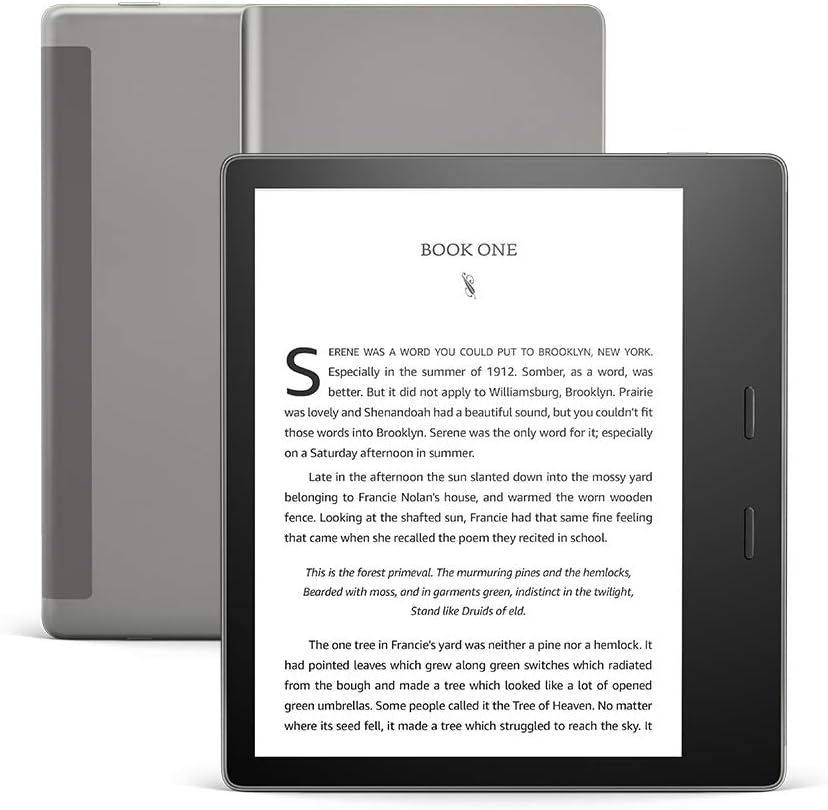
Physical page buttons are the whole reason to care about the Kindle Oasis. Reviewers call them satisfying, and one long-time reader explains why they matter more than you might think: tapping a screen full of links and footnotes keeps opening things you did not mean to open. If you read technical books, that small problem is your daily life.
I found almost nobody who wrote about PDFs on it, so I will mark where my own reasoning takes over.

Product image from the Amazon listing.
Two Generations Share This Name
There are two 7-inch Oasis models. Wikipedia’s Kindle table lists one from October 2017 and one from July 2019, with the same 7-inch, 300 PPI screen, the same 8 GB or 32 GB storage and the same IPX8 water rating. The 2016 Oasis was the smaller, older design.
Related reading

The difference you would notice is the light. The 2019 model added a warm front light. SlashGear describes a range that goes from cool to “a honeyed tone, verging on sepia”, which you can set by hand, on a schedule or by sunrise and sunset. FoneArena lists 25 LEDs and a warmth scale from 0 to 24, and calls the model a minor upgrade over the second generation.
Check which one you are getting before you buy. Look for “adjustable warm light” in the listing. Everything below is about the 2019 model unless I say otherwise.
Why the Buttons Win
Digital Trends calls the buttons “satisfyingly clicky” and says they are the standout feature. FoneArena points out that they are real buttons, unlike the pressure-sensitive ones on the old Voyage. SlashGear found them “a little clickier than on the old Oasis”. By default the top button goes forward and the bottom goes back, you can swap that in settings, and the job moves over when you turn the device around to hold it in your other hand.
The best account comes from a long review on Bible Buying Guide. That may seem an odd source for a tech blog, but a study Bible is a lot like a programming book. It is long, it is full of cross-references, and you jump around instead of reading in a line. The reviewer praises the “satisfying click”, and prefers the buttons to tapping the screen because a tap can trigger unwanted links or word lookups.
The same reviewer gives a warning that applies directly to technical books. Footnotes placed at the end of a chapter force many page turns, and large reference keys distract from the text. A book’s layout matters as much as the device. The screen itself gets high praise there: “I can read this screen for hours with no eye fatigue.”
The shape helps with long sessions too. SlashGear describes a stepped case, with a thicker grip where your hand sits and the weight moved toward that side, at 188 grams. FoneArena is less warm about it, saying that the wide body is hard to use with one hand for some people. Digital Trends adds that it is too wide for most pockets.
Product image from the Amazon listing.
PDFs and Your Own Documents
Here is where the honest answer is short.
None of the reviews here tested PDF reading. I can’t tell you how the page buttons act inside a PDF, how fast a large file pages, or how well zooming works. I found no owner report on these points for this model.
Related reading
I can do some simple reasoning. A 7-inch screen is much smaller than a printed A4 or US Letter page, so a full PDF page will shrink. For a textbook with small print or wide tables, that means zooming and panning on a slow E Ink screen, and the buttons won’t help you there. A proper Kindle-format ebook reflows its text to fit, so buy that edition when you have the choice. If your library is mostly PDFs of papers and manuals, I would treat that as a reason to look at a larger device. Please try a sample of your own files during the return period.
I also found no owner reports on how sending your own documents to this model works day to day. Amazon offers ways to do this, and they can change over time, so check what is available in your country and whether it fits your files.
The Annoying Parts
The most repeated complaint is the port. Digital Trends calls Micro USB the device’s biggest annoyance, and SlashGear and FoneArena both note it. If everything else on your desk uses USB-C, you will need to keep one old cable around.
The software is the next problem. Digital Trends calls the interface dated. The Bible Buying Guide reviewer says “I have to click the screen 3 times just to get to the font adjustments”, and reports restarts and freezing, which also happened on a Paperwhite and so looks like a software issue. The same reviewer found that auto-brightness adjusts slowly and changes too often or not enough.
Battery life needs a reality check too. Amazon’s claim of weeks assumes about half an hour of reading a day with wireless off. Digital Trends saw the battery fall from 64 to 41 percent over four days with Wi-Fi on and auto-brightness. The heavy reader at Bible Buying Guide says they use about a week’s worth of battery in a day. FoneArena lists a 1,130 mAh cell, and a full charge takes about three hours according to Digital Trends. So if you read for hours every day, plan on charging far more often than the box suggests.
A few smaller notes matter. The version with ads shows offers on the sleep screen, and removing them cost $20 when that review was written. The 2017 covers don’t fit, says SlashGear. And comics felt tedious to the same long-term reader, which is no surprise on a black-and-white screen.

Product image from the Amazon listing.
Price Is the Real Question
Wikipedia lists a launch price of $249.99 to $349.99. FoneArena calls the 2019 model a small step for that money, and Tom’s Guide questioned whether the extras justify the premium over a Paperwhite. Digital Trends gave it an Editors’ Choice and called it “just shy of being the perfect ebook reader”, but it also said casual readers have less reason to buy.
I think both views can be true. What you pay for is buttons, a bigger page and a better grip. If you read a little, that is poor value. If you read for hours, those are exactly the things you touch.
Related reading

Because this is an older design with an older port, also check what is on offer and what support Amazon gives this device before you buy.
Best for Long Reads, Weak for PDF Piles
I would choose the Oasis for someone who reads long reflowable books every day and hates accidental taps. A developer working through a Kindle edition of a big programming book is a good fit, as long as the book’s footnotes and code are formatted well. The buttons solve a real problem for that person.
I would skip it if most of what you read is PDF, because the evidence is missing and the screen size works against you. Skip it too if you only read a little, or if a Micro USB cable feels like one thing too many. A cheaper Kindle with a touch screen will do the same reading for less.
If buttons are what you are after, the Amazon Kindle Oasis (7-inch) is the Kindle to look at, once you have confirmed which generation is in the listing. This is an affiliate link. As an Amazon Associate I earn from qualifying purchases.
One email a month: new articles, reviews and the upcoming live webinar + free recording. No spam, unsubscribe anytime.