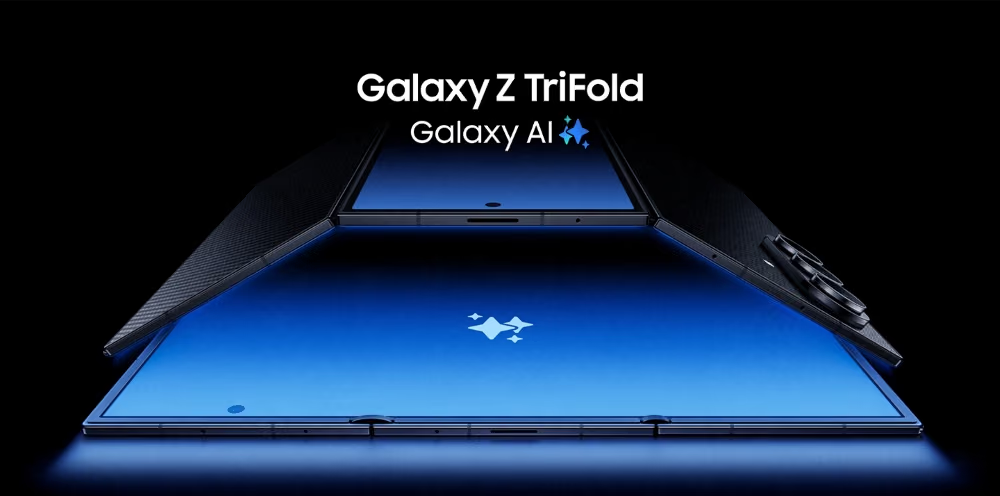
The Galaxy Z TriFold was a small tablet that needed room to open
The Galaxy Z TriFold reached retail first in South Korea on December 12, 2025. It put a 10-inch screen into three panels that fold twice. The outside provided an ordinary 6.5-inch class phone view. The larger interior gave much more room for apps, while the 309-gram weight and two moving joints remained part of everything you did before opening it. I would have considered the device for a particular task where much of the tablet-sized screen could replace a different piece of hardware I had regularly carried. Samsung’s first retail availability and TriFold specification
Quick verdict
Retail release in South Korea · Archive date
I would have chosen it when the broad workspace let me leave another display behind and I could comfortably carry the 309-gram closed device.
Best for: Someone who works often in several useful views or reads and checks large material before they reach another screen.
Main benefit: Opening it gives a genuine 10-inch surface for suitably arranged applications, with a phone-style cover for short ordinary tasks.
Biggest drawback: The folded weight and operating sequence affect every task. A wider compatible layout and the lack of S Pen support need to be compared with the work you do.
Reviewed version: The Korean Galaxy Z TriFold on sale from December 12, 2025, with 512 GB and a wide 10-inch inside screen. The US launch followed separately.
Compatibility: Dedicated S Pen input is unavailable. The device supports tablet-style DeX on its inside display and a separately usable cover display.
Review context: I evaluate the documented retail hardware and the software available in its release window. Regional variants and software changes are identified where they affect the verdict.
This retrospective covers that initial Korean release. Samsung offered a 512 GB variant with 16 GB of memory in Korea, at a launch price of 3,594,000 won. The US rollout on January 30, 2026 was separate. The early buyer’s decision was about the way the display opened and what Android apps could do when they had that screen. A large phone with unusual measurements needs to have some everyday use before a remarkable dimension means much. Samsung’s US TriFold availability
The folded device had to be the phone between useful jobs
The outer screen gives you a place for the usual call, a route or a short acknowledgement while all the inside panels are folded. Try using it for a brief task with only the hand you normally hold a phone in. The weight and thickness are still there. A common phone action can be perfectly usable, and carrying the device all day can still deserve a separate decision. For someone who keeps a bag or a place to set it down regularly, that cost might be lower than for someone using a narrow pocket.
Related reading
The extra hinge also adds an opening and closing routine. Samsung designed the panels to fold inward in sequence. Check the support it needs on a small work surface and whether you can make the change without losing the place in your work. I would have tested it while moving from a short read to a wider view of the same document. If most quick jobs remain on the front, there is less reason to handle the full shape in the middle of another activity. The inside has to improve enough of the larger tasks to justify that process.
Once open, it could be worth trying work that usually moves to a tablet
A 10-inch screen offers room to see more than a conversation and one small reference. Put an ordinary document, browser and relevant message across the workspace if the apps can work at the appropriate sizes. The screen helps when you can see the part of the reference you need without hiding the place where the next action happens. Apps can still have layouts that favour wide or narrow views. I would have tried the ones I needed at my preferred text size before treating the open shape as a tablet substitute.
Samsung offered a standalone DeX mode on the inside display. Choosing a different operating view can give workflow-specific controls, but check how the app, files and input method fit together. A small keyboard or pointer can help for some uses and add another item where you intended the main device to be enough. Separate from that setup, simply reading and comparing wider files could be worth carrying it for someone who manages material throughout the day. The deciding factor is what work can actually remain in progress on that available surface.
The camera and power still have to fit the use of the display
The rear camera layout included a 200MP Main camera and a separate 3x lens. A tablet-like preview can help you see what you captured once you stop holding the equipment in its recording position. Photograph what you need, then lay it down in the posture in which you intend to view the work. That shows you both whether the cameras fit the situation and whether the wide screen adds a useful step before you send or edit anything.
Samsung listed a typical 5,600 mAh battery, spread among the panels. The amount of time spent with the screen fully open and the kinds of apps and wireless connection have a substantial effect. I would have compared a shorter folded period with a longer open one to see which shape asks for more from your own routine. The large capacity is an important provision for the large display. The buyer still needs to decide where they could charge it between more involved jobs. Another specific trade is the lack of S Pen support on this device. A big screen alone doesn’t bring the pen workflow from a compatible older Fold. Samsung’s S Pen compatibility guidance
The screen changes how many separate things you can leave unfinished
One reason to use a tablet is knowing you can keep a useful reference in view without having to finish a short piece of writing first. Try leaving an original document visible while you enter a few remarks and keep the relevant message nearby. Use enough text size to read without leaning into it. The larger display’s value becomes clearer if it means two or three small pieces of work can remain ready without a constant return to the previous part. If you have to close them repeatedly as you move about, the time you really spend with the screen open deserves attention. The design pays off when the broader view stays useful for an appreciable stretch.
Related reading
A conventional separate tablet can give you the same comfort while leaving a smaller phone available. I would have asked how often both had to be in the same place. The TriFold made it possible to take ordinary messages from a phone and carry the work forward into the same device’s main screen. It also concentrates the physical risk and cost into one device. Two hinges and a widely opened surface need an appropriate place to support them. A trip filled with short changes between standing and moving is a different use from sitting far from a separate table for half an hour. A buyer who already works away from a desk has the best evidence for which pattern really happens.
My verdict on the TriFold
I would have chosen it if the broad canvas was regularly useful enough to replace a separate display and I could bring the folded weight and shape along most days. The Galaxy Z Fold7 launch review describes a less extensive fold with an 8-inch inside and a lighter phone shape. The Galaxy review timeline gives the Korean TriFold launch its own date alongside the Fold models from the same period.
What worked
Opening it gives a genuine 10-inch surface for suitably arranged applications, with a phone-style cover for short ordinary tasks.
A larger preview and 200MP Main sensor made it possible to review useful detail on the same device before moving a file elsewhere.
What bothered me
The folded weight and operating sequence affect every task. A wider compatible layout and the lack of S Pen support need to be compared with the work you do.
Two hinges and wide open geometry made the supporting surface, space and need to move one part of the job real considerations.
Who should not buy it
Somebody who wants a light phone between short checks, or who needs S Pen support to use the large screen.
Alternatives I would consider
Galaxy Z Fold7. Its one hinge and 8-inch inside offer less working area, with a significantly lighter closed device. Read my Galaxy Z Fold7 review.
Evidence and sources
The release date refers to general availability in the named market. The archive filing is ten days later. Feature assessments are editorial judgments based on the documented retail model.
Features, compatibility and rated figures from the maker are manufacturer information. My opinions are identified in the review.
Conclusion
Count the tasks that can be finished on the open surface while away from another device. Try the ways you usually carry and support an ordinary phone.
One email a week with practical Mac workflows, useful comparisons and honest tech recommendations.