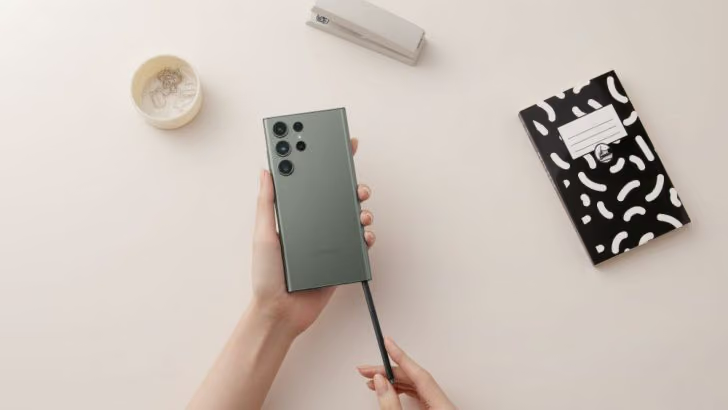
The Galaxy S23 Ultra gave the main camera a job worth trying at several resolutions
The Galaxy S23 Ultra reached stores in the United States on February 17, 2023. Its main camera moved to a 200MP sensor, while the two separate telephotos, integrated S Pen and large display made it recognisable as a successor to the S22 Ultra. The new sensor was easiest to value on a job that needed both a broad original and usable detail. More pixels provided useful options. A buyer still had to decide which output made sense for the light, the movement of the subject and where the photograph would go. Samsung’s February 17 availability announcement
Quick verdict
Retail release in the United States · Archive date
I would have bought it if regular photography benefited from the main sensor changes and I could use its integrated pen or long cameras often enough to carry it.
Best for: Someone who would save useful originals for cropping or need several kinds of rear camera and precise marking during a day away from another screen.
Main benefit: The new main sensor offered output options for showing detail while the established 3x and 10x views continued to help with difficult distances.
Biggest drawback: The larger body and larger images came with physical and storage costs. The S22 Ultra was already excellent at the two dedicated telephoto fields.
Reviewed version: The US Galaxy S23 Ultra as available from February 17, 2023, with a 6.8-inch display, Snapdragon 8 Gen 2 for Galaxy and 256 GB at entry.
Compatibility: Samsung's main sensor supports 200MP, 50MP and 12MP output under supported conditions. Expert RAW needed a separate installation. The two Telephotos offer separate fields.
Review context: I evaluate the documented retail hardware and the software available in its release window. Regional variants and software changes are identified where they affect the verdict.
This is a retrospective based on the launch specification and features. The US Ultra used a Snapdragon 8 Gen 2 for Galaxy and started with 256 GB. The 6.8-inch device put a lot of its camera and pen capabilities in one place. Somebody who made one short photo and moved on did not have to decide how to use all of them. It was worth finding out what part of the setup could actually solve a recurring difficulty. Samsung’s S23 Ultra cameras and specification
Let the subject tell you which resolution to use
Samsung listed 200MP, 50MP and 12MP output choices from the new sensor. Start with a feature on a still object or the wording across a broad sign. Make a frame with sufficient light and look at the detail you need, both in the broad view and after the crop you intend to use. If an ordinary frame already makes the text readable, the larger file has little to add in that situation. When you have to give several details from the same photograph without returning to where it was taken, a higher-resolution mode may earn its place.
Related reading
Output size and lens choice are distinct. A main view that shows the context around the subject can be useful with bigger files. When shooting across a large place, the separate optical cameras offer genuinely different fields. I would have tested the useful detail with whichever lens suited it before relying on a crop. A full-resolution mode cannot do the same work for every kind of light or motion, and some sharing methods scale the resulting image. Compare the thing you can send, print or examine rather than assuming the biggest number represents your output.
Two types of dim scene also need different attention. A sign can hold still long enough for a suitable camera setting. A person in front of it can move while the photo is taken. The result is easiest to understand by seeing what happens to a recognisable subject and nearby texture in each situation. Samsung gave the phone different ways to expose, process and save an image. Those were more useful when a determined photographer could decide what they wanted from the result.
The telephotos keep the point of the Ultra visible
The 3x and 10x lenses stayed as separate hardware. Try a subject several steps away, and one far enough away that you would normally walk closer before taking the picture. The 3x can frame a useful portrait or detail without showing too much of the surroundings. The 10x has an appreciable role when the distance itself cannot change, though it sees much less of the scene and asks for suitable light and steady handling. I would have kept a wider frame when it gave the distant detail a place in the overall picture.
An S22 Ultra buyer already had both of these useful views. The decision about which model to choose in February depended on how much the upgraded Main sensor and the other generational changes helped you. For some people the preceding device was already a better way to get the native long options for the price. A person doing regular detailed work on the main camera had a good reason to compare the two under the same situation before deciding.
The pen worked best as input you had close at hand
A short handwritten note, a label on a picture and a quick diagram are sensible jobs to try with the integrated S Pen. What matters is how easily the resulting material can be kept or sent. I would have tried showing someone where to look in a photo, then saved a note about it and retrieved it later by the normal route. Both activities make it possible to see the benefits of carrying the pen in the body. The activity that only demonstrates a lot of screen area may tell you less about when you will use the stylus.
The large display also shows more of a picture while you work on the markup. It is less comfortable in some grips than a smaller S23. A thick case can change access to the slot as well as the way you can hold it while writing. Try a brief use while standing and another with the phone on a desk. The former can tell you whether the pen is likely to get out often. The latter shows what you can finish after gaining space and a more precise tool.
Related reading

The amount of space on the phone belongs in the buying calculation
Larger images and more extensive video can fill the available storage faster than an ordinary capture. I would have tried one normal job at each resolution and looked at what files I wanted to keep afterward. People sharing a few pictures can choose the ordinary outputs and still get useful work from the new sensor. A buyer planning to make longer videos or keep many high-resolution originals should count how long that work stays local and how it moves to another device. The large phone has space to check what you captured, with capacity choices that should match your actual use.
My verdict on the S23 Ultra
I would have picked it if I could make good use of the new Main camera in addition to the integrated pen and native telephotos. The S22 Ultra retained the built-in pen and both long fields. It deserved a comparison if you bought chiefly to photograph at a distance. The Galaxy review timeline follows the different ways the Ultra moved from separate long views to more flexible use of the Main sensor.
What worked
The new main sensor offered output options for showing detail while the established 3x and 10x views continued to help with difficult distances.
The pen and large screen made it easier to check or mark a captured detail before moving it to somebody else's device.
What bothered me
The larger body and larger images came with physical and storage costs. The S22 Ultra was already excellent at the two dedicated telephoto fields.
Light, motion and viewing size dictated which of the several high-resolution modes was likely to yield the most useful result.
Who should not buy it
A buyer mainly looking for a native 10x option who already uses the S22 Ultra or has a more useful place to review everything elsewhere.
Alternatives I would consider
Galaxy S22 Ultra. The existing 3x and 10x lenses and a stowed pen help with many of the same tasks. Compare it for price where the updated main camera has a smaller use. Read my Galaxy S22 Ultra review.
Evidence and sources
The release date refers to general availability in the named market. The archive filing is ten days later. Feature assessments are editorial judgments based on the documented retail model.
Features, compatibility and rated figures from the maker are manufacturer information. My opinions are identified in the review.
Conclusion
The purchase made sense when the updated Main camera did something you could share or see in a meaningful way. Budget enough storage for the modes that do such work.
One email a week with practical Mac workflows, useful comparisons and honest tech recommendations.