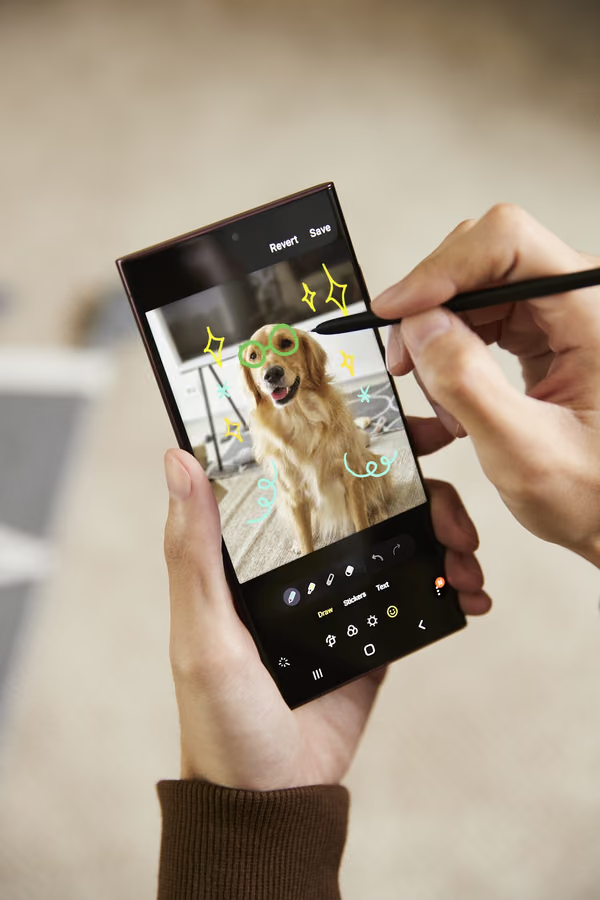
The Galaxy S22 Ultra made the pen part of the phone again
The Galaxy S22 Ultra gave the stylus a place to live inside the phone. That was the most important change to how it worked compared with the S21 Ultra. A pen you always carry can help with a task you did not plan, such as catching a short detail or signing something on a wider screen. The two telephoto views and capable main camera were still ways to use a large flagship. The question at launch was how many of those jobs belonged on one phone and whether you wanted to carry the whole thing through the ordinary time between them.
Quick verdict
Retail release in the United States · Archive date
I would have chosen the S22 Ultra if the stowed pen made notes or annotations easier and the longer camera views were worth carrying a large phone.
Best for: Someone who often took quick handwritten notes or made small precise marks on shared material and also used the versatile rear cameras.
Main benefit: The pen's permanent home made a potentially useful input available with the phone itself, without another item to pack.
Biggest drawback: The 6.8-inch screen and broad body made reaching across the device or carrying it one-handed part of the decision every day.
Reviewed version: The United States Galaxy S22 Ultra from February 25, 2022, including the 128 GB entry model and its built-in S Pen.
Compatibility: It launched with Android 12 and One UI 4.1. The processor and available storage depended on the market. The advertised 45W charging needed a suitable adapter and cable.
Review context: I evaluate the documented retail hardware and the software available in its release window. Regional variants and software changes are identified where they affect the verdict.
This is a retrospective based on Samsung’s United States launch information and device specifications. The S22 Ultra went on sale February 25, 2022 with a US starting price of $1,199.99 before offers. The features discussed here concern the hardware and software of that launch, including the pen supplied with the phone. Samsung’s S22 Ultra US availability and specifications
A pen in the body changes a small decision
An external pen is useful when you expect to use it and have a place to keep it. The integrated S Pen helped in the moment when you wanted it before thinking about where you put it. That is often what writing a short note on a phone is like. Someone gives you one or two details, or you can see a small area of an image worth marking. Having the pen available makes it possible to go through that first small action without getting another item out of a bag. Putting it back is easy enough to make it part of the same routine.
Related reading
Samsung claimed a reduced latency compared with the preceding Note. The visible benefit depends on what you do with the pen. Someone writing a few numbers might prefer to know how well the screen receives a tiny mark and where the resulting note goes. Somebody drawing several longer strokes could value the feeling of the line keeping up more closely. I would have compared a short note with a quick annotation. They give a buyer two reasons to think about how the hardware and software work together without treating one advertised number as the whole experience.
The stowed pen also lets the person decide when to use their fingers. Opening a page and moving through it can feel easier by touch. A precise mark or a handwritten detail is where the more controlled tip makes a difference. When the pen has a home in the phone, you can trade between those inputs more naturally. A new owner might never need it for long work. It would still be worth the space if it kept a useful note from being lost in the middle of another job.
The camera was still an Ultra decision
The rear cameras retained a Wide and Ultra Wide and two dedicated choices for tighter views, with 3x and 10x optical fields relative to the main camera. This was a useful feature if you took a picture from a fixed position where walking closer was not convenient. An object across a road or something above the place you can stand show how the two choices can make a difference. The longer view is more sensitive to movements and to what the available light can do. It is easier to value it by photographing a familiar sort of subject than by trying the highest digital zoom in the menu.
In a smaller scene I would have started with the main camera and thought about what surroundings the image needed. The shorter telephoto can help isolate a subject from a few steps away. The longer one is useful when the distance is the issue. Samsung promoted improvements to night photography. Whether a particular result is easier to use still depends on the camera, the motion in the subject and the way you hold the phone. I would have compared a stable night scene and a subject in motion before assuming an operating choice worked as well in both.
The large screen gave you room to check the result. It was also a convenient place to write over an image before sharing it. This was one situation where the big camera and pen made sense on the same device. It helps to decide where the marked image is going next. A brief note sent directly from the phone can be a complete job. Work that needs several other people to edit the original should be kept in a form they can readily use.
Related reading

The body had room for the pen, display and battery
The 6.8-inch display and broad body made this a larger thing to hold and carry throughout a day. A competitive amount of viewing space is useful when you increase the text size, split room between tasks or choose where to place an annotation. Typing with one hand is a different test. I would have tried an ordinary reach for a high control and considered the place where the phone normally sits when in use. A case offered another way to hold it and could increase the amount of space it took up.
A buyer who already liked the S21 Ultra could use a separate pen and had two useful longer camera views. The internal slot was a stronger reason to upgrade if keeping the pen available was a problem. A user who cared mainly about comfortable writing might also compare a previous Note. The finding that matters is whether the useful edge of the screen and the place to put the pen are things you would use together regularly.
Where the note goes matters as much as where the pen lives
A short mark on a screenshot can be a useful handoff if the person receiving it understands where to look. The small choice to send an annotated image is more practical to judge than an elaborate drawing on a phone. A handwritten phrase intended to be found again needs a sensible place to save it, which depends on the note and account tools you already use. I would have tried both before buying the phone for its pen. Having it on hand helps you begin the task. Being able to check and retrieve the result is what lets that habit stick.
My verdict on the S22 Ultra
I would have chosen the S22 Ultra for someone who had clear jobs for the stowed pen and the cameras and could carry it without hesitation. If all you wanted was a tight optical view, an existing S21 Ultra still deserved comparison. If the main need was taking notes in motion, the availability of the pen itself could be worth more than a change to any one camera. The Galaxy review timeline places it at the point where the S Ultra and some of the Note’s practical choices became the same buying decision.
What worked
The pen's permanent home made a potentially useful input available with the phone itself, without another item to pack.
The two dedicated telephotos gave a useful choice of fields of view without trying to make the most extreme digital setting the default.
What bothered me
The 6.8-inch screen and broad body made reaching across the device or carrying it one-handed part of the decision every day.
Some regional variants differed, and the wider body could put controls out of reach regardless of how intuitive the software looked on a spec sheet.
Who should not buy it
Someone who did just as well with an ordinary wide camera and rarely kept a separate document or note open while using a larger panel.
Alternatives I would consider
Galaxy S21 Ultra. The older Ultra already offers two dedicated telephoto options and accepts a compatible separate S Pen. It has no pen slot. Read my Galaxy S21 Ultra review.
Evidence and sources
The release date refers to general availability in the named market. The archive filing is ten days later. Feature assessments are editorial judgments based on the documented retail model.
Features, compatibility and rated figures from the maker are manufacturer information. My opinions are identified in the review.
Conclusion
The purchase made sense when the pen and camera gave you more ways to complete real work. A previous Ultra already offered two telephoto views if that was the main priority.
One email a week with practical Mac workflows, useful comparisons and honest tech recommendations.