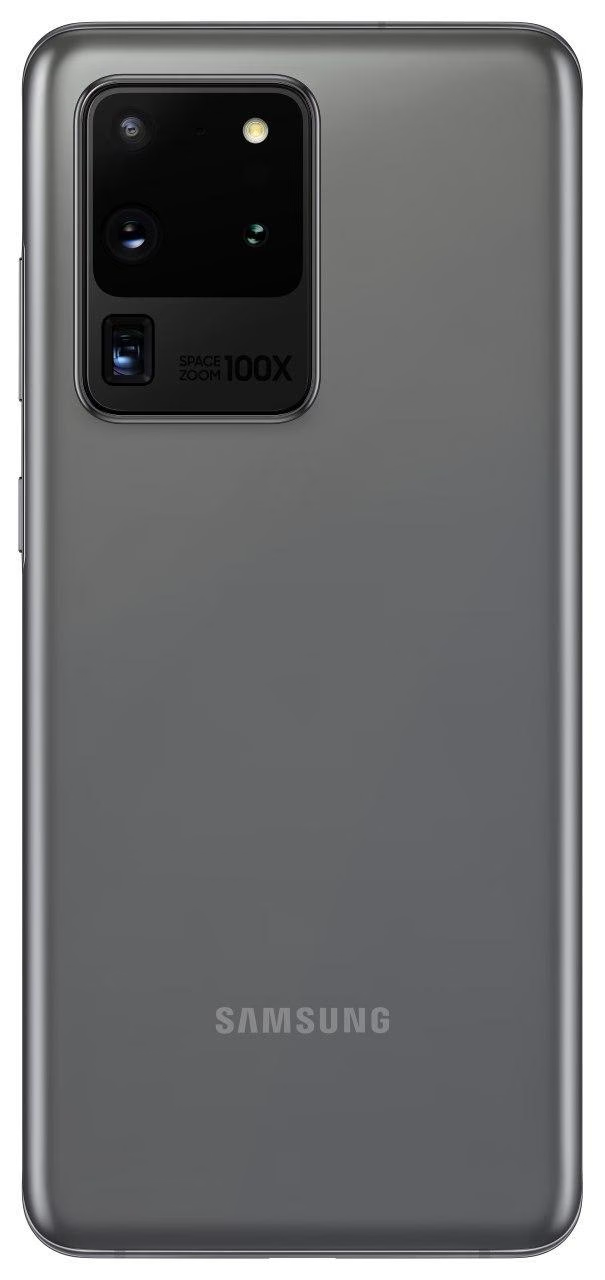
The first Galaxy S Ultra was a direct proposition. Carry a larger phone and give its cameras more room to work. Samsung put a folded telephoto beside the main camera, gave the buyer a 6.9-inch display and advertised zoom numbers that were easy to remember. In March 2020, the useful question was how often a buyer needed additional reach and under what conditions the phone could provide it. The largest number on the camera screen was a poor way to answer that question.
Quick verdict
Retail release in the United States · Archive date
The first Ultra was most convincing for readers willing to carry a larger phone for its camera options and display.
Best for: A 2020 buyer interested in framing distant subjects and viewing content on a large flagship.
Main benefit: A folded telephoto and a 6.9-inch display brought concrete uses beyond a tier name.
Biggest drawback: Size, camera software and display mode choices mattered more than the advertising maxima suggested.
Reviewed version: The original US Galaxy S20 Ultra 5G with the 108 MP wide camera and folded telephoto lens.
Compatibility: This review covers the US launch model and software. Display settings, modem support, processor and firmware can differ by market.
Review context: The discussion considers the hardware and software as offered around the documented retail date.
This is a retrospective of the initial US Galaxy S20 Ultra 5G, which went on sale on 6 March 2020. Samsung sold the regular Galaxy S20 5G and S20+ 5G at the same time. The same names across national markets make it worth being explicit about which hardware and rollout the comparison describes. Samsung’s US retail release
Start with the moderate zoom settings
The Ultra gave distant subjects a second way to fill the frame. Its folded telephoto design allowed the optical path to run across part of the phone instead of using the full length of the device’s thickness. That helped make a longer camera practical without adding a lens barrel like a traditional camera. If a subject was across a room or the other side of a field, the useful feature was the way a lens changed framing at a meaningful distance.
Related reading
Samsung described different kinds of zoom in the same product guide. Hybrid zoom combines optical and processing techniques. The very large 100x Space Zoom figure uses digital processing and cropping. When an image is cropped heavily, hand movement takes up a bigger share of the frame, changes in light matter more, and the detail you can recover is limited by what the camera captured in the first place. I would have tried less dramatic settings first. A frame from a usable distance is worth more than a number you rarely need to select.
Examples help explain the work. A sign far away may only need enough detail to read some large lettering. A person or animal needs a sensible framing and a reasonably sharp subject. A detail on a building can be a good challenge for the zoom if sunlight is strong and a surface lets you hold the phone steady. These are different expectations. The Ultra’s extra optical hardware mattered closest to the range where you could reliably make the shot, and advanced zoom modes were a separate capability to assess.
The main camera and its processing belonged in the same review
The S20 Ultra’s main sensor was specified at 108 MP. Samsung described software that could combine information from adjacent pixels in supported modes. That is a reason to look at results rather than equating the full count with the file that normally appears on the phone. An image saved at a lower resolution can be a perfectly useful everyday output. A full-resolution capture can be a better starting point for a well-lit static subject if you have a clear reason to crop it later.
It is worth testing how often you take that kind of picture. A person who records receipts, meals and family snapshots may need fast and dependable operation across varied lighting. A visitor in a museum may care more about low light or natural subjects than fine detail on a chart. I would judge the camera from a mixture of flat scenes, subjects at different distances and motion. Sensor specifications tell you which comparison is worth doing. They do not finish the comparison. Camera firmware and model revisions deserve to stay attached to any judgement about such results.
Video also asks for choices. A very high output resolution may allow more room for reframing a clip later, but it takes storage and can change which settings are available. A person who records long scenes and wants to send them immediately may be better served by a practical option that their software already supports. I would have checked that path from recording to playback before treating the launch’s 8K capability as a reason to carry a larger device. Samsung’s launch specifications and camera modes
The display had two useful decisions hiding in it
A large display matters for inspecting a photo, following a map and opening a page with type that feels comfortable to read. A higher refresh setting does a different job. Motion can be easier to see when a list moves or an animation runs. To compare the two, I would spend some time looking at small type and then scroll the same page at different settings. Those tests reveal why the display’s headline resolution and motion specifications are worth separating.
Related reading

Samsung listed 60 Hz as the default and made 120 Hz available as a separate display setting. The practical choice for some buyers would be smooth motion in daily use. Others might prefer the extra resolution when examining a picture or fine text and accept a conventional refresh rate. A bigger battery was an important part of making the total package usable, but the display and network could still account for much of the power used on a long day. Choice only helps when you know what each setting changes.
The outside size of a phone gives its benefits a price in every pocket. The screen might be worth carrying for someone who rarely brings a tablet and often looks at photos or directions. If most of the day involves a one-handed reply and occasional short calls, the standard S20 models should receive a serious look at their own prices. I would compare them after fitting the type to a sensible size on both, rather than comparing how much microscopic text a default layout could display.
Keep the photo after you make it
A phone that encourages more photography brings a simple operational question. Where do those photographs and recordings go? A set of high-resolution files gathered on a trip has a cost in storage and a second cost when you need to move and edit it. A buyer who already backed up ordinary photographs could test that process with a short sample at the settings they intended to use. See how large it is, move it to the editor and check that it plays or opens. Then think about the number of times you expect to do it in a week. This is also a useful way to compare a good default with the specialised modes. If a different setting makes the workflow much easier and produces the image you need, choosing it is a good use of the phone’s controls. Carrying this much camera should make the work simpler at some point in the process.
The first Ultra earned a place with some buyers
Early 5G was a capability whose value depended on carrier, spectrum, coverage and plan rather than one characteristic of the handset. A 2020 buyer with usable coverage in the places they frequented had one more reason to consider this series. Anyone whose connections worked well already could instead ask what they wanted from the camera and display before committing to the heaviest version of the idea.
The S20 Ultra was a sensible choice when a buyer had a job for its additional reach, a large screen to use every day and some tolerance for an ambitious camera system. The most useful version of the phone was the one with modes chosen deliberately for the scene in front of you. I would have skipped an upgrade motivated only by the highest advertised zoom and looked at the size and cost of the rest of the series. Samsung offered a different answer to pocket size at the time in the first Galaxy Z Flip. The Galaxy review timeline links the two choices in their original release order.
What worked
A folded telephoto and a 6.9-inch display brought concrete uses beyond a tier name.
What bothered me
Size, camera software and display mode choices mattered more than the advertising maxima suggested.
Who should not buy it
Buyers looking for current software and warranty support.
Alternatives I would consider
Original Galaxy Z Flip. A different 2020 flagship that prioritized pocket size and hands-free framing. Read my Original Galaxy Z Flip review.
Evidence and sources
Retail timing and specifications are tied to the market stated above. The author’s verdict evaluates the device in its launch context.
Features, compatibility and rated figures from the maker are manufacturer information. My opinions are identified in the review.
Conclusion
The first Ultra shows where extra hardware adds a tool and where the largest number offers little help.
One email a week with practical Mac workflows, useful comparisons and honest tech recommendations.