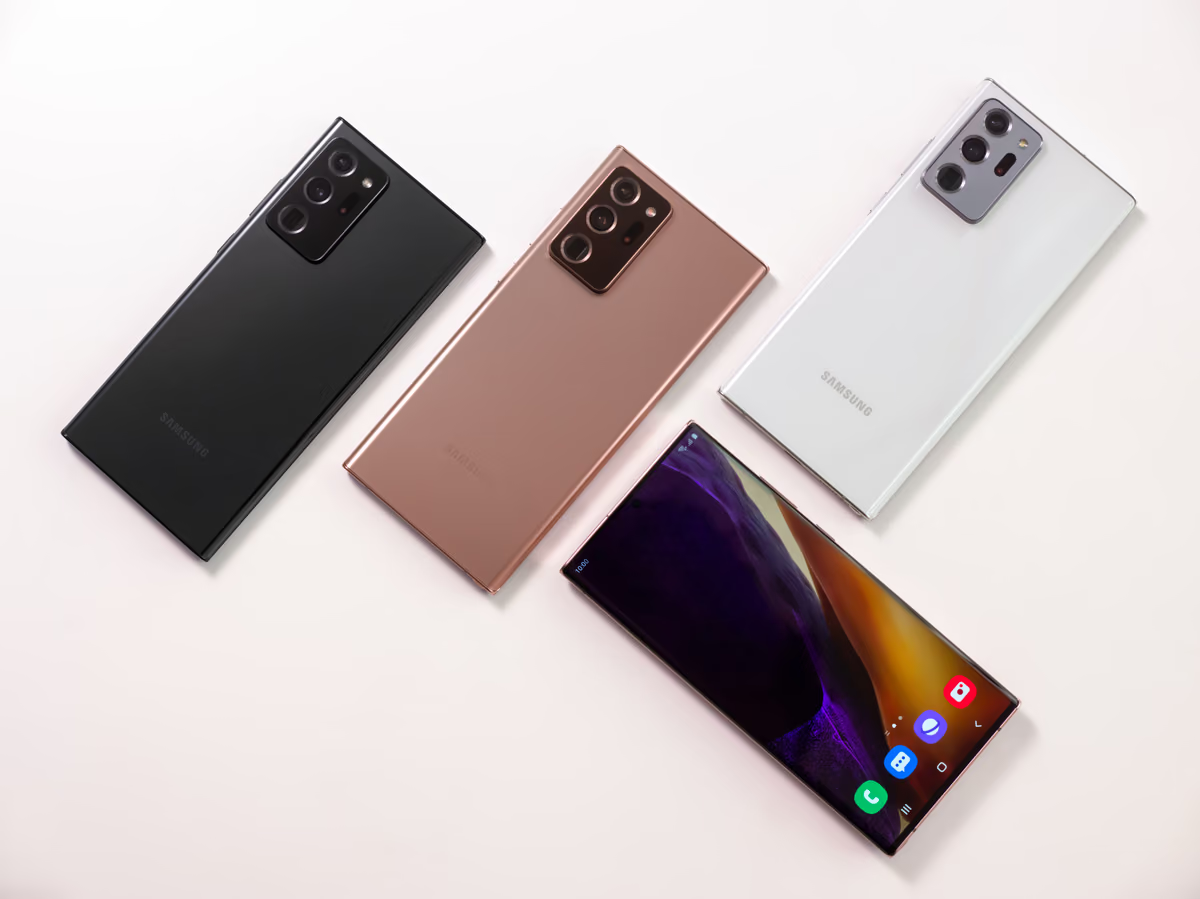
The Galaxy Note20 Ultra made the large screen and long lens part of the same decision
Samsung released the Galaxy Note20 Ultra in the United States on August 21, 2020. Its 6.9-inch adaptive display, a separate 5x optical camera and a built-in S Pen set it apart from the regular Note20. Some buyers could make good use of all of them on one job. Others might simply want a large screen that responds more smoothly to a scroll and gives them a place to write. The bigger camera hardware and phone outline still needed to be worth carrying through the parts of the day when neither one mattered. Samsung’s August 21 US retail release
Quick verdict
Retail release in the United States · Archive date
I would have picked it if the dedicated long camera and the larger surface regularly helped me capture, review and mark useful material.
Best for: Someone who often works with a large display away from a desk and has a clear need for both a precise pen and a longer optical view.
Main benefit: The separate 5x framing and broad working screen made it possible to see and annotate harder-to-reach detail on the same phone.
Biggest drawback: The device cost more, was harder to hold and could rest differently on a surface due to the camera. The regular Note20 had a flat panel.
Reviewed version: The US Galaxy Note20 Ultra 5G on sale August 21, 2020, with a 6.9-inch display, 128 GB at entry and support for appropriate microSD expansion.
Compatibility: Up to 120 Hz applies in supported display conditions. The 5x Telephoto is a separate camera. Wireless services and storage differ by region and configuration.
Review context: I evaluate the documented retail hardware and the software available in its release window. Regional variants and software changes are identified where they affect the verdict.
This retrospective concerns the US Note20 Ultra 5G at its $1,299.99 starting price with 128 GB. Samsung also offered a larger configuration and compatible microSD expansion. The standard Note20 and the devices sold in other regions had their own hardware choices. I would have compared this Ultra with a large Note I could already use, using the actual marks and files I needed. Samsung’s US launch hardware specifications
The main display can make several movement decisions visible
An adaptive refresh rate of up to 120 Hz applied under the supported display conditions. Compare how a useful line moves through the screen and whether you can follow it before stopping. This shows the practical gain if you spend much of your time selecting things from a long view. A static page asks for a different comparison, including comfortable reading size and which controls stay on the page. The benefit of smoother motion can reinforce the case for a larger work area. It can also be separate from wanting the display simply because it is larger.
Related reading
The surface was curved at the edge. A person drawing close to the side or using a case can appreciate the larger area and still favour the regular Note20’s flat screen for their particular grip. Try locating the pen slot while the phone rests where you would actually write. The Ultra offered faster supported S Pen response, but the area around a useful mark matters too. I would have checked a short annotation and a longer line on the same device, then retrieved the resulting file to ensure the whole action was useful.
A 5x optical lens makes sense when your feet cannot move closer
A separate 5x camera puts a broad view and a distant detail within reach from one place. I would have tried a distant stationary subject first, such as a clearly recognisable sign across an open space. Compare it with the shorter camera view that explains the surroundings. That shows an immediate change in what material can be recovered with the new hardware. A moving subject or limited light is a harder case. The separate lens can usefully frame it, but motion, exposure and how steadily you hold the broad device still affect the saved image.
Samsung also gave the Ultra a 108MP Main camera and separate Ultra Wide. A large output mode can give a later edit more source detail if the subject and capture conditions deserve it. Check the view that fits the specific thing you want to send as well as the size of the files it produces. The screen gives the buyer a larger place to understand the difference. Choosing to keep the additional detail brings its own storage and sharing considerations.
The extra hardware helped most when the workflow stayed on the phone
A useful example is making a wide image to show where something sits, taking a closer view and pointing out one small feature with the stowed pen. The large screen allows a quick inspection and the pen lets you choose precise input for the part that needs marking. I would have tried sharing the result through my usual app and making sure the marked area is visible and the intended original remains available. The distinctive case for the Ultra comes from what you can finish before you have to leave the place. A better capture device alone is not the entire reason to carry a larger body.
The 4,500 mAh typical battery and compatible charging gave enough starting provision to assess a long working day. A large display, active camera and mobile network can make different demands in separate parts of the job. Try thinking about where the phone can remain powered or be charged, and whether the regular Note would already take you through the work you need. Use the precise 5G variant when evaluating connections, and the intended mode when judging display behaviour. The bigger model takes more of the purchase price regardless of which of those changes actually come out.
Try the curve while actually making and sending a pen note
I would have started by marking a place on a visible detail that needed work. Put the phone down where you actually use it and see how much of the relevant line is in reach without accidentally moving the case or resting your palm on another control. The Ultra’s screen area and pen response can make that job feel easier. A flatter screen on the regular Note20 can be better for someone who uses a grip close to that edge. The best comparison is a mark you can send clearly to another person, and a note you can retrieve without remembering how you created it.
Related reading

The back of the Ultra included enough camera hardware to affect how the device rested. A case changes the amount of movement if you use the pen while it lies flat. I would have tried the most frequent posture with the case on. Somebody who buys the Ultra for a long lens has a different hand position while aiming at a distance. A phone that is comfortable for both does more of the note and camera work that led to choosing a larger body. That is useful evidence for a particular person and a better way to feel the difference from the ordinary Note20 than comparison by screen diagonal alone.
My verdict on the Note20 Ultra
I would have bought it for a larger screen, the separate telephoto and a genuinely useful way to work with the result using the pen. The Galaxy Note20 review covers the flatter and lower-priced model with the core pen workflow. The Galaxy review timeline places this Ultra next to the two August Note releases and the S Ultra devices that later took over much of the same role.
What worked
The separate 5x framing and broad working screen made it possible to see and annotate harder-to-reach detail on the same phone.
Samsung gave the top Note optical, storage and display options that were useful independently when the core pen and camera remained needed.
What bothered me
The device cost more, was harder to hold and could rest differently on a surface due to the camera. The regular Note20 had a flat panel.
Adaptive screen settings, image modes and capture distances affect what you get. The larger hardware does not automatically match every working position.
Who should not buy it
Someone who mainly wants a straightforward flat display and the stowed pen, and rarely needs distant photographs.
Alternatives I would consider
Galaxy Note20. The standard Note is less expensive and flat with the ordinary pen workflow, and has a different camera layout and fixed storage. Read my Galaxy Note20 review.
Evidence and sources
The release date refers to general availability in the named market. The archive filing is ten days later. Feature assessments are editorial judgments based on the documented retail model.
Samsung retail release information
Samsung's Note20 Ultra launch optical, display and storage specifications
Features, compatibility and rated figures from the maker are manufacturer information. My opinions are identified in the review.
Conclusion
Decide how often the camera and display do useful work together, and account for the files and hardware that need to go wherever the phone goes.
One email a week with practical Mac workflows, useful comparisons and honest tech recommendations.