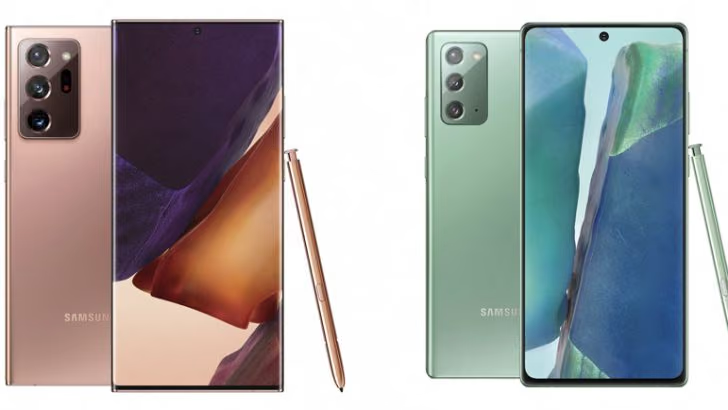
The Galaxy Note20 kept the pen at a lower price than the Ultra
The regular Galaxy Note20 went on sale in the United States on August 21, 2020. It had a flat 6.7-inch display, S Pen storage and the Note software built around that input. At launch the US 5G model was $999.99. The more expensive Ultra offered a different display and rear camera setup. The regular model had a case for a buyer who mostly wanted quick notes and ordinary photography in the more direct flat format. It was important to decide whether those were your actual reasons to buy a Note. Samsung’s US Note20 series retail start
Quick verdict
Retail release in the United States · Archive date
I would have chosen the standard Note20 when a flat display and the readily available pen mattered more than a dedicated long camera or faster display.
Best for: Someone who principally wanted a conventional flat Note for short marks, notes and typical photography and could work within the fixed storage.
Main benefit: The flat shape gave the supplied pen and ordinary main camera a straightforward place to do the common work of a Note.
Biggest drawback: The 128 GB storage had no microSD path. It lacked the adaptive refresh and optical reach that set the larger Note20 Ultra apart.
Reviewed version: The US Galaxy Note20 5G sold August 21, 2020, with 128 GB of fixed storage, a flat 6.7-inch display and a built-in S Pen.
Compatibility: It used compatible 5G service and a 60 Hz display. Its 64MP camera provides hybrid framing rather than the Ultra's separate 5x lens.
Review context: I evaluate the documented retail hardware and the software available in its release window. Regional variants and software changes are identified where they affect the verdict.
The reviewed model is the US 5G Note20. Availability of LTE configurations in other markets and which networks the handset could use were separate questions. The regular and Ultra both went on sale in August. I would have compared them using the actual material I would write or read, the file storage I needed and a photograph I would use. Those are the most familiar experiences the cheaper model aimed to preserve.
A flat screen determines how the pen sits against it
The 6.7-inch Super AMOLED Plus panel was flat and used a standard 60 Hz refresh rate. For short handwritten input, being able to see and reach the exact part of the page may matter more than greater smoothness while scrolling. Open one ordinary file, mark near a side and then keep the result ready to send. The display shape is one thing you can judge in that movement. The Note20 Ultra’s adaptive high refresh and larger curved panel would show their value differently. A buyer who wants a phone mainly to read and write a quick note might reasonably choose a flat surface.
Related reading
The S Pen stores in the phone and Samsung advertised better note workflows, including notes that can be used alongside other work within the supported software. An ordinary note should remain easy to find later. Open it on the sort of occasion that already makes you reach for another tool, enter the useful part and hand it off in the normal way. I would have thought about what kind of document and other app needed the result. The ability to start writing is useful. The shape of the information you can use afterward is responsible for much more of the benefit.
The cameras were a different system from the Ultra
Samsung provided a 12MP Wide, 12MP Ultra Wide and a 64MP camera as part of the regular model’s zoom arrangement. It was not the same as choosing the Note20 Ultra’s dedicated 5x camera. A useful short crop may work well for ordinary subjects with adequate light. Being able to put more of a room into the shot with the Ultra Wide is a stronger reason to choose an actual lens for that purpose. I would have made a quick broad image and a much tighter frame from a regular standing distance to see what difference the choice made.
Some people use the phone to take pictures of a small object and then mark the exact detail. The standard Note20 got enough of a picture to compare for that work, while the bigger Ultra gave a broad way to preview it. Another type of buyer may need an optical field farther from the subject. Choosing for that distance makes more sense than comparing the highest software zoom on either. Use a real photo and think about what the person who receives it can actually read.
The internal storage and connectivity have their own importance
The US launch model had 128 GB and no microSD expansion. A preceding Note could be much more practical for a person already using a large card. I would have measured how much needed to stay local and checked which apps and files could be moved. If the storage limit makes a familiar capture routine difficult, the ordinary model’s lower price can be deceptive. Buying for a comfortable flat display is sensible when the fixed storage and camera also suit what you expect to keep locally.
5G was part of the US configuration. That was useful under compatible service, plans and coverage. A person need not buy chiefly for the modem if the pen or ability to see a little more makes several ordinary tasks easier. Samsung rated the battery at a typical 4,300 mAh. Other conditions and setup determine whether you get that device through a full stretch of work between chargers. Compare the whole set of tasks rather than the new radio alone.
Related reading
Consider a long note alongside a short one
A person who frequently writes a few words at a time might find the 60 Hz panel adequate. A long scroll through a busy page could give the faster Ultra a more visible advantage. I would have tried reading the last part of a document, making a mark and going back to its beginning in the normal app. The amount of movement involved makes this test useful for distinguishing the flat regular panel from the more advanced one. The shape at the edge also deserves attention for any notes that extend near the side.
Pick a photograph that really needs the 64MP crop and compare it with the ordinary main shot. The digital and optical behaviour at longer distance are not the same on the standard and the Ultra. Look at the recorded detail and how much of the original space it needs to show. If the relevant subject remains close enough, the camera setup of the less expensive phone already fits. A buyer who frequently stays behind a boundary and shoots into a large area has another reason to consider the Ultra’s dedicated lens. Both phones can give you a large surface for looking at the output. They make different promises about which pictures you can reasonably create from the same position.
The display can matter as soon as you move the pen
On a page of print, the Ultra’s faster panel primarily changes the movement when you scroll. With the pen down, each frame also determines when the next visible part of a stroke arrives. The Note20’s own battery or storage trade-offs could matter more after that, but I would have drawn a short arrow and then made the same small correction on each model before buying. On a single sentence or signature the flat panel is attractive. If the page will be full of handwriting, watch what happens while changing direction and while your hand approaches a curved side. Those are two reasons to see the displays in person.
My verdict on the Note20
I would have chosen the regular Note20 when a flat screen, stowed pen and ordinary photos were good enough to make the cheaper model an easier purchase. The Galaxy Note20 Ultra review examines what more a different display and dedicated telephoto could get you. The Galaxy review timeline keeps the two August releases in their own place.
What worked
The flat shape gave the supplied pen and ordinary main camera a straightforward place to do the common work of a Note.
The standard Wide and Ultra Wide offered distinct views, including more room for close group or work scenes.
What bothered me
The 128 GB storage had no microSD path. It lacked the adaptive refresh and optical reach that set the larger Note20 Ultra apart.
The fixed storage and hybrid longer framing could cost time if the buyer expected to keep large files or frequently shoot from a very distant position.
Who should not buy it
A buyer relying on removable local media, separate long optics or the smoothest display when navigating long material.
Alternatives I would consider
Galaxy Note20 Ultra. It offers a larger adaptive panel, compatible expandable storage and a dedicated 5x camera, along with a stowed S Pen. Read my Galaxy Note20 Ultra review.
Evidence and sources
The release date refers to general availability in the named market. The archive filing is ten days later. Feature assessments are editorial judgments based on the documented retail model.
Features, compatibility and rated figures from the maker are manufacturer information. My opinions are identified in the review.
Conclusion
Compare files and camera needs along with the display shape. The lower launch price has more weight if those are truly sufficient for your everyday use.
One email a week with practical Mac workflows, useful comparisons and honest tech recommendations.