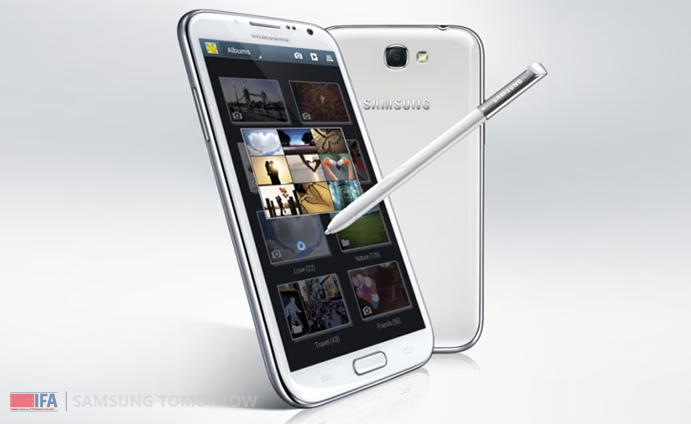
The Galaxy Note II put its big display to work twice
The quickest way to explain the Galaxy Note II is to picture a telephone call where you need to write something down. A normal way to do that on a smartphone is to put the call on speaker, leave the call screen and find a notes app. The Note II gave the pen its own place inside the phone and could bring up a small notepad as you drew it out. Having the stylus available was part of the design. The phone gave it a short path to a sensible first action. That is what made the second Note more convincing than simply making the first model bigger.
Quick verdict
Retail release in South Korea · Archive date
The Note II made its size worthwhile for buyers who could name a real task for both the pen and the screen.
Best for: Someone who captured short notes or consulted another app while composing a message.
Main benefit: A larger S Pen could preview content before touching, and Popup Note gave it a fast way to start writing.
Biggest drawback: The large body still demanded some room in the hand and the pocket, and compatible software decided which tools worked.
Reviewed version: The Samsung Galaxy Note II as released in South Korea in September 2012.
Compatibility: Multi Window supported a defined set of apps. Regional carriers shipped their own hardware and software variants.
Review context: I evaluate the documented retail hardware and the software available in its release window. Regional variants and software changes are identified where they affect the verdict.
This is a retrospective analysis of the South Korean launch model, based on Samsung’s specifications and descriptions of the interface. Samsung identifies September 26, 2012 as the first Korean release, following the introduction at IFA. Carrier hardware and software varied. The time window matters especially for the split-screen feature, whose availability depended on the software supplied with a particular model. Samsung’s account of the launch in Seoul
The change in shape made room for two things
The first Note’s display was 5.3 inches with a 1280-by-800 resolution. The Note II spread 1280 by 720 pixels over a 5.5-inch 16:9 panel. That means a larger measured diagonal and a narrower shape when held upright. It also means fewer pixels across portrait width, despite the bigger diagonal. The number on the box leaves that trade unexplained. In landscape the new shape suited widescreen video. In portrait the extra reach could help a tall page, while the narrower frame made it a little easier to wrap your fingers around a large phone.
Related reading
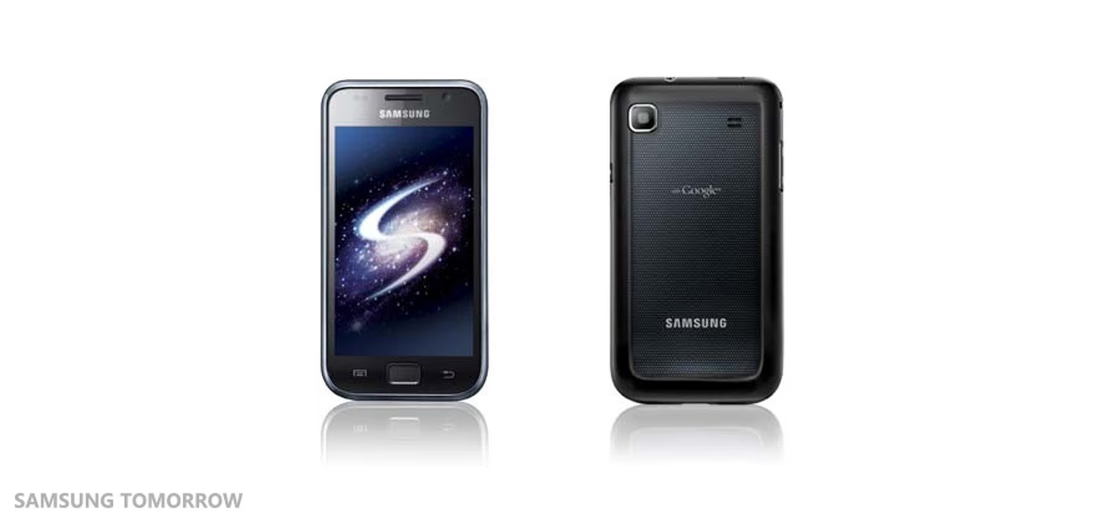
A slim text column can be helpful for reading, because the eye has a shorter trip to the beginning of the next line. A wide field is better when the content needs space between elements, such as a diagram or a spread of handwritten numbers. The first Note had its own argument on that test. A prospective owner could ask what the display had to hold for one minute of real use. Watching a video, reading a long page and writing near a reference were three different answers, even though all of them started with the same large rectangle. Samsung’s comparison with the original Note
Charging and portability were inseparable from that display. Samsung fitted a removable battery rated at 3,100 mAh, up from 2,500 mAh on the previous Note. More capacity made sense in a phone that encouraged long sessions with its screen on. A spare could help somebody spending a long time away from power, although it was also one more item to keep charged and find room for. The larger number did not say how long you could run two active apps over cellular data. Screen brightness and radio conditions affected that answer.
A pen could point without committing to a tap
The redesigned S Pen was larger and easier to grip than the first model’s. Air View was a more consequential change to how it worked. Hovering let selected apps give an extra hint before you acted. A thumbnail or part of a message could appear while your hand was already in position to choose something. That preview was useful when nearby items looked similar, such as a group of photographs or messages with similar subject lines.
This was a different kind of input from a finger. A finger has an obvious advantage for scrolling down the page or pressing a broad control. The pen made more sense for marks in a small area, with the extra possibility of seeing a preview first. For a task like circling a detail in an image, both the mark itself and the edge you wanted to avoid might be close together. The inclusion of clipping tools gave the pen a use even if you never created a notebook. A buyer who never drew or annotated could use the phone perfectly well with a finger, but would be carrying a more elaborate device for its screen alone. Samsung’s Note II launch demonstration
The pen could not make a glass screen behave exactly like paper. It still had to work where the computer understood the tools and could save the result. A quick drawing to communicate a location or rough shape was a good case. A detailed process with several people editing the same document after it left the phone raised other questions about the file format and where it would be stored. The phone made capturing the first bit more pleasant. The process afterward still belonged to the people who needed the result.
Related reading
Multi Window was useful for particular pairs
Samsung’s split views could share the display between supported apps. A simple test is looking at a message while checking the place or time it mentions. Saving a few trips back and forth to recover the missing piece of information gives the large screen something specific to do. Having a browser open next to an app can likewise help copy an address or verify that you read a name correctly. If both panes are full of dense controls, a bigger device with more display space may still make the job easier.
Which apps could appear mattered more than the list’s length. The value was highest for a pair you could name before getting the device. A buyer working through company software needed to ask whether those apps supported it on the exact carrier build. A person using standard messaging and the browser had a more realistic chance of finding a small routine that fit. Samsung described supported combinations in its Korean launch material. The experience could differ when early international models arrived with a different build.
Another practical limit was the room left when the keyboard came up. An upright phone divided between a source and a writing field can hold two useful things when both stay short. Ask it to show a long document, a second application and a large keyboard, and the available working area is quickly accounted for. I would think of it as a place to take an action while briefly consulting another app, with a tablet or laptop still earning its keep for extended work.
Who would have benefited from the second Note?
I would have chosen the Note II in its launch window if I needed to capture short notes in motion or regularly looked between two small pieces of information. There was room for the subject, the line you were writing and the appropriate control. A buyer who mostly read notifications and took casual photos had less reason to accept the size. A smaller phone such as Samsung’s Galaxy S III answered many of those needs with a body easier to hold one-handed.
The Note II also makes sense as a comparison with the original Galaxy Note. The first model made space for handwriting in a pocketable device. The second gave that space more to do before you put the pen away. The best reason to value it is a task that fits between those two moments. The Samsung Galaxy timeline places it with the other Note releases and separate Fold and Flip experiments.
What worked
A larger S Pen could preview content before touching, and Popup Note gave it a fast way to start writing.
A removable 3,100 mAh battery gave people another option for getting through a long session away from a charger.
What bothered me
The large body still demanded some room in the hand and the pocket, and compatible software decided which tools worked.
The taller 1280-by-720 panel surrendered some width compared with the first Note despite a larger advertised diagonal.
Who should not buy it
Someone who mostly needed a one-handed phone for calls and short messages.
Alternatives I would consider
Original Galaxy Note. It used a wider portrait display and introduced the pen slot, while the Note II gave the pen more ways to produce or preview information. Read my Original Galaxy Note review.
Evidence and sources
The release date refers to general availability in the named market. The archive filing is ten days later. Feature assessments are editorial judgments based on the documented retail model.
Features, compatibility and rated figures from the maker are manufacturer information. My opinions are identified in the review.
Conclusion
The improvements were easiest to value against a task that required mixing a short reference with an action.
One email a week with practical Mac workflows, useful comparisons and honest tech recommendations.