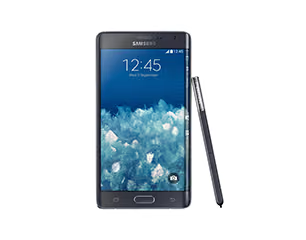
The Galaxy Note Edge gave a narrow strip its own job
NTT Docomo sold the charcoal black Galaxy Note Edge in Japan on October 23, 2014. Samsung brought it out alongside the larger-screen Note 4 generation, with a curved strip of display that wraps around the right side. That strip could show tools or information while the main view stayed occupied. It made the case for a different control layout on a phone with an integrated pen. The question I would have taken into a store was how often a control belonged there. NTT Docomo’s dates and hardware specifications
Quick verdict
Retail release in Japan · Archive date
I would have bought it if one repeated control or notification belonged in the edge area and the grip suited me.
Best for: A Note buyer who takes short notes, wants shortcuts available alongside other work and can reach the strip comfortably.
Main benefit: The Edge Screen let specific controls and alerts sit alongside the main view rather than take it over.
Biggest drawback: The asymmetrical body and case selection carry a cost every time you handle it. The usefulness of panels depends on their support.
Reviewed version: Japanese charcoal black Galaxy Note Edge SC-01G, first sold by NTT Docomo on October 23, 2014.
Compatibility: The right-side display works with designated apps and panels. See Samsung's details about the flip-screen mode and compatible cover.
Review context: I evaluate the documented retail hardware and the software available in its release window. Regional variants and software changes are identified where they affect the verdict.
The best first test would have been to open two familiar apps that regularly interrupt each other. Imagine watching a clip while waiting for a message. An unobtrusive cue along the side can let you keep your place in the clip. If you already swipe down to check the status bar with little effort, the benefits are less immediate. The Note Edge was asking for one new movement and a glance that you might get back dozens of times across a day. You would have needed to get used to where that glance belongs.
A side panel makes room at a cost
Samsung put shortcuts, tools and notification information in the edge area. Flip between the panel you use to launch a repeated app and the panel for a quick piece of information. The feature’s interest depends on whether you can switch quickly while your other hand is occupied. I would have set one favorite row and left it there for a few days. Putting a great many controls on a surface primarily used for short glimpses would have made it easy to lose the thing that gave the edge the best case.
Related reading
The right-handed position changes where the phone is easiest to hold. Samsung provided a feature to flip the screen for left-hand use. I would have tried that with the pen out, then turned it back for a call or a photo. A software rotation is an unusual solution for a feature literally part of one side of the body. If you switch hands to write frequently, the attraction depends on how natural the whole motion feels. Samsung’s explanation of the Edge Screen and left-hand orientation
The main screen still has to be a good Note
Samsung presented the Note Edge with a 5.6-inch Quad HD+ Super AMOLED display. The narrow side strip is an extension of the display with its own role in the UI. I would read the part of a document I needed before deciding whether the extra width of the body was going to help me. An ordinary Note already offered plenty of room for writing. The Edge is more interesting when persistent tools or interruptions have somewhere to go while you continue doing the job in the middle.
This is a full Note with a stowable S Pen, built around the same basic appeal as the Note 4. Hold the phone, pull the pen and annotate a page close to the curved side. Some of the pen’s applications are much easier to value than the edge applications. Marking a detail in a picture without covering it and storing a note immediately are straightforward targets. If what you want does not actually depend on the panel, the more conventional Note 4 gave you a better chance of finding the grip you expected without buying into the extra controls.
Turning the phone changes the value of an edge
Samsung moved some camera controls into the edge area. This matters most if you normally shoot in landscape and the shutter is in a more natural place for your finger. Whether your other hand is busy also changes how a separate little line of controls feels. I would have photographed a simple scene with the two phones held at the same height. Look for how reliably your finger finds the right control and whether reaching it moves the frame. The camera might still be a reason to compare the Notes regardless of the strip, because Samsung gave the Edge a 16-megapixel rear camera with optical stabilization.
Information displayed while the main screen works on something else is a better fit for the strip than a feature you spend several minutes reading at once. The feature’s resemblance to a ticker does not imply that you should keep your eyes on it. I would choose at most a few useful sources of information. Pin a favorite app or useful indicator and check whether you regularly reach the right result sooner. Small repeated improvements are the reason to bother learning the side, and also the easiest ones to lose behind an awkward case.
Related reading

Some hardware choices still came down to daily ownership
Docomo lists the Note Edge with a removable battery pack and has separate information about charging equipment. I would have carried it in the case or cover I planned to buy. A wider body, rounded strip and separate accessories are physical things you can compare immediately. If a cover makes the surface harder to reach, part of the edge’s point goes away. If you can see an alert while the cover is shut on a compatible design, that might give you another reason to use the strip.
The relative difference to the Note 4 belongs in the decision about value. Two similarly large phones can still demand different cases, gestures and habits. I would have used the shape that worked while I moved between a seat and a desk. Some people would have chosen the Edge for the novelty and kept using the control once it felt familiar. I would have put it in a pocket, picked it up with each hand and looked for one reason to prefer the design after those first impressions. Samsung’s Note Edge and Note 4 specifications
The accessory decision belongs with the display decision
I would have checked the window in Samsung’s compatible cover before choosing one from pictures. A small visible strip changes where the edge of a cover has to stop. With any other case, the side protection and the space needed for a swipe need to agree. This is a phone whose unusual feature can be influenced by a piece of hardware many people buy without much thought. Choose the case by the way you intend to use the panel and the pen together. That once again makes the Note 4 a good reference point for noticing the cost of the experiment.
My verdict on the Galaxy Note Edge
I would have chosen it for the combination of S Pen and side shortcuts if I already knew where the side control belonged in my life. If I needed a roomy place to write and nothing about the strip felt immediately helpful, the Galaxy Note 4 was the simpler choice. It is worth giving the Edge credit for a specific idea that comes up in later phones in other ways: well-placed secondary information can let the main screen keep doing its job. The phone asks you to place a high value on that idea at every grip.
What worked
The Edge Screen let specific controls and alerts sit alongside the main view rather than take it over.
The Note format, removable battery and pen remain recognizable in the experiment.
What bothered me
The asymmetrical body and case selection carry a cost every time you handle it. The usefulness of panels depends on their support.
The right-side panel has accessibility and orientation implications. Software support is specific to the original market.
Who should not buy it
Someone who wants the usual Note controls and prefers an easier body for switching between hands.
Alternatives I would consider
Galaxy Note 4. Its large pen surface and more conventional housing make it a useful contemporary comparison. Read my Galaxy Note 4 review.
Evidence and sources
The release date refers to general availability in the named market. The archive filing is ten days later. Feature assessments are editorial judgments based on the documented retail model.
Features, compatibility and rated figures from the maker are manufacturer information. My opinions are identified in the review.
Conclusion
Compare the case, flip-screen controls and the price with the Note 4 before deciding how often the edge makes a difference.
One email a week with practical Mac workflows, useful comparisons and honest tech recommendations.