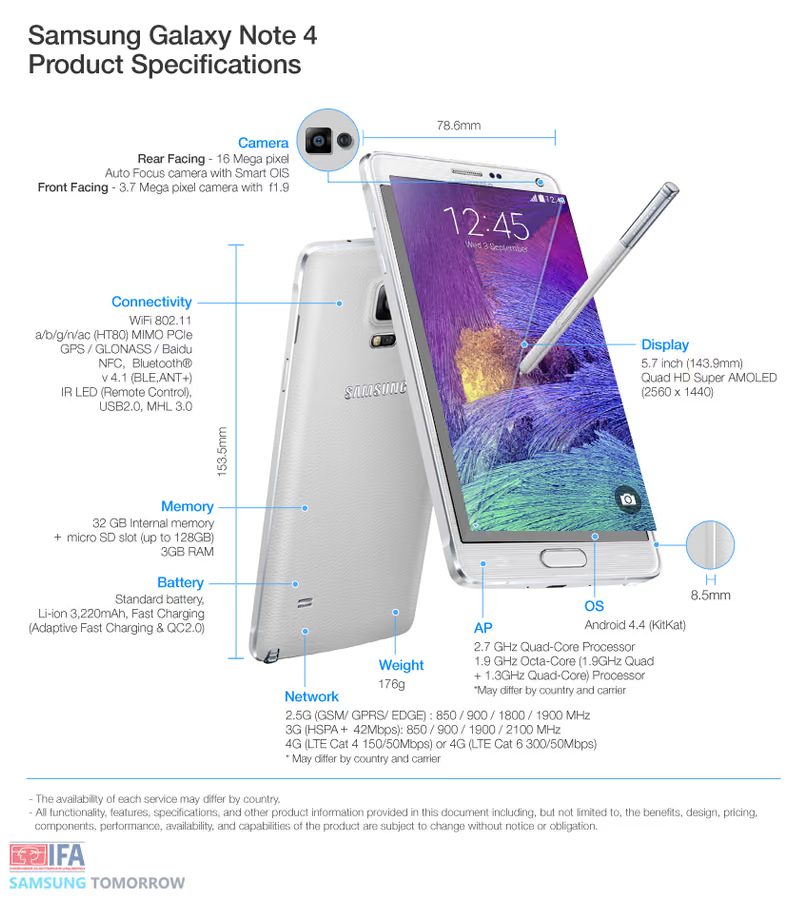
The Galaxy Note 4 made the pen and split screen work together
At its September 26, 2014 South Korean release the Galaxy Note 4 stayed at a 5.7-inch display while moving to Quad HD and adding a revised S Pen. Samsung added more ways to use several parts of the screen and describe a portion of another view. It also added stabilisation to the rear camera. The large phone made the most sense if I could name a job that used the extra surface and the more precise input at the same time. A bigger place to read and the ability to write a brief note were both useful even when I had no reason to change how I worked with every app. Samsung’s commercial availability and specifications
Quick verdict
Retail release in South Korea · Archive date
I would have chosen the Note 4 if the finer pen and the larger display made writing, selecting or finishing a daily task easier together.
Best for: A buyer who frequently made short notes on a phone, looked at detailed material and knew where the useful output needed to go.
Main benefit: An available S Pen and sharper display gave a real reason to do more of a written or visual task while away from a larger screen.
Biggest drawback: The bigger body was harder to reach, and running two applications together depended on whether the appropriate apps supported that layout.
Reviewed version: The first Galaxy Note 4 available in South Korea on September 26, 2014, with a 5.7-inch Quad HD display and supplied S Pen.
Compatibility: It used a version of Android 4.4 with Samsung's Multi Window. Support depended on the actual app. Regional hardware and mobile network variants differed.
Review context: I evaluate the documented retail hardware and the software available in its release window. Regional variants and software changes are identified where they affect the verdict.
This is a research review of the first retail hardware. International availability followed by market, with differences in modem and processor. The S Pen and larger display arrangements demonstrate the choices that went into the Note model itself. A buyer should use documentation for their exact local model when features or network details depend on the country.
A better pen is a familiar way to make a small mark
Samsung published double the predecessor’s pressure sensitivity, up to 2,048 levels. Somebody starting a drawing can use that capability differently from somebody making an arrow on a screenshot. Try printing a short phrase at the size you actually write, then draw a controlled line close to an important existing element without changing the scale of the image. The useful result is seeing the mark and being able to locate it or send it. Detailed sensitivity also has a reason to matter if a longer stroke is part of your work. What counts depends on the app and the kind of line you want.
Related reading
The pen stores in the body. A short note to yourself is easier to make when the pen is already with the phone. Open the app you want, enter one short thought, put away the pen and see where the result was filed. The advantage comes from being able to repeat the whole task. A buyer who only uses the pen in a store to write a large example can miss how it fits a two-second decision while carrying something else.
Smart Select offered a way to collect portions of displayed content. Photo Note was intended to help turn a photograph of handwritten work into something editable in Samsung’s tools. Both gave the pen and camera extra ways to point at useful material. I would have tested whether the resulting note could be stored and shared with the people who needed it. A nice input gesture is one part of the job. Useful output in the right app is what makes it worth doing in the first place.
Split and pop-up views made the screen pay off when the apps fit
Open a message that asks for one number and keep the reference nearby. A split layout can let the number and response show simultaneously. This is a good way to judge a screen that can show two apps, including the time required to get to the correct arrangement. A shorter and larger app around it can also leave an essential control out of easy reach. Multi Window is most helpful when both apps you need in that situation are supported and work at their smaller size. I would have put two useful apps on the panel rather than choosing whichever ones looked best in the shop.
The higher resolution gave a single document or webpage a clearer place to display smaller detail. For many people the simpler benefit was using ordinary text at a comfortable size. One full-screen app could be more useful than two competing for space. I would have tried the new window features only when viewing both really helped. A person who regularly wrote or edited more than one thing on a desk could use a separate device. The Note’s appeal was doing some of that work in the places where you just carried a phone.
Stabilisation and a large preview could help in a different job
The rear camera’s optical stabilisation could reduce visible shake from holding the phone. Check a still object in comparatively poor light and then try one with a moving subject. Subject motion has a different effect from movement of the photographer, and exposure settings still matter. The screen can help you find a frame that is usable before you have left the scene. Someone who uses the phone to inspect or annotate an image can also make that detail part of their next step rather than moving the whole task to another screen.
Related reading
The metal frame and familiar rear access mattered to people who wanted to handle the bigger design and use a removable battery. Foldable devices were not part of the direct comparison that September. Try reaching the top control and pulling the pen using the grip you intended to use away from a desk. A phone that is comfortable for two-handed notes can still feel very different when used while holding another item. Samsung gave the pen a clear place but it still needed a hand to use it.
The pen can lead to a smaller and more useful final file
Try clipping part of a mail message or a reference page and adding the one mark another person needs to see. Give the output to someone who did not see the original interaction, then check whether they understand which part is relevant. This is a useful comparison of Smart Select and an ordinary screenshot. If the whole screenshot contains sensitive or distracting material, a suitably selected excerpt may be the right way to show the work. If it removes something the recipient needs, it can be better to keep more of the context beside it.
This also gives a no-pressure way to use the improved pen and see how easy it was to recover the result later. An app that feels comfortable to write in can be a good starting point, but find the note again and check the form in which it leaves the phone. That is something a sharper display can make clearer without changing where you want the work to end.
My verdict on the Galaxy Note 4
I would have bought the Note 4 for regular handwritten work, a larger document view and a handful of situations where two supported apps belonged side by side. The Galaxy Note 3 offered the previous design and a useful pen if those changes did not affect your main task. The Galaxy review timeline shows when the Note series added the finer pen and continued to change its larger display.
What worked
An available S Pen and sharper display gave a real reason to do more of a written or visual task while away from a larger screen.
Smart Select and the stabilised camera gave a buyer complementary ways to collect a particular detail and show it to someone else.
What bothered me
The bigger body was harder to reach, and running two applications together depended on whether the appropriate apps supported that layout.
Some of the more interesting pen and window workflows took effort to learn. Short jobs remained easier when the application and note output already worked together.
Who should not buy it
Someone who rarely used a stylus or could not carry and use this size comfortably enough to get a repeatable benefit.
Alternatives I would consider
Galaxy Note 3. It offers the older pen and full-size display with many of the same basic ways to jot something down. Read my Galaxy Note 3 review.
Evidence and sources
The release date refers to general availability in the named market. The archive filing is ten days later. Feature assessments are editorial judgments based on the documented retail model.
Features, compatibility and rated figures from the maker are manufacturer information. My opinions are identified in the review.
Conclusion
The screen and pen paid for themselves when you could use them on the same workflow. The preceding Note offered both in simpler form.
One email a week with practical Mac workflows, useful comparisons and honest tech recommendations.