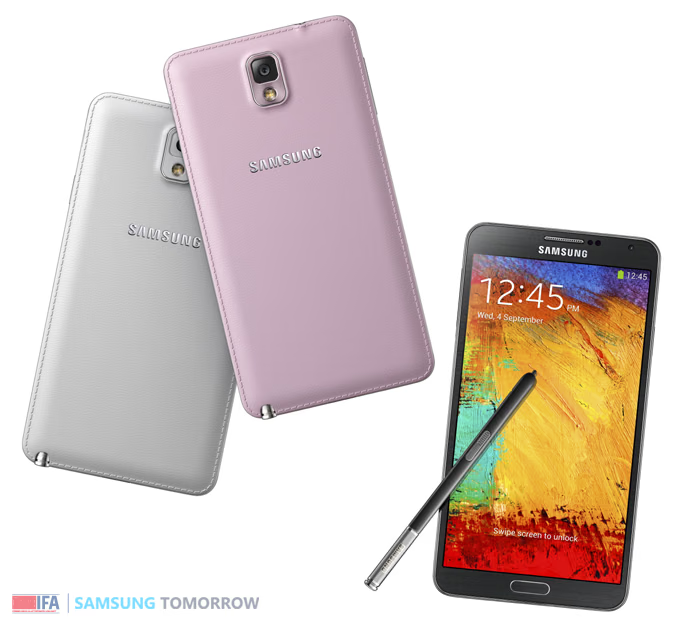
The Galaxy Note 3 made the pen easier to start using
The Galaxy Note 3 could put a menu of pen actions close to the place you already wanted to work. The stylus was still a physical item you could take out of the phone. Air Command gave it more visible first steps than a collection of features that had to be found in different places. The larger, denser display made a little more room for choosing an action and keeping the content beneath it. I would have tried a concrete job such as writing down a short detail during another task before judging the number of things that the menu offered.
Quick verdict
Retail release in First international rollout · Archive date
The Note 3 was worth carrying for someone who could use the wider screen and pen menu to take useful notes in the middle of another job.
Best for: A buyer who annotated a document or used a small tool to work with a separate piece of content.
Main benefit: Air Command put several usable choices in one place while the user already held the pen.
Biggest drawback: Regional variants could change the hardware experience and the wider design remained a deliberate carrying choice.
Reviewed version: The Samsung Galaxy Note 3 as documented at its September 2013 international launch.
Compatibility: Core pen and screen features were shared while processors, video functions and network support varied by region.
Review context: I evaluate the documented retail hardware and the software available in its release window. Regional variants and software changes are identified where they affect the verdict.
This is the research-based retrospective of Samsung’s September 25, 2013 international rollout. Samsung gave that date for the first wave of Galaxy Note 3 and Galaxy Gear availability. Local carrier models, chipsets and the timing of a particular market could differ. The focus here is the global launch package described by Samsung, with the display and pen experience shared across those principal variants. Samsung’s launch details and Note 3 specifications
Air Command gave the pen an obvious first decision
Removing the S Pen or pressing its button above the display could open Air Command. The useful point is that a choice became visible while you were already holding what you needed to make it. That changes the work of starting a note. It is easy to make a new input hard to use by keeping its abilities in a series of unrelated settings. Putting several familiar things beside the point where the pen entered the task made it easier to decide which of them fit.
Related reading
Action Memo could connect a short handwritten note to a follow-up, such as trying to use a number you had written. That would be helpful if the recognition of the content left you with an accurate result. A number from a conversation can be important enough to be worth checking before acting. Saving the note even if you meant to verify one detail was useful in its own right. The better question for the buyer was how often moving a short bit of writing into another task saved them enough time to care about the interface.
Screen Write gave a buyer a familiar way to capture what was visible and add a mark to it. That is a useful kind of note because it keeps the context that might otherwise have to be explained. A person marking part of a drawing or pointing out a misplaced line can give the other person a better idea of what needs attention. The choice of where the result went, how it could be read later and whether it could be edited remained separate parts of the job.
A bigger panel could handle more than drawing
The 5.7-inch display increased the resolution to 1920 by 1080. Writing beside visual detail made an especially good use of the extra space. A dense part of an image, an email or some small text can remain readable enough to be worth keeping in sight while you annotate a section. The physical screen also determined how large the writing area actually felt. If you turn the phone or show a keyboard, the space can be distributed quite differently from what the first impressive diagonal implies.
Pen Window let a buyer use the stylus to create a region for one of the supported apps. A tiny calculator above another piece of content offers a good example of where that approach saves a step. A second program that needed many controls and a broad view would benefit much less from a small region. This means the hardware could help with a short tool during a larger action without trying to substitute for a full laptop layout. Try the app and the action before deciding that any tool can fit anywhere on a phone screen.
The Note 3 was slightly thinner and lighter than the Note II despite the larger display. It used a textured back with a stitched visual detail. The overall look was different, and the width still made it a large phone. A person who used the S Pen could gain more from the big body than someone who mainly used a screen for short notifications. I would have kept a pocket and a writing surface in mind when trying it. A small change in the weight or width can matter when the device lives between a desk and a jacket. Samsung’s comparison of the Note 3 and earlier Notes
Related reading

Practical hardware helped it move files and last through longer jobs
Samsung sold models with 32 GB or 64 GB of internal storage and microSD expansion. Those were useful choices for a buyer who meant to store photos, video and files. A replaceable 3,200 mAh battery gave somebody travelling another way to extend a session of reading or working. That capacity still needed to support the display and the exact radio in use. I would have asked what a working day looked like before deciding a larger battery meant the same result for every Note owner.
The USB 3.0 port made sense to somebody who intended to transfer a bigger file with a compatible cable and computer. A new connector’s speed matters most when the whole path supports it, and the way the device fits older accessories also matters. For a buyer who kept media on a card or sent a few photos over Wi-Fi, that feature might be a smaller reason for changing phones. The new camera was more useful in part because the rest of the device gave a person ways to handle what it recorded.
Some configurations also came with different processors or video capabilities. It is easy to apply the better part of a specification to every device sold under the same name. I would have matched the model number, the regional network and any video requirement before giving those parts of the upgrade much weight. The pen, screen and storage choices were usually easier to assess directly.
My verdict on the third Note
I would have chosen the Note 3 if I regularly used a pen for a purpose that fit on a phone, such as taking a short note without losing my place. The screen and pen menu together gave it a clear advantage for that job. An owner of the Note II could try the new menu and the same few writing tasks before deciding to replace what was already a reasonable setup. The Galaxy review timeline separates the generation because it gave larger hardware and pen features a more visible way to work together.
What worked
Air Command put several usable choices in one place while the user already held the pen.
The Full HD display made writing beside a clear view of a document more feasible than on the previous Note.
What bothered me
Regional variants could change the hardware experience and the wider design remained a deliberate carrying choice.
The smallest windows suited short operations more than a program with many settings.
Who should not buy it
An owner who mostly used the phone in one hand for short replies and had little use for a stowable pen.
Alternatives I would consider
Galaxy Note II. The earlier large Note already had Air View and a useful S Pen, with a less dense screen. Read my Galaxy Note II review.
Evidence and sources
The release date refers to general availability in the named market. The archive filing is ten days later. Feature assessments are editorial judgments based on the documented retail model.
Features, compatibility and rated figures from the maker are manufacturer information. My opinions are identified in the review.
Conclusion
The stylus improvements had lasting value if they made the start of a frequent note easier instead of just increasing the number of launch features.
One email a week with practical Mac workflows, useful comparisons and honest tech recommendations.