A trackball appeals to me most when the problem is easy to name. Perhaps a keyboard, notebook and microphone have left very little room for a mouse to travel. Perhaps moving the pointer without moving the whole device would make a particular desk easier to arrange. The original Logitech MX Ergo has a clear response: keep the body still, move the ball with a thumb and choose a hand angle with its hinge.
Quick verdict
I would shortlist the original MX Ergo when saving mouse-travel space and choosing a hand angle are real needs.
Best for: A right-handed desk where a stationary pointing device has a clear advantage.
Main benefit: The trackball stays in place while its hinge offers a choice of hand position.
Biggest drawback: Thumb control has its own learning and fit requirements, and the original charging connection is Micro-USB.
Original Logitech MX Ergo, Graphite, 910-005177
Amazon US · US
Check price and availability: Original Logitech MX Ergo, Graphite, 910-005177 at Amazon USAffiliate link. As an Amazon Associate I earn from qualifying purchases.
Reviewed version: Original Logitech MX Ergo, Graphite, 910-005177
Compatibility: A supported Bluetooth host or the matching Unifying USB receiver, with current Logitech software support checked separately. This is the original Micro-USB model, not MX Ergo S.
Review context: I assess a stationary desk, thumb-based pointer control, the hinge, charging and the software needed for the intended workflow.
I like that focused idea, but I would not turn it into a promise that every hand will prefer it. This is the original Graphite model, 910-005177. The newer MX Ergo S and a package with extra accessories are separate buying decisions. The name on the offer matters as much as the familiar shape in the photograph.
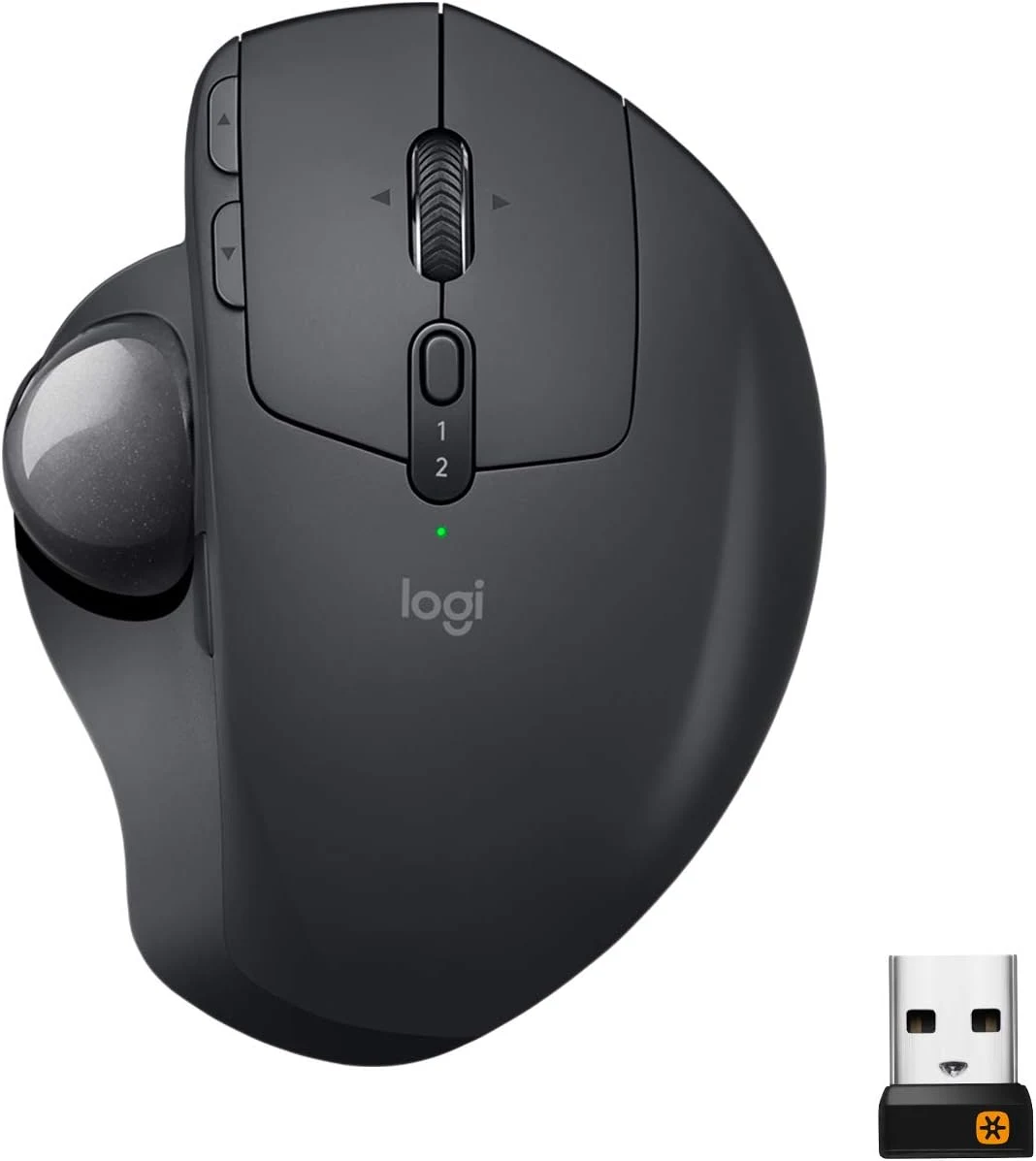
The space saving is real in principle
An ordinary mouse needs a working area in addition to the space it occupies while resting. A stationary trackball changes that arrangement. I can plan where the device sits without leaving a broad path beside it. For a crowded desk, that is a more concrete reason to investigate than a long collection of performance numbers.
Related reading
The trade moves from the desk to the hand. My thumb would control the pointer while the rest of the hand stays around the body. That is a different habit, not simply a normal mouse with fewer movements. I would allow time to decide whether the control feels natural for selecting text, reaching small buttons and moving between screens.
I would also think about which tasks repeat. A pointing device can feel pleasant for browsing yet less convincing for a particular game or detailed editing motion. The useful question is not whether trackballs are better in general. It is whether this form of control improves the work that actually fills the day.
The hinge deserves attention
Logitech’s original MX Ergo page describes a hinge that changes the angle between zero and twenty degrees. I like a physical adjustment whose purpose is easy to understand. It gives the hand another position without requiring a separate stand to be improvised beside the keyboard.
I would judge the position as part of the complete desk. The height of the chair, the keyboard and the resting place of the forearm do not disappear when a pointing device gains an ergonomic label. I would choose a position that suits the arrangement rather than assume that the larger angle must always be the correct one.
That is also why I would keep the return conditions in view. Published claims about reduced strain describe the maker’s comparison, not a personal health outcome for every buyer. The hinge is a feature I can identify. Whether I enjoy the resulting fit is a decision that still belongs to me.

Related reading
Two connections solve different problems
This model offers Bluetooth and a Logitech Unifying receiver connection. I like having a choice. Bluetooth can preserve a USB port, while a matching receiver can provide a dedicated connection route. The right answer depends on the host and the rest of the desk rather than on a rule that one technology is always superior.
I would keep the receiver identity clear. Unifying and Logi Bolt are different systems, despite both appearing on small Logitech USB devices. A familiar brand name does not make every receiver interchangeable. For a used or open-box purchase, the included receiver and its condition deserve a direct check before the price starts to look attractive.
Logitech also describes switching between two computers. That can be useful on a desk with more than one machine, but it is worth separating device switching from software-assisted movement of files or control between systems. I would verify the current software requirements for the intended feature instead of treating all of them as one hardware function.
Charging and cleaning remain ordinary jobs
The original MX Ergo uses a Micro-USB charging connection. That is a meaningful detail in a bag or desk that has otherwise moved to USB-C. It is not a reason to dislike the whole product, but I would include the correct cable in the ownership plan rather than discover the difference after the first low-battery warning.
A trackball also needs a clear cleaning routine. The ball and its supports are the moving interface, so keeping them accessible matters. I would follow the product’s maintenance guidance and avoid treating a sticky movement as immediate proof that the whole device needs replacing. A stationary body still contains parts that need ordinary care.
Neither task is especially exciting, which is why I think they belong in a useful review. A good desk accessory should remain understandable after the novelty ends. The charger, receiver and routine for keeping the ball moving are parts of the same purchase as the attractive adjustable shape.
Related reading
The reason I would choose it

I would compare the MX Ergo with the simpler M570 when the stationary role is the main attraction. The hinge, rechargeable design and connection choice give the MX Ergo its own argument. I would compare an MX Vertical when a different grip matters more than changing to thumb control.
My recommendation is positive for someone with a clear reason to try this format. I like that the product tackles both desk space and hand position through visible hardware choices. The exact Amazon US affiliate listing should still be checked for the original model, included receiver, condition and current availability. The right purchase is the arrangement that fits the work, not the most persuasive ergonomic label.
What worked
The trackball stays in place while its hinge offers a choice of hand position.
What bothered me
Thumb control has its own learning and fit requirements, and the original charging connection is Micro-USB.
Who should not buy it
Someone seeking a guaranteed comfort improvement or expecting the original model to have the newer S hardware.
Alternatives I would consider
Logitech M570. I would compare the simpler receiver-based trackball if the hinge and second connection route are unnecessary. Read my Logitech M570 review.
Logitech MX Vertical. I would choose a conventional moving mouse with a different grip when thumb-ball control is the obstacle. Read my Logitech MX Vertical review.
Evidence and sources
Product details come from the cited sources. Images: Amazon product gallery, manufacturer feature diagrams and manufacturer product images. These are not personal test photographs or measurements.
Features, compatibility and rated figures from the maker are manufacturer information. My opinions are identified in the review.
Conclusion
Worth considering when the stationary design solves a problem; it is a less useful purchase if a familiar mouse already fits.
Original Logitech MX Ergo, Graphite, 910-005177
Amazon US · US
Check price and availability: Original Logitech MX Ergo, Graphite, 910-005177 at Amazon USAffiliate link. As an Amazon Associate I earn from qualifying purchases.
One email a week with practical Mac workflows, useful comparisons and honest tech recommendations.