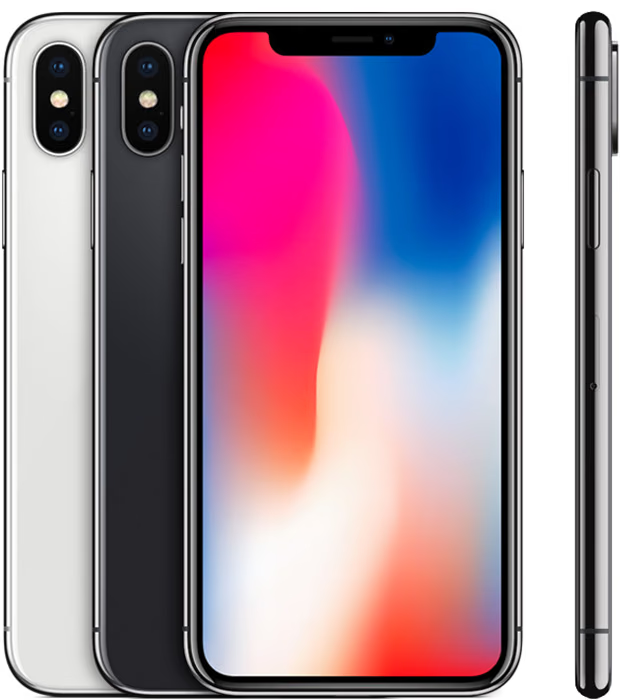
The iPhone X made moving between apps a reason to learn a new phone
The iPhone X asked a buyer to change two movements they had been using for years. Face ID replaced the usual fingerprint check. A swipe from the bottom took the place of pressing the Home button. Over several uses the main question was whether those changes worked more naturally in the positions where the phone was already used. The taller OLED panel made room for more of the screen in a body significantly narrower than the 8 Plus. That was a visible benefit before anybody adjusted to its new controls.
Quick verdict
Retail release in the United States · Archive date
The iPhone X made a strong case if you wanted more display in a narrower body and were happy to learn gestures and use Face ID.
Best for: A buyer whose common apps made useful use of a taller panel and who usually held the phone where the camera could see them.
Main benefit: The phone put more OLED display into the width of an easier grip than that of the Plus.
Biggest drawback: The new top and bottom gestures and the face camera asked for changes to established work.
Reviewed version: The 5.8-inch iPhone X with Face ID in the first US retail wave.
Compatibility: The original Face ID controls differed from the Home-button design. App layouts took time to adapt to the new screen shape.
Review context: I evaluate the documented retail hardware and the software available in its release window. Regional variants and software changes are identified where they affect the verdict.
I owned the iPhone X as part of having every iPhone. This retrospective covers the November 3, 2017 US retail launch. The iPhone 8 and 8 Plus had reached stores in September with the same generation of processor and easier comparisons for people who wanted to keep the Home button. November was the first chance to judge the fully available shape of the X. Apple’s record of the November 3 store launch
A swipe began to replace a movement to the button
The new bottom gesture meant you could end an ordinary task by moving the finger already on the display. You did not have to aim for a separate physical control. The phone extended this logic to switching between apps. That made the new system feel approachable in several tasks after the first gesture became familiar. I would have shown a new owner how to get home and reach the app switcher, then let them try those movements in their usual grip.
Related reading
Some actions used new positions. Control Center moved to a swipe from the upper-right corner. Reaching up for a repeatedly used control could matter on a taller phone. A gesture that is convenient with the phone low in the hand can be less convenient when its starting point is far away. A good explanation of the new interface should include where common actions moved. Buying for the display alone still brings those movements with it.
The benefit ended up being more about where the device let you move than how quickly you could memorise a set of gestures. A person holding a phone at a comfortable angle could get in and out of an app easily. A person with established accessibility or one-handed habits had a separate reason to check the particular actions they cared about. I would use the new method beside the old one for enough repetitions to see which was easier after the novelty of the first try.
Face ID was useful in a different set of positions
Face ID used the TrueDepth camera to recognise the person looking at the phone. This made it possible to authenticate without reaching a particular finger to a reader. Wake the display while looking at the phone and then make the usual upward gesture. The important question was whether you already looked at the screen in the required position. For some people that would line up well with the motion of taking the phone out of a pocket.
An office desk provides a different test. A phone flat on a desk can be beside you or nearer the edge with its display pointing away. A fingerprint reader is accessible by reaching over. The face system works better if it can see you from the way the device is positioned. A tilted stand could suit that buyer. Someone whose work involved protective gear or who often used the phone at an odd angle could find more variation in the new method than a person usually holding it up.
Using the camera for identification could also change the way a notification showed up. The phone could reveal content once you authenticated without going through the same button motion as the 8 Plus. That can be useful when a brief glance is the whole job. The passcode still matters, and the first release should be judged in the conditions when you expect to unlock it every day. Apple’s Face ID and TrueDepth introduction
The screen diagonal told only part of the story
The X used a 5.8-inch OLED screen with a taller shape and a cutout for the front sensors. The older 8 Plus had a 5.5-inch screen with a broader grip and a different aspect ratio. The X put much of its visible front to work and fit the extra diagonal in a narrower body. That did not automatically make every landscape video or every layout larger in the same way. A buyer who mostly used wide content ought to compare the part of the screen that displayed it rather than the headline diagonal.
Related reading

OLED gave the phone a distinct way to display dark backgrounds because individual pixels could stop emitting light. It could be persuasive for photos or video with dark areas near bright ones. A reading app with plain text offered another way to assess its clarity. The cutout and rounded corners affected where apps could put information. Software updated for the layout could use the new space deliberately. Older apps could use a more conservative area, which made a familiar favourite worth checking before assuming it filled all the new display.
The rear cameras were another reason to compare the X with the 8 Plus. Apple equipped both the wide and telephoto lenses with optical stabilisation. The phone also supported portrait work with the front camera thanks to the TrueDepth system. Those changes mattered to photographers who would use the separate views and in conditions where holding the phone steady helped. The shared A11 meant buyers did not have to assign the entire cost of the X to speed. Its premium paid for a different physical design, display, camera functions and system of authentication.
It was also worth spending time with the phone using its most ordinary screen brightness. A spectacular OLED image gives the new size a good introduction. A sequence of small tasks shows if the narrow shape, the new Home gesture and the sensor position give you more natural access to that display.
My verdict on the first Face ID iPhone
I would have bought the X for somebody who wanted the larger-feeling display in a narrower shape and was comfortable with the new unlock and gestures. In the United States the 64 GB model began at $999. Somebody mostly looking for a fast new processor that autumn had a good reason to compare the iPhone 8 or 8 Plus. The Plus still offered a wider writing area, dual cameras, Qi charging and the fingerprint control many people already understood.
The iPhone model timeline gives the X its November date because it changed what a buyer could find beside the older shapes once it reached stores. It was memorable for using more of its front as a display. The better reason to own one was how naturally the new controls let you use that space after learning them.
What worked
The phone put more OLED display into the width of an easier grip than that of the Plus.
The two rear cameras both offered optical stabilisation and the front used TrueDepth.
What bothered me
The new top and bottom gestures and the face camera asked for changes to established work.
The screen cutout and old app layouts changed the area that could actually show a piece of content.
Who should not buy it
Someone who wanted Touch ID in familiar positions or mainly needed the A11.
Alternatives I would consider
iPhone 8 Plus. The larger Home-button phone shared the A11 and wireless charging and had a capable dual camera system. Read my iPhone 8 Plus review.
Evidence and sources
The release date refers to general availability in the named market. The archive filing is ten days later. Feature assessments are editorial judgments based on the documented retail model.
Features, compatibility and rated figures from the maker are manufacturer information. My opinions are identified in the review.
Conclusion
The purchase premium covered a different physical and interactive design, a capable screen and new camera options.
One email a week with practical Mac workflows, useful comparisons and honest tech recommendations.