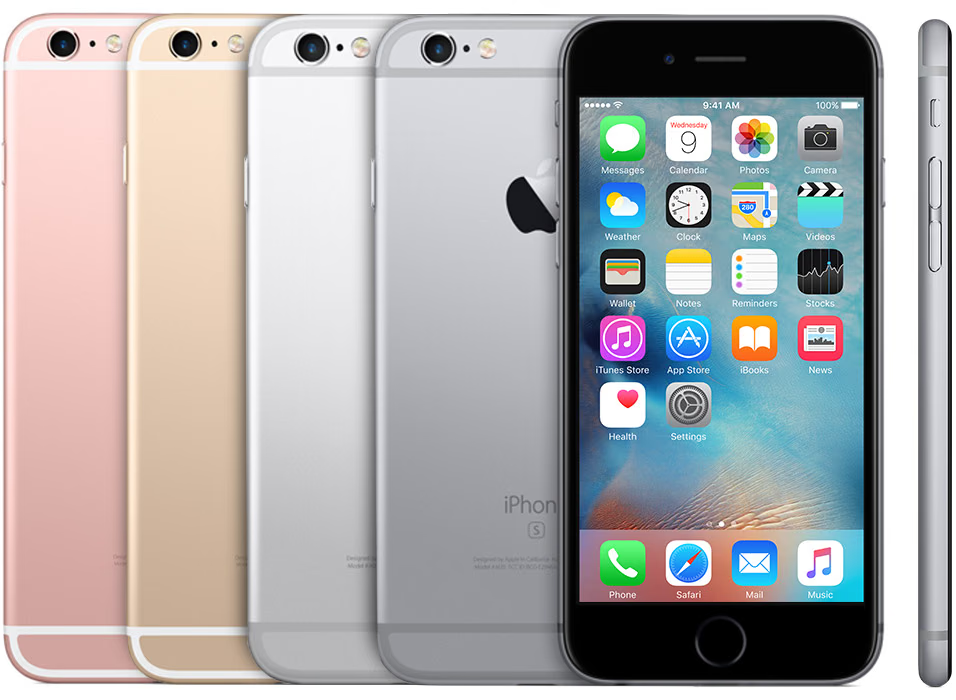
The iPhone 6s gave the same size more ways to respond
A look at the iPhone 6s in the first days after launch would start with the familiar 4.7-inch screen and then find changes under nearly every frequent action. The A9 improved what the phone could do between two taps. Touch ID responded more quickly. The camera offered a different way to keep the moment around a still picture. 3D Touch was the one change that asked you to learn something before it could help. For someone already using the iPhone 6, sorting those differences by how often they came up was a good way to decide whether to change phones.
Quick verdict
Retail release in the United States · Archive date
The iPhone 6s made a familiar size quicker and more versatile, especially when used as a camera.
Best for: Someone already comfortable with a 4.7-inch display who cared about unlocking speed, photos or more capable apps.
Main benefit: The A9 and a revised 12-megapixel camera improved tasks that had already justified buying the iPhone 6.
Biggest drawback: Pressure shortcuts required discovering where an app used them. The regular 6s omitted the Plus's optical camera stabilisation.
Reviewed version: The 4.7-inch iPhone 6s, distinct from the larger iPhone 6s Plus.
Compatibility: Supported apps could implement pressure shortcuts. Apple introduced both 6s models with iOS 9 and used Lightning for wired charging and data.
Review context: I evaluate the documented retail hardware and the software available in its release window. Regional variants and software changes are identified where they affect the verdict.
I owned the 6s as part of having every iPhone. This retrospective concerns the smaller of the two models that reached stores in the United States and other first markets on September 25, 2015. The iPhone 6s Plus reaches a different conclusion on how much phone to carry and how its camera works. Apple’s retail availability announcement
3D Touch had to make a familiar action shorter
The display could sense pressure in addition to where a finger landed. From a supported home-screen icon, pressing could open a small set of quick actions. In software with Peek and Pop, one level of pressure could preview an item and a stronger press could open it properly. I would have assessed this on a message that you wanted to glance at without losing position in a list. If the preview saved an open, a search and a return to the surrounding context, it had done enough to become part of a daily routine.
Related reading
Availability made the benefit uneven. One app might supply the right action, while a visually similar control in another app could call for a standard tap. The new pressure gestures had few persistent marks to teach you where to use them. Someone explaining the phone to a new owner could help by showing just one time it saved a real step. Asking them to try pressing on everything would trade away the confidence that made the rest of the interface easy to approach.
The first few weeks offered plenty of ordinary reasons to use a 6s even before you developed any preference for pressure. The important parts of the interaction still worked with direct controls. That made the new input easier to try at your own pace. A buyer with accessibility needs would have had a practical reason to try pressure sensitivity and its settings separately from the usual test of reading the screen and reaching the controls. Apple’s introduction of the pressure-based gestures
The screen and size did a good job of staying familiar
The 6s kept the 1334-by-750 display from the iPhone 6. That was a useful match for someone who liked the larger picture after a four-inch iPhone but still wanted a phone they could carry and reach around with few adjustments. The case was slightly thicker and heavier than the 6. Apple described a different aluminium alloy and stronger front glass. A buyer who planned to use an existing case ought to check a particularly close fit. A person picking it up in the store could also compare the physical difference before deciding that two phones with almost the same profile would feel identical.
A faster fingerprint reader mattered because the phone could wake and be ready in less time. This could change a moment you barely noticed on a steady old phone. It also matters whether you intend to use the Lock Screen to read a line of a notification. When merely pressing the Home button takes you into the phone more quickly, the side button remains a useful way to wake the display without asking it to unlock. The new speed gave both of those movements a distinct purpose.
The A9 improvements also needed the context of the things you ran. A small bit of text still opens as a small bit of text. Image processing, heavier web content and capable games give the new chip more to do. I would have tried a familiar task that had felt slower on my old phone in addition to considering the camera. A test of larger files helps separate an everyday improvement from a different number on a specification sheet.
Related reading

Live Photos had a reason if the moment kept going
The main camera moved to 12 megapixels and could record 4K video. Live Photos captured a short interval around a still picture. The normal photo is where most of the attention goes. A short look at what came before and after could capture the gesture or sound that made you reach for the phone. This was useful if you could plan to stay on the subject for a bit after pressing the shutter. Bringing the phone straight down at the end could put an unintended movement into the result.
Sharing shaped whether the feature was useful. A compatible viewer could see and hear the extra material. Sending an ordinary still photo remained the reliable option for someone whose device or app could not play it the same way. This also gave the photographer a reason to know which format they were sending. There are everyday pictures where you want only the still and would rather omit the activity or audio around it.
I would also have treated 4K as a choice that needed a reason. A short clip you expected to edit or view on a suitable screen could benefit from the extra detail. A long recording would use more of the buyer’s fixed storage and take longer to move. The smaller 6s did without the Plus model’s optical stabilisation. Choosing an ordinary video setting and a stable position could matter more to someone who mostly wanted to share simple clips than choosing the largest resolution every time.
My verdict on the smaller iPhone 6s
I would have bought the 6s for the quicker everyday operation, more flexible camera and comfortable intermediate size. I would have compared it closely with the iPhone 6 if the predecessor already handled all the applications I wanted, especially if I could try iOS 9 on it first. Somebody particularly interested in stationary reading or steadily held video could find a separate reason for the 6s Plus. The size decision deserves more weight than whether a single pressure shortcut is impressive when demonstrated.
The 6s gets its own spot in the iPhone model timeline because it changed what the same spaces could do. The Home button unlocked more quickly, the screen recognised a more deliberate press, and a shutter action could keep a little more of what happened. All of those were real additions. A buyer got the most out of the phone by deciding which one made an existing action easier.
What worked
The A9 and a revised 12-megapixel camera improved tasks that had already justified buying the iPhone 6.
Live Photos could capture the action close to an ordinary still picture without needing to switch to a separate video mode.
What bothered me
Pressure shortcuts required discovering where an app used them. The regular 6s omitted the Plus's optical camera stabilisation.
Production cases designed to the earlier body's tight fit needed a second look before being transferred.
Who should not buy it
Someone who mainly needed an extended reading area or the Plus model's stabilisation for video.
Alternatives I would consider
iPhone 6s Plus. The larger sibling supported the same pressure gestures and could optically stabilise its video camera. Read my iPhone 6s Plus review.
Evidence and sources
The release date refers to general availability in the named market. The archive filing is ten days later. Feature assessments are editorial judgments based on the documented retail model.
Features, compatibility and rated figures from the maker are manufacturer information. My opinions are identified in the review.
Conclusion
It worked for a 2015 buyer who wanted more speed and camera options with almost the same fit as the previous phone.
One email a week with practical Mac workflows, useful comparisons and honest tech recommendations.