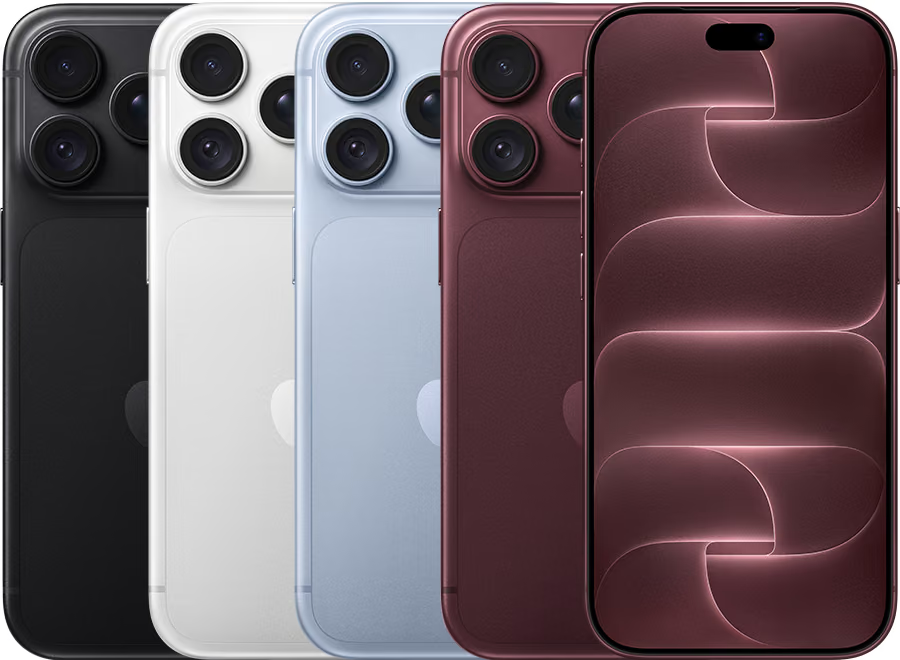
The iPhone 18 Pro let me decide how much of a scene stayed in focus
The iPhone 18 Pro brought a variable aperture to the main camera and gave the camera app more direct controls for exposure, shutter speed and white balance. That was a clear reason to try this Pro at the US launch on September 18, 2026. I would have started with a group and a dark room because they have different demands. Opening the aperture can help with low light. Closing it can keep more of a group at different distances acceptably sharp. A person who regularly made those choices had a clearer reason to use a new Pro than somebody who mainly needed the phone to open quickly and take an ordinary photo.
Quick verdict
Retail release in the United States · Archive date
I would have chosen the smaller 18 Pro if optical control of the Main lens helped with real group, low-light or deliberately framed photography.
Best for: A photographer keeping people at several subject distances in focus or working with the same composition in changing light.
Main benefit: The adjustable physical aperture and manual settings allowed another useful choice before a photo was even captured.
Biggest drawback: The results depended on subject motion, available light and other exposure settings. Ordinary photography already worked well on the 17 Pro.
Reviewed version: The US iPhone 18 Pro sold from September 18, 2026, with a variable-aperture Main camera and A20 Pro.
Compatibility: It launched with iOS 27. The four manual aperture positions apply to the Main lens with supported capture settings in the Camera app.
Review context: I evaluate the documented retail hardware and the software available in its release window. Regional variants and software changes are identified where they affect the verdict.
I owned this model as part of having every iPhone. This launch review concerns the documented September hardware and the camera options Apple described at that release. My separate iPhone 18 Pro assessment looks more closely at later published battery evidence, regional pricing and whether the features make a good upgrade. Apple’s iPhone 18 Pro and Pro Max introduction
Start with people who are not all standing next to each other
An object placed between you and a wall is an easy way to see depth of field. A group gives the feature a more useful job. Suppose two people stand in front and someone else is a step behind. A narrower aperture can keep all those people more visible while the phone still has to make an exposure suitable for the amount of light. Check each row before deciding that the camera has done what you need. I would have arranged a short series with the people at a couple of different distances, then chosen which version would actually be worth sharing.
Related reading
The aperture is a mechanical change to the Main lens. The result depends on the working distance and what else the camera has to change to expose the image. In a dark room, closing the aperture can reduce light reaching the sensor. A camera may use a longer exposure or a change in sensitivity, and either can make a different trade when people move. I would have considered that separately from whether I like the out-of-focus portion of the image. A useful outcome is keeping the important people or objects sharp enough in the conditions in which you needed to take the photo.
Pro controls have a clearer case when you know what automatic will do
The Camera app lets you choose among four manual aperture settings on supported captures. It also gives access to settings such as shutter speed and white balance and an exposure histogram. Moving manually can mean making a decision the automatic mode would have made for you. Try an ordinary interior picture on automatic and another for which you know one setting ought to change. The benefit becomes clearer if you can describe what is improved when you view or send the result.
I would have checked whether I needed to use more than one of the new controls together. In a space with mixed light, an exposure setting and a chosen white balance could help make several pictures look consistent. For a quick image on the move it might be better to use the automatic mode, choose where to stand and take a frame while the timing is right. Pro controls can be available without turning every use of the camera into a deliberate shoot. That is what made them suitable for a phone I might carry daily.
It is useful to separate the aperture on the Main camera from what the rear array can do around a tighter field of view. The way a 2x or tighter option frames a subject does not make it the same lens. I would have started by choosing a useful rear camera and only then asked which image settings supported that composition. A narrower crop can emphasise the right subject. It does not fix motion that already made the part of the scene hard to read.
Keep camera handling separate from choosing the largest phone
The Pro shared its most important camera changes with the Pro Max. I had a choice about where I wanted to inspect the work and how I wanted to hold the phone when making it. A 6.3-inch class display offers enough space for many smaller checks. A larger preview has a separate benefit when it must show several people or a long sequence at once. The smaller body remains useful if it lets you raise the camera sooner and keep it steady. Try the relevant position with any case you use, including the way it leaves Camera Control accessible.
Related reading

The smaller Dynamic Island and the new A20 Pro and thermal design were other changes. Some make a meaningful difference depending on how a phone is already used. A faster or cooler operation during a longer job is different from the effort of checking a single photograph. A person considering the hardware chiefly for a long recording can try that very different workload in a familiar environment. A reliable photo in a crowded room remains a different reason for choosing the same phone.
A physical aperture can help even if you never set it yourself
A younger child at the front of a group and another several steps back make a good pair of things to check. If an automatically chosen aperture can keep both acceptably clear, that is already an improvement a buyer might notice. If I want the face in front to stand out and the people behind it are incidental, a different choice might serve the photograph better. Going through both versions is a useful way to decide if I want to make this decision routinely. I would have left all the images at the size I expected to use and asked whether someone who did not take the pictures could see the desired difference.
A histogram can have its own use in a room with a bright window. If I mean to preserve some detail in the background as well as the subject’s face, I can see when a bright area is at risk of losing information. I would have checked the word or surface I wanted the person receiving the image to see. That felt like a more persuasive use of the app changes than reaching for manual controls simply because I could.
My verdict on the 18 Pro
I liked having a regular-sized Pro with a visible optical change to the Main camera. I would have spent for it if I regularly worked with people at different distances or had a clear reason to use the extra controls. A well-functioning iPhone 17 Pro already gave you several useful distances and a capable standard camera. The iPhone 18 Pro Max launch review looks at the costs and benefits of carrying more screen with the same basic camera. Both belong to the September launch in the iPhone model timeline.
What worked
The adjustable physical aperture and manual settings allowed another useful choice before a photo was even captured.
Both Pro sizes shared the variable-aperture Main camera, so grip and preview size could be compared separately.
What bothered me
The results depended on subject motion, available light and other exposure settings. Ordinary photography already worked well on the 17 Pro.
The new controls added manual decisions that were useful only when they changed the result. Holding the phone steady continued to matter.
Who should not buy it
Someone who only needs the ordinary quick camera and has no identifiable scene that benefits from manually choosing the aperture.
Alternatives I would consider
iPhone 17 Pro. Its older Main lens has a fixed aperture, though the familiar rear cameras and 4x telephoto still cover several ordinary situations. Read my iPhone 17 Pro review.
Evidence and sources
The release date refers to general availability in the named market. The archive filing is ten days later. Feature assessments are editorial judgments based on the documented retail model.
Features, compatibility and rated figures from the maker are manufacturer information. My opinions are identified in the review.
Conclusion
Compare the actual scene across the models instead of paying for the controls in isolation. Use a familiar room and the size you would share the photo.
One email a week with practical Mac workflows, useful comparisons and honest tech recommendations.