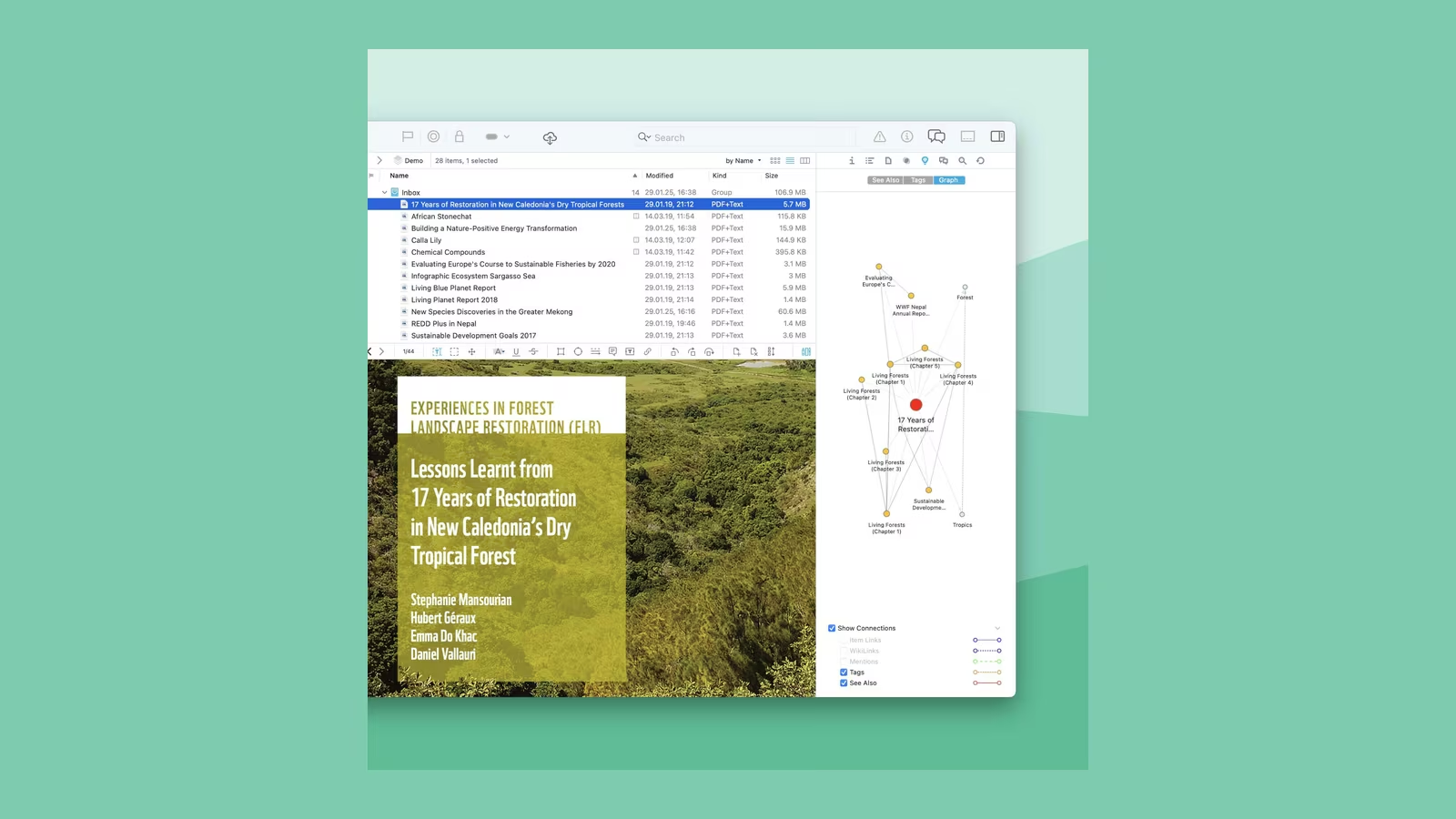
DEVONthink is not a notes app with more folders. It is a document database for people whose archive has become larger than the folder structure they once designed for it. PDFs, mail, scans, web pages, Markdown and office files can live together, be indexed, related and retrieved by content rather than by the filename someone happened to choose five years ago.
That power makes the application difficult to review. A new empty database proves almost nothing. DEVONthink becomes interesting only when it contains enough material to expose weak naming, overlapping topics and half-remembered documents. It also becomes demanding. Import decisions, sync design, backups and edition choice matter more than the first hour of interface exploration.
Version 4 adds modern AI features and a refined interface, but the reason to buy DEVONthink remains older and less fashionable: local control over a serious archive, with search and classification designed around the material inside it.
The database is a boundary, not just a folder
A DEVONthink database holds records, metadata, groups, tags and indexes around documents. Files can be imported into the database or indexed in an external location. That choice determines what DEVONthink owns and what another tool may change.
Imported material is managed as part of the database. This simplifies consistency and backup because the records and files travel together. Indexed material remains in the filesystem, which can be important when other applications, scripts or version control also need direct access. The cost is that moving or renaming files outside DEVONthink can break the relationship.
I would not make one universal choice. Scanned correspondence and reference PDFs fit naturally inside a managed database. A Markdown publishing repository should remain ordinary files because Git, editors and build tools are part of its identity. DEVONthink can index that repository without becoming its owner.
The decision should be documented before a large import. Mixing methods without a rule is how an archive becomes impossible to reason about later.
Search is the product’s strongest argument
Finder and Spotlight are good when the query is known. DEVONthink is useful when the memory is incomplete. A phrase, date range, tag, document kind or related item can narrow the archive without requiring the exact filename. Boolean operators and metadata provide precision, while similarity can surface documents that do not share the obvious keyword.
The distinction matters. Search answers what the user asks. Similarity tries to answer what the user meant. It can connect a proposal with earlier research or find correspondence related to a document whose title is forgotten.
This is not magic understanding. Results depend on extractable text and the character of the corpus. OCR quality, language, duplicated boilerplate and very short documents all influence the signal. A set of invoices may cluster by repeated legal text rather than the business question the user cares about.
Related reading

Test with the failures already known in the current archive. Make a list of twenty documents that are difficult to find today and write down the clues actually remembered about them. Search after import, then record which clues worked. That is a better evaluation than timing an obvious query in a demo library.
Classification is assistance, not autonomous filing
DEVONthink can suggest groups and tags based on material already organised. The appeal is clear: after years of manual filing, the archive teaches the application what belongs together. The danger is treating a plausible suggestion as a correct destination.
Classification should be scored against known answers. Hold back a representative set of documents, import them into an inbox and compare the top suggestion with the folder chosen previously. Count exact matches, useful near-matches and clearly wrong results. A tool that is right seventy percent of the time still requires review on every document.
I value the feature as a way to reduce navigation. A good suggestion puts the likely destination one click away. I would not build an unattended rule that files important records solely from a content recommendation. Deterministic metadata, sender or document type is safer for automation.
The suggestions can also reveal problems in the human structure. If the same document fits equally well in several groups, the taxonomy may express projects, subjects and people in one hierarchy. Tags or saved searches may represent those overlapping dimensions better.
OCR decides whether paper joins the archive
Scans without a text layer are pictures. DEVONthink Pro and Server include optical character recognition, allowing photographed or scanned pages to participate in search. That turns old letters, receipts and technical manuals into usable archive material.
OCR accuracy varies with language, paper quality, skew, type size and layout. Tables and multi-column documents are harder than clean prose. Names, identifiers and account numbers deserve manual verification because a single character matters.
Build a small validation set before processing thousands of pages. Include clean print, a poor scan, several languages, a table and documents containing the exact kinds of identifiers the archive relies on. Compare selected passages with the image. If the error pattern is unacceptable, improve scanning or use a specialist OCR path before import.
The searchable PDF produced by OCR should preserve the original page image. Recognition text is an access layer, not a replacement for the evidence. For legal or financial records, keep the source unchanged and record when derived text was created.
Sync is not backup
DEVONthink can synchronise databases between devices using supported stores, and DEVONthink To Go extends access to iPhone and iPad. Sync makes current data available elsewhere. It also propagates deletions and mistakes. That is why it cannot be the only copy.
The first sync of a large database should happen on a stable connection with time to finish. Confirm free space on every destination, then compare database counts and representative records. Interrupt a test database deliberately before trusting the production one. Restart the device, resume and inspect whether attachments and metadata arrive intact.
Encrypted sync protects the store, but the password becomes part of recovery. Keep it in a password manager and understand whether losing it makes the remote data unusable. Do not expose a sync store publicly simply because its contents are encrypted.
Backup the Mac database separately with versioned history, and test restoration. A backup that has never been opened is a hope. DEVONthink can verify databases, but filesystem and backup integrity still belong to the wider system.
DEVONthink To Go changes the update calculation
The mobile application is useful for reference, capture and light organisation. It is not the Mac application squeezed onto a smaller screen, and a large local database may not belong on every device. Selective sync can keep the mobile set practical.
DEVONtechnologies currently includes DEVONthink To Go access with eligible Pro and Server 4 licences, but only while the Mac licence remains eligible for updates. The company’s licensing FAQ explains that the mobile app otherwise uses its own subscription model.
This detail changes the phrase one-time purchase. The Mac application keeps working when update coverage ends. Full mobile entitlement through the Mac licence may not. Anyone buying for a Mac and iPad workflow should include update extensions or the mobile subscription in the long-term price.
I would sync only groups that are genuinely needed away from the Mac. A phone is excellent for retrieving a document at the right moment. It is not an ideal place to administer a complex archive.
Server is a specific edition, not the best default
DEVONthink 4 comes in Standard, Pro and Server editions. Standard covers the core document-management experience. Pro adds professional features such as OCR, email archiving, custom metadata and automation. Server adds browser-based access to databases hosted by a Mac.
Related reading

The word Server can imply a headless, enterprise service. That is not the right model. DEVONthink Server runs with the Mac application and serves selected open databases through a web interface. The Mac must remain available, the service must be secured and the network design still belongs to the owner.
This can be excellent for a household, laboratory or small team that needs browser access without installing the Mac client everywhere. It is not a public content-management system, high-availability platform or substitute for an organisation’s identity and audit infrastructure.
Keep the service on a trusted network unless there is a properly managed secure access layer. Use TLS, individual accounts and narrow database permissions. Avoid direct router port forwarding. A private VPN is easier to reason about than publishing a document archive to the internet.
The web interface is about access, not full parity
Browser users can search, view and contribute according to their permissions. This lowers the barrier for people on Windows, Linux or locked-down machines. They do not need to understand the full DEVONthink interface to retrieve a document.
The compromise is that administration and advanced workflows remain on the host Mac. A web client should be evaluated against the tasks those users actually need: find a policy, download a PDF, add a record or update selected metadata. If they need complex filing, scripting or database maintenance, the Server edition may not solve the collaboration problem.
Test with a standard user account rather than the administrator. Verify which databases, groups, metadata and download actions are visible. Check session expiry and behaviour after the host sleeps or the application closes. The service is useful only if its operational boundary is understood.
The host Mac becomes infrastructure. Disable automatic sleep when appropriate, monitor storage, install updates deliberately and include the database in a real backup policy. Calling the edition Server does not perform those jobs.
Automation is powerful when the filing rule is explicit
Smart rules, AppleScript, Shortcuts and document actions allow DEVONthink to process repetitive input. Mail can be archived, scans renamed, metadata assigned and documents routed based on predictable properties.
Automation works best with facts. File type, sender, date pattern and a known tag are safer than an opaque relevance score. Begin with rules that flag or duplicate into a review group. Only move or delete automatically after the rule has run visibly for long enough to expose exceptions.
Every automation should have a recovery path. Record the source, destination and transformation. Preserve original filenames or identifiers in metadata. Keep logs for bulk operations. A knowledge tool should make provenance clearer, not hide it behind clever filing.
The system can become a hobby. It is tempting to design an elaborate taxonomy and dozens of rules before the archive answers a single useful question. Start with capture, search and a small number of durable groups. Let repeated retrieval problems justify additional structure.
Generative AI belongs behind a privacy decision
DEVONthink 4 adds an AI chat assistant and connections to generative models. Asking questions across selected material can help summarise or locate themes, but it introduces a separate data boundary from the local index.
Before enabling a provider, determine what document content leaves the Mac, which company receives it, how requests are retained and whether the account is approved for the data. Local archive does not automatically mean local inference. Financial, client or personal material may be inappropriate for an external model.
Answers also need source verification. A generated synthesis can be fluent and wrong. Use it to identify candidate documents, then open the originals and cite them. DEVONthink’s conventional search remains the trustworthy retrieval layer because it exposes the records directly.
AI is not the reason I would buy this application. Its durable advantage is the controlled archive and rich index. Model integrations will change. The database must remain useful when they do.
Performance should be tested on the real corpus
Indexing speed depends on document count, total size, file formats, OCR and storage. A thousand small notes exercise different overhead from one large PDF. Search latency depends on index size and query shape. One universal benchmark would be misleading without publishing the corpus.
The trial is generous: DEVONtechnologies currently offers at least 30 days or 150 hours of runtime. Use it on a copy or representative subset. Time initial import, note database and index size, then run the same query set as the corpus grows. Watch memory pressure while ordinary applications remain open.
The more important performance question is interaction. Does search return before attention drifts? Can a large group open without a long redraw? Does background indexing make the Mac uncomfortable? Those answers determine daily use even when raw throughput looks respectable.
Related reading

Do not import the only copy of an archive to make a benchmark. Preserve the source and compare counts afterward.
Pricing makes edition discipline essential
DEVONtechnologies currently lists version 4 at $99 for Standard, $199 for Pro and $499 for Server. Each licence includes two Mac seats and one year of updates. The application remains usable after update coverage expires. The official pricing page lists extension pricing and explains that coverage can be resumed later.
This is a fair ownership model, but the edition gap is large. Most individual users considering a serious paperless archive should compare Standard and Pro. OCR, email archiving, custom metadata and mobile access can justify Pro. Server makes sense only when browser access for other people is a defined requirement.
Do not buy Server as future-proofing. The $300 difference from Pro can fund years of update extensions, backup storage or another purpose-built collaboration service. Start with the workflow that exists.
Version 4.4 currently requires macOS Ventura or later, according to the official product page. Check every licensed Mac before upgrading an older archive.
Verdict
DEVONthink 4 is one of the few Mac applications built for an archive that is already complicated. Its search, similarity, metadata, OCR and automation can recover value from documents that would otherwise remain technically stored and practically lost.
The Server edition is excellent for a narrow case: a Mac-hosted archive that selected users need to reach through a browser. It is not the automatic choice for a power user, and it does not remove the need for network security, uptime planning or backups.
I would begin with a copy of real material, not sample documents. Search for things that are currently hard to find, score classification suggestions against known filing, interrupt a test sync and export representative records. If DEVONthink makes the archive easier to retrieve without obscuring ownership, it earns the learning curve. If the requirement is primarily collaborative writing or public publishing, a document platform will be simpler. This is a private information system first, and that is precisely why it remains distinctive.
Screenshot: DEVONtechnologies.
One email a month: new articles, reviews and the upcoming live webinar + free recording. No spam, unsubscribe anytime.