The portable SSD I find most appealing is the one that fits the computers I actually use. The Crucial X9 Pro 2TB has a clear role in that decision: a small drive for working files, media and transfers without turning storage into a desk project. I like the idea of carrying a useful amount of fast local storage in a simple USB device.
Quick verdict
I would choose it for a compact 2TB working drive used through compatible everyday USB connections.
Best for: I would choose it for a compact 2TB working drive used through compatible everyday USB connections.
Main benefit: Its portable form and straightforward USB storage role suit moving a working folder between machines.
Biggest drawback: The port and filesystem can limit the experience, and one portable copy is not a backup.
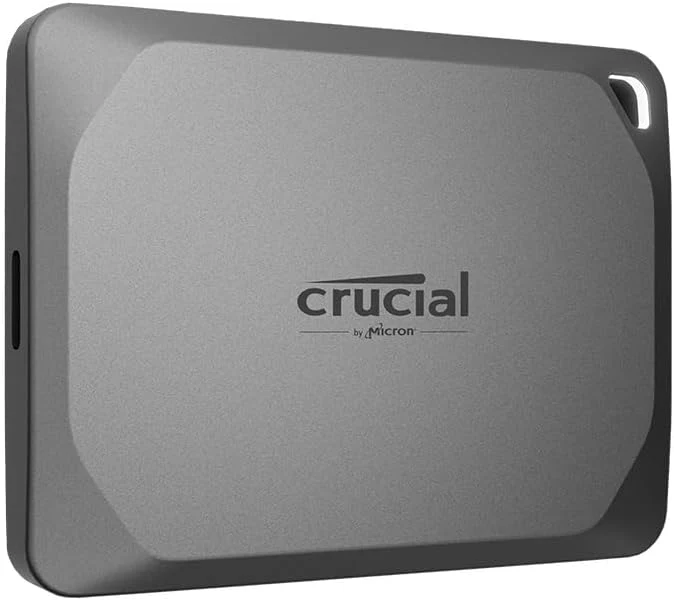
Crucial X9 Pro 2TB Portable SSD
Amazon US · US
Check price and availability: Crucial X9 Pro 2TB Portable SSD at Amazon USAffiliate link. As an Amazon Associate I earn from qualifying purchases.
Reviewed version: Crucial X9 Pro 2TB Portable SSD, Up to 1050MB/s Read & Write, 3.2 USB-C, External Solid State Drive, Durable Storage for PC & Mac, for Content Creators & Videogaphers, Silver - CT2000X9PROSSD902
Compatibility: 2TB USB-C portable SSD, CT2000X9PROSSD902. The host, data cable and filesystem must support the intended workflow; device compatibility does not mean identical console game use.
Review context: I assess carrying working files between computers, USB bandwidth, formatting, physical handling and independent backups.
I would choose it for a project folder or media collection that needs to move between compatible machines. I would not treat the drive as a complete backup system simply because it sits outside the computer. The strongest case is convenient working storage supported by a separate plan for the files I cannot afford to lose.
The port decides what the cable can deliver
The selected X9 Pro listing describes the X9 Pro’s USB storage role and its advertised transfer capability. I treat the speed figure as a manufacturer maximum, not a result established here. The actual connection includes the host port, the data cable and any dock between them.
Related reading

A USB-C socket is a shape, not a promise that every attached device runs at the same rate. I would identify the computer’s supported USB mode before paying more for another drive’s larger headline figure. For many ordinary fast USB connections, matching the host sensibly is more valuable than buying an interface the host cannot fully use.
I would begin an unfamiliar setup with the supplied suitable cable and a direct connection. That creates a simple baseline before adding adapters or a dock. If a transfer behaves unexpectedly, there are fewer parts to check. A neat desk arrangement is worthwhile, but I want to know which connection carries the working files reliably.
Moving a project means moving its assumptions
A folder full of documents is simpler than an application workspace with links, permissions and temporary files. I would confirm which parts of a project belong on the portable drive and which software expects a fixed local path. A drive can carry the files without automatically making every application setup portable.
For active editing, I would keep the cable out of a place where it can be knocked loose. A laptop balanced at the edge of a table and an SSD hanging from its connector is not a good working arrangement. I would put both devices on a stable surface and allow enough slack to move the computer without pulling on the connection.
A 2TB label also needs to be translated into a working plan. Formatting, existing content and the operating system’s capacity display affect what appears available. I would allow room for new footage or project growth instead of filling the drive at the start. A slightly larger working margin can be more useful than arguing over the final displayed capacity.
The filesystem is a compatibility choice
If I need to use both a Mac and a Windows computer, I would choose a filesystem with that exact exchange in mind. The right answer depends on the file types, required permissions and applications. I would check the hosts and keep a backup before reformatting, because formatting can erase what is already on the drive.
Related reading

Cross-platform convenience can involve trade-offs. A format that both systems can access may not provide every feature of a native filesystem. I would not choose it solely because it appears in a quick online recommendation. A shared transfer disk and the main working volume for a demanding application can have different requirements.
I would be equally precise about console compatibility. Being able to connect a USB drive does not mean every console can run every game directly from it. Installation, storage and playback rules differ by platform and game generation. I would use the console’s guidance for the intended job rather than let a broad compatible-devices list answer a narrower question.
Physical protection is useful within its limits
Crucial advertises dust, water and drop-resistance characteristics for this model. I regard those as controlled product claims with conditions. They are useful context for a portable device, but I would still protect the connector, keep the drive away from liquids while connected and handle it as the holder of important files.

I would also think about loss. A small drive is easy to carry and easy to leave behind. If the files are sensitive, encryption and a recoverable password arrangement belong in the plan. The exact security features and their host support should be checked before relying on them for a mixed-computer workflow.
For a media trip, I would make a second independent copy before deleting camera cards or clearing the computer. Portability is not redundancy. I find that distinction especially important with a fast drive, because quick transfers can make it tempting to tidy the source too soon. A completed copy should be verified before the original disappears.
Related reading

Where I see the value
I would compare the Kingston XS2000 when the host explicitly supports its faster USB mode. I would choose network storage when the real job is shared access and scheduled backups. The X9 Pro is attractive when one compact working drive and familiar USB connectivity are the right answer.
I would check the exact 2TB model, included cable and current seller terms before buying. My view is positive because the product has a useful everyday role without requiring a complicated setup. I would spend the rest of the decision on the host, filesystem and backup routine; those choices determine whether a convenient portable drive stays convenient after the first transfer.
The product images come from the selected listing and identified manufacturer materials. My assessment uses the linked product information and the buying decisions explained here. Specifications are manufacturer or retailer claims; the conclusions are my own editorial judgement.
What worked
Its portable form and straightforward USB storage role suit moving a working folder between machines.
What bothered me
The port and filesystem can limit the experience, and one portable copy is not a backup.
Who should not buy it
Someone needing automatic multi-device backup or a drive that guarantees the same transfer rate on every USB-C host.
Alternatives I would consider
Kingston XS2000 2TB. I would compare it when the host explicitly supports USB 3.2 Gen 2x2. Read my Kingston XS2000 2TB review.
A network storage system. I would choose it for shared files and managed backup jobs rather than carrying one drive.
Evidence and sources
The linked product documentation and exact retailer listing support the product details. Images: Amazon product gallery. These are not personal test photographs or measurements.
Features, compatibility and rated figures from the maker are manufacturer information. My opinions are identified in the review.
Conclusion
Worth considering when portability and a compatible fast USB path matter more than chasing a faster interface.
Crucial X9 Pro 2TB Portable SSD
Amazon US · US
Check price and availability: Crucial X9 Pro 2TB Portable SSD at Amazon USAffiliate link. As an Amazon Associate I earn from qualifying purchases.
One email a week with practical Mac workflows, useful comparisons and honest tech recommendations.