I like the Aqara Climate Sensor W100 because I can understand the point of it without opening a phone. Temperature and humidity belong in the room as well as in an app. A screen turns the sensor into something the household can glance at, while the smart-home connection can do useful work in the background. That is a combination I find more appealing than another anonymous white sensor hidden on a shelf.
Quick verdict
I recommend the Aqara W100 when the room should show its temperature and humidity without a phone.
- Best for
- Smart-home households that want a readable display and physical controls.
- Main benefit
- I like making the information visible to the household instead of hiding it in one person's app.
- Biggest drawback
- The chosen connection route and hub requirements need checking before purchase.
Aqara Climate Sensor W100 TH-S04D
Alza Czechia · Czechia
Check price and availability: Aqara Climate Sensor W100 TH-S04D at Alza CzechiaProduct link.
Reviewed version: Aqara Climate Sensor W100 TH-S04D
Compatibility: Check the exact TH-S04D version on Alza's W100 page, then match the chosen protocol to your controller.
Review context: The review focuses on smart-home households that want a readable display and physical controls.
We bought the W100 ourselves, and it is one of the products in this group that I have really enjoyed. My positive view starts with the design: it gives the information a visible place and adds physical controls, rather than assuming every interaction should pass through a phone.
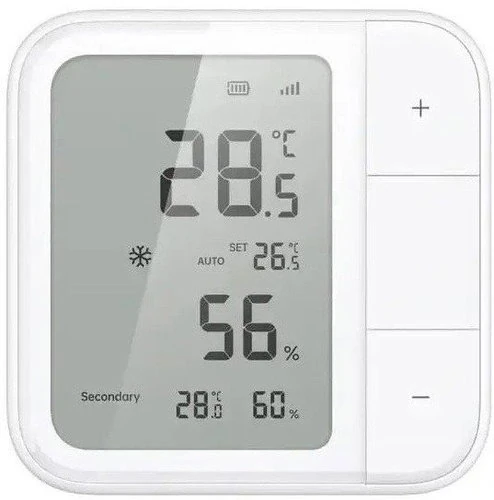
Product images: Aqara and Alza.
A room display is useful on its own
The W100 listing describes a 3.4-inch LCD showing temperature and humidity. It also lists three buttons and support for Zigbee or Matter over Thread. Those features explain the appeal clearly. The screen offers a simple local view, while the connection gives the readings a place in a wider system.
I prefer this to a setup where a sensor is technically clever but practically invisible. If you have to find an app before checking the room, the information can become a private tool for the person who installed it. A display gives other people a way to understand what is happening without learning the smart-home arrangement first.
Related reading
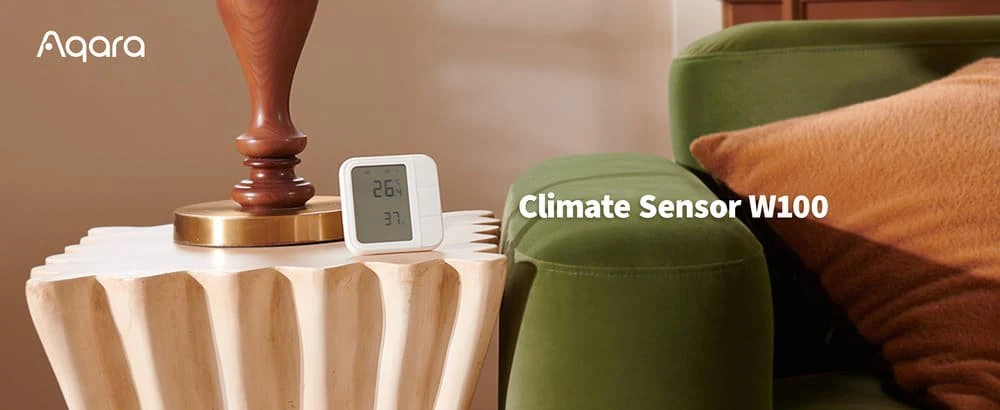
The screen also changes where I would put the product. A sensor hidden behind furniture may be tidy, but a readable display deserves an accessible place. That creates a useful tension: the location should make sense for the reading and for the person looking at it. I would solve that physical question before building complicated rules around the numbers.
Temperature and humidity are local conditions. A sunny window, a nearby heat source or a draught can create a different picture from the part of the room where people sit. I do not see that as a flaw in the W100. It is a reason to treat placement as part of owning any room sensor, rather than expecting one small device to describe every corner equally.
The protocol choice has consequences
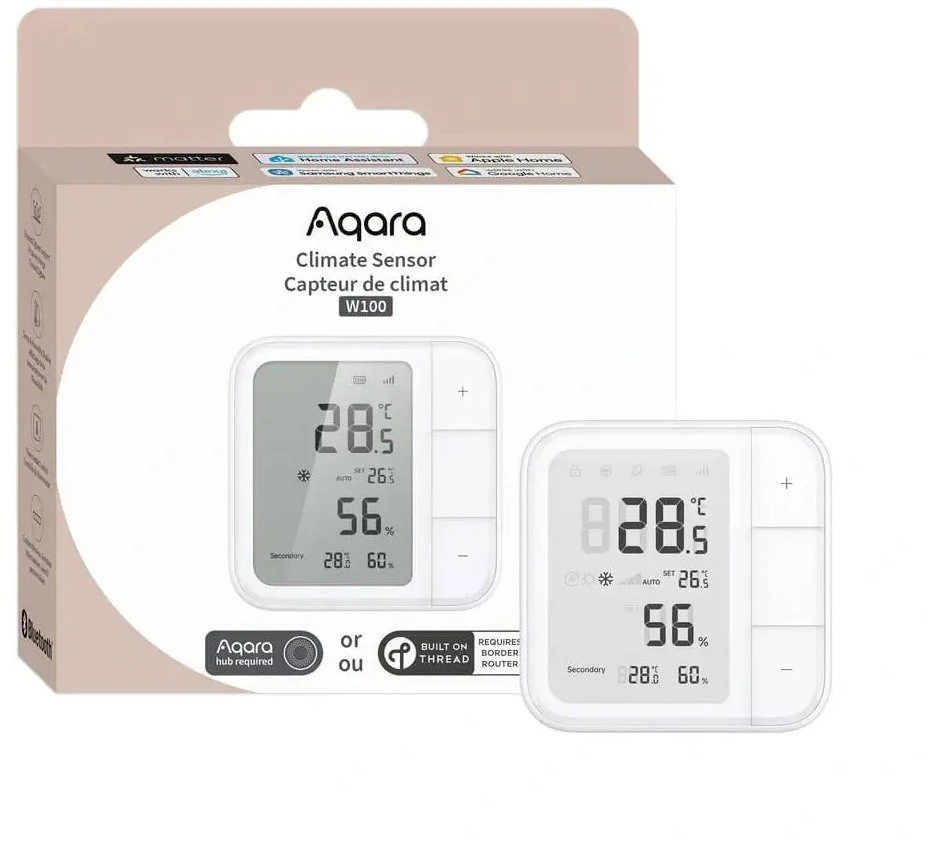
Aqara presents the W100 as a Climate Sensor with two connection options. Zigbee and Matter over Thread are alternatives for how it joins a system, rather than a reason to assume every feature appears identically in every app. The route you choose should follow the home you already have and the features you actually want.
I like having a choice because it reduces the pressure to rebuild a working home around one new purchase. Someone with an Aqara setup may have a clear reason to choose Zigbee. Someone building around Matter over Thread may prefer the other route. The sensible answer is the one that fits the existing controller and network, not the one that sounds newest.
Thread also needs the right supporting hardware. A protocol badge on a small sensor does not create the rest of a network by itself. Before buying, I would check the controller and border-router requirements for the intended platform. Doing that once is much simpler than discovering afterward that the missing part is a more expensive device.
I am cautious about the idea that a compatibility logo means a completely identical experience. Smart-home platforms expose different controls and build their interfaces in different ways. The useful question is whether the readings and actions you need are available through your chosen route. A short, clear set of useful features is better than a broad promise that hides the important detail.
Buttons make the room feel less remote
The physical buttons are a large part of why I like this design. A smart room should still have ways to act that do not depend on finding a phone. A clearly assigned button can be easier for another person to use than a scene buried in an app. That matters in a shared home, where the person who built the system is not the only person living with it.
I would keep the assignments easy to explain. A button that does something different with several press patterns can be powerful, but that power is not always helpful. If people have to remember a small code to control a room, the interface is asking too much. A few obvious actions can be more useful than filling every available slot.
The same principle applies to labels and placement. Controls should be near the place where the action makes sense. A sensor with buttons creates a compact object that can serve both as information and as a point of interaction. I like that idea because it connects the smart-home system back to the physical room.
Related reading

I would also avoid assigning an action whose result is hard to see. A button should give the user a clear sense of what changed. That is especially important when a system contains several devices and delays can make cause and effect unclear. The W100’s controls are most valuable when they make the room simpler, rather than create a hidden layer of behaviour.
Useful automation starts with a small decision
A temperature reading becomes more useful when it answers a real question. Is this part of the room warmer than expected? Does the humidity change in a way worth noticing? I prefer starting with that question instead of adding rules because a sensor happens to support automation. Information should guide the rule, rather than the rule becoming a reason to collect information.
For the same reason, I would avoid making a system react to every tiny change. An automation that constantly switches between states can become more irritating than the condition it was meant to improve. A clear threshold and a sensible delay are often easier to live with than a complicated response to every new reading.
The W100 does not need to become a complete heating controller to earn its place. A visible reading can already help explain a room. A button can already offer an easy action. I like products whose basic usefulness survives even if you decide not to build the most elaborate version of the system around them.
There is also a difference between a comfort decision and a health claim. I see this as a room-information product, not a diagnostic instrument. A screen full of numbers can look authoritative, but the practical interpretation should remain tied to the product’s stated purpose. That keeps the smart-home project useful without giving a household sensor a role it was never designed to fill.
Batteries and long-term ownership
The W100 uses two CR2450 batteries according to the listing. I like a replaceable power source in this kind of device, because a sensor should be able to stay in the home after its first set of cells is finished. The battery choice is also a reason to keep a note of the exact type instead of assuming every small Aqara product uses the same cell.
Published battery-life estimates are useful for understanding the design, but settings and reporting behaviour affect consumption. I would choose a reporting pattern that supports the actual purpose. A room display does not need to behave like a fast laboratory logger to be valuable for comfort and everyday decisions.
Battery access should remain practical after installation. A beautiful location becomes less attractive if changing the cells means moving furniture or undoing a complicated mount. I prefer a place where the device can be reached, read and maintained easily. That is a small ownership choice that can matter much more than an extra scene in the app.
Why I prefer a visible device
The display makes the W100 feel like a household object to me, which is a big part of my enjoyment. I do not want a smart home to become a private collection of dashboards that only one person understands. A screen in the room can offer a common reference, and the buttons can give people a direct place to act. I find that a much more welcoming design than another hidden box sending information somewhere else.
Related reading

It also gives me a clear reason to choose this model over a smaller sensor. I am paying for the visible interface as well as the reading. If all I wanted were a background number for an automation, I could make a different choice. I like the W100 precisely because I want the information to belong to the room.
My verdict
I think the W100 is a great example of a smart-home accessory with an understandable clear purpose. I like its visible display, I like the idea of simple buttons in the room, and I like having a choice of connection route. It feels like a product designed to be encountered by the household, rather than only configured by one enthusiastic owner.
I would choose it when the display and controls are part of the appeal. A smaller hidden sensor may be better value if all you need is a background reading. The W100 earns its extra presence by making the information and the interaction more accessible. That is the part of the product that makes me happy to have bought it.
Check the exact TH-S04D version on Alza’s W100 page, then match the chosen protocol to your controller. A smart room is better when its useful parts remain easy to see and explain.
Where to buy
See Aqara Climate Sensor W100 TH-S04D at Alza. This is the product page for the model covered in this review. Check the model number, colour, included parts and delivery options before ordering. Prices and stock can change, so I use this page for the current offer. Matching the product to the review matters more to me than finding a similar name.
What worked
- I like making the information visible to the household instead of hiding it in one person's app.
- The screen gives placement a practical purpose: people can glance at the reading.
What bothered me
- The chosen connection route and hub requirements need checking before purchase.
- Sun, draughts and nearby heat affect where a room sensor should sit.
Who should not buy it
- Someone who wants only an invisible background reading for an automation.
Alternatives I would consider
- Govee H5075. I would compare this for a simpler Bluetooth display use; I would choose the W100 for its own smart-home connection and room controls. Read my Govee H5075 review.
- Govee H5074. I would consider a smaller sensor when the visible interface is not needed. Read my Govee H5074 review.
Evidence and sources
The article separates my judgement from specifications and claims credited to their sources. Product images are identified by the credits in the article.
Features, compatibility and rated figures from the maker are manufacturer information. My opinions are identified in the review.
Conclusion
Worth the extra size when the display and buttons matter; a hidden background sensor can cost less.
Aqara Climate Sensor W100 TH-S04D
Alza Czechia · Czechia
Check price and availability: Aqara Climate Sensor W100 TH-S04D at Alza CzechiaProduct link.
One email a week with practical Mac workflows, useful comparisons and honest tech recommendations.