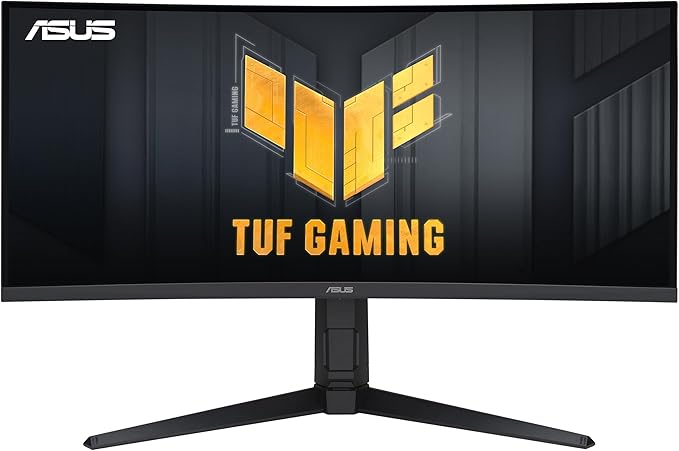
ASUS TUF VG34VQL1B
ASUS TUF VG34VQL1B — premium monitor for sharp, color-accurate work and smooth everyday use. See specs and current price on Amazon.
The ASUS TUF VG34VQL1B is a 34-inch curved ultrawide gaming monitor: a 3440x1440 VA panel running at 165Hz, with adaptive sync and the gaming-first feature set of ASUS’s budget-oriented TUF line. It targets the buyer who wants the ultrawide experience — the wraparound field of view in games, the extra desktop width for work — without paying for the premium IPS and OLED ultrawides that sit a tier or two above.
TUF is the value arm of ASUS’s gaming catalog, the line that inherits features from the premium ROG shelf a generation later and wraps them in cheaper plastics. Knowing that lineage tells you most of what to expect: a spec sheet that reads impressively, a feature set genuinely built for games, and savings extracted from materials and panel refinement rather than from the headline numbers. The VG34VQL1B sits near the top of TUF’s monitor range, which in practice means ROG-grade numbers on a value chassis.
The honest position: this is a value play, and a fairly successful one. You get genuine immersion, high refresh, and strong contrast at a sensible price, and in exchange you accept the well-documented behavior of VA panels in fast motion. Whether that trade suits you depends entirely on what you play.
The shape is the feature
Ultrawide is one of those formats that sounds like a gimmick until you sit in front of one. In driving, flight, and open-world games, the 21:9 aspect ratio fills peripheral vision in a way no 16:9 panel does — cockpit sims gain an entire side window, racing games put the apex in the corner of your eye instead of off-screen — and the pronounced curve, among the tighter in this class, keeps the edges of the image at a consistent viewing distance rather than falling away. The first evening with a big curved ultrawide has a genuine novelty jolt to it, and unlike most novelty jolts, this one survives the first month.
The same geometry earns its keep at a desk. The width comfortably holds two full documents, or an editor beside a browser beside a terminal — a real alternative to a dual-monitor setup, minus the bezel down the middle and the mismatched color between two cheap panels. Window-tiling shortcuts, whether the operating system’s own or a utility’s, go from nicety to necessity within a day; a maximized window on a 34-inch ultrawide is almost never what you want.
The remote-work case deserves its own mention. On a day that alternates between a morning of documents, an afternoon of calls, and an evening of games, one ultrawide replaces the two-panel arrangement most home offices drift into — and unlike a dual setup, the game at night uses the entire investment rather than one half of it.
1440p stretched across 34 inches
The pixel math is worth understanding before buying. Spreading 3440x1440 across this diagonal produces roughly the same pixel density as a standard 27-inch 1440p monitor — the long-running sweet spot for gaming displays — so text and interfaces look familiar rather than coarse, and at arm’s length individual pixels stay below the threshold of irritation. What it is not is 4K-class sharpness: anyone stepping over from a high-density office panel will notice slightly softer type for the first few days.
For gaming, the resolution is arguably the format’s quiet advantage. Driving 3440x1440 at high refresh demands meaningfully less graphics horsepower than 4K, so a mid-range card can hold high frame rates here that it could never sustain on a 4K panel. The ultrawide crowd has long treated this as the rational middle path, and the reasoning holds: more immersion than 1440p, far less GPU pain than 4K. The arithmetic cuts the other way against plain 16:9 1440p, though: there are roughly a third more pixels per frame here, so a card that comfortably drove a 27-inch panel will land a tier lower on this one. Owners of aging hardware should budget accordingly, or lean on adaptive sync to paper over the dips while a graphics upgrade waits.
Contrast is the panel’s best trick
VA is the panel technology of the budget ultrawide, and its strength is the one thing IPS cannot buy at any price in this bracket: contrast. Dark scenes in games and films have actual black in them rather than the gray glow comparable IPS panels produce, and the difference is most obvious exactly when a monitor like this gets used — evening sessions in a dim room, atmospheric single-player games, a film after work. Horror and space titles in particular reward deep native contrast more than they reward color precision, and owners of VA ultrawides consistently name dark-scene depth as the thing they would miss most in a sidegrade to IPS. The same depth makes it a better after-hours movie screen than most office panels, black bars and all.
Color coverage is respectable for gaming and casual creative work, with saturation that reads vivid rather than cartoonish once you step out of the punchiest picture preset. But nobody should grade photos or video for clients on a curved budget VA panel, and the slight gamma shift that creeps in toward the far edges of a curved VA screen is one more reason why. Brightness is ample for an indoor room without fighting a sunlit window; this is a panel happiest with the blinds half-drawn, like its owner.
165Hz, adaptive sync, and where VA runs out
At 165Hz with adaptive sync engaged, general motion is genuinely fluid: the desktop scrolls smoothly, camera pans in games track cleanly, and tearing is a non-issue. The panel carries FreeSync certification, and in practice variable refresh works with either GPU vendor over DisplayPort, which removes the last configuration anxiety from the spec sheet. Coming from a 60Hz or 100Hz panel, the refresh jump is the upgrade you feel within the first minute.
The asterisk is the one that follows every VA gaming panel: pixels change state slowly in dark transitions, producing smearing behind moving objects in dark scenes — the exact scenes this panel’s contrast otherwise flatters. Owners describe it consistently: a dark corridor pans cleanly until a shadowed edge drags a faint ghost behind it. The overdrive settings in the menu mitigate this, and the class-wide consensus applies here too — the strongest overdrive level overshoots and looks worse than one notch down. ASUS also includes ELMB, its backlight-strobing blur-reduction mode, and Shadow Boost, which lifts dark areas for visibility in competitive play; both are mitigations rather than cures. General input feel is snappy in the way high-refresh panels are — the cursor tracks your hand closely enough that a return to a 60Hz office screen afterward feels faintly gummy.
HDR and color: temper expectations
The panel carries an entry-level DisplayHDR-class certification, and it should be treated as a marketing checkbox rather than a capability. Without meaningful local dimming or high peak brightness, HDR content looks at best slightly punchier and at worst dimmer and less accurate than SDR — a pattern true of virtually every monitor at this certification tier, not a specific failing of ASUS. The practical advice from long-term owners is unglamorous: leave HDR off in Windows, enable it per-game only if a title demonstrably benefits, and treat this as an SDR display that technically accepts an HDR signal. Out of the box the picture leans vivid, as gaming monitors do; five minutes stepping color temperature and brightness down produces a more honest image that is easier on the eyes across a workday.
The TUF toolkit
The on-screen menu carries ASUS’s usual gaming utilities: GamePlus overlays with crosshairs, timers, and a refresh-rate readout, plus GameVisual picture presets tuned for genres. These are harmless extras that a few players genuinely use — the hardware crosshair in games that lack one, the timer for strategy sessions — and the rest ignore after the first week. More useful daily are the basics done right: input switching that behaves, a menu layout you can navigate without a manual, and picture presets that remember settings per mode. The blue-light and flicker-reduction modes are standard-issue for the class and inoffensive. None of it requires ASUS software on the PC, which is quietly a virtue — the monitor’s personality lives entirely in the on-screen menu, with no companion app to update, crash, or nag.
Build, stand, and desk reality
The TUF-line build is plasticky but sturdy — matte black, angular in the gaming idiom but restrained enough not to embarrass a home office on video calls. The stand is the pleasant surprise at this price: real ergonomic adjustment, including height, rather than the tilt-only bases common in the budget ultrawide bracket, plus standard VESA mounting for anyone going the arm route. Plan the desk before it arrives, though. A curved 34-inch panel is wide in the obvious way and deep in the non-obvious one — the curve pushes the stand’s footprint backward, and shallow desks put the screen closer to your face than the format wants. Sitting roughly centered matters more with a curve than with a flat panel; far off-axis, the geometry that immerses from the middle seat starts to look mildly warped. The matte anti-glare coating, for its part, handles a bright room without mirror games, at the usual small cost in perceived contrast next to glossy glass.
Living with 21:9
The format’s frictions are worth naming honestly. Not every game supports 21:9 cleanly: most modern titles do, some render cutscenes with black pillars at 16:9, and a handful of competitive shooters deliberately cap the field of view to prevent widescreen advantage — check your core library before committing to the format at all. Almost all video is 16:9 or wider-but-letterboxed, so full-screen YouTube puts black bars on the sides; owners stop noticing within weeks, but it surprises everyone once. Screen sharing on video calls is the sleeper annoyance: sharing a full ultrawide desktop renders illegibly small for viewers on laptops, so you learn to share single windows instead. Presenting is the cousin problem: slides authored while your deck tool fills an ultrawide window can tempt you into layouts that collapse on the 16:9 projector every meeting room uses. None of these are dealbreakers; all of them are part of the texture of ultrawide ownership that spec sheets never mention.
A PC-first purchase
One buyer deserves a specific warning: this format serves PC gaming almost exclusively. Game consoles do not output the panel’s native ultrawide resolution — they render 16:9, so a console plugged in here plays inside black side bars, wasting the format’s entire premise. A media box or a film habit fares similarly, since nearly all video is mastered for 16:9 or arrives letterboxed regardless. Hooked to a gaming PC, every one of this monitor’s arguments applies; hooked to anything else, you are paying for width you will rarely fill. The multiple inputs still earn their keep — a console as a secondary source works fine inside its bars — but nobody should buy an ultrawide primarily for one.
The long haul
Monitors in this class are appliances, and that mostly works in the buyer’s favor. There is no companion software to decay, firmware updates are rare-to-never and rarely needed, and VA panels of this type age gracefully — backlights dim slowly over years rather than failing in dramatic fashion, per the general experience with the technology. The feature set it ships with is the feature set it dies with, which matters only if you were hoping HDR might improve; it will not. The realistic ownership arc is five-plus years of service, with the eventual upgrade motivated by OLED prices falling rather than by anything breaking. The sensible ownership start is a first-day inspection — run full-screen color slides and check for stuck pixels and backlight irregularities while the return window is open, standard hygiene for any budget panel.
The alternatives picture
Within the affordable ultrawide bracket, the aging BenQ EX3501R offers a similar VA canvas at 100Hz — fine for productivity-first buyers, but the ASUS’s 165Hz is decisively better for games and usually similar money. If the honest priority is work rather than play, a 32-inch 4K flat panel like the Dell UltraSharp U3223QE trades width for sharpness and vastly better connectivity. Spending up dramatically changes the conversation: a monitor like the Samsung Odyssey Neo G8 delivers 4K, far higher brightness, and serious HDR in a 16:9 format, while OLED ultrawides solve VA’s motion problems outright at several times the outlay. And at the frugal extreme, a basic 16:9 budget panel like the SANSUI ES-G32C3F reminds you what the ultrawide premium actually buys. The VG34VQL1B’s job is to make the expensive upgrades feel optional, and for most players it does.
The buying logic
Buy this monitor if you play immersive single-player games, want meaningful desktop width for work, and care about price — it hits the ultrawide experience at close to the minimum viable cost, with a proper stand and a refresh rate that will not need apologizing for in three years. It suits the player whose library leans toward open worlds, sims, and story games, and whose workday leans toward many windows. The configuration question answers itself, since this is one SKU — the real decisions are environmental: a desk deep enough to sit back from the curve, a graphics card strong enough to feed it, and a library that rewards width. Audit those three and the purchase is largely derisked.
Skip it if you play fast competitive shooters seriously, where VA smearing and the format’s restricted support both work against you; if you need color accuracy for professional output; or if your desk cannot give a deep curved panel the centered seating it wants. It is a value ultrawide that knows exactly what it is, and that self-awareness is most of its charm.
Our take
Verdict: A well-priced 34-inch ultrawide for gaming and work — smooth, immersive, with the usual VA trade-offs.
The problem. You want immersive ultrawide gaming and multitasking without a flagship price. Why it matters. Ultrawide adds real width for games and side-by-side work that 16:9 can’t match. What it is. ASUS’s 34-inch curved ultrawide: 1440p VA panel, 165Hz, FreeSync and a gaming-oriented design.
Pros
- Immersive 34-inch ultrawide for games and productivity
- 165Hz with adaptive sync feels fluid
- Strong VA contrast for the money
Cons
- VA pixel response trails IPS/OLED in fast scenes
- HDR is entry-level
- Ultrawide needs game and app support to shine
Who should buy it
- Gamers and multitaskers wanting affordable, immersive ultrawide
Who should skip it
- Competitive esports players and color-critical pros
Bottom line. A solid value ultrawide — buy it for immersion and width, not pixel-perfect speed.