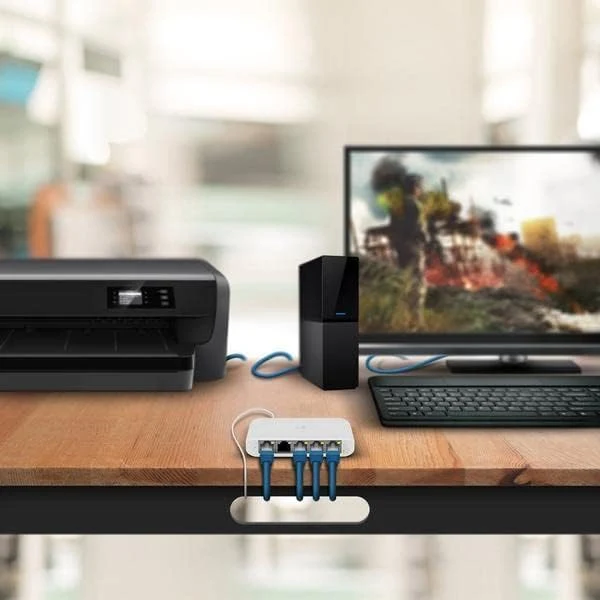
I like a small switch when its place in the network is clear. The original UniFi Flex Mini is appealing as a compact edge device: a way to add a few wired connections where one cable reaches a desk or media area. Its managed role is most useful to me when the rest of the network already has a sensible UniFi arrangement.
Quick verdict
I would choose it to add a few gigabit edge connections to a supported UniFi network.
Best for: I would choose it to add a few gigabit edge connections to a supported UniFi network.
Main benefit: Its compact five-port format can extend an existing managed network without a large switch on the desk.
Biggest drawback: One port normally becomes the uplink, and its feature set is smaller than larger UniFi switches.
Ubiquiti UniFi Flex Mini
Amazon US · US
Check price and availability: Ubiquiti UniFi Flex Mini at Amazon USAffiliate link. As an Amazon Associate I earn from qualifying purchases.
Reviewed version: UBIQUITI UNIFI USW Flex MINI 5 Port GIGABIT Switch
Compatibility: Original USW-Flex-Mini five-port gigabit switch, not Flex Mini 2.5G. Requires supported power and the appropriate UniFi management setup for configured features.
Review context: I assess a small managed edge switch, uplink use, VLAN planning, power input and configuration recovery.
I would shortlist the exact USW-Flex-Mini for that job. I would not confuse it with a newer multi-gigabit model or expect the feature set of a much larger managed switch. The useful buying decision starts with the ports, power and configuration actually needed at that location, rather than the broader reputation of the UniFi family.
Five ports do not mean five additional devices
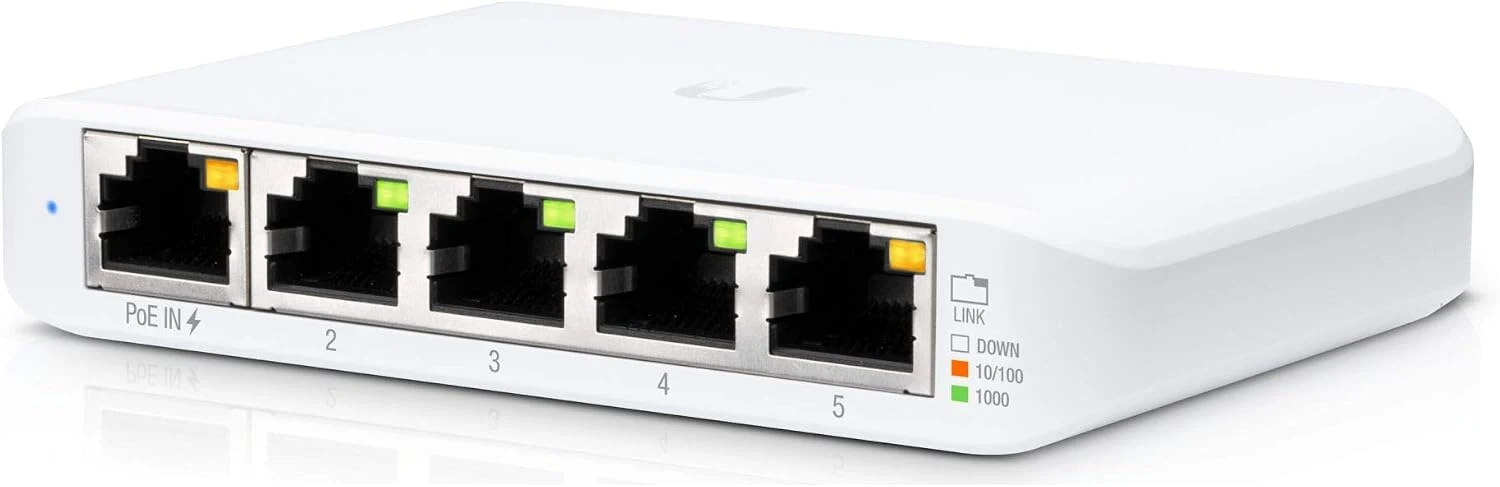
Ubiquiti’s technical specifications identify the original Flex Mini’s gigabit port layout. In a normal edge arrangement, one port connects back to the upstream network. That leaves the remaining ports for local devices. I would count the actual cables before deciding whether the small switch has enough room to grow.
Related reading

The uplink is also shared by traffic that needs to travel beyond the local switch. Several busy devices can compete for that path. A gigabit switch at the edge does not give each device an independent gigabit internet connection. I would judge it against the combined workload rather than add the port labels as though they were separate outside links.
For ordinary printers, a desktop and a small media device, that may be entirely sensible. For several heavy storage clients, I would compare another uplink or switch arrangement. The useful distinction is the path the data takes, not whether the enclosure looks small enough to disappear behind a monitor.
Power input is different from PoE output
The Flex Mini’s supported power routes need to be read in the correct direction. A switch that can receive power over an appropriate Ethernet connection is not automatically a switch that supplies power to cameras or access points. I would check the documented input and output roles before choosing equipment around it.
I would also confirm the retail package contents. A single unit and a multi-pack can have different supplied accessories. If USB power is the intended route, the suitable power source belongs in the purchase plan. A low enclosure price is less useful if the installation later needs an unexpected adapter or another cable route.
For a neat edge position, I would arrange the cables so they do not pull the light enclosure around. Network equipment should remain accessible enough to identify links and recover from a problem. Hiding it completely behind furniture can make a small fault much harder to diagnose than it needs to be.
Management has value when it serves a plan
I would use managed features only when I can explain the intended network behaviour. Device names, port purpose and the upstream connection should be clear in the management interface. That makes the small switch part of an understandable network rather than one more unidentified box with an administrator account.
Related reading

VLAN use needs the whole path to agree. A port setting on this switch is only part of the route through the upstream switch, router and wireless network. I would check the Flex Mini’s current supported features for the exact plan, rather than assume every option from a larger UniFi model is present.
I would start with a known working ordinary connection, then apply the intended segmentation carefully. Changing several network layers at once can make it difficult to identify the cause of a problem. A manageable installation keeps a clear way back to the previous configuration, including access to the system that manages the switch.
A small switch still needs maintenance
I would keep firmware and configuration within a supported process and read the release guidance before making changes. The point is not to create a large administration ritual for five ports. It is to know which device changed if a network behaviour changes afterwards.

A simple network diagram can be enough. I would record the uplink, the attached devices and any non-default port purpose. That helps after a cable is moved or another household member needs to reconnect equipment. Physical labels can be more useful than relying on memory, especially when several identical cables disappear behind a desk.
I would also keep the model identity in that record. The original gigabit Flex Mini and a similarly named faster product should not share an ambiguous label in the plan. Clear identification makes later capacity changes and replacement decisions easier. It also prevents a review or instruction for another version from quietly becoming the configuration guide.
Related reading

When I would use a simpler switch
If I only need extra ordinary wired ports, an unmanaged gigabit switch may be the more pleasant choice. If I need power output, many more devices or a particular advanced feature, I would compare a suitable larger managed switch. The Flex Mini is most appealing between those roles, as a small extension of a network whose management already has value.
My assessment is positive for that focused placement. I would check the exact original model, power arrangement and supported configuration before ordering. Its value is a tidy set of useful edge ports inside a coherent network, rather than an assumption that a managed label or a familiar family name makes every small switch interchangeable.
The product images come from the selected listing and identified manufacturer materials. My assessment uses the linked product information and the buying decisions explained here. Specifications are manufacturer or retailer claims; the conclusions are my own editorial judgement.
What worked
Its compact five-port format can extend an existing managed network without a large switch on the desk.
What bothered me
One port normally becomes the uplink, and its feature set is smaller than larger UniFi switches.
Who should not buy it
Someone needing PoE output, multi-gigabit ports or every managed feature found on larger switches.
Alternatives I would consider
An unmanaged gigabit switch. I would choose one when extra ordinary ports are the whole requirement.
A larger managed PoE switch. I would choose it when port count, power output or a specific advanced feature is necessary.
Evidence and sources
The linked product documentation and exact retailer listing support the product details. Images: Amazon product gallery. These are not personal test photographs or measurements.
Features, compatibility and rated figures from the maker are manufacturer information. My opinions are identified in the review.
Conclusion
Most attractive within an existing UniFi setup; a simpler unmanaged switch may be better for basic extra ports.
Ubiquiti UniFi Flex Mini
Amazon US · US
Check price and availability: Ubiquiti UniFi Flex Mini at Amazon USAffiliate link. As an Amazon Associate I earn from qualifying purchases.
One email a week with practical Mac workflows, useful comparisons and honest tech recommendations.