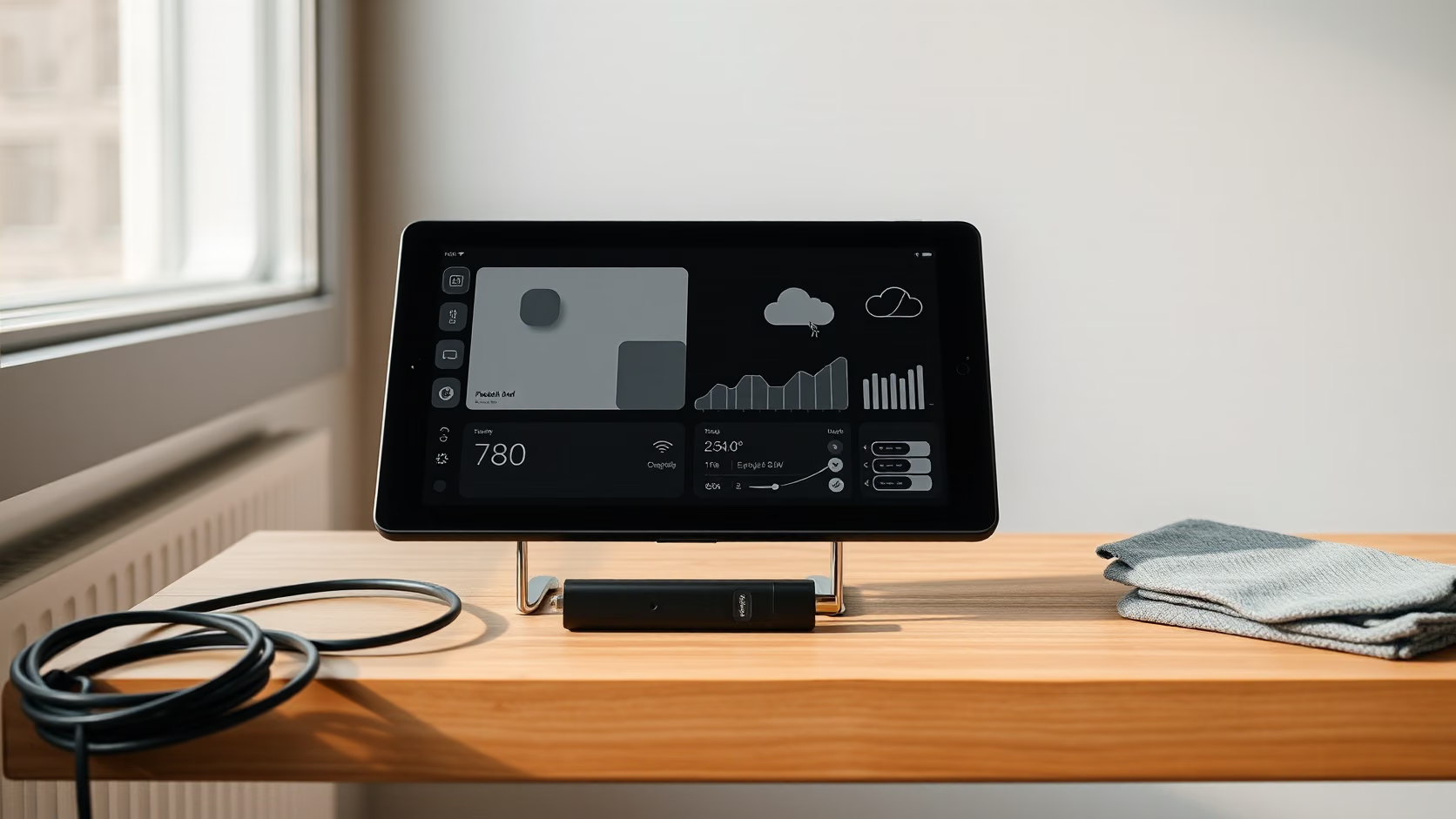
The TRMNL OG is a 7.5 inch e-ink screen in a plastic case with a kickstand. It shows one image, it changes that image a few times an hour, and it runs for months on a battery. That is the entire hardware story, and it is why the product works.
The interesting part is the model behind it. The device never receives anything. It wakes up, asks a server for the next image, draws it, and goes back to sleep. The server renders the picture from plugins, which are templates fed by APIs. Everything clever happens on the server, which is why the hardware can be simple and the battery can be small.
I bought the OG with the Clarity Kit, a 25 USD bundle that adds a larger battery, a USB-C cable, a cleaning cloth and the Developer Edition licence. The licence is the reason I ordered the kit. I had a Python collector that renders four layouts for this screen and nowhere to run them, because private plugins need the developer licence. The rest of the kit is a nice way to package that purchase.
The hardware is deliberately minimal
The display is a 7.5 inch e-paper panel at 800 x 480 pixels. The current OG panel supports four grey levels, which is enough for text, icons and simple charts, and not enough for photographs. There is no backlight. Like a Kindle, it reads by ambient light and is invisible in the dark.
Inside is an ESP32 microcontroller with Wi-Fi 4, a battery, a power switch, a refresh button and a USB-C charging port. TRMNL’s documentation places the OG on the smaller ESP32 variants; newer and larger TRMNL models use the S3 and C5. The shell is soft touch ABS in black, grey or sage, with clear, white and two faux wood finishes also listed, and a chrome plated steel kickstand.
The standard battery is 1,800 mAh. The Clarity Kit upgrades it to 2,500 mAh. TRMNL quotes two to six months between charges depending on refresh preferences, which is a wide range because the refresh interval is the single largest factor in battery life.
There is no speaker, no touch, no buttons beyond refresh, no camera and no microphone. It is a picture frame that updates. That is the correct amount of hardware for the job.
The device only ever pulls
The architecture is the reason to prefer TRMNL over a tablet running a dashboard app. The device wakes on a timer, connects to Wi-Fi, calls the TRMNL API with its API key and MAC address, reports its battery voltage and Wi-Fi signal, and receives a link to a PNG plus the number of seconds to sleep before asking again. It downloads the image, updates the panel, and disconnects.
Related reading

Nothing on the network can push to it. There is no open port, no listener, no persistent connection. A device that only makes outbound requests at intervals is easy to reason about on a home network, and it means a compromised server can at most show a wrong picture.
The server side renders the image from plugins. TRMNL runs first party plugins, community recipes, and mashups that put several plugins on one screen. Each plugin is a Liquid template with a data source, and the rendered output is a bitmap sized for the panel. TRMNL says it does not store rendered images over time; each render replaces the last.
The refresh interval is configurable in minutes per device and, for some plugins, per plugin. Shorter intervals mean fresher data and shorter battery life. For a weather and calendar screen, fifteen or thirty minutes is plenty. For a stream schedule that changes twice a day, an hour is fine and the battery lasts a season.
Developer Edition is the kit’s real content
The standard TRMNL account uses the plugins in the catalogue. The Developer Edition unlocks private plugins, which are templates that take data from your own source, and API access from the web app. TRMNL’s documentation states that building your own device gives equivalent access, so the licence is the software side of the product regardless of hardware.
That is what I needed. My collector pulls weather from Open-Meteo and live status from Kick and Twitch without their developer apps, and pushes JSON to a TRMNL webhook. Four Liquid layouts render it. None of that runs on a standard account. The Clarity Kit was the cheapest way to add the licence, because it cannot be purchased separately from the device and it bundles the larger battery at close to the price of the battery alone.
The private plugin flow is simple. Create the plugin in the web app, choose a webhook or polling strategy for the data, write the Liquid template, and preview the render. The render engine is the same one the public plugins use, so anything the catalogue can show, a private plugin can show. The Framework UI design system is recommended and optional. It gives consistent typography and layout on a low resolution grey panel, which is harder to get right than it looks.
The alternative to the licence is BYOS, Bring Your Own Server. TRMNL’s firmware and a server client are open source, so a device can point at a self hosted server and never touch TRMNL’s cloud. That is the route for someone who wants zero dependency on the company. It costs time rather than money. For a single screen with a few plugins, the licence is the pragmatic choice, and the open server is the exit if the company disappears. TRMNL calls that its unbrickable pledge.
Screen quality on an 800 x 480 grey panel
Text renders well when the template respects the panel. Large sans serif type, strong contrast, generous margins. Thin lines and small text at 800 x 480 turn into grey mush, and the four grey levels dither anything with gradients.
The panel refreshes with a visible flash as e-ink clears. On a shelf across the room the flash is barely noticed. On a desk it is a small event a few times an hour. Fast refresh mode reduces ghosting from the previous image; a full refresh every so often clears it.
Viewing angle and reflection are those of paper. It reads in daylight, under a lamp and at a shallow angle. It does not read in a dark room, and a screen that goes dark at night is either a limitation or a feature depending on whether it lives in a bedroom.
I would design for the panel rather than fight it. Four big numbers, a short list, an icon. The plugins that look best are the ones that put the least on the screen.
Battery and charging
The upgraded 2,500 mAh battery in the Clarity Kit is the second reason to buy the bundle. At a fifteen minute interval a 1,800 mAh OG sits toward the lower end of the two to six month range; the larger cell stretches the same interval further. The battery voltage in every server request means the web app shows a charge trend rather than a guess.
Charging is over USB-C with the included cable. The device works while charging, so a permanent cable is an option for a screen that lives near a socket and should never sleep on the refresh interval. For a screen on a shelf, a charge every few months is the point.
The power switch matters. It fully disconnects the battery, so a TRMNL in a drawer for a month wakes up with the charge it went in with. That is a small thing that most connected devices get wrong.
Related reading

The screen I built for it
The plugin is one screen, and it is deliberately dull: the weather for Jihlava and whether the Kick and Twitch streamers I follow are live. Temperature, feels-like, humidity and wind on the left, a three day forecast on the right, then two columns of streamers with viewer count, category and the time they went live. Offline channels drop to a grey line at the bottom. That is everything I want to know when I glance at the shelf, and nothing I would open a browser for.
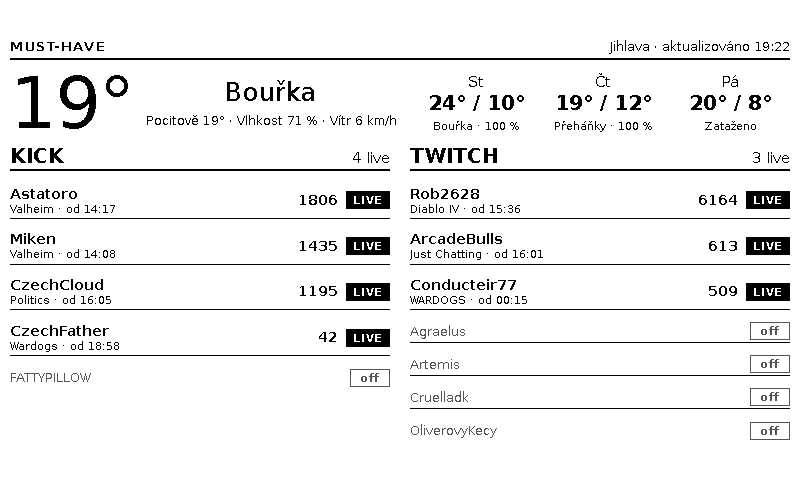
The full layout as the panel draws it. Weather from Open-Meteo, streams from Kick and Twitch, rendered from a Liquid template.
The collector behind it is plain Python with no third party packages. Open-Meteo needs no key. Kick has an unofficial channel endpoint, and Twitch’s own website talks to a public GraphQL endpoint whose client id can be read from the page, so neither needs a developer application. The collector runs every five minutes, pushes JSON to the private plugin’s webhook only when something changed, and sends a heartbeat after fifteen minutes so a stale screen is at least an honestly dated one. The payload is about 1.1 kB for twelve streamers, well under TRMNL’s 5 kB limit.
Four Liquid templates render it: the full screen, a half in each orientation and a quadrant, so the same data can share the panel with other plugins in a playlist. The code and the templates are in the trmnl-musthave repository under MIT.
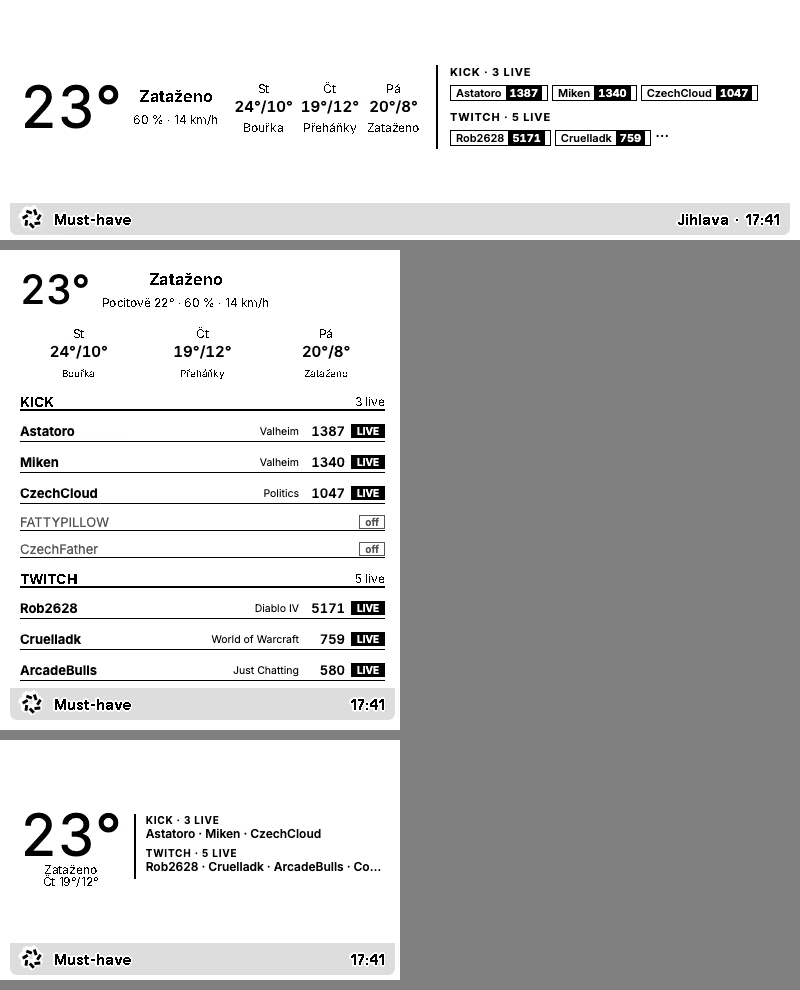
Half horizontal, half vertical and quadrant. The quadrant keeps the temperature and the names of whoever is live.
Why I ended up patching the firmware
The first limit I hit was cadence. Without TRMNL+, the cloud re-renders a private plugin at most every fifteen minutes, whatever the device’s refresh interval says. A streamer who goes live at 14:17 shows up at 14:30. So the collector grew a small BYOS server: it renders the same Liquid template locally with headless Chrome to a 1-bit PNG and serves the three endpoints the firmware expects. Point the device at it from the captive portal and it updates every five minutes, from a Raspberry Pi or a Mac, without the cloud. If a fetch fails, the previous image stays and the panel does not redraw. The server still pushes the data to TRMNL, so going back is a soft reset.
The second limit was the panel itself. In deep sleep the OG cuts power to the display, so with a five minute cadence every wake ended in a full refresh, the flash-to-black cycle you see on any e-ink screen. Twelve flashes an hour on a shelf is not restful. The stock protocol has no way for the server to say “nothing changed”, because the device never tells the server what it is showing.
That is what the protocol v1 pull request to the official firmware adds, open at the time of writing. The device sends the id of the frame it currently shows in a request header. The server answers none, partial or full. For none nothing is downloaded or drawn. For partial it serves up to four changed rectangles with their old and new pixels, so the panel refreshes only those windows, without the flash. The server decides when a real full refresh is due to clean ghosting, whether the device should sleep lightly on USB power or deeply on battery, and it can offer a firmware build from the LAN. A stock server that returns only an image URL behaves exactly as before, and the whole extension sits behind a build flag with unit tests. On my shelf the result is a screen that changes the viewer count next to one name and leaves the rest of the panel untouched.
None of this is required. The licence and the catalogue are enough for a screen that changes a few times an hour. But the device is open enough that when the fifteen minute limit and the flashing started to bother me, both had a fix I could write myself, and that is a large part of why I like it.
Setup and daily behaviour
Setup is a captive portal. Switch the device on, join its temporary Wi-Fi from a phone, enter the home network credentials, and claim the device in the web app with the code on the screen. The device then pulls its first image. The whole thing takes a few minutes and does not require an app.
After that the device is invisible in the best sense. There is nothing to update on the device except firmware, which the server offers when available. Plugins are configured in a browser. The refresh button forces an immediate pull when a template has changed and the wait is annoying.
Wi-Fi is 2.4 GHz only, which is normal for an ESP32 and needs a network that still broadcasts it. Signal strength is reported with each request, so a device that misses updates can be diagnosed from the web app without touching it.
Related reading

Price and the alternatives
The OG lists at 139 USD. The Clarity Kit adds 25 USD on sale against a regular 35 USD, is offered only with a device, and was showing as sold out at the time of writing. The battery upgrade alone is 10 USD. Shipping to the EU is free.
The alternative for a tinkerer is the DIY kit at 45 USD, a Seeed Studio XIAO based board with the same 800 x 480 panel, a 2,000 mAh battery and no case. It needs a 3D printed housing and the same licence for private plugins. The alternative for a non tinkerer is a tablet on a stand, which costs more, needs charging weekly, glows at night and runs an app that will eventually need updating.
Compared with an Inkplate or a bare Waveshare panel, TRMNL is the finished product: case, battery, firmware, server, plugin catalogue. Compared with the larger TRMNL X, the OG is the affordable size and the one that fits on a shelf.
What I will verify in the first month
Battery drop at a fifteen minute interval with the 2,500 mAh cell, read from the web app graph. Whether my four private layouts render identically in the preview and on the panel, particularly thin chart lines. Ghosting after a day of fast refreshes. Reconnection after the router reboots. Whether the webhook strategy delivers an update within one refresh interval of a push. Reading distance for the largest type across a room.
Verdict
The TRMNL OG is an e-ink dashboard that does one thing correctly: it pulls a picture at an interval and sleeps. That model gives it months of battery, no open ports, no app on the device and a server side that can be replaced with an open one. The 800 x 480 four grey panel is adequate for numbers and lists and wrong for anything dense.
The Clarity Kit is the version to buy if you intend to write a plugin. The Developer Edition is the part that makes the device yours rather than a viewer for the catalogue, the larger battery is the part that makes the interval choice cheaper, and the bundle costs less than the licence and battery would separately. The kit was sold out when I checked, so availability is worth watching.
I bought the OG with the Clarity Kit to run my own collector on a screen that needs no attention, and that is what it is for. I would not buy it as a photo frame, a night time clock or a screen for a busy chart. For a small set of numbers that should always be visible and never need a charger, it is the least demanding device on my network.
One email a month: new articles, reviews and the upcoming live webinar + free recording. No spam, unsubscribe anytime.