Two different drives have been sold under this name, and that is the first thing a buyer should know. Samsung changed the controller inside the 970 EVO Plus during its life and kept the model name. When The FPS Review covered the swap in August 2021, Samsung had not released a statement to confirm it. So when an owner tells you how this SSD behaves on long writes, your next question should be which one they have.
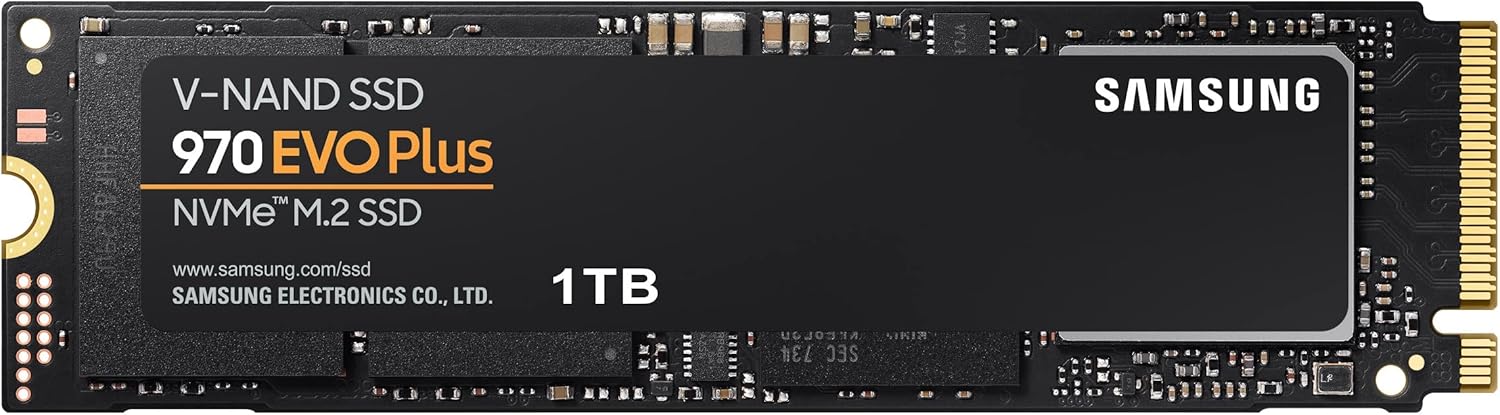
Product image from the Amazon listing.
I still like this SSD inside a computer. I like it much less as the heart of a fast external drive, and most of this article explains why.
What Samsung Promises, and the Small Print
Samsung’s page for the 1TB model lists PCIe Gen 3 x4, up to 3,500 MB/s reads and up to 3,300 MB/s writes. The write figure only applies while Intelligent TurboWrite is active. That is a fast cache, and it runs out. Samsung gives 1,700 MB/s as the sustained write speed after it.
Related reading

The endurance rating is 600 TBW, with a five-year warranty, and whichever limit comes first ends the cover. Some simple arithmetic makes that less scary than it sounds. You could write about 330GB every day for five years before reaching 600TB. Very few home users come close, so wear is not my worry here.
It is a Gen 3 drive, so plugging it into a faster slot will not make it faster. If you shop for this drive, you are buying it for reasons other than peak speed.

Product image from the Amazon listing.
Long Writes Tell the Two Versions Apart
The original drive used a controller called Phoenix. The later one uses Elpis, the same controller found in the 980 PRO. The FPS Review summarised a test of both. The first version held about 1,750 MB/s and fell to about 1,500 MB/s after the 40GB mark. The revised version held a steady 2,500 MB/s, then dropped to about 800 MB/s once its 115GB cache was full.
That is a strange trade. The new one starts faster and ends far slower. I did some rough arithmetic with those numbers, and please treat it as a guide only, since it comes from one test:
A 100GB copy takes about 40 seconds on the revised drive and about 63 on the original. A 500GB copy turns that around, at about nine minutes on the revised drive against about five and a half on the original. Photo imports and game installs favour the newer drive. Large video projects and full-disk copies favour the older one.
The 800 MB/s floor sounds worse than it is. PCWorld’s 2019 review tested a 500GB sample and wrote: “The 970 EVO Plus’s sustained write rate dropped from about 1.7GBps to around 850MBps.” PCWorld added that this is still about twice the speed of a SATA SSD. That is a different capacity and an earlier drive, but it shows the same shape. This SSD is quick, then less quick, and never truly slow.
Some coverage of the swap pointed to the PSID code on the drive’s label as the way to tell them apart, so look at yours when it arrives. You can’t check it before buying, which is the real problem. A listing page will not tell you which version will arrive.
Related reading


Product image from the Amazon listing.
The External Box Is Where Owners Get Frustrated
Many people now buy older NVMe drives to put in an external enclosure. This is where the owner stories turn sour, and Thunderbolt boxes are the main theme.
In a 2022 Apple Community thread, a Mac mini owner with a 1TB Phoenix drive bought in November 2020 got about 1,200 to 1,300 MB/s writes in a Thunderbolt 3 case, after trying several cases and connections. They had expected around 2,500 MB/s. A follow-up post says a Samsung 980 Pro in the same setup reached that figure. If so, the case was capable of more, and the 970 EVO Plus looks like the limit.
A MacRumors thread from the same year tells a rougher story. An owner on Apple silicon put the drive in a Wavlink Thunderbolt 3 box and saw about 1,400 MB/s writes. Worse, the drive disconnected again and again, ran very hot, and would not show data under several file systems. The same SSD had passed 3,000 MB/s in a desktop, so it was not dead. Another poster there said: “Samsung 970 Evo Plus is notorious for slow write speeds on almost all Thunderbolt 3 chipsets.” That is one person’s view, and no one in the thread proved the cause. Still, it matches the Apple thread closely.
The fix in that thread is the part I find useful. The owner returned the Wavlink box and moved the SSD to a Sabrent USB enclosure. Speed fell to about 990 MB/s write and 945 MB/s read, and the SSD kept working. For a backup drive, I would take that deal every time. It also changes the maths from earlier. If the link tops out near 1,000 MB/s, a cache that falls to 800 MB/s barely matters, so the choice between old and new versions fades away.
The chip inside the box matters too. In a 2020 Apple Community thread, a MacBook Pro owner had a JMS583 enclosure crash a few seconds into writing to a Time Machine partition. To be fair to Samsung, that crash was on a plain 970 EVO, and a 970 EVO Plus worked in the same box. The owner later found both drives worked in an ASM2362 enclosure, but that enclosure’s poor thermal design made the SSD throttle.
Heat keeps appearing in these stories. Samsung rates the drive for 0 to 70°C, and a small sealed box with no airflow is a hard place to stay inside that range during a long copy. If you go this way, pick an enclosure with real metal and fins, and expect it to get warm.
The Gaps in What Owners Report
Most of the detailed reports I found come from Mac users with enclosures, because that is who goes to forums with a problem. Happy desktop owners rarely post at all. That means the external trouble may look more common than it is.
I also found no owner who tested restoring data from a backup made on this drive inside an enclosure. If backups are your plan, do one trial restore before you trust it. A drive that disconnects during a long write is exactly the kind you want to catch early, and a copy that looks finished is not proof.
Related reading

The Mac side has one more limit. Nobody in these threads could say why this controller and some Thunderbolt chipsets get along so badly, and I can’t either. All I can report is the pattern.
Keep It Inside the Computer, or Accept USB Speed
If you have a free M.2 slot in a PC and you want a dependable 1TB drive, the 970 EVO Plus still makes sense when the price is right. It has a five-year warranty, its endurance is far beyond normal use, and neither version gets slower than a good SATA drive during long writes. In that role, I would not worry much about which version shows up.
Skip it if your plan is a Thunderbolt enclosure and you expect 2,500 MB/s or more. Mac owners in these threads landed between 1,200 and 1,400 MB/s, and one had a far worse time. Skip it too if you copy hundreds of gigabytes at once and need a known result, because you can’t choose the version you get.
For a USB backup or scratch drive on a Mac, I think it is a reasonable pick, as long as you accept about 1 GB/s and buy a well-cooled box. You can find the Samsung 970 EVO Plus 1TB here, and I would check the PSID on the label as soon as it arrives. This is an affiliate link. As an Amazon Associate I earn from qualifying purchases.
One email a month: new articles, reviews and the upcoming live webinar + free recording. No spam, unsubscribe anytime.