The LetsTrust TPM is a very small product that leads to some very interesting questions. Where should a computer keep the secret that opens its encrypted disk? What should happen after a restart? How do I recover my own files if a piece of hardware fails? I enjoyed this board because it makes those questions practical on a Raspberry Pi.
Quick verdict
I recommend considering LetsTrust TPM for a Raspberry Pi security project with a clear boot and recovery plan.
- Best for
- Raspberry Pi owners who understand what they want the TPM to protect.
- Main benefit
- I like giving boot secrets a hardware boundary rather than treating them as another file on the disk.
- Biggest drawback
- The module is only one part of the encrypted-boot policy and recovery setup.
LetsTrust TPM module for the Raspberry Pi setup described
LetsTrust / pi3g · Choose the local store or delivery region
Check price and availability: LetsTrust TPM module for the Raspberry Pi setup described at LetsTrust / pi3gProduct link.
Reviewed version: LetsTrust TPM module for the Raspberry Pi setup described
Compatibility: The exact LetsTrust module and supported Raspberry Pi overlay and driver. The article discusses Pi 5, NVMe and Argon ONE V3 clearance; confirm the complete physical setup.
Review context: The review focuses on raspberry Pi owners who understand what they want the TPM to protect.
pi3g supplied the module free of charge. My opinion is my own. The setup I care about is my Raspberry Pi 5 with 8 GB of memory, an Argon ONE V3 case and an NVMe boot drive. It is a small homelab machine, and I like products that give a machine like that a useful new role without replacing it.
Why I wanted a TPM on a Pi
A password at every boot is a clear way to keep an encrypted disk locked. It is also inconvenient for a little machine that may restart when nobody is sitting beside it. Putting the unlock secret on the same disk solves the typing problem, but changes what the encryption protects against. That is the tension that makes this product interesting to me.
A TPM is a separate security component. Its value comes from giving secrets and security operations a hardware boundary. It is not simply extra storage for a password. The way a key is created, the conditions attached to its use and the boot software all matter to the result.
I like this because it moves the discussion beyond a checkbox marked encryption. A useful setup has to answer a real question: what happens if someone takes the drive, and what happens if someone takes the whole machine? Those are different situations. The little board does not make them identical, and understanding that is part of the satisfaction of building the system.
Related reading
My interest is also practical rather than decorative. A new component earns space in a small computer when it changes how I can operate that computer. A more considered path to automatic unlocking is an appealing example. It lets me think about ease of use and the location of a secret together, instead of treating one as the enemy of the other.
The exact board matters
The LetsTrust family has changed over time. The developer’s product change notice describes the move from the Infineon SLB9670 to the SLB9672 while keeping driver compatibility. It also explains why the Device Tree overlay keeps the older chip name. I like that detail because it prevents a very ordinary source of confusion.
An old-looking name in a setup file does not automatically mean the new hardware is unsupported. At the same time, I would identify the actual module revision rather than assume every photograph and older datasheet describes the same chip. Hardware reviews are more useful when they keep those differences visible.
The published revision information describes TPM 2.0 support. That gives the software a clear interface, but it does not finish an encrypted-root setup by itself. The disk format, early boot environment, key policy and recovery arrangement still need to fit together. For me, that is a strength of the product’s scope: it is a component with a clear job, rather than a vague promise to secure an entire computer.
I enjoyed the small scale of it. There is something satisfying about a board that does one specialised thing and lets the rest of the system stay familiar. I would rather understand that one responsibility clearly than buy a larger box whose security story is hidden behind a dashboard.
Physical fit is part of compatibility
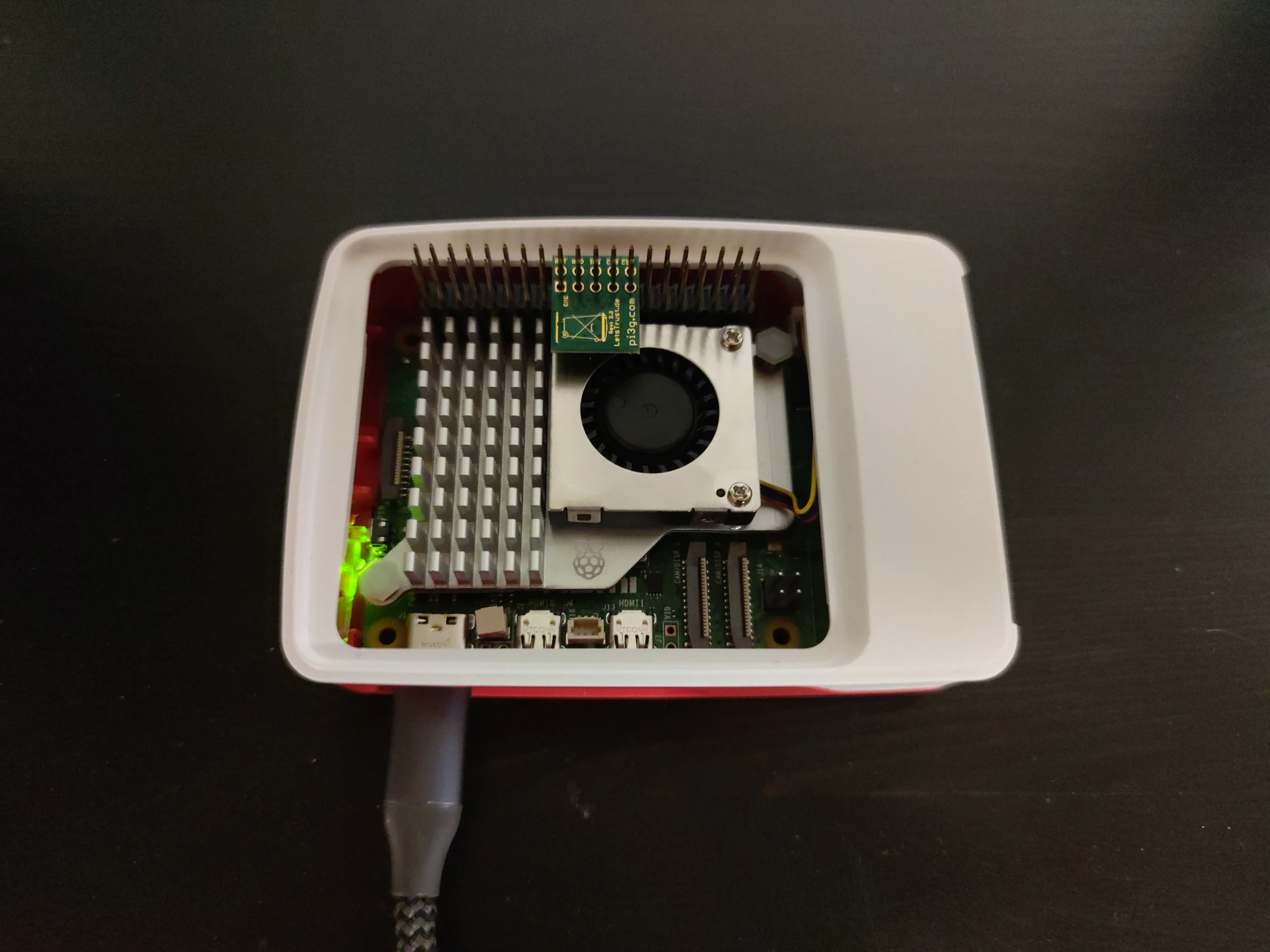
The developer has an explicit Raspberry Pi 5 compatibility note. It also points out the need for a stacked header when a heatsink is present. That is exactly the kind of practical information I want before planning a case installation.
The Pi’s GPIO connector is not empty space just because a module uses only part of it. Cooling, a case board, cables and an NVMe arrangement all have their own claim on the available room. For my Argon ONE V3 setup, clearance and access matter as much as a software compatibility statement.
I like checking the physical plan as a whole. The enclosure should close without pressure on the board. A connector should not become a lever against another component. Cooling should still have the space it needs. Those are simple engineering preferences, but they are especially important when several small accessories share a compact machine.
That is why I find a photograph of the module on a real Pi useful. It helps explain the relationship between parts in a way a feature list cannot. A tiny module can still change the height of an installation. I would include that in the buying decision from the start, alongside the intended case and cooling arrangement.
Device Tree gives the driver its map
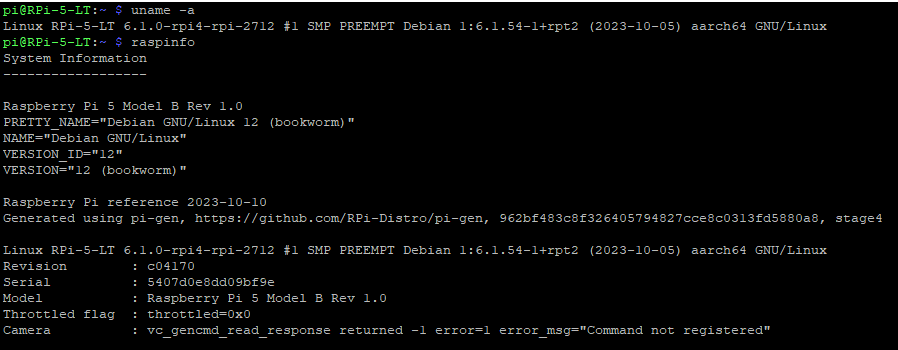
For the Linux path, the relevant overlay name is tpm-slb9670, as documented by the developer for the newer compatible chip too. Device Tree describes hardware that the operating system needs to know about. The point is to make the TPM available to its driver in the correct place, rather than hope the presence of a board is enough.
I like this kind of explicit setup. It leaves a readable record of what the system expects. It also makes diagnosis more structured: identify the board, check the setup, confirm the driver and then look at the TPM interface. Those are separate layers, and keeping them separate makes a small homelab project much easier to understand.
The developer’s screenshots show the command-line side of the setup. I find that right for this product. A TPM does not need a glossy management window to be useful. Clear documentation, a stable interface and the ability to inspect the setup are more valuable to me.
Related reading
Sealing a key is the interesting part
The tpm2-tools documentation describes creating TPM objects and sealing data. The companion unseal documentation explains releasing sealed data under the required permission. That is the main idea of the disk-unlocking idea.
I like thinking of it as a rule attached to access. The question is not only where the secret sits, but what has to be true before it can be used. A design that binds access to the hardware is already different from a plain key file copied beside the encrypted volume. A design that also checks meaningful boot state asks another question again.
Those differences matter when describing the result. Automatic unlocking can be convenient, and it can still leave a running machine’s data available to someone with access to that machine. Disk encryption protects data at rest under clear conditions. It does not make an already unlocked system immune to a compromised operating system.
I appreciate the LetsTrust because it encourages that more precise way of thinking. I do not have to pretend one small board solves every threat to find it valuable. Its job is worthwhile on its own. The enjoyment comes from giving the secret a better-clear home and making the rest of the boot design careful.
Recovery belongs in the design
My favourite security setup is one I can recover when an ordinary component fails. A board can stop working. A setup can change. A useful encrypted-root design therefore needs a recovery route that does not depend on the TPM being available forever.
I would keep the recovery secret separately from the machine and make the backup arrangement part of the same plan. That is not a weakness in the module. It is a basic requirement of owning encrypted data. The person who builds the security boundary should remain able to open their own files when the surrounding hardware changes.
Boot policy also needs to be considered alongside updates. If the release conditions depend on system state, a legitimate change can affect them. I like having that relationship documented before turning unattended restart into a routine expectation. A machine that is secure but impossible for its owner to maintain is not the result I want.
This is where a TPM project becomes more rewarding than simply buying a new accessory. It encourages clear decisions about backups, updates, physical access and the difference between a stolen disk and a stolen computer. Those decisions are useful even beyond this particular Pi.
Who I think will enjoy it
I would recommend looking at the LetsTrust if the interesting part of a homelab is understanding how the pieces work together. It is an appealing product for a small Linux system with a real reason to protect keys. The hardware is focused, and the software path uses tools with a clear purpose.
Someone who wants an appliance-like encrypted boot solution should first look at the complete operating-system and enclosure arrangement. The TPM is one part of that system. I like it precisely because I enjoy making those connections, and because the result can be explained without relying on a marketing word such as secure to carry the whole argument.
For a Pi with NVMe storage, that makes a satisfying project. The fast drive deals with storage, the case deals with the physical machine, and the TPM has its own narrower responsibility. Keeping each component’s job clear is a large part of what makes small computers enjoyable to me.
Related reading

My verdict
I really like the LetsTrust TPM. It is a great little product for the kind of practical security work that makes a homelab interesting. It adds a useful capability without pretending to replace a complete security design, and it gives an ordinary Raspberry Pi project more depth.
For me, the strongest reason to buy it is having a clear purpose for the hardware: protecting a secret under clear conditions. The LetsTrust documentation is where I would begin checking the module revision, software path and physical installation plan. That is a small purchase with a lot of worthwhile thinking behind it.

Where to buy
See pi3g LetsTrust TPM Raspberry Pi at the official product page. This is the product page for the model covered in this review. Check the model number, colour, included parts and delivery options before ordering. Prices and stock can change, so I use this page for the current offer. Matching the product to the review matters more to me than finding a similar name.
What worked
- I like giving boot secrets a hardware boundary rather than treating them as another file on the disk.
- TPM 2.0 and the supported Linux overlay route give concrete compatibility points to check.
What bothered me
- The module is only one part of the encrypted-boot policy and recovery setup.
- Legitimate system changes can affect a state-bound unlock policy, so updates and recovery need a plan.
Who should not buy it
- Someone expecting a TPM to protect an unlocked machine or make encrypted data recover itself.
Alternatives I would consider
- Manual encrypted-disk unlocking. I would keep a manual unlock when entering the secret at boot is practical; I would consider a TPM when unattended restarts justify the added policy and recovery work.
Evidence and sources
The article separates my judgement from specifications and claims credited to their sources. Product images are identified by the credits in the article.
Features, compatibility and rated figures from the maker are manufacturer information. My opinions are identified in the review.
Conclusion
Worth it for a defined TPM job; it is not a simple way to add security without planning the rest of the system.
LetsTrust TPM module for the Raspberry Pi setup described
LetsTrust / pi3g · Choose the local store or delivery region
Check price and availability: LetsTrust TPM module for the Raspberry Pi setup described at LetsTrust / pi3gProduct link.
One email a week with practical Mac workflows, useful comparisons and honest tech recommendations.