
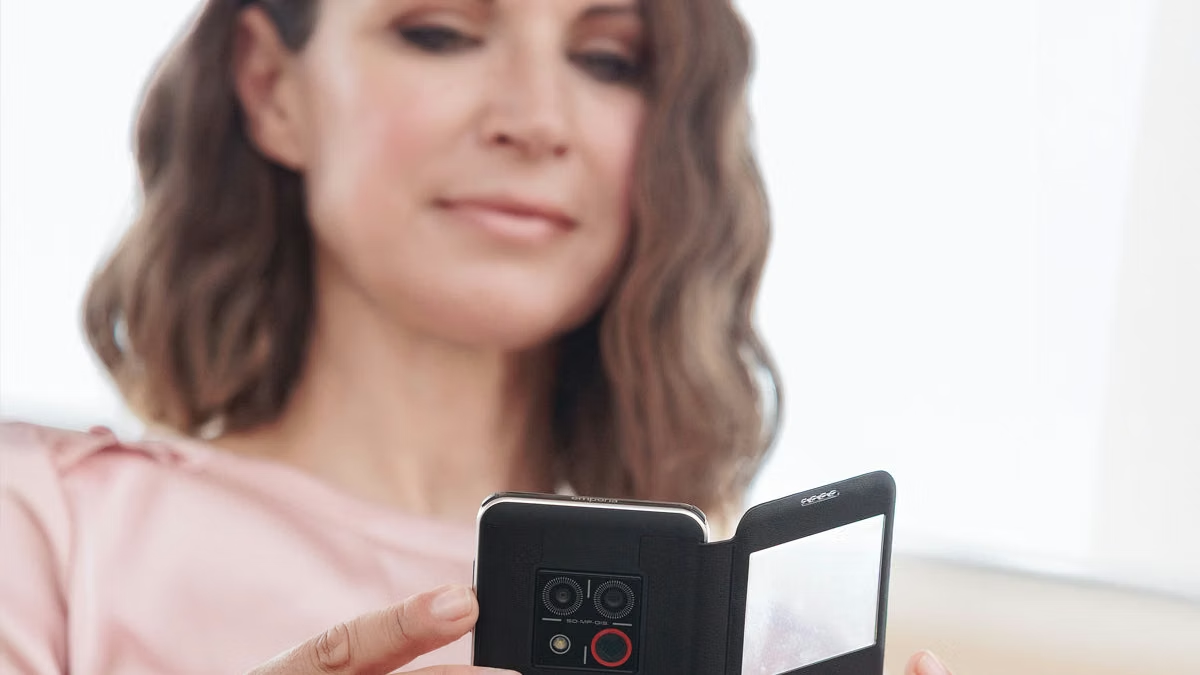
The Mudita Kompakt has an eight-megapixel camera. It’s one of the things I’ve most enjoyed about the phone.
The explanation is on the other side of the handset: a small E Ink screen that turns the camera preview into something wonderfully odd. Point a phone at the world and watch it appear on electronic paper. That’s the bit I want to show someone. The megapixel count can wait.
I’ve been playing with the Kompakt for the past two weeks, using it as my main phone. It has been a thoroughly pleasant break from my normal smartphone routine. I enjoyed the display, the battery life and the ability to disconnect completely. I also enjoyed things I wouldn’t normally spend much time discussing in a phone review, including chess and a meditation timer.
There’s still plenty here for someone who likes technology. Give me unusual hardware and a good reason for it to exist, and I’m interested. The Kompakt kept that curiosity alive while giving me a quieter phone experience. After using it as my main handset, I can happily recommend it to someone looking for a little of their lost peace.
But first, that camera.
Eight megapixels, plenty of character
Photographing through E Ink was simply fun. The monochrome preview gives the camera a personality that has very little to do with the number printed beside the sensor in a specification sheet.
There’s a useful distinction here: the Kompakt captures colour photographs. Its display shows them in monochrome. The black-and-white appearance comes from the screen, rather than a dedicated monochrome sensor, as Mudita’s camera description confirms.
That separation appeals to me. The camera records colour information; the viewfinder gives me a different way to look at the scene. I enjoy the fact that one component can change the feel of using another so much. Put the same sensor behind a conventional display and a large part of what interested me would disappear.
Without colour in the preview, outlines, light and contrast become more prominent. A shape has to hold its own. A bright patch or a dark edge becomes more noticeable. That’s an enjoyable way to look at an image, and the electronic-paper rendering adds to the character of it.
I’m not buying this camera for its technical superiority. What I liked was taking pictures through that screen. Framing an image, capturing it and looking at it on E Ink gives an ordinary phone function enough novelty to make it enjoyable again.
Related reading

This is also why I’m glad Mudita kept the camera. A very selective feature list still needs a little room for play. The camera gave me another reason to explore the device, and another use for the component I liked most. Removing it would have made the Kompakt a less interesting phone for me.
If I were handing it to another gadget enthusiast, this is where I’d begin. Open the camera and look at the preview. It explains quite a lot about the appeal of the handset before either of us needs to talk about specifications.
The screen changes everything around it
The display is a 4.3-inch E Ink touchscreen with an 800 × 480 resolution. Those are the published specifications, and they’re a fairly unexciting description of a component I really enjoyed using.
A photograph is the most obvious example, but the same display also has to show contacts, messages, maps and a chessboard. They all end up sharing a palette. That gives the Kompakt a consistency I find appealing: even when the activity changes, the phone still looks unmistakably like itself.
I like seeing what happens when a manufacturer commits to a display this thoroughly. Colour can’t distinguish one control from another. Shapes, spacing, labels and contrast have to do more of the work. At this size and resolution, the choices are visible. There isn’t much room to disguise a confusing interface with decoration.
That makes the screen interesting to me as hardware, beyond its appearance. Choosing E Ink affects the whole product. A camera preview, a map and a turn-based game each ask something different of a display, and I enjoyed seeing those familiar activities brought together on electronic paper.
There is a trade-off in how E Ink redraws content and handles movement. A touchscreen makes the input feel familiar, but the panel underneath has different characteristics from a conventional phone screen. It would be a mistake to expect the two to behave identically.
For me, that adjustment belongs to choosing this display. I enjoyed what the screen brought to the phone. On a chessboard, for example, the position matters much more to me than an elaborate transition between moves. With a photograph, the appeal is in the monochrome rendering itself.
The useful part of my experience is that I liked E Ink while the Kompakt was serving as my main phone. A component can be fascinating to inspect and still be something I’d rather leave on the desk. Here, the display was part of the pleasure of actually using the handset.
It also gave an otherwise very ordinary little game a surprising amount of appeal.
I have to mention the chess
Chess was one of my highlights. It’s a slightly unusual thing to be enthusiastic about in a phone review, but I enjoyed it enough that leaving it out would give an incomplete account of these two weeks.
The board looks at home on electronic paper. The pieces and squares suit monochrome, and a turn-based game makes sensible use of a display whose strengths don’t depend on constant movement. There’s a satisfying fit between the hardware and the activity.
I also like the smallness of the idea. A chessboard gives me a position to think about. The pieces stay put while I consider a move. It doesn’t need a complicated explanation, and I don’t need to justify playing it as some kind of exercise in self-improvement. I enjoyed having a game.
Chess is included in the Kompakt’s built-in software. On a phone with such a short collection of applications, that gives it a more noticeable place. It became one of the features I associate with the device, alongside much more obvious talking points like E Ink and the offline switch.
The camera and chess did something important for my overall impression: they made the Kompakt fun. I was using a quieter phone and still enjoying myself with the hardware. That’s an appealing combination, particularly when I like exploring a device for the sheer pleasure of seeing what it does.
Of course, this was also my main phone. There was more to the experience than admiring its chessboard.
The practical side: maps and battery life
Maps were among the features I liked about using the Kompakt. They belong here. Finding a place and working out how to get there is exactly the kind of useful job I want a phone to retain, even when its selection of applications is deliberately limited.
The software includes offline maps and turn-by-turn voice guidance for walking, cycling and driving. Mudita introduced that navigation capability in a released software update.
I enjoyed the pairing of maps and electronic paper. A map is already a selective view of a place: roads, connections, names and positions. Rendering it on a restrained display feels like a reasonable match. The camera made the screen playful; maps gave the same screen an immediately practical job.
The offline part appeals to me technically, too. Stored map data supplies the context, and the location receiver supplies a position. I like that comprehensible division of labour. Having the map on the device makes sense for a phone whose offline capabilities are part of what attracted me to it.
Related reading
I treat offline maps and Offline+ as separate features, incidentally. One concerns using downloaded map data; the other is the phone’s dedicated disconnection mode. The presence of both is interesting, but they shouldn’t be confused with each other.
Maps helped the Kompakt feel like a sensible device to use as my main phone. The selection had room for a practical tool as well as the small things I enjoyed playing with. That balance mattered to me more than making the application list as short as possible.
Battery life supported the positive impression. It was one of the things I liked about the Kompakt during my use, and it deserves a place beside the more eye-catching features. Enjoying a display only gets me so far if the rest of the device becomes frustrating to live with.
For the numbers, there’s a 3,300 mAh battery, and Mudita quotes up to six days in standby. That last word matters: it is the manufacturer’s standby rating, not a claim that I got six days of active use. My own assessment is that battery life was a definite positive during these two weeks.
Charging is through USB-C or wirelessly, with published limits of 10 W and 2.5 W respectively. Those are modest rates. I see the wireless option as a convenient additional way to top up, while USB-C is the familiar connection I want on a handset like this.
I’m quite happy for this part of the hardware to be ordinary. There’s plenty of unusual engineering to appreciate on the front of the phone. The charging connector doesn’t need to become another hobby.
The control that really deserves attention is the switch on the side.
A proper switch for going offline
I’m a sucker for a physical control with a clear job. The Kompakt’s Offline+ switch is absolutely my kind of feature, and the ability to disconnect completely was one of the things I most appreciated about using the phone.
The implementation is interesting. Offline+ disables the mobile modem and microphones at the hardware level. The camera, Wi-Fi and Bluetooth are disabled in software. That’s the distinction given in Mudita’s explanation of the mode.
A hardware cutoff for a modem gives me something specific to understand. Including the microphones makes the control more substantial still. I care about that scope because it tells me what the switch actually changes, beyond the word “offline” appearing somewhere in the interface.
The pleasure of using it is much simpler than the technical description. I can choose the disconnected state with a dedicated physical control. The choice has its own place on the device. There is no need to make a small settings project out of wanting some time offline.
That’s the kind of convenience I appreciate. I still get to be interested in how the phone works, but the action itself remains straightforward. The engineering earns its place by making a useful choice easy to make.
It is a real disconnection, with the consequences that implies. Calls can’t reach me in Offline+, and making an emergency call requires turning the mode off first. Mudita explicitly notes that in its feature documentation. I think of the switch as a deliberate decision to become unavailable.
The camera being disabled is another part of that boundary. It’s useful to know that Offline+ changes the phone’s capabilities as well as its connectivity. I appreciate the specificity: modem and microphones in hardware, other components through software, with a physical control for selecting the state.
If I were specifying a phone for myself, this would be one of the Kompakt features I’d want to keep. It combines a personal benefit I enjoyed with a piece of hardware I find satisfying. The switch helped make the break from my usual routine feel like a choice built into the handset.
And it has a natural companion among the smaller applications.
A little room for a pause
The meditation timer also worked for me. It’s one of the included tools, and I was pleased to find it there.
A timer has a pleasantly limited job. It handles the time and leaves the activity to me. That is enough. I appreciate having a simple tool for taking a pause on a phone I already enjoy partly because it lets me disconnect.
This is where the smaller features start to make the handset feel personal. Chess and meditation would barely register in some reviews. Both were on my list of things I liked. Along with the camera, they gave the phone room to be enjoyable in ways that don’t have much to do with its processor.
Offline+ and the timer also make a coherent pair in my eyes. One provides a deliberate way to disconnect the phone, while the other supports setting aside a little time. That fits the change of pace I appreciated when I made the Kompakt my main handset.
Related reading
I liked having both available. There’s no grand claim to make about that; sometimes the appeal of a device comes down to finding several small things that suit me particularly well. The Kompakt had enough of those to keep me interested beyond the screen itself.
The Android underneath
For all its unusual hardware choices, the software has a familiar foundation. MuditaOS K is based on the Android Open Source Project and runs without Google Services. Third-party Android applications can be installed, although Mudita doesn’t guarantee compatibility. Its app support documentation sets out those limits.
That strikes me as a pragmatic choice. There is an established software base underneath the electronic-paper interface. At the same time, an APK being installable doesn’t mean all its dependencies will be available. The absence of Google Services is a real consideration, especially if a particular application is essential.
The flexibility is interesting to me, but the things that made my experience enjoyable are already in this review: the camera preview, maps, chess, meditation and the ability to go completely offline. Those are the features I associate with using the Kompakt as my main phone.
I appreciate having room to explore without losing sight of why I liked the device in the first place. Its own collection of tools gave me plenty to enjoy. The appeal was already there.
Two weeks in, I’d happily recommend it
Using the Kompakt as my main phone has been a pleasant change from a routine that had become repetitive. I enjoyed the calmer experience, and I had fun with the device itself. The E Ink display has a lot to do with that, but so do the little details around it.
If someone handed me a sheet listing an eight-megapixel camera, an 800 × 480 display and a chess game, it would leave out much of what made this phone enjoyable. Taking a photograph through that screen explains it better. So does understanding what the offline switch disconnects. Those are the details I’d want to share with a friend.
I’d happily recommend the Kompakt to someone who wants to recover a little of their lost peace and finds this kind of hardware appealing. My enthusiasm comes from using it as my main phone for these two weeks and enjoying the change.
I still like technology. I’m still curious about this little handset. And yes, I’d still want to show you the camera.
One email a month: new articles, reviews and the upcoming live webinar + free recording. No spam, unsubscribe anytime.