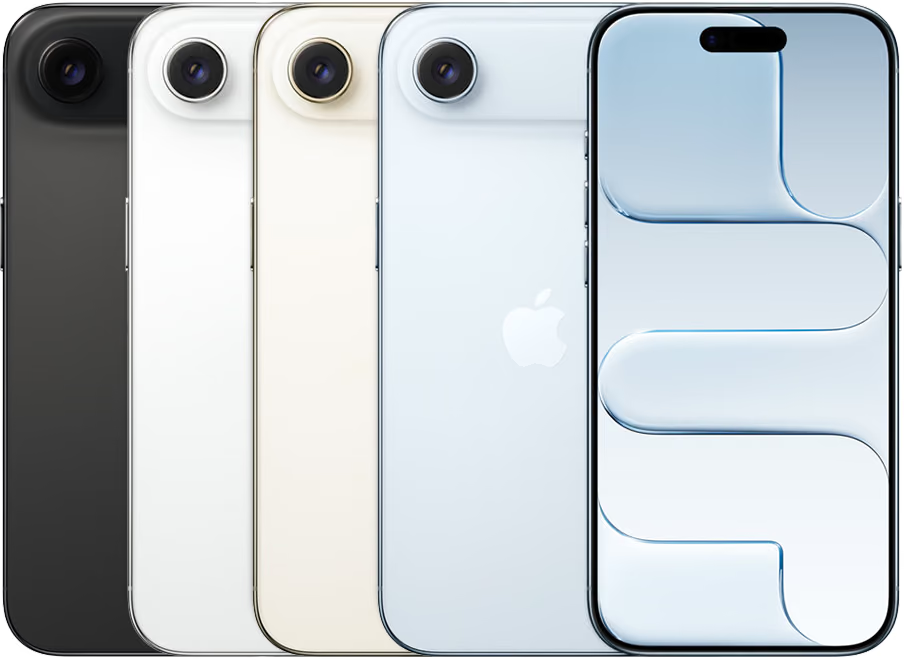
The iPhone Air made the shape itself the reason to buy
The iPhone Air put a 6.5-inch display in a thin body with a titanium frame and one rear camera. It had ProMotion and an A19 Pro chip, but the everyday decision was how the device fit the places I used and carried a phone. Someone who wanted a readable screen but felt the weight of an ordinary large phone had a good reason to handle it. The individual camera, speaker and power decisions on the device were things to consider at the same time as the shape.
Quick verdict
Retail release in the United States · Archive date
I would have picked the Air where the ability to carry a thinner and lighter device made a difference I could see more often than the missing camera views.
Best for: A buyer who preferred a large enough screen for reading and carrying a light phone with a useful standard rear camera.
Main benefit: It fit a 6.5-inch display into a light and thin phone that could be easier to hold during ordinary work.
Biggest drawback: There was one rear camera and one speaker. Mounts, thick cases and extra power could reduce the shape advantage.
Reviewed version: The US iPhone Air at September 19, 2025 retail launch, starting with 256 GB and a single Fusion rear camera.
Compatibility: It used an A19 Pro, C1X, eSIM, ProMotion and MagSafe. A compatible optional external battery could add room between charges along with size and weight.
Review context: I evaluate the documented retail hardware and the software available in its release window. Regional variants and software changes are identified where they affect the verdict.
I owned the Air as part of having every iPhone. It went on sale in the United States on September 19, 2025 from $999 for 256 GB. Apple sold it alongside the iPhone 17 and both Pros. This review focuses on what was available in the early purchase window. Apple’s iPhone Air launch announcement
A thin phone is useful if the size you see is different from the size you carry
Apple listed the body at 5.64 millimetres deep and the phone at 165 grams. The camera area rises beyond the rest of the back, which affects how it rests on a surface. I would have tried a real example: read something longer than a notification while sitting, then hold the phone in the way you use it when standing or walking. The Air could offer more viewable space than the regular 17 and still sit lightly in a grip. A particular case can make the relative difference smaller and add back some depth. Try the arrangement you want to carry before treating the uncased shape as part of the purchase value.
Related reading
ProMotion adjusted the display up to 120 Hz. Motion is a useful part of comparing the large panel if you frequently read by scrolling. The bigger diagonal can let physical text look a little larger or make it easier to keep another part of the page in view. In a coat pocket the Air is still a relatively long phone. In one hand the length is still a reason to try the highest touch areas. The design helps separately with thickness and weight. Those were the measurements that made it distinct.
The one rear lens still gave two useful framings
The 48MP Fusion camera supported a standard view and a useful 2x option using the middle of its sensor. I would have tried making a picture where the main subject was currently a little small. The 2x can help bring it into the useful portion of the frame when you cannot walk closer. It still leaves out the broad view of an Ultra Wide. It was clearer to judge these as field-of-view choices than as a list of numerical zoom levels.
Try two shots you frequently make, a person across a room and a few people taking up most of the space close to you. A regular 17 has a second rear camera to make sense of the second example. In good light the Air’s main camera can be more than adequate for many other images. Someone who wants macro, a separate Ultra Wide or the real option to work at the far end of a large space has a fair reason to bring another phone. I would have decided how many of my normal pictures were in those categories before giving them up for the shape.
The Center Stage front camera could help fit a group and gave useful framing options. That had some value for someone who often joined a call or took a casual portrait involving several people. Rear and front needs are separate. The front camera can be especially useful in a tight room where faces are fairly close. It does little to replace a wider view for a scene you need to capture from your own standing position.
The return for carrying less depends on what else you bring
The Air used eSIM, Apple’s C1X modem and its N1 wireless networking chip. Its cellular possibilities depended on region and service, and the lack of a physical SIM option mattered if you relied on one. I would have checked transfers and the carrier in the places I needed it rather than treating newer chips as coverage. MagSafe gave a route to wireless charging and an optional battery. The battery itself puts some of the thickness back into the package while it is attached. Plan to compare the case, charger and extra battery if you expect to use all of them often.
Related reading

It also used a single speaker rather than the stereo arrangement of other iPhones in the lineup. For phone calls and headphones, that distinction might not matter much to some people. I would have tried an ordinary video played straight from the phone. The size of a display and what it sounds like in the same room are both parts of choosing where you actually use it. Apple’s iPhone Air technical specifications
Test whether the Air changes how you carry a whole kit
Keep it on its own for a short outing, then think about the equipment you would put around it for a longer day. A thin case or a compatible fold-out stand can leave much of its size advantage. A thicker case and the magnetic battery change where that depth and mass end up. I would have compared the full set I usually put in a pocket or bag with what I carried for a different iPhone. Somebody who already shares a USB-C charger with other devices might keep the option of the thinner body more often.
People who photograph and review together can also try holding the phone in whatever posture feels natural. If the low weight lets you carry it to more places, the camera you like may still capture more moments even with fewer viewing angles. There is a reason to pay for the Air when the shape itself gives access to the phone at more of those moments. Compare it with the regular model’s Ultra Wide and the Pro’s telephoto using the photographs for which you actually needed those cameras.
My verdict on the iPhone Air
I liked having this different shape available. I would have picked it if I spent significant time holding and carrying a phone and mostly needed the main camera. The regular iPhone 17 was a useful counterpoint for a more flexible rear camera and a lower price. The iPhone model timeline gives the Air a separate place alongside the other September releases, just as its physical design deserved.
What worked
It fit a 6.5-inch display into a light and thin phone that could be easier to hold during ordinary work.
The adaptive OLED and front camera kept several common uses convincing even in a device with a narrower camera choice behind it.
What bothered me
There was one rear camera and one speaker. Mounts, thick cases and extra power could reduce the shape advantage.
The long display still asked for reach. An eSIM-only arrangement and smaller range of rear views would matter in specific jobs.
Who should not buy it
Someone who regularly took a wide group picture or short-range macro shot, or depended on a physical SIM while travelling.
Alternatives I would consider
iPhone 17. The ordinary model costs less and adds a dedicated Ultra Wide. It is smaller diagonally but thicker in the hand. Read my iPhone 17 review.
Evidence and sources
The release date refers to general availability in the named market. The archive filing is ten days later. Feature assessments are editorial judgments based on the documented retail model.
Features, compatibility and rated figures from the maker are manufacturer information. My opinions are identified in the review.
Conclusion
Try the Air with your actual accessories. The purchase worked when the shape remained valuable with the equipment you really carried.
One email a week with practical Mac workflows, useful comparisons and honest tech recommendations.