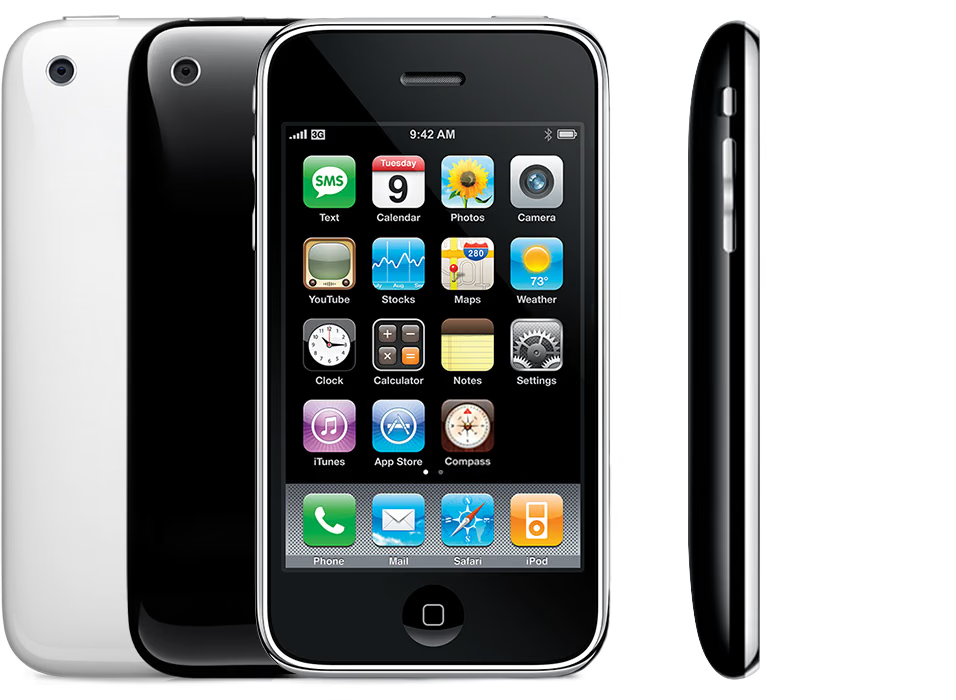
The 3GS made the camera worth opening
The iPhone 3GS is easy to underestimate because the screen and curved plastic case make it look like an iPhone 3G. The strongest reason to change phones in June 2009 was the camera, especially if taking a picture and sending it were already things you did on the same device. The faster phone felt like the continuation of a workable design. The better camera brought a small, complete job inside that design. You could record a moving subject, cut away the few seconds when you were getting ready, and send the result without syncing a separate camera first.
Quick verdict
Retail release in the United States · Archive date
The 3GS was the better June 2009 iPhone for people who took photos and made short videos.
Best for: A new buyer who wanted easy recording or a 3G owner whose most-used applications made them wait.
Main benefit: Autofocus and trimming put more of a complete camera task on the device.
Biggest drawback: The body and display offered a familiar experience, and the fastest cellular service was still rolling out.
Reviewed version: The 16 GB and 32 GB iPhone 3GS sold at the US launch.
Compatibility: GSM and HSDPA depended on carrier support. The 8 GB edition arrived later. These capabilities describe the phone and its software in June 2009.
Review context: I evaluate the documented retail hardware and the software available in its release window. Regional variants and software changes are identified where they affect the verdict.
I owned a 3GS as part of having every iPhone. I liked the series, and the 3GS makes a particularly good case for keeping a familiar shape while fixing several jobs that shape could already do. This retrospective takes the US June 19 retail release as its starting point. Apple’s UK and German releases also specify June 19. Apple’s US launch and contract details
Why autofocus mattered more than one extra megapixel
The camera moved from a simple two-megapixel still camera to a three-megapixel autofocus unit. One extra megapixel gives a little more information to work with. Focus decides whether the bit that matters in the picture is readable. Imagine taking a photograph of a handwritten sign through a shop window. Your subject may be the sign while the most conspicuous edge in the frame is a reflection or the frame of the glass. With tap to focus you could tell the phone where to work. You could also bring a small object close enough to fill more of the frame, a useful change for labels and short bits of text.
Related reading
I find that more persuasive than assessing the camera by image size alone. If the phone is already in your hand when a useful picture presents itself, a small change to the odds of getting the shot can matter more than a big change to the best picture you might produce with another device. The 3GS was a good fit for records that would be viewed on another phone or attached to a message. A buyer who took indoor photos in poorly lit rooms would still have a reason to keep a separate camera. The 3GS had no built-in flash.
The video controls followed the same idea. A short clip has a spot where something actually begins or finishes. Being able to trim in the phone reduced the work needed to show somebody only that part. The camera could record 640-by-480 video at up to 30 frames a second, which was enough to communicate a moment clearly in good light. Long events and complicated edits still suited a larger setup. A single good example would be a few seconds of a dog trying a new trick. A complete recital asks different things of the lens, microphone, battery and person holding the phone. Apple’s iPhone 3GS technical specifications
Getting to the next thing
The best way to think about the speed upgrade is to follow a whole task. Open a browser, choose a result, copy the address and return to the message you were writing. Some of the overall wait comes from web rendering and opening apps. Another part comes from fetching the page. The 3GS could improve the work done on the handset even in circumstances where the carrier delivered the same connection. That distinction is important. An operating system can feel more willing to do small things before the headline speed of a mobile connection has changed where you live.
Apple rated the new radio for up to 7.2 Mbps HSDPA where supported and said the service would be available from AT&T later that year. I would therefore have considered it a useful ability to have, with the day-one decision resting on tasks already improved by the hardware in the phone. Improved graphics support helped games that chose to use OpenGL ES 2.0. Buyers who used a phone for email and maps could get a worthwhile benefit out of application performance without needing to play a game that demonstrated the new graphics.
Storage made a second difference over time. A buyer choosing between the 16 GB and 32 GB launch models could look at how much music was already synced before thinking about video. Recording a clip on the phone also makes the phone its first and sometimes only copy. More room is convenient, and a deliberate way to move the clips somewhere else matters just as much. For somebody who synced regularly and kept a small music library, I would have started with 16 GB.
Related reading

A compass changed what the map could tell you
The iPhone 3G could use GPS to put a useful point on the map. On foot your other immediate question is often which side of the street or which exit to take. The compass gives the map another clue. At low speed or at a standstill it can turn the map as you turn. Standing after leaving a station, you could match the first road in front of you to a line on the map without necessarily having to walk far enough for an obvious difference in GPS position.
The magnetometer measures a physical field. Nearby metal and magnets can interfere with what it sees. I would have checked signs and street names before following an uncertain pointer. The gain was strongest in a simple first decision with a clear visual cue after it. You still needed carrier or Wi-Fi data for the maps you were loading. An illustrated map you could unfold without cellular service could still earn its place on a trip.
VoiceOver deserves similar attention because it changed who could approach the interface in the first place. Speech feedback gave a person another way to find an item and know what they had touched. The universal screen zoom gave a low-vision user more flexibility than increasing the text in one app. Voice Control had a different job, such as choosing music or dialling a known contact. Keeping these controls distinct helps explain why the 3GS mattered even to a buyer who had no interest in its camera.
What an iPhone 3G owner already got
Apple released iPhone OS 3.0 as a free software update to iPhone owners on June 17. Copying a little text out of a message and pasting it into another app was an improvement an existing user could try before buying a phone. Spotlight could find a contact or a song with fewer trips through the icons. Better landscape keyboard support helped someone who wanted more space to compose a reply. A carrier still decided when its customers actually got MMS. At the US launch, Apple’s own material pushed AT&T’s MMS support to later in the summer.
That makes the 3GS an unusually good example of how to compare neighbouring iPhones. Try the new system on the phone you already own, if it supports it, then visit the store with a question the old hardware cannot answer. Does selecting a point of focus make that camera useful enough to keep open? How many of the apps you use make you wait? Does the size of the library you want to carry exceed your current storage? Those are three independent reasons to spend money that each survive the comparison with the free update.
Related reading
My verdict on the iPhone 3GS
At US launch the qualifying two-year AT&T plan put the 16 GB model at $199 and the 32 GB model at $299. The 8 GB iPhone 3G cost $99 under the preceding model’s new offer. I would have chosen the 3GS for regular pictures or clips, or after seeing that faster local work solved a recurring wait. A buyer whose iPhone was mostly a phone and music player might reasonably have taken the software update and waited until the existing contract allowed a cheaper change.
The iPhone 3G made the iPhone more useful when it left Wi-Fi. The 3GS improved more of the work that happened between taking it out of a pocket and getting on with the day. It made a more rounded everyday tool without asking anybody to learn a different shape. The iPhone model timeline puts it back between the 3G and the more visible redesign that followed.
What worked
Autofocus and trimming put more of a complete camera task on the device.
VoiceOver and system-wide zoom made the phone easier to approach for people who needed different ways to read the screen.
What bothered me
The body and display offered a familiar experience, and the fastest cellular service was still rolling out.
The camera still had no flash, and a larger recording called for steadier support and more control.
Who should not buy it
An iPhone 3G owner satisfied with the old camera who mainly wanted the new software.
Alternatives I would consider
iPhone 3G. The less expensive 8 GB iPhone also received iPhone OS 3.0. Read my iPhone 3G review.
Evidence and sources
The release date refers to general availability in the named market. The archive filing is ten days later. Feature assessments are editorial judgments based on the documented retail model.
Features, compatibility and rated figures from the maker are manufacturer information. My opinions are identified in the review.
Conclusion
The useful changes were already in the phone at launch. The extra storage made more sense once you knew what you wanted to carry or record.
One email a week with practical Mac workflows, useful comparisons and honest tech recommendations.