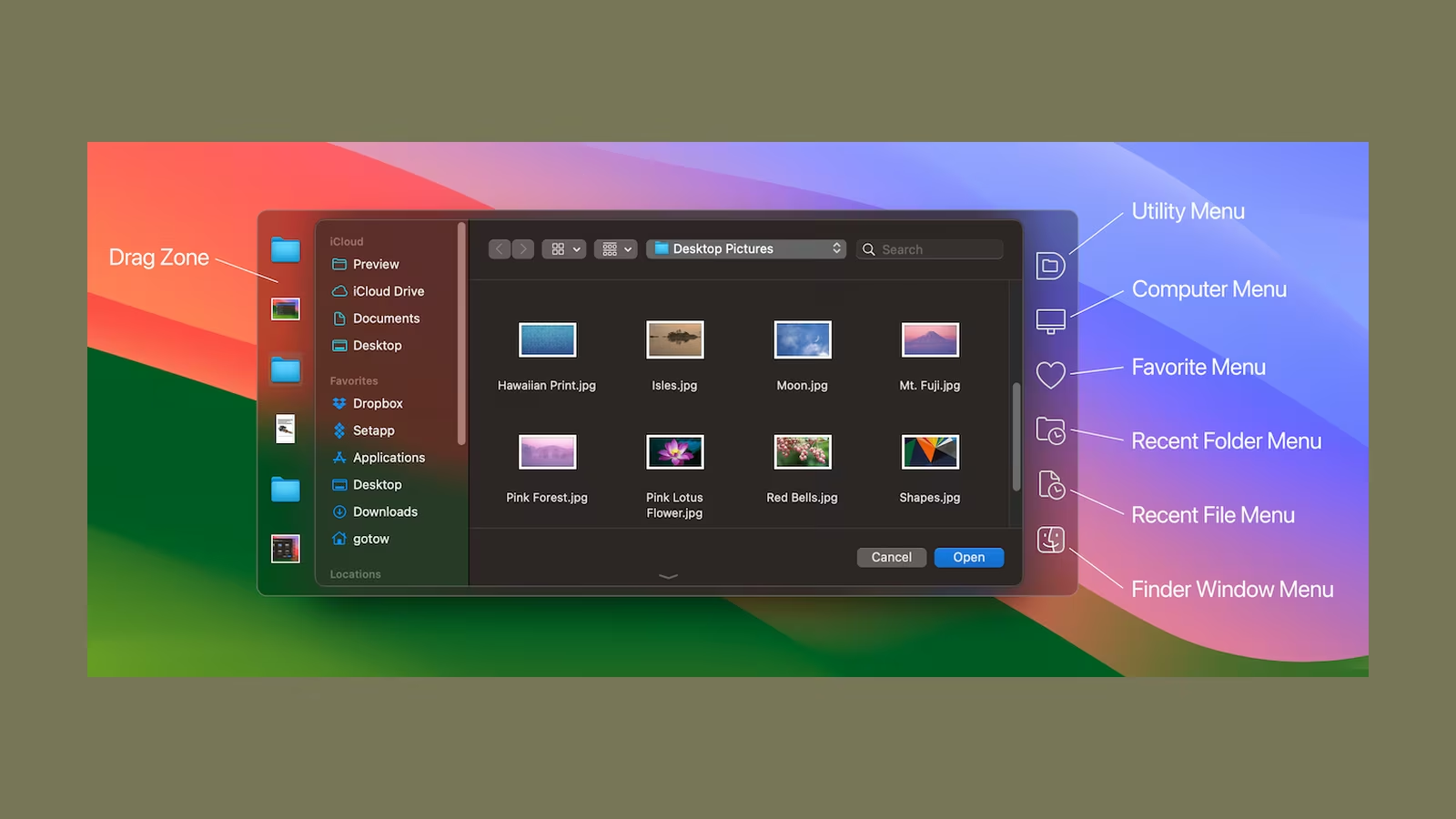
An Open or Save dialog is rarely the work. It arrives between finishing something and putting it where it belongs. macOS then asks you to navigate a miniature Finder, often back through folders that are already open on the desktop. The interruption lasts seconds, but it happens exactly when attention should remain on the document.
Default Folder X has spent decades fixing that small piece of the Mac. It adds recent and favourite locations to file dialogs, lets a click on a Finder window choose that folder, remembers different defaults for different applications and exposes useful file operations without leaving the dialog.
This is not a spectacular category. There is no generated summary and no new creative medium. The product claims to remove navigation, which makes it unusually easy to judge. Either the same file reaches the right folder with less searching, or it does not.
The best feature is clicking the folder you can already see
The most convincing Default Folder X interaction is also the simplest. A Save dialog is open, and the destination folder is visible in a Finder window behind it. Move the pointer over that window, click, and the dialog switches to the folder.
Without the utility, the visible Finder location and the file dialog are separate worlds. I can know exactly where the file belongs and still have to reconstruct the path inside a smaller navigation interface. Dragging a folder into a dialog sometimes helps, but it is less direct and not always comfortable when windows overlap.
Finder-click connects the context already on screen to the decision being made. That is why it feels faster than selecting a favourite from a menu. It does not ask the user to translate a visual location back into a path.
This is the first feature I would test with every important application during the 30-day trial. Standard macOS dialogs should behave predictably. Applications with custom windows, unusual sandboxing or nonstandard frameworks may not. The developer maintains compatibility fixes, but no utility that augments system dialogs can assume every app behaves identically.
Recent folders are more useful than recent files
macOS remembers recent documents reasonably well. The missing piece is often the place rather than the file. Work tends to happen in clusters: a release folder, client directory, image-export location or repository subfolder remains relevant for hours or days, then disappears from attention.
Default Folder X maintains recent folders and makes them available where the next Open or Save action occurs. This avoids walking down the same project tree repeatedly. It also reselects recently used files, which helps when several operations concern the same artefact.
Related reading

Recency has to be understandable. A list that mixes files and folders from every context can become another search problem. Default Folder X lets the user work through its menu and keyboard shortcuts, so the useful habit is to keep favourites for stable anchors and use recents for the current work set.
I would not fill favourites with every project. Pin the locations that remain meaningful over months: a writing inbox, screenshots folder, active repositories and perhaps a shared team location. Let temporary client and release folders appear through history. The distinction keeps both lists useful.
Per-application defaults solve a surprisingly specific annoyance
Different applications produce different kinds of files. An image editor should probably save into an asset folder. A Markdown editor may open in the writing vault. An audio tool has a recording destination. macOS does not consistently preserve this context in the way each workflow needs.
Default Folder X can assign a default folder to an application. The next file dialog begins where the work normally belongs instead of wherever the previous unrelated dialog happened to finish. This is valuable when output destinations are stable and deeply nested.
The feature should be used narrowly. A forced default becomes irritating if an application works across many projects. In that case, recent folders or Finder-click preserve context better. Per-app defaults are strongest for tools with one clear home.
There is also a difference between Open and Save behaviour. A tool may need to read from many locations but always export to one. Check whether the chosen rule fits both directions, and avoid a configuration that saves time in one dialog while creating navigation in another.
The file dialog becomes a small working surface
Default Folder X adds operations normally associated with Finder. The current product page describes options to get information, duplicate, rename and delete existing files from Open and Save dialogs. It also expands the filename field and provides navigation through hierarchical menus and search.
These additions matter because they handle mistakes at the moment they become visible. A filename is wrong, a previous export should be replaced or the destination contains a duplicate. Leaving the dialog, switching to Finder, fixing the issue and reopening the dialog breaks the flow for a task that should be trivial.
Power requires restraint. Deleting from a Save dialog is convenient but easy to do while thinking about another goal. I would keep destructive actions behind confirmation and rely on the Mac’s Trash rather than any permanent path. The product is most valuable when it shortens navigation, not when it encourages file management from every window.
The larger filename field is a small but sensible repair. Technical and project files often need descriptive names. A narrow system field turns naming into horizontal scrolling and guesswork, which is an absurd limitation on a wide display.
Search should begin with the path you remember
People rarely remember every folder component. They remember a client name, repository or fragment of the destination. Default Folder X can search for a file or folder from the dialog, reducing the need to reconstruct the hierarchy manually.
This is different from Spotlight as a general search surface. The goal is not to discover content. It is to reach a location and continue the current Open or Save operation. The best result is therefore a fast transition back into the dialog rather than a separate result window.
Search quality depends on the locations macOS has indexed and on permissions. Network volumes, external disks and cloud providers may behave differently from the internal drive. Test the exact storage used for work. A feature that is excellent on local files but inconsistent on a company share should not determine the workflow for that share.
Keyboard access matters here. If reaching search requires several pointer movements, the utility has only moved the navigation cost. Assign memorable shortcuts to favourites, recents and search, but avoid collisions with application commands. A shortcut used weekly is better than twelve clever bindings forgotten after setup.
Measuring the saving without inventing a number
Default Folder X makes a measurable claim, but I do not have a controlled timing set that justifies publishing a universal seconds-per-dialog result. The saving depends on folder depth, pointer position, keyboard habits and whether the destination is already visible. A neat number from one machine would create more certainty than it deserves.
The personal test is easy. Write down eight operations before testing: save next to an open Finder file, return to a recent project, open from a deep repository, export to a fixed asset folder and four tasks that reflect your own week. Perform each with stock macOS and with Default Folder X. Count clicks and time from dialog appearance to confirmation.
Use medians over several trials, because the first attempt includes thinking and later attempts include learned paths. Also count how many Open and Save dialogs appear during a normal day. A five-second improvement used twice a week is comfort. The same improvement used forty times a day changes the rhythm of work.
Related reading

If the licence costs P dollars, the average saving is s seconds and the workflow uses D dialogs per day, the daily time recovered is s multiplied by D. Dividing the licence cost by the value of that time gives a rough break-even point. The equation is less important than using honest inputs.
I would not overvalue the salary calculation. Recovered seconds are rarely converted directly into billable work. The more believable benefit is keeping attention on the document instead of navigating the filesystem again.
Compatibility is continuous work
Default Folder X integrates with a system interface it does not own. Apple changes file dialogs, Finder and privacy boundaries. Third-party applications implement their own variations. Compatibility is therefore not a box checked once. It is the product’s ongoing work.
The current release notes show this clearly. Version 6.2.8, released in May 2026, adds Finder-click support for current Path Finder and Bloom versions, works around a macOS Tahoe dialog bug and fixes OneDrive for Business recent-item handling. The same page lists native Apple Silicon and Intel support and compatibility across a broad range of macOS versions.
That maintenance record is one of the better arguments for paying. A utility this dependent on macOS internals becomes worthless if it stops at the next system update. Long development history does not guarantee future support, but regular release notes are stronger evidence than a product page that has not changed for years.
I would still wait before installing a major macOS update on a production Mac. Confirm that the currently installed Default Folder X version supports it, export or note important settings and keep the installer for the previous working release.
Permissions should match the integration
To connect file dialogs with other applications and Finder windows, Default Folder X may require Accessibility or Automation permissions depending on the feature and macOS version. These controls allow deeper interaction with the interface than an ordinary document app receives.
Review each request in System Settings under Privacy & Security. Enable it when the associated feature is understood, and check whether core functions still meet the need if a broader permission is not acceptable. On a managed Mac, organisational policy takes precedence over convenience.
This is not a reason to reject the utility automatically. It is a reason to treat the developer and update channel as part of the security decision. Download from the official site, verify macOS recognises the signed application and do not use repackaged copies from software archives.
The app should also be removed cleanly if the trial fails. Disable it, remove its login item and revoke permissions. A utility that no longer runs does not need continued access in the privacy list.
Cloud files and shared documents need their own test
Modern Mac folders are often views into remote systems. iCloud Drive, OneDrive, Dropbox and company file providers may download content on demand, represent placeholders or track shared-document state. A shortcut that reaches the right path has not necessarily made the file local or resolved a synchronisation conflict.
Default Folder X can track recent material in these locations, and version 6 has added features around shared cloud documents. The practical boundary is the file provider. If a document is offline, opening it may still wait for download. If two users change it, the storage service decides what happens.
Test recent-folder behaviour after a file becomes online-only, after a cloud account reconnects and with identically named folders in personal and business storage. The utility should make the location clearer, not hide which provider owns it.
I would use favourites with descriptive names for cloud roots rather than relying on similar default labels. A few seconds saved are not worth placing a client file in the wrong tenant.
Pricing is unusually simple
The official site currently lists a single-user Default Folder X 6 licence at $39.95 and a 30-day free evaluation. Its user manual says upgrades and technical support are included with the purchase, while an upgrade from an older eligible version is $19.95. The release page states that updates within version 6 are free.
I like this model. The user can test the complete utility, buy the current major version and decide separately whether a future major upgrade is worth paying for. There is no need to keep a subscription alive simply to preserve an Open and Save workflow.
Forty dollars is still too much if the stock dialogs are not a problem. The trial exists to answer that. Do not evaluate by exploring every setting. Configure Finder-click, recent folders and one or two application defaults, then use the Mac normally.
Setapp availability or bundle pricing may change and can alter the calculation for existing subscribers, but a bundle should not be purchased for one small utility without comparing the annual total with the standalone licence.
Related reading

What macOS already does well enough
Finder’s sidebar can hold favourites. Spotlight can locate files. The Go to Folder command accepts a path. Open and Save dialogs remember some recent locations, and dragging a folder into a dialog can navigate there. A user comfortable with those tools may already have an efficient workflow.
Default Folder X does not make those abilities obsolete. It brings them closer to the current action and remembers context more deliberately. The difference is integration, not access to a secret filesystem feature.
Before installing anything, clean up the Finder sidebar, learn Command-Shift-G and check whether applications can set their own default export locations. If that removes most navigation, the simpler system has won.
The utility earns its place when those separate techniques still require repeated context switching. It is for a Mac where files move through many applications and project folders, not for someone who saves everything to Downloads.
Verdict
Default Folder X is a focused Mac utility with a clear argument: file dialogs should know more about the folders already in use. Finder-click is the feature that proves the point, recent folders keep active work near the surface and per-application defaults remove repeated navigation from predictable workflows.
Its value is personal and easy to test. The app depends on system integration and meaningful permissions, so compatibility and developer maintenance matter as much as the visible controls. St. Clair Software’s long history and detailed current release notes are reassuring, but the exact applications and storage providers in your workflow remain the real test.
I would recommend the trial to anyone who opens and saves across several projects every day. Keep the configuration small, compare eight real tasks with the stock dialogs and notice whether attention stays on the work. If the shortcuts become instinctive, $39.95 is a reasonable one-time price for a problem solved repeatedly. If you have to remember to use them, macOS is already doing enough.
Screenshot: St. Clair Software.
One email a month: new articles, reviews and the upcoming live webinar + free recording. No spam, unsubscribe anytime.