I like CLion because C++ development needs more than a good text editor. The compiler, flags, generated headers, build target, and debugger all influence what the project means. An environment that treats those choices as part of everyday work has a strong appeal for me. I enjoyed CLion, and its practical side is more interesting than a long feature checklist.
Use period: Not recorded in the review notes.
Review context: The review focuses on developers maintaining C or C++ projects with a defined toolchain.
Quick verdict
I recommend CLion when C and C++ development needs a clearer link between source, build and debugger.
- Best for
- Developers maintaining C or C++ projects with a defined toolchain.
- Main benefit
- I like seeing the compiler, build target and debugger as parts of the same project.
- Biggest drawback
- The IDE still needs the correct compiler, paths and build configuration.
- Worth the price?
- Worth it for regular C++ work when navigation and debugging save repeated setup effort.
Reviewed version: JetBrains CLion licence
Compatibility: C and C++ projects with a supported host system, compiler, debugger and build setup. Check your exact embedded or remote target before purchase.
JetBrains CLion licence
JetBrains · Global; local terms at checkout
Check price and availability: JetBrains CLion licence at JetBrainsProduct link.
We paid for our JetBrains software. The product images in this article come from official JetBrains documentation.
The CLion product page presents C and C++ development across operating systems and toolchains, with free noncommercial use currently available. The licence choice needs to match the work. The technical choice needs to match the actual build system and target.
The build is the source of meaning
In C++, the same source file can mean different things under different build options. A preprocessor definition can select another implementation. An include path can choose a different header. A language standard changes which constructs are valid. An editor that guesses those choices can produce a convincing but incorrect picture.
This is why I place build understanding ahead of completion features. Before an IDE can help change a symbol, it needs a sound view of the translation unit. Otherwise, a warning may describe an imaginary setup rather than the program that will be shipped.
For a project with several targets, that question becomes more visible. A library, test executable, and platform adapter can have different requirements. The environment should help the developer see which target and setup are active, rather than hide those choices behind one generic run button.
Related reading

I find CLion’s direction appealing because it puts these concerns close to the code. The benefit is not removing the build system. It is making the build’s assumptions easier to work with while reading, running, and debugging the application.
Toolchains deserve clear names
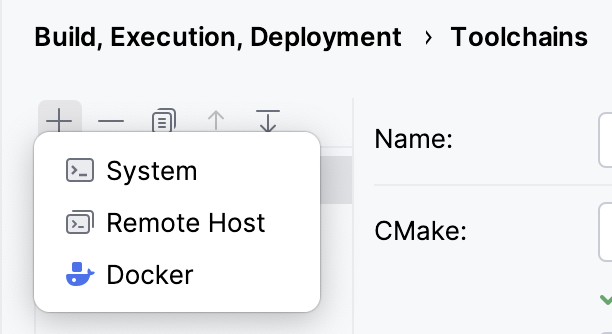
JetBrains’ toolchain guide describes the compiler, build tools, debugger, and environment as a set. That is a useful model because changing one part can change the behaviour of the whole workflow.
A project may need the system compiler for one target and another toolchain for a different platform. The developer should be able to identify those choices without tracing a collection of unnamed local settings. A clear name and a short explanation often prevent more confusion than another automatic detection step.
I also want setup knowledge to remain in the project where possible. Required compiler versions, external dependencies, and generation steps should not exist only inside one person’s IDE. CLion can provide a convenient interface to a shared process, while the project explains why that process exists.
That matters for remote and container work too. The host editor and the build environment may see different paths and tools. A successful local setup does not automatically describe the target machine. The useful setup makes that boundary clear so a failure can be investigated in the right place.
CMake profiles make choices visible
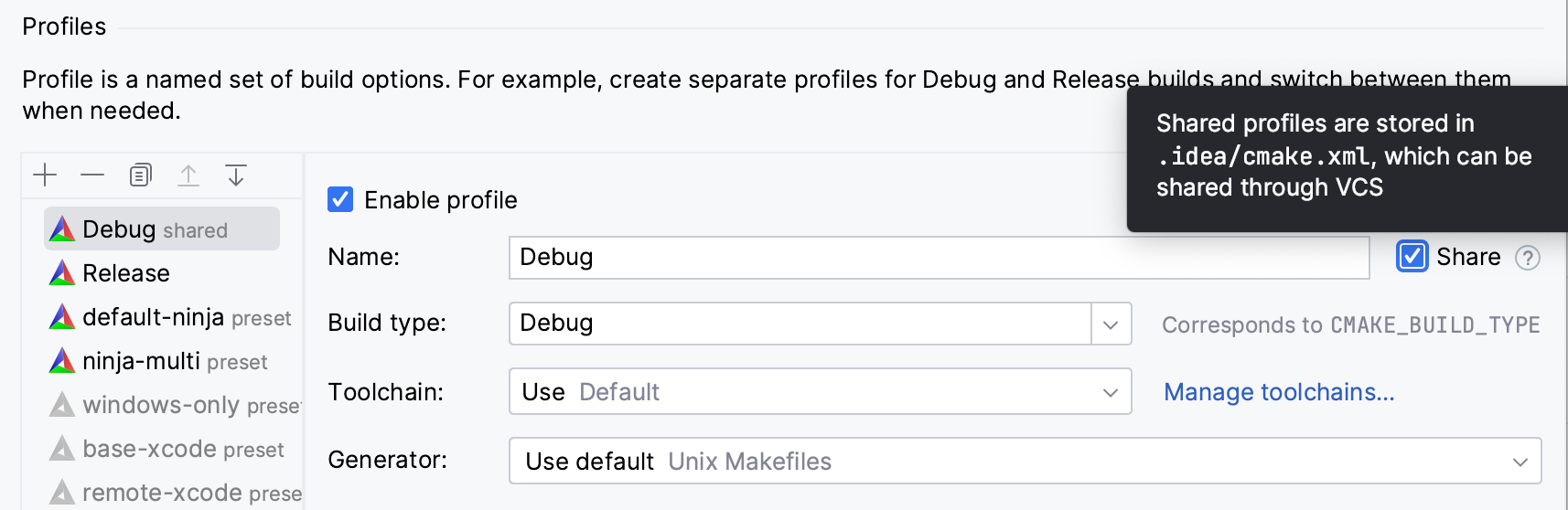
The official CMake profiles documentation groups toolchain, build type, and CMake options into profiles. Multiple profiles let a project express different build settings. The attraction is a visible choice that can be reviewed and reused.
A Debug build and a Release build answer different questions. Debugging needs useful state and a predictable investigation path. Performance work needs the right optimisation and target setup. Confusing the two can lead to conclusions that are exact but irrelevant.
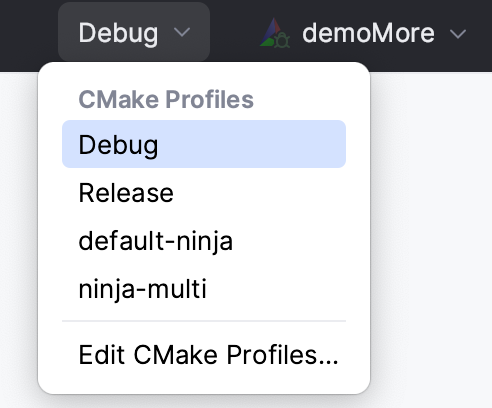
I like a setup where the current profile is obvious. A useful label should say more than “new profile.” It can identify the purpose of the build so that a developer knows which result is being discussed. That also makes a bug report easier to reproduce.
Shared profiles can help a team, but machine specific paths need care. A setup that works only on one laptop has a different role from a project default. Keeping those roles clear makes the convenience portable instead of turning it into another hidden dependency.
Refactoring must follow the language
C++ gives an IDE a difficult job. Templates, overloads, macros, conditional compilation, and generated code can all affect a change. A simple text replacement cannot reliably express the intent of renaming one symbol across a project.
This is where structured navigation and refactoring are useful. I want to know which declaration the tool understands and which references it proposes to change. A preview helps turn that understanding into something a developer can inspect before applying a broad operation.
Related reading

The useful standard is precision, rather than the promise that every possible pattern can be transformed automatically. Some code is deeply dependent on build setup. Some contracts reach external users. The IDE can help with the project it sees, while the developer remains responsible for the larger agreement.
I also prefer to keep structural cleanup separate from behaviour changes. A rename can be reviewed for consistency. A new algorithm needs a different discussion. Mixing them makes both harder to judge, even when the tool performs each edit correctly.
Debugging connects the model to the program
A source level explanation is valuable, but a running program can disagree with the developer’s mental model. A value can be invalid before the function begins. An object may have a shorter lifetime than expected. An error can originate several calls before its visible symptom.
A debugger provides a place to examine that actual state. The useful connection is between the source, the selected build, and the process being inspected. If those do not match, the view can become confusing. Correct symbols and the intended binary matter more than the appearance of the debug panel.
For performance work, I would separate debugging from measurement. A paused program answers questions about state. A suitable profiler or benchmark answers different questions about time and work. The IDE can organise both kinds of investigation, while the method still needs to match the question.
This is one reason I enjoy a full C++ environment. The task is rarely just writing a new method. It is understanding a failure, confirming a build assumption, following a value, and changing the smallest relevant part. Keeping those activities connected is useful.
Embedded and platform work need exact expectations
The current CLion page includes embedded and remote development in its scope. That can be attractive, but it is important to begin with the actual compiler, target, debugger connection, and build system involved. A broad product category is not enough to establish that every hardware setup will fit equally well.
For a target device, source code is only part of the system. Startup behaviour, memory layout, peripherals, and deployment steps may affect the result. The environment should help reach the device evidence that matters, rather than make a host build look like the end of the job.
I would keep the required target workflow documented independently of the editor. That allows another developer to distinguish an application failure from a local setup problem. CLion then becomes a useful way to operate the workflow, rather than an unexplained requirement in the chain.
The same principle applies to an agent making C++ changes. A generated patch may compile under one setup while missing another. The relevant targets and checks need to be clear. A general success message is much less useful than a result connected to the intended build.
Why this fits the way I think about C++
I enjoy C++ work most when the evidence stays connected to the exact build. A source change, compiler choice, and target setup belong to the same discussion. If one of them changes, the conclusion may change too. I like an environment that makes those choices accessible while I am reading the code.
Related reading

That is the personal attraction of CLion for me. It gives the surrounding tools a clear place without pretending the build is an uninteresting detail. A Debug profile, an optimised target, and a different toolchain have different purposes. Keeping those purposes visible helps the whole investigation remain honest.
I also like having fewer small details to remember. Remembering another path or finding an old command in shell history is not where I want to spend most of my attention. I would rather use that attention to understand ownership, interfaces, and behaviour. CLion is enjoyable when it supports that balance: make the mechanics easier to operate, and leave the important engineering decisions clear enough for the developer to judge.
Is it worth the larger environment
CLion asks for project setup and some learning. For regular C and C++ work, that can be a good investment because the same build and navigation questions return every day. For an occasional edit to one simple utility, a lighter tool may already be enough.
The machine also needs space for the whole development workload. The IDE, build processes, browsers, containers, and other applications share resources. I would judge comfort with the actual project open, rather than the editor alone in an empty session.
My verdict is positive. I like CLion because its strongest ideas respect the reality of C++: the build setup is part of the program, and changing code requires understanding that context. Check the current CLion licensing and the fit with your toolchain. The product makes the most sense when it gives a clearer path from source to the binary and target you actually need to maintain.
Where to buy
See CLion at the official product page. This is the product page for the model covered in this review. Check the model number, colour, included parts and delivery options before ordering. Prices and stock can change, so I use this page for the current offer. Matching the product to the review matters more to me than finding a similar name.
What worked
- I like seeing the compiler, build target and debugger as parts of the same project.
- Build context is more useful to me than an editor that guesses what a source file means.
What bothered me
- The IDE still needs the correct compiler, paths and build configuration.
- Embedded and remote work need checks against the actual target; broad support is not universal compatibility.
Who should not buy it
- Someone expecting the IDE to remove the need to understand their build system.
Alternatives I would consider
- Your current editor and toolchain. I would keep a light editor for a small project whose build and debugger already work clearly from the terminal.
Evidence and sources
The article explains my workflow preferences. Product screenshots come from JetBrains documentation and show the named setup controls.
Features, compatibility and rated figures from the maker are manufacturer information. My opinions are identified in the review.
My final verdict
I recommend CLion when C and C++ development needs a clearer link between source, build and debugger. Worth it for regular C++ work when navigation and debugging save repeated setup effort.
JetBrains CLion licence
JetBrains · Global; local terms at checkout
Check price and availability: JetBrains CLion licence at JetBrainsProduct link.
One email a month: new articles, reviews and the upcoming live webinar + free recording. No spam, unsubscribe anytime.