Earbuds can have the right brand, the right connection, and the wrong shape for your ears. The second-generation AirPods make that especially clear. Their hard, open design is the main reason to consider them, and the main reason someone else should choose a different pair. An attractive old-stock price cannot settle that question.
This is a research-based review of AirPods 2 with a Lightning charging case. I checked Apple’s specifications and current support guidance. I have not listened to or measured a review sample, so I cannot report personal comfort, microphone quality, or remaining battery life. Those are central parts of the purchase to test yourself.
My Amazon link for this AirPods 2 listing is an affiliate link. As an Amazon Associate, I earn from qualifying purchases. The photographs are product images from the listing, not evidence of hands-on use.
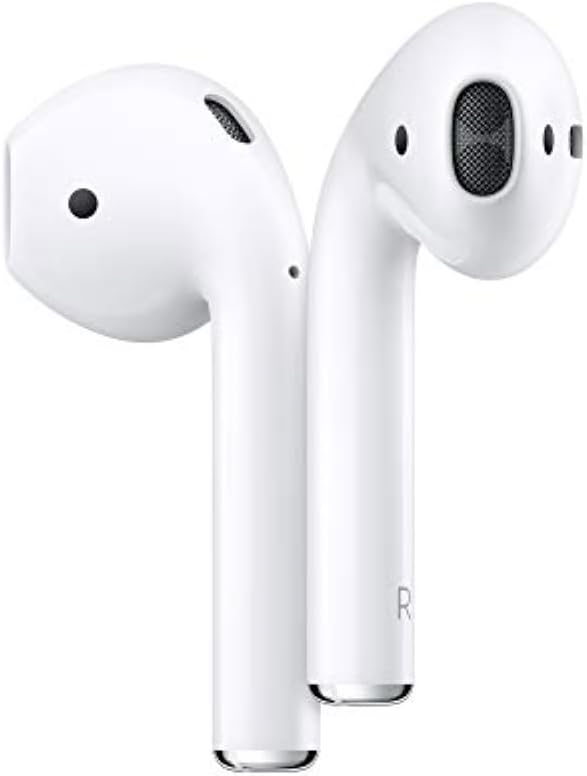
The shape is the starting point
The standard AirPods 2 have no replaceable silicone ear tips. You cannot change to a larger tip to make a poor fit secure or a smaller one to reduce pressure. That makes a proper fit check more valuable than a long comparison of wireless specifications. Borrowing a clean pair of the same model, where practical, can answer a question that photographs cannot.
Related reading

Try the activities you expect to do. Sit at a desk, look down at a bag, walk around indoors, and speak for a while. A pair that feels fine while you hold your head still may become distracting when you talk. Do not test security over a drain or on a busy street. Begin somewhere a loose earbud can be recovered easily.
An open fit also changes how you hear the room. If your priority is blocking a train, aircraft cabin, or noisy office, judge that need before buying this design. Turning the volume up to compete with the surroundings is a poor substitute for choosing a suitable listening product. For a quiet home office, awareness of a doorbell or someone speaking nearby may be exactly what you want.
These are consequences of the fit style, not a measurement of this sample’s sound. Without a seal, position in the ear matters. If a slight movement changes what you hear considerably, the fit may be too unstable for your use even if another listener loves the same model. Earbud advice becomes more useful when it admits that people have different ears.
Know the generation and the case
Apple’s AirPods 2 specifications identify the model as introduced in 2019, with the H1 chip, Bluetooth 5.0, double-tap controls, and hands-free Siri. Apple lists both a Lightning charging case and a separate wireless charging case configuration. The case supplied with a particular offer therefore matters; “AirPods 2” alone does not prove wireless charging.
The linked Amazon item is the Lightning-case configuration in the supplied product list. Check the seller’s current description and package before buying. Do not rely on an image that shows a different case variant beside a long marketplace title. If wireless charging is essential, get that detail confirmed explicitly rather than assuming every white AirPods case has it.
Lightning can be a small convenience or another cable to carry. Look at the charger already beside your bed and the cable in your work bag. If all your other equipment has moved to USB-C, the older connector adds a separate charging routine. That is not automatically a reason to reject it, but the low purchase price should include the accessories you actually need.
I would choose one fixed place for the case and charge it there consistently. A charging case is useful only when you can find it. Putting the earbuds into a flat case after a long call does not prepare them for the next one. Keep the cable somewhere the lid can open comfortably, so checking the contents does not become awkward.
Battery claims describe new hardware under test conditions
Apple advertises up to five hours of listening on a charge and more than 24 hours with the case, with results dependent on settings and use. Those figures describe Apple’s testing of new hardware. They do not establish what a used pair, or an old sealed unit stored under unknown conditions, can deliver now.
For an older pair, test the length of the activity that matters to you. A short music check cannot establish whether the earbuds will last through a long work call. Start with a full charge, use your usual device and volume, and watch for a large difference between left and right. Repeat an unexpected result before deciding it is a permanent fault.
Call use deserves its own check. Ask a person you trust to listen from the other end in a quiet room and then in your normal working environment. Test the actual meeting app on the computer you use. Bluetooth pairing alone is not proof that the app has selected the intended microphone and output. Check its audio menu before the first important meeting.
Related reading

Apple’s service page offers inspection and estimates and notes that service options depend on location and availability. I would check the current cost for this exact model in your country before buying a used set with weak batteries. A cheap purchase followed by service can be more expensive than choosing a different pair at the start.

Simple controls need a little preparation
Double-tap controls sound simple, but they should be configured around the actions you use most. Look at the available options on your own device and choose something easy to remember. A control that you keep triggering by accident is not a useful shortcut, however neat it looks in a feature description.
Practise the chosen action while paused at a desk. You should not have to learn it while walking across a road or carrying a hot drink. If speaking to Siri is part of your plan, test the requests you actually need in the language and region you use. A broad promise of voice control does not tell you whether your preferred command feels natural.
For a Mac and iPhone setup, rehearse the switch between a phone call and the computer’s meeting app. Confirm where the sound goes after each transition. Account settings, software versions, and the app can all influence what you experience. I would rather spend five quiet minutes understanding that behaviour than discover it at the start of a client call.
Name the earbuds clearly in the device settings when that option is available. In a home with several white cases and similar Bluetooth names, a personal name makes the audio menu easier to read. Then check that the meeting application still selects the correct output. A familiar name is a modest convenience, but it is more useful in a rushed call than trying to distinguish two nearly identical entries while other people wait.
There is also value in having a simple backup. Keep wired headphones or another working audio device available for a meeting that cannot wait for a charging problem. This does not make the AirPods a poor product. Small wireless earbuds necessarily depend on several charged components, and a backup removes pressure from the purchase decision.
Cleanliness matters with an older pair
Buying used earbuds adds a condition question that does not apply in the same way to a used keyboard. Look closely at the speaker meshes, charging contacts, case hinge, and connector. Cosmetic scratches may be harmless, but heavy residue or damaged mesh deserves more caution. Ask the seller for clear photographs rather than relying on a stock image.
Follow Apple’s cleaning guidance for the appropriate model. It warns against running AirPods under water and against sharp tools or abrasive cleaning. Do not copy a wet mesh-cleaning procedure for a different generation simply because a video calls every model “AirPods.” Check the model coverage of the instructions first.
For daily use, return dry earbuds to a clean, dry case and keep the case out of a pocket full of loose debris. A small pouch can help separate it from keys. Avoid treating a case cover as a fix for dirt already inside the charging wells. Inspect the actual charging points when one earbud repeatedly fails to charge.
Related reading

I would be careful about a seller using the word “refurbished” without explaining the work. Cleaning, replacing a case, and servicing batteries are different things. Ask what was tested and what the return policy covers. A condition label is the beginning of that conversation, not the end.
My judgement
AirPods 2 can still appeal to someone who wants this particular open shape and a light, straightforward way to listen at home. The documented controls and Apple integration give them a clear identity. Their age, fixed fit, and Lightning charging are the practical limits to weigh against the current offer.
I would put fit and battery condition ahead of the logo or the original launch price. If they do not stay comfortable, or cannot last through your normal call, a discount will not make them useful. If you already own a pair that fits well and still lasts long enough, that direct experience is better evidence than pressure to upgrade for a newer generation number.
Check the exact case, condition, and seller terms through my Amazon AirPods 2 affiliate link. Buy these because you want the shape and have confirmed the condition, rather than because a familiar white case makes an old offer feel automatically safe.
One email a month: new articles, reviews and the upcoming live webinar + free recording. No spam, unsubscribe anytime.