An older Full HD television does not need to become electronic waste because its apps are slow or missing. A separate streaming player can give the screen a new software life. The third-generation Fire TV Stick is aimed at that modest job. Its main limit is clear: this is the HD model, and a higher generation number does not turn it into a 4K player.
This is a research-based review of the 2020 third-generation Fire TV Stick with the Amazon ASIN supplied in the workbook. I have not measured a physical unit’s speed, buffering, or energy use. I checked Amazon’s listing and device documentation, then used those facts to assess the setup and buying decision.
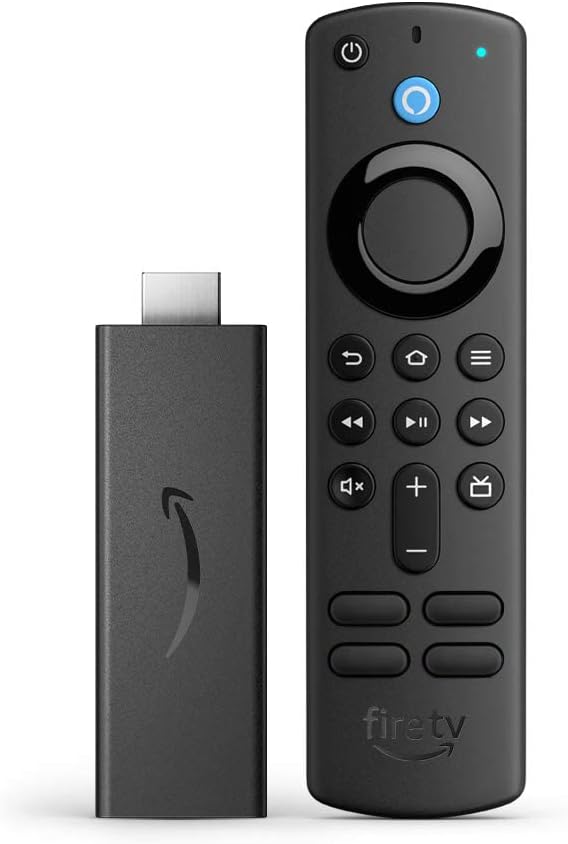
My Amazon link for this third-generation Fire TV Stick is an affiliate link. As an Amazon Associate, I earn from qualifying purchases. The product photographs come from Amazon’s listing and are not pictures of a unit I tested.

HD is a useful limit to understand
Amazon’s device specification page identifies this as the 2020 Fire TV Stick, build model AFTSSS. It lists Fire OS 7, 1 GB of RAM, 8 GB of storage, and playback up to 1080p at 60 frames per second. It explicitly distinguishes this product line from the first-generation Fire TV Stick 4K.
That distinction is more useful than a seller’s long title. If your screen is Full HD and your main purpose is ordinary streaming, 1080p may be all you need. If you are buying for a 4K television and want a 4K source, this is the wrong model even when the listing calls it “third generation” in large text.
Related reading

For a bedroom or spare-room television, begin with the actual screen and viewing distance. The question is whether the whole arrangement is comfortable to watch and easy to use. Paying for a feature the screen cannot display may deliver little benefit, but choosing an old player only to save a very small amount can create avoidable app and support questions.
Check the model information in the offer and confirm which remote comes with it. Product photos can show an older or newer remote than the seller actually supplies. On a used purchase, ask about missing accessories before treating the listed price as the total. An incomplete bargain can lose its appeal after buying the missing power lead or remote.
The remote is part of the upgrade
The listing describes an Alexa Voice Remote with television power and volume controls for compatible equipment. That matters if the current TV setup requires several remotes. A slightly older picture can be entirely acceptable when a family member can turn it on and reach the programme without assistance.
Try that complete journey during setup. Begin with the TV off, press power, select the main streaming app, play something, change the volume, and switch off. Have the person who uses the room most often repeat it. They may reveal a confusing step that the technically confident installer stopped noticing after the first hour.
Keep the television’s own remote somewhere known. You may still need it for input selection, picture settings, or a fault. A streaming remote can make daily use easier without replacing every service menu in the TV. Label a drawer or small box rather than burying the original remote among spare cables.
Do not judge voice search only by whether it finds a title. Check which service it offers and whether the result is included in the account you already pay for. A rental option and an included stream are different outcomes. Read the provider and charge information before confirming a purchase, especially on a shared family television.
Check your apps before your picture settings
A streamer is only useful if it runs the services you want in your region. Make that check with the exact older model before buying. A general Fire TV logo on a service’s website is a starting point, but current device eligibility and account requirements still matter. Local broadcasters can be as important as the biggest international platforms.
Include language and accessibility needs in the check. Find a familiar programme and verify the subtitle language, audio options, and controls you need. A working app is not automatically a satisfactory viewing experience if its regional catalogue or language selection differs from what the household expects.
I would install the few essential apps first, sign in, and use them for a normal evening before adding optional ones. This keeps troubleshooting simple. If something is wrong with the main service, you have fewer account and software changes to sort through. It also avoids filling the small device with apps that will never be opened.
The 8 GB specification describes total storage, not free app space. Keep the installation focused on what you watch. If you find yourself repeatedly removing apps to make the device comfortable, take that as useful buying evidence rather than a puzzle you must solve indefinitely. A television should not require routine storage housekeeping from everyone in the house.
Related reading

Power and placement deserve an unhurried setup
A streaming stick hides behind the television, which makes a messy installation easy to ignore. Keep access to the connector and power cable while testing. Do not tie every lead tightly into a bundle before you know that the player starts reliably and fits without pressing against a neighbouring HDMI plug.
Follow the supplied power instructions. The nearest USB socket on the TV is not automatically the appropriate source simply because the cable reaches it. If the device restarts unexpectedly, document when it happens and check the power arrangement before changing accounts or buying a different router.
Use any supplied HDMI extension as intended if the stick cannot sit comfortably in the available space. Check that a used package actually includes the accessories you need. For a wall-mounted television, plan how you will remove the player later without straining the television’s socket or pulling the screen away from its bracket.
Label the power lead while you can see both ends. Behind a cabinet, several black cables can look identical. A small label makes a later restart or replacement simpler and helps another person maintain the setup. This is an inexpensive improvement with a clearer benefit than many optional accessories sold beside a streamer.
Write down the television input you used as well. If somebody later connects a game console or changes inputs, a note saying “Fire TV on HDMI 2” can restore the normal arrangement immediately. It is a useful courtesy for a shared room and for the person who inherits responsibility for the setup when you are away.
Wireless problems need a narrow diagnosis
The developer specifications list dual-band Wi-Fi. Whether the connection is stable depends on the room and network as well as the player’s radio. A television in a far corner can reveal a coverage problem that a laptop beside the router never shows. Do not assume your broadband speed test answers that question.
If playback stops, repeat the same title and note whether the issue occurs in one app or several. Check whether another device in the same room also struggles. A problem limited to one service points to a different investigation from a complete loss of Wi-Fi throughout the room. That small distinction can save an unnecessary hardware purchase.
Change one condition at a time. Try a different allowed placement, pause a large household download, or compare the available network band. Keep the content and other settings consistent. When several things change together, an apparent improvement does not tell you which one mattered or whether the fault will return.
I cannot give you a measured buffering result for this model because there is no tested unit in this review. During your own return period, use the busiest normal evening in the house as part of the trial. A demonstration at midday on an empty network is less relevant than the conditions in which everyone actually watches.
Related reading

An old TV does not always need an old player
There is a reasonable case for keeping an HD screen and replacing only its streaming software. There is a weaker case for choosing any old player merely because the screen is old. The total price difference, current app support, and expected convenience should decide the player purchase.
If you already own this stick and it works with your services, it may be doing exactly the job you need. Measure an upgrade against a real complaint: a missing app, unacceptable navigation, or a requirement for 4K on another screen. A newer generation number is not itself a benefit you will notice while watching an ordinary programme.
If you are buying now, I would want an appropriate return policy and a meaningful price advantage over a newer suitable device. A small saving can disappear quickly if you replace the streamer again because a required service does not work. Do the account and app checks while returning it is still straightforward.
My judgement
The third-generation HD Fire TV Stick has a clear documented role: adding Full HD streaming and a voice remote to a suitable television. Its resolution limit is not a flaw when it matches the screen and the viewer’s needs. Its age and current app eligibility are the more important questions when buying today.
Check this exact model through my Amazon affiliate link, then verify the services and supplied accessories. The useful upgrade is the one that makes an evening’s viewing easier from power-on to power-off, without turning the television into another device you have to manage.
One email a month: new articles, reviews and the upcoming live webinar + free recording. No spam, unsubscribe anytime.