TP-Link’s download page for the Archer AX21 lists a long row of hardware versions, from V1.20 all the way to V5. The listing for this router names V5. Almost every owner complaint I can point you to was written about an earlier version. So there is a basic problem with reviewing this router: the name has stayed the same while the hardware under it has changed.
I found no detailed owner reports about V5 itself, so I will treat the older reports as a warning and not as proof about the unit you would get.

Product image from the Amazon listing.
My view, in one line: it is a sensible cheap router for a small home office, as long as you treat firmware as a job you keep up with.
What You Get
The product page lists dual-band Wi-Fi 6 at AX1800, split as 1,201 Mbps on 5 GHz and 574 Mbps on 2.4 GHz. There are four fixed antennas, one Gigabit WAN port and four Gigabit LAN ports. It supports WPA3, an OpenVPN server, OneMesh and EasyMesh.
Related reading

Those Wi-Fi numbers are link rates under ideal conditions, and TP-Link’s own footnote says so. Nobody gets them in a house.
The wired side matters to a home office. Four Gigabit LAN ports let you run a desktop, a NAS and a printer by cable, which is the most reliable way to use any router. There is no multi-gig port, so a plan above 1 Gbps is wasted here.
There is also no USB port, which HighSpeedInternet’s review lists as a drawback. You can’t plug a drive into this router to make simple network storage, so a real NAS on a LAN port is the way to go.
Real Speeds Fall Fast With Distance
Two outlets ran useful tests. HighSpeedInternet got 824 Mbps on an iPhone at 2 feet on 5 GHz, 685 Mbps at 30 feet, 428 Mbps on a porch at 40 feet, and 223 Mbps from across the street at 120 feet. That is decent long-range performance for the price, and the reviewer called it a “great budget pick.”
BroadbandNow’s test in a three-level condo was less kind. It measured 813 Mbps at 5 feet, but only 463 Mbps at 15 feet. A basement office got 330 Mbps, or 291 Mbps with a busy network running 4K streams and a game download. The reviewer felt the router suits small to medium homes and said it struggled to reach gigabit speeds.
Neither review states the hardware version, so please read these as a rough guide. They still tell a home office worker something useful. Even the weak results here are far more than a video call needs. Your limit in a far room will be the stability of the signal, and walls, more than raw speed.
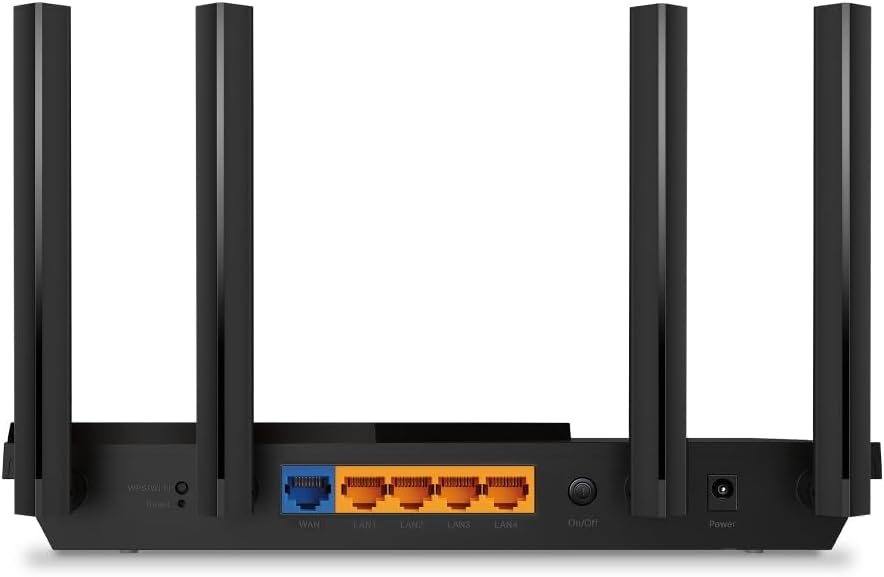
Product image from the Amazon listing.
The Stability Reports
The complaints below are from TP-Link’s own forum, and they deserve a calm reading. People with working routers don’t post. No forum can tell you how common a fault is. What these threads do show is a pattern worth knowing.
In January 2022, owners on V1 hardware reported the internet dropping as often as every hour or every four hours. One installed a beta firmware and wrote that it “seems to have solved the issue for me.” Another got relief from a factory reset.
Related reading

In December 2022, a V2 owner called the router “rock solid” until a firmware update, after which ping swung wildly and rose above 500 ms about once a minute. Rolling back fixed it. A 2023 thread describes the internet dropping every couple of days, with a factory reset making no difference.
The most detailed report is a V1 owner in early 2023 who logged pings every 15 seconds. The router stopped responding after anything from 20 minutes to 13 hours in access point mode. It later locked up in normal router mode too. The owner suspected heat in a switch chip and tried a heatsink, with unclear results. There was no confirmed cause, and the owner planned to leave for another brand.
A V3 owner in 2024 saw similar trouble in access point mode, with no error in the logs and no fix in the thread. And one V1 owner with a NAS and a Raspberry Pi on the network lost 5 GHz internet, had Microsoft Teams freezing for 2 or 3 seconds, and said no firmware update had arrived for years. That thread ended with the owner shopping for a mesh system.
On the other side, one reviewer at TheTestedHub reports running the router as the main unit for four months with zero unplanned reboots. It is a single unit, on a small affiliate site, but it is a fair counterweight.
My takeaway: a firmware update can help or hurt, access point mode draws an unusual share of the complaints, and a reset sometimes fixes things and sometimes doesn’t. If you rely on this for paid work, keep a spare cheap router or a phone hotspot ready.
The Security Story
This router has a real history here. In 2023, BleepingComputer reported that a Mirai botnet was using a flaw in the AX21’s web management interface, CVE-2023-1389. It let an attacker run commands with no login. TP-Link’s first fix was incomplete, and a full fix arrived in March 2023 as firmware 1.1.4 Build 20230219. FortiGuard’s report says CISA added the flaw to its Known Exploited Vulnerabilities list that May.
The lesson is about old stock and lazy habits more than about V5. Nothing I found ties this particular flaw to V5, which has its own firmware line on the download page. But any router sitting on a shelf may ship with old firmware. On day one, check your hardware label, download only the file for that exact version and your region, and install it. BleepingComputer also lists warning signs of infection: overheating, dropped connections, and settings or admin passwords that change by themselves.
If the idea of checking firmware every few months bores you, consider that a real cost of this router.

Product image from the Amazon listing.
Two Things to Budget For
HighSpeedInternet lists subscription-locked features as a drawback. Premium security and parental controls need a paid plan, and BroadbandNow says advanced app features sit behind a paywall. The basics work without paying. If strong parental controls are the reason you are shopping, look at those limits before you buy.
Related reading

BroadbandNow also found the first internet setup frustrating, with modem resets needed. TheTestedHub says setup took about five minutes. So the app is fine, but keep your modem’s power cable within reach on setup day.
HighSpeedInternet also suggests the older AX20 for people who want USB file sharing, because the AX21 dropped that port. Performance between the two matched in its tests.
A Fair Pick for One Small Office
I would buy this for an apartment or a small house, with an internet plan under 1 Gbps, where the desk and NAS can use cables and only phones and laptops need Wi-Fi. For that setup, you get Wi-Fi 6, four LAN ports and a built-in VPN server for little money.
Skip it if you have a large or multi-level home, because the tests show a fast fall with distance. Skip it if you need a multi-gig port, or USB storage on the router. And skip it if you plan to run it in access point mode for serious work, given how often that mode comes up in the complaints. If your income depends on a call never dropping, I would spend more.
If your home is modest and you will keep the firmware up to date, the TP-Link Archer AX21 is a reasonable place to start. This is an affiliate link. As an Amazon Associate I earn from qualifying purchases.
One email a month: new articles, reviews and the upcoming live webinar + free recording. No spam, unsubscribe anytime.