I like RubyMine because Rails work rarely stays inside one file. A controller, view, model, migration, and test can all belong to the same small feature. An environment that helps keep those relationships clear is a good fit for the way I want to work. I enjoyed the product, and its appeal is easy to explain without a long list of fashionable extras.
Quick verdict
I recommend RubyMine for Ruby and Rails work that benefits from a view of the whole application.
- Best for
- Developers maintaining routes, models, tests and related Ruby code.
- Main benefit
- I like rebuilding application context through navigation instead of relying on memory.
- Biggest drawback
- The learning and setup effort is harder to justify for occasional edits to a small script.
RubyMine
JetBrains · Choose the local store or delivery region
Check price and availability: RubyMine at JetBrainsProduct link.
Reviewed version: RubyMine
Compatibility: Choose the exact personal, business or bundle licence for the intended work. Check the current host, project-toolchain and account requirements.
Review context: The review focuses on developers maintaining routes, models, tests and related Ruby code.
We paid for our JetBrains software. The images below are official JetBrains product screenshots.
The RubyMine product page currently offers free noncommercial use and presents a complete Ruby and Rails environment. My interest is in the connection between reading an application and changing it. A clever editor is pleasant. A useful map of the project matters more when the feature already exists and someone needs to maintain it.
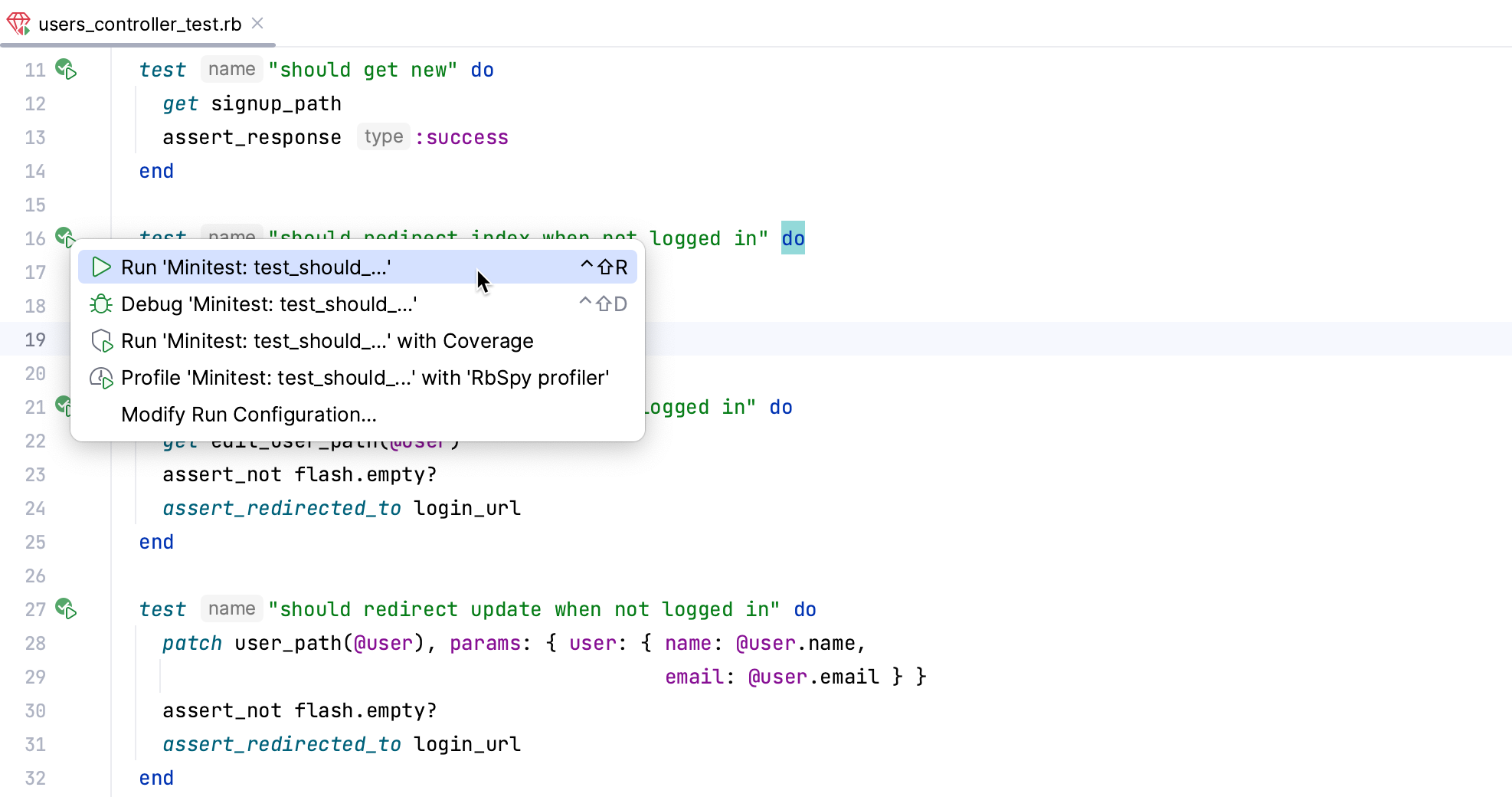
Rails shared rules are helpful until you lose the thread
Rails puts related ideas into predictable places. That can make a project easy to approach, especially when the team follows its shared rules. It can also make the relationship between files less visible to someone entering a new area of the application.
A view may depend on values prepared by a controller. A model may carry validation and callback behaviour. A route points to an action whose real work lives somewhere else. Reading a single file can leave the interesting decisions hidden.
This is where I find RubyMine’s direction appealing. I want to follow the feature, rather than remember every path by hand. The better the environment helps connect the relevant files, the less attention I need to spend on folder navigation.
Related reading

That is especially useful when returning to code after working on something else. Remembering a whole application is not a realistic requirement for a development tool. Helping the reader rebuild context is a much more practical goal. It is one reason I enjoy a full IDE for work that will be maintained for a long time.
Generators should remain understandable
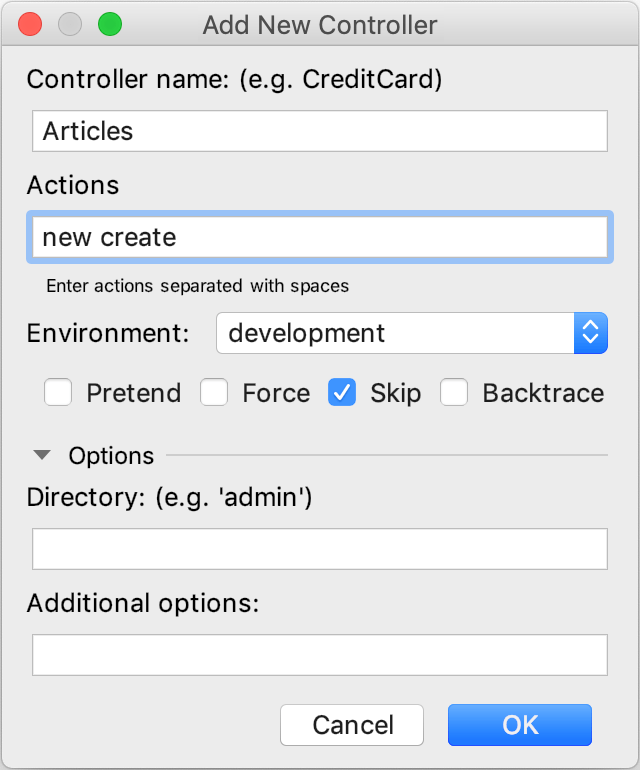
RubyMine can expose Rails generators through its interface. The official guide to creating Rails elements shows controller, view, and model creation, with the generated files available from the output. This is a useful convenience when it keeps the command and the result connected.
I like automation best when it leaves an ordinary project behind. A generated controller should be a file a colleague can read and change, with an understandable place in the application. The IDE should make the process easier without turning the project into something only the IDE can manage.
That also means reviewing generated files. A generator provides a starting point, while the application still needs a good design. Extra routes, unused actions, or unnecessary tests are still extra maintenance. The right amount of generated structure depends on the actual feature.
There is value in knowing the command line equivalent too. A team may use several editors or automate project setup. The generator is part of Rails; RubyMine offers another convenient way to reach it. Keeping that distinction clear makes the tool easier to recommend.
Tests belong next to the question
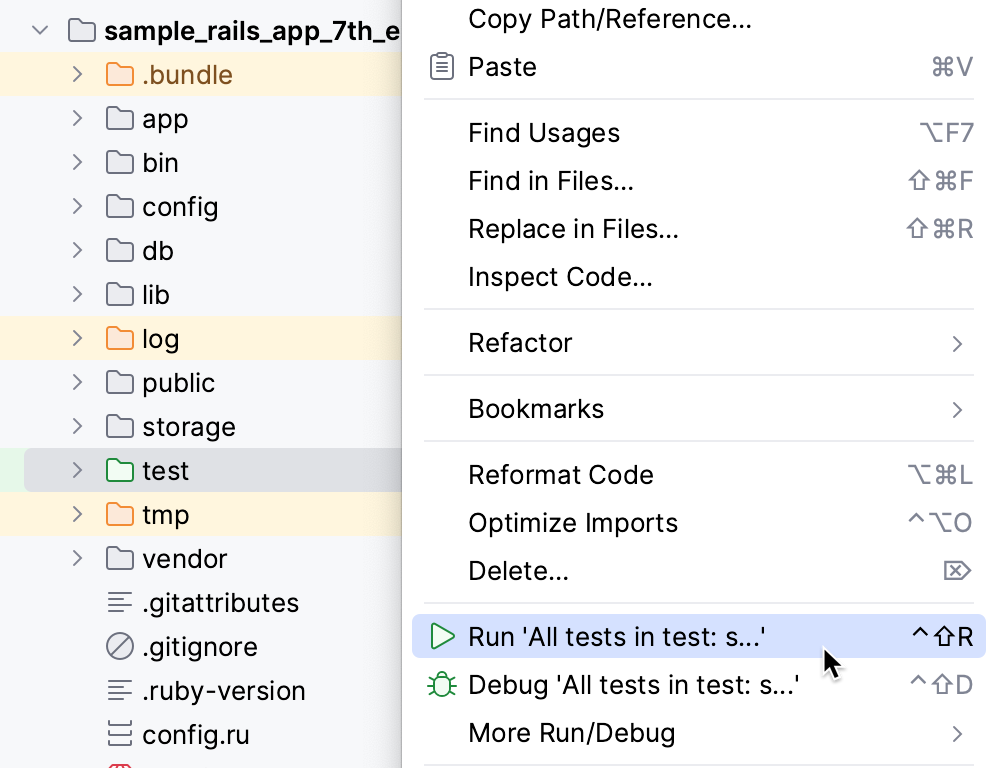
The RubyMine test guide describes running an individual case, a file, a folder, or a saved run setup. The attraction is a short route from the code being changed to the behaviour that should remain true.
For a Rails feature, that may mean starting with one failing example rather than the whole suite. A narrow loop helps explain the failure. The broader suite then answers a different question: whether the change affected other behaviour elsewhere in the application.
I like having these two views available without making them compete. Running everything after each tiny edit can obscure the useful feedback in a long stream of output. Running only one example forever can miss a wider dependency. A useful test workflow makes it easy to choose the right scope for the current decision.
The test itself still needs to matter. A green result can show that an assertion passed, but the assertion must describe the intended behaviour. If a test simply copies the implementation’s assumptions, the friendly interface does not make it stronger evidence.
Dynamic code still needs careful reading
Ruby’s flexibility is part of its appeal. It also makes it important to understand where behaviour is defined and how it is added. An IDE can help with navigation and analysis, while some relationships remain more dependent on runtime behaviour.
I would not judge RubyMine by expecting every dynamic pattern to become obvious. The useful question is whether it helps with the patterns the project actually uses. A standard app and a framework with many custom changes can place very different demands on the same tool.
Related reading

This is why a real project is a better basis for a purchase than a sample project. The interesting code is the code that is slightly awkward: the shared concern, the callback, the old compatibility layer, or the helper with several callers. That is where clearer navigation has a practical payoff.
My preference is to keep the design readable enough that the next person can follow it with or without the IDE. RubyMine should amplify that clarity. It should not be required to decode an application whose own structure has become obscure.
Setup is part of the experience
A Ruby project has a runtime, dependencies, environment variables, and often several supporting services. The IDE needs to work with that setup. A project opening in the editor is only the first step toward a meaningful run setup.
I want the selected Ruby version and dependency context to be clear. A command that succeeds in a terminal can behave differently if another environment launches it. That is a general development problem, and it is worth resolving directly rather than treating each failure as a new application bug.
The good outcome is a shared explanation of how the project starts and how its checks run. Local convenience can then sit on top of that. A new team member should not need to copy a mysterious collection of settings from someone else’s machine.
I also prefer a modest interface setup. The code, project structure, and current test result usually deserve the most space. Other panels can be available when needed. RubyMine has enough capability to become busy, so a careful layout helps its useful parts stand out.
The AI layer should fit the existing strengths
RubyMine’s current page includes agent workflows alongside Ruby and Rails tooling. I find that direction interesting when it connects a planned change to tools that can explain it. An agent can prepare a patch, while the IDE helps the human follow its references and examine the result.
The review standard should remain unchanged. A generated feature needs a clear purpose and the same attention to data, errors, and user behaviour as a manually written one. A pleasant final message does not make a broad patch easier to maintain.
For a direct rename or a small structural change, an ordinary refactoring command may be a better tool than a conversation. For a task that needs investigation across several files, an agent can have a more useful role. I like a setup that lets the developer choose, rather than making AI a required middle step.
The payment choice deserves similar care. IDE licensing and model access can involve separate terms. It makes sense to pay for the combination when it repeatedly closes meaningful work. Buying every available layer just because it is integrated would be a poor way to judge value.
The personal appeal is staying with the feature
I enjoy development more when I can follow the problem without spending much attention on the mechanics of moving around. Rails gives a feature several homes, and RubyMine’s direction fits that reality. The controller, view, model, and relevant test can remain parts of one thought instead of becoming an exercise in remembering paths.
That matters to me because a task in existing code often starts with incomplete knowledge. I want the environment to help rebuild context, not assume that I remember the application perfectly. A tool that supports careful reading has value even before it changes a line.
Related reading

I also like keeping convenience close to the framework’s normal workflow. Generators and test commands should remain recognisable. The project should still feel like a Rails application, rather than an IDE project that happens to contain Ruby. That balance is a major part of my positive view: I enjoyed RubyMine because the useful assistance can support the existing structure without becoming a new structure the team must maintain.
What would make me choose it
RubyMine is most appealing when Ruby or Rails is regular work and the application is large enough that navigation, tests, and project details matter every day. I like the idea of one environment that follows the feature across its parts. That is the practical benefit behind my positive view of the product.
For occasional scripting, a lighter editor can be entirely reasonable. The IDE asks for learning and setup, and those costs should earn their place through repeated tasks. A person maintaining a Rails service every week has a different case from someone changing one Ruby script twice a year.
There is also a team consideration. Shared formatting and useful run settings can remove small disagreements, but they should support the project’s own tools. A colleague should still be able to run the same meaningful checks in CI or from a terminal. Consistency is valuable when it explains the process, rather than hiding it.
My verdict is positive: I enjoyed RubyMine, and I like its focus on the whole application rather than one attractive editor window. The clearest reason to choose it is a shorter route through Ruby and Rails maintenance. Check the current licence options, then judge the value against a real feature and the files, tests, and runtime decisions that feature involves.
Where to buy
See RubyMine at the official product page. This is the product page for the model covered in this review. Check the model number, colour, included parts and delivery options before ordering. Prices and stock can change, so I use this page for the current offer. Matching the product to the review matters more to me than finding a similar name.
What worked
- I like rebuilding application context through navigation instead of relying on memory.
- Tests and run settings can make project knowledge easier to revisit and share.
What bothered me
- The learning and setup effort is harder to justify for occasional edits to a small script.
- Generated code still needs review; convenient generation does not make every added file necessary.
Who should not buy it
- Someone expecting an IDE to replace clear Rails design or meaningful project checks.
Alternatives I would consider
- Your current Ruby editor and terminal. I would keep a light setup for a small script with clear checks. RubyMine is more appealing when following a maintained application is the recurring job.
Evidence and sources
The article separates my judgement from specifications and claims credited to their sources. Product images are identified by the credits in the article.
Features, compatibility and rated figures from the maker are manufacturer information. My opinions are identified in the review.
Conclusion
Worth it for regular application maintenance when its connected tools address repeated work.
RubyMine
JetBrains · Choose the local store or delivery region
Check price and availability: RubyMine at JetBrainsProduct link.
One email a week with practical Mac workflows, useful comparisons and honest tech recommendations.